

Agentic AI Playbook: A Confident, Powerful Blueprint 🚀
You’ve probably seen two extremes with “AI at work”:
- A chatbot that answers questions but can’t actually do anything.
- Automation that does things… until the real world changes, and then it breaks in weird, expensive ways.
This article is a beginner-friendly agentic AI playbook for building something in the middle: AI agents that behave like dependable digital teammates—handling repeatable work, keeping context, and escalating when the risk is real. The goal isn’t hype. It’s practical outcomes: fewer hours lost to busywork, fewer costly errors, and faster cycles (like approvals, shipping, support resolution, reconciliations). The “teammate, not tool” mindset is a key shift in the source material.
You’ll walk away with a workflow you can repeat to design your first agent (or a small fleet) without turning your business into a science experiment.
Why it should behave like a teammate, not a tool
A “tool” waits for you to tell it exactly what to do. A “teammate” notices what matters, asks for missing info early, and finishes a defined piece of work—while still knowing when to pause and check with you.
That isn’t philosophy. It’s a design shortcut. When you design an agent like a teammate, you naturally build the parts that make it useful in real operations: clear goals, shared context, handoffs, and guardrails.
Tools vs teammates in everyday work
Think about a good colleague you trust:
- They don’t just complete tasks. They track what’s blocked.
- They ask clarifying questions before they waste time.
- They follow your policy and tone, not their own.
- They leave a trail: notes, status, and what they tried.
Now compare that to a basic chatbot:
- It answers what you ask right now.
- It doesn’t know what “done” means.
- It forgets why you decided something last week.
- It rarely warns you when the question is risky.
When people say “AI isn’t useful,” they’re often expecting teammate behavior from a tool.
The 4 teammate behaviors to design for
If you build for these four behaviors, you’ll avoid most beginner mistakes.
- Owns a micro-goal
- Not “help with finance,” but “flag invoices over policy and draft an exceptions list.”
- Keeps shared context
- It remembers key facts for a case (IDs, thresholds, current status).
- People don’t have to repeat themselves.
- Acts, then reports
- It can take allowed actions (draft, route, compare, summarize).
- It always leaves a readable status update.
- Stops when risk is high
- It asks for approval before irreversible or sensitive actions.
- It escalates when confidence is low or data is missing.
Notice what isn’t on the list: “be creative” or “sound smart.” In business workflows, usefulness beats cleverness.
A quick scenario: same task, two outcomes
Let’s say you want weekly budget recaps.
Tool design (common):
- You ask: “Summarize this week’s spend.”
- It writes a paragraph.
- You still check numbers, spot anomalies, and email it yourself.
Teammate design (better):
- It pulls spend data at a scheduled time.
- It highlights anomalies (over threshold, unusual vendor, missing receipt).
- It drafts the recap in your tone.
- It asks for approval before sending.
- It logs what changed if you edit the draft.
Same “AI,” totally different outcome. The second version saves time every week, not just once.
The “Agent Job Card” that prevents scope creep
Before you build anything, write a one-page job card. It forces clarity and reduces risk.
- Role name: (e.g., “Invoice Exceptions Assistant”)
- Micro-goal: one measurable sentence
- Inputs: what data it can use
- Allowed actions: what it can do without asking
- Ask-first actions: what requires approval
- Stop rules: when it must pause/escalate
- Update format: what it logs each run
If you can’t fill this out, the agent will feel “AI-ish” because it has no real job.
Three traps that make agents fail in real teams
- Scope is a bucket, not a goal
Fix: shrink until you can write one “done test.” - No brakes (it can message/update/approve too freely)
Fix: default to “draft + ask,” then earn autonomy later. - No memory (humans become the glue)
Fix: store a simple case record: status, actions taken, open questions.
The 3 pillars of agency you can actually design for
“Agency” isn’t magic. It’s three practical capabilities you can design for, test, and improve. If one is missing, the agent becomes either useless (can’t act) or risky (acts blindly).
Pillar 1: Goal-seeking autonomy (outcomes, not scripts)
Autonomy doesn’t mean “do whatever you want.” It means “solve a defined problem with allowed tools.”
For beginners, the cleanest method is micro-goals:
- Outcome: what success looks like
- Plan: a short sequence of steps (2–6)
- Done test: how you verify success
- Stop rule: when to ask a human
Example: “Review new refunds and flag cases that require manual approval.”
Done test: “A list of flagged refunds with reason codes and evidence.”
Stop rule: “If policy is unclear or customer history is missing, escalate.”
This keeps the agent focused and makes performance measurable.
Pillar 2: Context awareness (situational, not generic)
Context awareness is what stops an agent from acting like it has amnesia. You need two kinds of context:
- Case context (short-term): current status, missing fields, prior actions
- Policy context (long-term): thresholds, rules, tone, allowed tools
A beginner-friendly pattern is a visible case record the agent updates each run:
- Case ID
- Status (new / waiting approval / completed)
- Key fields (amount, dates, thresholds)
- Actions taken (with timestamps)
- Open questions (what it needs from a human)
- Next step (what it will do once answered)
This can live in a spreadsheet, ticket, or database. What matters is consistency.
Pillar 3: Self-improvement (feedback loops, not one-off prompts)
Most AI pilots die because nothing learns. Edge cases appear, inputs change, and trust evaporates.
Self-improvement can start simple:
- Each run produces a short log: what it did, what it couldn’t do, what it escalated
- Someone reviews patterns weekly (10–15 minutes)
- You make small upgrades based on evidence (tighten a rule, add data, refine the done test)
If you do this, reliability tends to go up over time instead of drifting down.
A tiny “ready-to-pilot” check
- Autonomy: micro-goal + done test + stop rules exist
- Context: a case record is updated every run
- Improvement: runs are logged and reviewed on a schedule
That’s enough to pilot safely—without overengineering.
Approach × Kind × Style: a quick taxonomy for choosing the right “degree of freedom”
A common beginner mistake is giving an agent too much freedom too early. The fix is to choose the right “degree of freedom” for the job using three dials:
- Approach: Specialized vs Hybrid
- Kind: Asynchronous vs Interactive
- Style: Informative vs Proactive vs Prescriptive
Pick a combination that matches the risk and tempo of the workflow.
Approach: Specialized vs Hybrid (how wide is the job?)
Specialized agents do one job extremely well.
- Easier to measure, guardrail, and trust
- Best starting point
Hybrid agents combine multiple jobs.
- Powerful later, but riskier early
- Harder to debug when something breaks
Beginner rule: If you can’t define one done test, don’t go Hybrid yet.
Kind: Asynchronous vs Interactive (when does it work?)
Asynchronous agents run without you watching.
- Batch work (weekly reports, nightly checks)
- Monitoring (alerts, anomalies)
- Preparation (drafts, routing)
Interactive agents collaborate in the moment.
- Ask clarifying questions
- Request approvals
- Handle “it depends” cases
Beginner rule: Lots of ambiguity → Interactive first. Repetitive, data-rich work → Asynchronous first.
Style: Informative vs Proactive vs Prescriptive (how strongly does it push?)
This dial is about assertiveness.
- Informative: “Here’s what I found.” (lowest risk)
- Proactive: “I noticed an issue—want me to act?” (medium risk)
- Prescriptive: “I recommend X and can execute now.” (highest risk)
Beginner rule: Start Informative. Add Proactive after trust. Use Prescriptive only when policies are clear and the action is low-risk or reversible.
A simple way to pick your first build (in 5 minutes)
- Is the task narrow and measurable?
- Yes → Specialized
- No → rewrite as a micro-goal first
- Does it need clarifying questions?
- Yes → Interactive
- No → Asynchronous
- What happens if it’s wrong?
- Low → Informative or Proactive
- Medium → Informative + approvals
- High → Informative only, strict stop rules
Most first wins look like: Specialized + (Interactive or Asynchronous) + Informative.
If you want a safe “graduation path,” use this order:
- Draft mode: the agent prepares work, humans approve.
- Suggestion mode: the agent flags issues and recommends next steps.
- Execution mode (limited): the agent takes low-risk actions that are reversible, and escalates everything else.
If you start here, you’ll get real value quickly without creating new risks. In the next part, we’ll translate these choices into a concrete build plan: map workflow handoffs, define micro-goals with done tests, and set the guardrails that keep the agent dependable when the data gets messy.
Your agentic AI playbook starts with a “Pin Map” of handoffs
Most process pain doesn’t live inside the steps. It lives between them—when ownership, tools, or decisions change. Those are handoffs, and they’re where delays, rework, and expensive mistakes pile up.
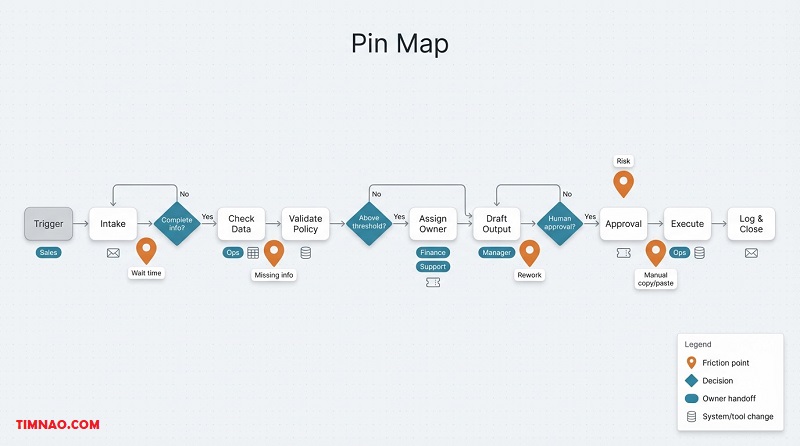
A Pin Map is a quick sketch of a workflow with “pins” marking the handoffs that hurt the most. It’s not meant to be pretty. It’s meant to help you pick the first agent use-case that saves time without creating new risk.
The only 3 things to label on each step
Keep the map simple. For each box/step, write:
- Owner: who does it today?
- System: where it happens (email, CRM, spreadsheet, ticket tool)
- Output: what changes when it’s done (a field updated, a draft created, an approval given)
That’s enough to spot bottlenecks and handoffs without turning this into a “process project.”
Build a Pin Map in 30 minutes (no perfection)
- Pick one workflow that happens weekly/daily and crosses tools
Good beginner targets: ticket triage, meeting notes → CRM updates, quote → invoice draft, content review → publish. - Draw the happy path in 8–12 boxes
Use verb + object: “Collect request,” “Check policy,” “Route,” “Draft,” “Approve,” “Send.” - Add pins where reality hurts
Pin any step with:
- waiting (approval queues, “blocked until…”)
- rework (sent back because info was missing)
- copy/paste (same data moved across tools)
- judgment calls (“depends on experience”)
- high risk (wrong = money/customer/compliance)
Your goal isn’t to pin everything. It’s to find 2–4 handoffs where a small agent could remove a lot of friction.
The 5 pin types (so you build the right agent)
Naming the pin type stops you from building “a chatbot” when you really need “a checker.”
- Clarification pin: missing info blocks progress → agent asks one smart question early.
- Validation pin: rules/thresholds must be checked → agent computes and flags exceptions.
- Routing pin: work goes to the wrong queue → agent classifies + routes with a short reason.
- Translation pin: messy text must become structured fields → agent extracts fields + flags missing.
- Memory pin: context gets lost across handoffs → agent keeps a simple case record.
Beginner tip: choose a pin where “wrong” is recoverable (drafts, routing suggestions, exception lists).
A worked mini-example: support ticket intake
Workflow (happy path):
- Customer submits ticket → intake queue → triage → assign owner → first response → resolution
Common pins:
- Routing pin: “billing vs tech” is guessed wrong
- Clarification pin: missing order number blocks triage
- Translation pin: long customer message hides key fields (product, plan, device)
- Memory pin: customer repeats the same context across replies
A strong first agent here is not “support agent.” It’s intake teammate:
- extract key fields
- propose category + urgency
- ask one question if a critical field is missing
- route when confident
- log what it did (so humans don’t have to guess)
This feels small, but it removes the worst time-wasters: back-and-forth, misroutes, and repeated questions.
Pick the right pin with one tiny scoring pass
For each pinned handoff, estimate:
- Frequency: how often it happens
- Delay: average waiting time
- Rework: how often it bounces back
- Risk cost: what a mistake costs
Then pick the pin that’s either:
- high frequency + high delay (fast ROI), or
- medium frequency + medium risk (good learning case)
This keeps you from picking the “coolest” pin instead of the most valuable one.
Turning a Pin Map into something buildable
Your first build should follow this chain:
one pin → one micro-goal → one persona → one pilot
If your Pin Map shows heavy tool-switching, a workflow layer usually helps. In Microsoft-first environments, Power Automate is commonly used to move work across systems (routing, approvals, updates), and the official Power Platform documentation helps when you’re wiring connectors and permissions. If your biggest pins are “data is scattered,” a data foundation like Microsoft Fabric can help centralize status, logs, and reporting.
(You don’t need to adopt new platforms to do the exercise. The Pin Map works with whatever tools you already use.)
Micro-goals: write “done” tests a new hire can verify in one click
Once you’ve chosen a pin, your job is to shrink scope until trust is possible. That’s what micro-goals do.
A micro-goal is the smallest useful unit of work an agent can own repeatedly. Think “job description,” not “AI project.”
Right-sized micro-goals (with examples)
Too big:
- “Handle invoicing”
- “Improve customer support”
- “Automate sales follow-ups”
Right-sized:
- “Extract invoice fields from emails and flag missing PO numbers”
- “Tag new tickets with category + urgency and route them”
- “Draft a customer reply using the case facts; ask approval before sending”
If you can’t measure it, it’s too big. If you can’t explain success in one sentence, it’s too big.
The one-click “done” test (your trust engine)
A done test answers: “Where can a human verify success in one click?”
One click means:
- one screen (ticket/record/row)
- visible output (fields, draft, route)
- short evidence (why it decided that)
- clear status (done / waiting / escalated)
If verification requires reading long paragraphs, people stop checking—and then stop trusting. So don’t make “good writing” the bottleneck. Make verification easy.
Done test template (steal this)
Done = Output + Evidence + Stop rule
- Output: what changed (draft created, fields filled, routed, exception logged)
- Evidence: 1–2 bullets explaining why (rule matched, computed value, key phrases)
- Stop rule: when to pause (missing required input, low confidence, threshold exceeded)
This template is boring in the best way: it creates predictable behavior.
Two done-test formats that work well for beginners
- “Filled fields + reason” format
Best for translation/routing pins.
- Output: category, urgency, destination, missing-field flag
- Evidence: key phrases or extracted signals
- Status: routed / needs info
- “Exception card” format
Best for validation pins.
- Output: exception created with a reason code
- Evidence: computed numbers vs policy threshold
- Status: escalated / approved-for-review
If you standardize one of these formats early, training and QA get easier later.
Micro-goal spec you can write in 10 minutes
Write this before you build anything:
- Trigger: what starts it?
- Inputs required: and what to do if missing
- Allowed actions: safe actions without approval
- Ask-first actions: anything irreversible/sensitive
- Done test: one-click verification
- Escalation rules: when to stop + where to send it
- Log fields: what gets recorded each run
This is what prevents “prompt tweaking forever.” Your team can review this spec like a mini SOP.
Common micro-goal mistakes (and the quick fix)
- Bundling multiple pins: “extract + approve + send”
Fix: stage it. Start with extract + flag missing. Add approval later. - No evidence trail: outputs look correct but can’t be verified fast
Fix: require structured outputs (fields + 1–2 reasons). - No default stop behavior: agent guesses when info is missing
Fix: “ask one question; if unanswered, escalate.”
If you handle these three, you’ll avoid most early trust failures.
Where Microsoft tools can help (without driving the design)
If your micro-goal needs interactive clarification (collect missing info, confirm intent), a conversational front door like Microsoft Copilot Studio can fit well. If it needs repeatable workflow actions (route, approve, update systems), pairing with Power Automate keeps it operational instead of “chat-only.”
If you want a builder-focused environment to prototype agent behaviors, connect tools, and iterate safely, Azure AI Foundry is a practical starting point. For broader workflow governance and connectors, the official Power Platform documentation is a useful reference.
Personas over prompts: match Specialized/Hybrid and Async/Interactive to risk + tempo
Prompts are what you say. Personas are what the agent is allowed to be.
A persona is a role with boundaries: what it owns, how it works, what it must never do without approval, and how it reports progress.
Start with risk × tempo (the fastest correct decision)
Ask two questions:
- Risk: what happens if it’s wrong?
- Low: drafts, summaries, internal notes
- Medium: routing, tagging, non-critical field updates
- High: approvals, money movement, compliance actions
- Tempo: how quickly must work move?
- Fast: triage, scheduling, first response
- Medium: follow-ups, reminders, weekly ops
- Slow: audits, month-end reviews
High risk → start in “draft + ask.” Fast tempo + missing info → Interactive.
Choose the persona shape with two dials
Approach: Specialized vs Hybrid
- Specialized: one micro-goal, one done test (best for first builds)
- Hybrid: multiple micro-goals (only after you trust the parts)
Kind: Asynchronous vs Interactive
- Asynchronous: runs on a trigger/schedule without chatting
- Interactive: asks questions and confirms steps
Beginner rule: start Specialized, then choose Interactive if missing info is common.
Four starter personas teams actually adopt
- Triage Teammate (Specialized + Asynchronous)
Categorizes and routes with a short rationale; escalates if uncertain. - Clarifier (Specialized + Interactive)
Asks one question that unblocks the case; records the answer; escalates if unanswered. - Checker (Specialized + Async/Interactive)
Runs policy/threshold checks; produces exceptions with evidence; pauses on ambiguity. - Drafting Assistant (Specialized + Interactive)
Drafts replies/recaps in your tone; requires approval before sending.
These personas feel like “help” because they reduce workload without stealing authority.
The persona contract (one page, no fluff)
Write this once and your team will trust the system faster:
- Persona name:
- Micro-goal owned:
- Allowed actions:
- Ask-first actions:
- Stop rules:
- Output format:
- Case record fields it updates:
- Owner who reviews failures weekly:
If “owner” is blank, don’t ship. Agents need maintenance like any workflow.
A simple graduation ladder for autonomy
To keep trust high, evolve autonomy in stages:
- Draft mode: agent prepares drafts/suggestions; humans execute
- Assist mode: agent routes, fills fields, flags exceptions; humans approve sensitive steps
- Limited execute mode: agent performs reversible, low-risk actions under strict stop rules
Most teams get real ROI at stage 2. Don’t rush to stage 3 until your done-test pass rate is steady.
Transition to what comes next
At this point you have the foundation that makes agentic work feel operator-ready: a Pin Map to pick the right bottleneck, micro-goals you can verify in one click, and personas that fit real-world risk and tempo. Next, you’ll add the safety and reliability layer—shared memory handoffs, guardrails, and a pilot plan that improves speed without sacrificing correctness.
Early agents often feel helpful for a week, then become annoying. The usual reason: they’re built like islands.
One agent summarizes. Another drafts. A third routes tickets. None of them share a stable record of what happened—so humans become the glue, re-explaining context and redoing work.
Shared memory is the fix. Not “the AI remembers everything,” but: your system keeps a case record that humans and other agents can trust, and it passes the baton from step to step.
Shared memory is four things:
- A consistent case ID (ticket/order/invoice/customer)
- A small set of state fields (status, owner, next step)
- A log of actions taken (what changed)
- A list of open questions (what’s missing)
If a new teammate can open a case and answer “where are we?” in 10 seconds, you’re doing it right.
The Case Record template you can start with today
Keep it boring and visible (ticket fields, CRM fields, a spreadsheet row):
- Case ID
- Owner / queue
- Status (New → In progress → Waiting approval → Waiting info → Done)
- Current micro-goal
- Key facts (only what matters: amounts, dates, plan type, priority)
- Evidence (1–3 bullets: why the agent decided that)
- Actions taken (timestamped)
- Open questions
- Stop reason (if it paused)
- Next step
This prevents “amnesia” and makes retries safe: the next run can continue instead of starting over.
State retention: make “retry” safe and boring
State retention is what keeps your agent from creating duplicates or repeating actions when it runs again.
Beginner-friendly rules:
- If a draft already exists, update it instead of creating a new one.
- If a ticket is already routed, don’t reroute unless the evidence changes.
- If the agent asked a question, don’t ask it again—check whether it was answered.
Practical trick: add two fields to the case record:
- Last action (what it did most recently)
- Last run result (Done / Waiting info / Waiting approval / Error)
These two fields eliminate most “looping” behavior.
Baton passes: the habit that keeps multi-agent systems sane
A baton pass is a structured handoff from one step (or one agent) to the next.
The baton is:
- the case record (state), plus
- a small handoff payload (what the next step needs)
A useful handoff payload includes:
- Intent: what’s next (“verify policy,” “request missing PO,” “route to billing”)
- Constraints: thresholds, deadlines, permissions
- Artifacts: IDs/links to drafts or records created
- Ready/not-ready: whether it’s blocked (and by what)
This makes your system modular. You can replace one agent without rewriting everything.
A baton pass “payload” example (no code, just structure)
Imagine your Checker finishes and hands off to a Drafting Assistant:
- Intent: “Prepare approval request”
- Constraints: “Do not send externally; require approval”
- Artifacts: “Invoice draft link; exception list link”
- Evidence: “Variance $620 > $500 threshold; missing PO”
- Blockers: “Approver not assigned”
- Next step: “Ask: who is the approver for cost center 4012?”
You can store that as structured fields or a compact JSON blob—either way, the next step starts with clarity.
Baton pass checklist (use this before you add a second agent)
Before agent A hands off to agent B, confirm:
- The case record is updated (status, last action, next step)
- The handoff payload names one intent (not five)
- The payload includes constraints (what not to do)
- Any artifacts created are referenced (IDs/links)
- The stop reason is explicit if blocked
If you can’t do all five, keep it single-agent for now.
Pick the place your team already checks:
- System of record fields (best: ticketing/CRM)
- A shared spreadsheet (fine for pilots)
- A lightweight table/database (best for scaling + reporting)
If you’re in a Microsoft workflow stack, many teams use:
- Power Automate to move status updates and approvals across tools
- the Power Platform documentation to set up connectors, governance, and deployment hygiene
The tool choice matters less than consistency: update the case record every run.
Memory hygiene: what to remember, what to avoid
Remember:
- decisions and constraints (“routed because…”, “paused because…”, “variance exceeded…”)
- short evidence bullets
- next step and owner
Avoid:
- dumping full emails/chats into memory fields
- logging raw sensitive data when a reason code would do
Short, structured memory keeps systems fast, readable, and safer.
Guardrails day one: confidence gates, cost ceilings, time-boxes, PII scope
Guardrails are what let you deploy without creating “silent risk.” The simplest definition is: when should the agent stop, slow down, or ask a human?
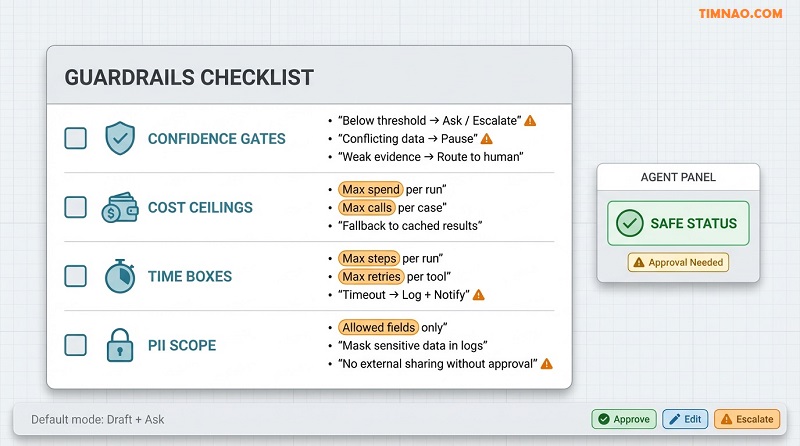
Confidence gates: don’t guess when the downside is real
Use confidence gates to prevent confident nonsense:
- If confidence < X → ask one clarifying question
- If required fields are missing → stop and request them
- If evidence is weak (only one clue) → escalate
- If two data sources conflict → pause for review
Beginner tip: start with conservative thresholds. You can loosen them later, but it’s hard to rebuild trust after a bad incident.
Cost ceilings: cap spend and add a fallback
Agents can burn money quietly through repeated tool calls, expensive lookups, or over-frequent runs.
Set caps:
- max calls or spend per case
- max calls or spend per day
- max external lookups per run
Then choose a fallback:
- use cached results
- batch runs (hourly/daily) instead of real-time
- switch to a lighter mode (extract key fields instead of deep analysis)
- escalate if the cap is hit
Workflow visibility helps here—tools like Power Automate make “how many steps happened” obvious.
Time-boxes: no infinite loops, no runaway retries
Add:
- max steps per run (e.g., 8 actions)
- max retries per tool (e.g., 2)
- max runtime per case (e.g., 2 minutes)
When the time-box hits, the agent should:
- write what it tried into the case record
- mark the stop reason
- notify a human with one clear question or next action
A good time-box message is short: “I tried A and B, but missing C. Do you want me to proceed with option D?”
PII scope: minimize what the agent can access and log
Beginner rules that work:
- whitelist allowed fields (everything else is forbidden)
- mask sensitive fields in logs by default
- avoid copying raw customer data into free-text outputs unless required
If the agent needs more access, that becomes an approval decision—not a “helpful” default.
Rollback and audit trail: plan for “oops” without panic
Even with guardrails, mistakes happen. Your system should make recovery easy.
Two practical habits:
- Write audit notes to the case record (“what changed, when, why”)
- Prefer reversible actions early (drafts, labels, routing suggestions)
If an action is not reversible (sending an email, approving a refund), put it behind approval gates until you’ve earned trust.
Approval gates (HITL): draft + ask for irreversible actions
Default to human approval for anything that:
- sends messages externally
- changes financial status
- updates customer-facing records
- triggers compliance workflows
Start with the agent producing drafts, recommendations, and exception flags. Then add approvals where humans click “approve” to execute.
For interactive clarification and approvals, a conversational layer like Microsoft Copilot Studio can be a practical “front door,” while workflows and approvals commonly run through Power Automate.
A baseline guardrail bundle you can apply to almost any agent
- Confidence gate (below X → ask/escalate)
- Cost ceiling (cap calls/spend → fallback)
- Time-box (cap steps/time → stop, log, notify)
- PII scope (allowed fields only; masked logs)
- Approval gate (irreversible actions → human approve)
Ship with this bundle and your pilot will feel calm instead of risky.
Pilot like an operator: reflections, metrics + counter-metrics, HITL checkpoints
A demo answers “can it work?” A pilot answers “can we trust it in our workflow?”
The difference is operations: logs, metrics, review cadence, and clear expansion rules.
Reflections: the cheapest way to improve reliability
A reflection is a short, structured note after each run—written for humans who will review failures.
Use fields like:
- What I did: 1–2 bullets
- What changed: fields/records/drafts created
- What I’m unsure about: missing info, ambiguity, low confidence
- Why I stopped: which guardrail triggered
- Next question: one question a human can answer quickly
Reflections turn “weird behavior” into fixable tasks.
Metrics + counter-metrics: avoid “fast but wrong”
Track value and safety together.
Value metrics:
- cycle time (end-to-end time)
- queue time (waiting)
- time saved per case
- cases handled per day
Counter-metrics:
- rework rate (humans redo output)
- false positives (bad flags/alerts)
- customer-impact incidents
- policy/compliance exceptions caused by the agent
A strong beginner set:
- done-test pass rate
- escalation precision (were escalations truly needed?)
- rework rate
- cost per case
- time per case
- user adoption (do people actually use the outputs?)
If speed improves but rework rises, you haven’t reduced work—you’ve moved it.
HITL checkpoints: put humans at the right moments
Don’t “approve everything.” Put HITL where it matters:
- decision cliffs (money/customer/compliance downside)
- low-confidence moments
- external actions (send/publish/update customer record)
- policy boundaries (thresholds and exceptions)
Design HITL to be fast:
- show the draft or proposed action
- show 1–3 evidence bullets
- offer 2–3 buttons (Approve / Edit / Escalate)
Weekly review agenda (15 minutes, operator style)
Keep review lightweight but consistent:
- Top 5 failures by frequency (what pattern repeats?)
- Top 5 escalations (were they useful or noisy?)
- One guardrail tuning (tighten/loosen one threshold)
- One data fix (add a required field, clarify a rule, improve a label)
- Decide: expand scope, refine, or hold
This is how pilots improve steadily instead of “randomly.”
A clean 30-day pilot plan (simple and realistic)
Week 1: Define and sandbox
- lock the micro-goal + done test
- measure the baseline (current cycle time, rework rate)
- run in draft-only mode
Week 2: Add memory + guardrails
- implement the case record updates
- apply the guardrail bundle
- start collecting reflections
Week 3: Limited autonomy
- allow low-risk actions (routing, tagging, internal notes)
- keep approvals for external/irreversible steps
- patch weekly based on reflections
Week 4: Decide what happens next
- expand only if pass rate is steady and rework is low
- refine if value is high but failures cluster
- stop if the pin wasn’t real or adoption is weak
When to scale (and when not to)
Scale when:
- people trust the outputs without heavy supervision
- escalations are useful, not noisy
- the case record reduces handoff friction
- there’s “pull” demand from users
Don’t scale when:
- “done” is still debated
- ownership is unclear
- the workflow changes weekly
- users ignore the agent’s outputs
Where Microsoft’s ecosystem fits (Copilot Studio, Azure AI, Power Platform)
If you’re building on Microsoft, think in layers: front door, workflow engine, agent logic, memory, and reporting.
Quick chooser: which Microsoft piece fits which need?
- Need interactive questions and approvals → Microsoft Copilot Studio
- Need workflows, routing, approvals, connectors → Power Automate
- Need platform guidance for connectors/governance → Power Platform documentation
- Need orchestration + evaluation as things get more complex → Azure AI Foundry
- Need a broader view of Azure AI services → Azure AI developer resources
Copilot Studio: a front door for interactive personas
Use Copilot Studio when your agent needs to:
- ask clarifying questions
- request approvals
- guide users through structured decisions
Key beginner rule: the chat experience should always write back to the case record so it doesn’t become a new island.
Azure AI: a home for orchestration and evaluation
Use Azure when you need:
- controlled tool calling and orchestration
- deeper monitoring and evaluation loops
- a place to iterate safely as behavior grows
A practical starting point is Azure AI Foundry. Keep your first orchestration small: one micro-goal, one output format, and strict guardrails.
Power Platform: workflows, connectors, approvals
Use Power Automate for the “hands and feet” work:
- routing and updates across systems
- approvals and notifications
- scheduled runs and triggers
Pair it with a visible case record so humans can see progress without asking, “Did the agent do anything?”
The data layer: track reliability over time
Shared memory and reflections generate operational data (status changes, stop reasons, pass rates). If your biggest problem is “data is scattered,” a data foundation can help. In Microsoft stacks, Microsoft Fabric is positioned as a unified analytics/data platform you can use to track outcomes over time.
A beginner architecture you can copy
- Interface: Copilot Studio (interactive) or scheduled triggers (async)
- Workflow: Power Automate for actions/approvals
- Agent logic: micro-goals + guardrails (kept small)
- Shared memory: case record in the system of record
- Ops: reflections + metrics + weekly review
If you keep these roles clear, your agent stays maintainable as you expand.
If this playbook saved you time (or helped you avoid a costly mistake), consider buying me a coffee ☕️😊
Your support keeps these practical, beginner-friendly guides coming—more templates, real-world examples, and step-by-step workflows you can actually use. 🚀✨
👉 Buy me a coffee here: https://timnao.link/coffee