TikTok Ads Not Converting? Fix These Costly Leaks Before You Spend More
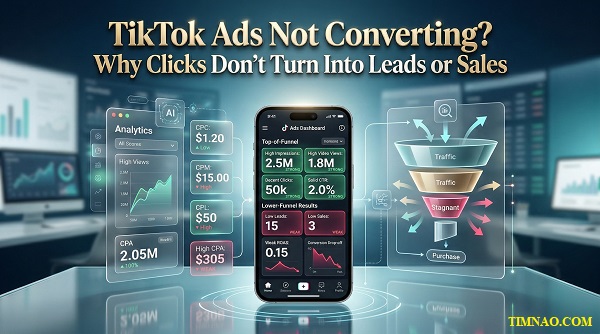
TikTok ads not converting is usually not a traffic problem. It is a diagnosis problem. You may be getting views, clicks, or even cheap CPMs, but if those numbers are not turning into qualified leads or sales, something earlier in the funnel is breaking. In this guide, you will learn how to spot the real leak, fix the foundation first, and make your ads feel more relevant before you touch advanced targeting.
Why TikTok ads fail even when the numbers look busy
A lot of beginners get fooled by “busy” numbers.
The dashboard looks active. Views are coming in. Clicks are happening. Maybe engagement even looks decent. So it feels like the campaign should be working.
But motion is not the same as progress.
On TikTok, it is very possible to get attention without getting action. That is why many advertisers say things like:
- “People are watching, but nobody is buying”
- “Clicks are cheap, but leads are weak”
- “The ad looks good, but revenue is flat”
This usually happens because the ad is succeeding at the wrong job.
Busy numbers can hide three different problems
When a campaign looks alive but does not produce results, the issue usually sits in one of these three places:
- You are attracting curiosity, not intent
Your creative gets attention, but it pulls in people who are only mildly interested. They watch, maybe tap, then leave. - Your next step is too weak
The ad makes a promise, but the page, form, or offer does not carry that promise forward clearly. - You are reading the wrong metric first
You focus on reach, CTR, or video views before checking whether the campaign is producing meaningful business outcomes.
This is where beginners often get stuck. They assume more traffic will fix the problem, so they increase budget or launch more creatives. In reality, that often just makes the waste happen faster.
The beginner mistake: judging success by one metric
TikTok gives you a lot of numbers inside TikTok Ads Manager. That is useful, but it can also be distracting.
A strong CTR does not automatically mean your offer is strong.
A low CPC does not automatically mean your traffic is useful.
A high view count does not automatically mean your message is landing.
A better way to think about performance is to read it in layers:
- Attention metrics tell you whether people are stopping
- Interest metrics tell you whether they care enough to click or keep watching
- Action metrics tell you whether your funnel is actually doing its job
If the top of the funnel is active and the bottom is dead, your problem is not “TikTok ads.” Your problem is message match.
What healthy performance actually looks like
For beginners, a healthy campaign does not need to look perfect. It just needs to make sense from one step to the next.
Here is a simple test:
- Does the ad attract the right kind of person?
- Does the click lead to the right next action?
- Does the next action feel easy and clear?
If the answer is no at any stage, that is where you start.
For example, imagine you run ads for a free consultation.
The video gets strong watch time and decent clicks. Great. But when people land on your page, they see a general company overview, three service categories, and a long form asking for too much information.
That campaign is not failing because the ad is weak. It is failing because the handoff is clumsy.
A simple diagnostic beginners can use today
Before changing anything, review your campaign with these three questions:
1. What result am I actually paying for?
Be specific. Not “more awareness.” Not “better marketing.”
Choose one clear result:
- more qualified leads
- more booked calls
- more purchases
- more product page visits from likely buyers
2. What does the person expect after clicking?
The ad creates an expectation. The next step must match it.
If the video says “Get a free custom quote,” the landing page should not open with a brand story. It should move straight into the quote process.
3. What makes the visitor hesitate?
This is where conversions often die.
Common hesitation points include:
- too many choices
- unclear pricing
- weak trust signals
- generic copy
- a slow mobile page
- a form that feels like work
When you look at your campaign this way, the problem becomes easier to solve. You stop asking, “Why is TikTok not working?” and start asking, “Where is the friction?”
That question will save you more money than another round of random targeting tweaks.
Start with the real leak: objective, offer, and destination
If your TikTok ads are not converting, do not start with targeting.
Start with the three things that shape the whole funnel:
- the objective
- the offer
- the destination
If any one of these is off, the campaign can look active while still underperforming.
Choose the objective that matches the next action
Inside TikTok for Business, it is easy to get pulled toward the wrong campaign setup because the platform makes launching feel simple.
But the platform cannot fix a bad strategic choice.
Your objective should match the action you want the user to take next. That sounds obvious, but many campaigns are built around vague intentions.
Here is a beginner-friendly way to think about it:
Use a traffic-style mindset when:
- you want to drive people to a page
- you are testing early interest
- you need more top-of-funnel data
Use a lead-generation mindset when:
- you want form fills
- you want consultation requests
- you want quote requests
- you want contact details from likely buyers
Use a conversion or sales mindset when:
- you want purchases
- you want add-to-cart behavior
- you want more direct revenue from ad spend
The mistake is choosing an easy objective and hoping it somehow produces a harder result.
Traffic is not the same as lead generation.
Lead generation is not the same as qualified pipeline.
Sales are not the same as impulse clicks.
If the campaign objective and business goal are not aligned, optimization becomes messy very fast.
Make the offer easy to understand in five seconds
A weak offer is one of the biggest reasons TikTok ads look promising but fail to convert.
The problem is not always that your product is bad. Often, it is that the ad asks the user to care before the offer gives them a reason to.
A good beginner offer is:
- clear
- specific
- low-friction
- easy to understand fast
Here is the difference.
Weak offer:
“Learn more about our digital services.”
Stronger offer:
“Get a free 10-minute TikTok ad audit for your brand.”
The second one is better because it is concrete. The person knows what they get, how fast it feels, and why it matters.
A quick offer check
Before you launch, ask:
- What exactly is the person getting?
- Why should they care now?
- Is this easy to say yes to on mobile?
- Does this feel like a good next step for cold traffic?
Cold audiences rarely want a big commitment right away. They respond better when the next step feels manageable.
That is why beginner-friendly offers often work best when they are one of these:
- checklist
- free audit
- short demo
- quote request
- mini consultation
- limited product bundle
- simple first-purchase offer
Send people to the right destination, not the most obvious one
A lot of campaigns send people to the homepage because it feels safe.
That is usually a mistake.
Your homepage is built for many types of visitors. Your ad is speaking to one type of visitor with one specific promise. Those two things often do not match.
A better rule is this:
One ad = one next step
That destination might be:
- a product page
- a booking page
- a focused landing page
- a short lead form
- a TikTok-native lead capture flow
The more focused the destination, the easier it is for the user to continue.
What a strong destination should do
A good destination page should answer these questions almost immediately:
- Am I in the right place?
- What is this offer?
- Why should I trust this?
- What should I do next?
If a visitor has to scroll, search, or think too hard, you are losing momentum.
That is especially important on TikTok because the click often comes from a fast, emotional, mobile-first environment. The page must continue that momentum, not kill it.
A mini example for beginners
Let’s say you run a local dental clinic and your ad says:
“Thinking about teeth whitening? Here is what most people get wrong before booking.”
That is a strong curiosity-based angle.
Now imagine the click goes to your homepage with tabs for implants, Invisalign, family care, insurance info, careers, and a generic “contact us” button.
That is too broad.
A better destination would be:
- a focused whitening page
- a short explanation of the process
- before-and-after proof
- a simple “book a consultation” CTA
Same ad spend. Better message match.
The fastest fix if you are overwhelmed
If you are a beginner and you only fix one thing this week, fix this:
Make sure the ad promise, the offer, and the destination all say the same thing.
That single improvement often lifts performance faster than chasing more audience layers.
Your creative is doing the targeting before your targeting does
This is one of the most important things beginners misunderstand about TikTok.
They think targeting starts with age, gender, interests, or lookalikes.
It does not.
On TikTok, creative often shapes targeting before your manual settings do, because your ad sends strong signals through:
- the first line
- the visual style
- the spoken words
- the pace
- the caption
- the problem being described
- the type of person who feels seen by the message
That means your video is not just selling. It is also filtering.
Why this matters so much on TikTok
TikTok is not a platform where people calmly browse ads on purpose. People are scrolling quickly. The feed is fast. Attention is earned in seconds.
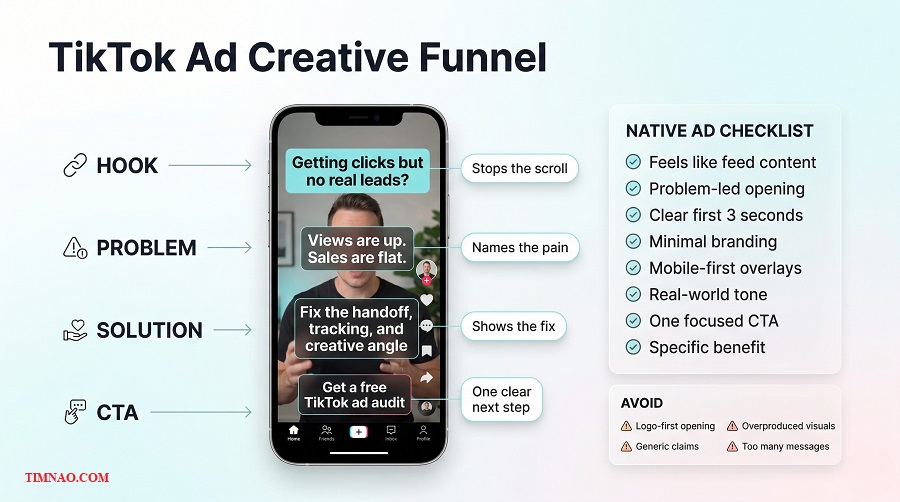
That is why a video that feels native usually performs better than one that feels like a polished commercial.
Beginners often assume a “professional” ad should look highly branded from the first frame. But on TikTok, that can work against you.
People respond better when the content feels:
- natural
- specific
- easy to follow
- emotionally familiar
- close to what they already consume in-feed
This does not mean low quality. It means low resistance.
Stop making ads that look like ads
The easiest way to lose attention on TikTok is to announce yourself like an ad too early.
That usually looks like:
- a logo-first opening
- a stiff voiceover
- generic brand claims
- overproduced visuals with no tension
- long setup before the point
A better approach is to enter through a problem, a moment, or a question.
For example:
- “Your TikTok ads are getting clicks but no leads? Here is the first thing I would check.”
- “Most brands do not have a traffic problem. They have a handoff problem.”
- “This is why a decent CTR can still produce weak revenue.”
That style works because it feels more like useful content than interruption.
A beginner-friendly creative structure that works
If you are not sure how to script your ad, use this simple structure:
Hook
Start with a problem, tension point, or surprising idea.
Problem
Name what is going wrong in plain English.
Shift
Show the mistake or missing piece.
Solution
Introduce your product, service, or next step naturally.
CTA
Tell the person what to do next.
This keeps the creative focused. It also helps the right people self-select.
If someone hears the hook and instantly feels, “That is exactly my issue,” the ad is already doing part of the targeting work for you.
Your creative should signal who it is for
You do not always need to say, “This is for women aged 30 to 45.”
You can target more naturally through context.
For example:
- the examples you use
- the language you choose
- the type of frustration you describe
- the visuals in the scene
- the offer in the CTA
A video about “why clinics waste ad spend on generic landing pages” speaks to a different buyer than a video about “why Shopify product pages kill TikTok conversion.”
That is creative targeting.
A simple 7-day creative habit for beginners
If you want better performance without overcomplicating things, start here:
Day 1
Collect five real customer questions, objections, or frustrations.
Day 2
Turn each one into a hook.
Day 3
Write two short scripts using the same offer but different angles.
Day 4
Record both in a simple, natural style.
Day 5
Edit lightly in CapCut or your usual editor. Keep the pacing clean.
Day 6
Review whether the first three seconds are clear enough.
Day 7
Publish, compare, and note which message attracted better-quality clicks.
That is a beginner-friendly testing loop you can actually repeat.
One more thing beginners should remember
Better targeting cannot rescue weak creative forever.
If the message is vague, the opening is dull, and the offer feels generic, tighter targeting will not magically create demand.
But when the creative is sharp, specific, and easy to understand, the algorithm has more useful signals to work with. Your ads start finding people who are more likely to care, and your whole funnel becomes easier to optimize.
That is why the smartest place to start is often not the audience settings menu.
Install TikTok Pixel before you think you need it
A lot of beginners wait too long to set up tracking.
They tell themselves they will do it later, after the creative improves, after the offer gets clearer, or after the campaign starts bringing in more traffic. That sounds reasonable, but it creates a problem: by the time you want better optimization, better remarketing, or better reporting, you have very little useful data to work with.
That is why the smarter move is to install your TikTok tracking setup early, even if your ad account is still small.
What the TikTok Pixel actually does
The TikTok Pixel is a small piece of code added to your website so your ad account can understand what people do after they click.
That includes actions like:
- viewing a page
- starting a form
- submitting a form
- adding a product to cart
- completing a purchase
For beginners, the biggest mistake is thinking of the Pixel as a “sales-only” tool.
It is not just there to count purchases.
It helps you do three important things:
- Measure what happens after the click
Without it, you are mostly judging campaigns by surface-level numbers like views and clicks. - Improve campaign optimization
The more useful event data you send back, the better your campaigns can learn what a valuable visitor looks like. - Build stronger audiences later
Pixel data becomes the foundation for remarketing and lookalike work.
So if your site is connected properly, you are not just collecting numbers. You are building future leverage.
Why installing it early matters more than people think
Many beginners only install tracking once they are “serious.”
That is backwards.
If you wait until you are serious, you start optimization late. You also lose the chance to understand early patterns in your traffic.
For example:
- Which landing page gets more engaged visitors?
- Which offer gets more form starts?
- Which product page gets more add-to-cart behavior?
- Which ad angle attracts people who actually take the next step?
If tracking is missing, you cannot answer those questions clearly.
And when you cannot answer them clearly, you tend to make decisions based on guesswork.
That usually leads to the same cycle:
- ad underperforms
- you change too many things at once
- results become harder to read
- budget gets wasted faster
Early tracking does not magically make campaigns profitable. But it gives you a cleaner feedback loop, and that is what beginners need most.
Track the full journey, not just the final conversion
Another common mistake is only tracking the end result.
For example, a business might only track “Purchase” or “Lead Submitted” and ignore everything that happens before that.
That is not enough.
If you want a clearer picture of where performance is breaking, you need to track the steps along the way.
A simple beginner-friendly event path might look like this:
- Page View
- View Content
- Start Form
- Submit Form
Or for ecommerce:
- View Content
- Add to Cart
- Initiate Checkout
- Purchase
This matters because not every problem happens at the same stage.
If people are reaching the page but not starting the form, your destination may be weak.
If they start the form but do not complete it, the form may feel too long or too invasive.
If they add to cart but do not buy, pricing, trust, or checkout friction may be the issue.
When you track the whole path, you stop treating conversion like a mystery.
Do not treat setup as “just a technical task”
Yes, someone technical may need to help with setup. But the marketing side still matters.
Before you ask a developer, webmaster, or teammate to install anything, answer these questions first:
- What counts as a lead in your business?
- What counts as a qualified lead?
- Which page or action matters most?
- What event names match your funnel?
- Which actions do you want to use later for retargeting?
If you skip this thinking, you may end up with tracking that exists but does not help.
That is surprisingly common.
The code is installed. Events are firing. But no one is sure which signals actually matter. At that point, you are collecting noise, not insight.
A beginner setup checklist that keeps things simple
If you want a practical starting point, use this checklist.
Minimum setup
- Install the base Pixel on the site
- Connect key pages to the right events
- Test whether events fire properly
- Make sure form submissions or purchase completions are tracked
Better setup
- Track micro-conversions, not just final conversions
- Use consistent naming so reports stay readable
- Review event quality before spending more budget
Best next step
- Pair the Pixel with server-side support through tools like Events API when possible
You do not need a perfect system on day one. But you do need a usable one.
When to think beyond the Pixel
As privacy changes, browser issues, and data loss become more common, many advertisers now combine browser-based tracking with stronger server-side data connections.
For a beginner, that does not mean you need to panic or overbuild.
It simply means this: if your campaigns depend on website conversions, it is smart to think beyond the Pixel alone over time.
If you use platforms like Shopify, supported integrations can make this easier. If not, this is the kind of improvement you can plan once your basics are working.
The important thing right now is not advanced architecture.
It is making sure your ad account is not blind.
Remarketing, Custom Audiences, and Lookalikes: stop paying for cold traffic forever
If you are only advertising to cold audiences, you are paying the highest price for the weakest relationship.
That is one of the fastest ways to make TikTok feel expensive.
Cold traffic matters. You need it. It fills the top of the funnel and introduces new people to your offer.
But if every campaign keeps talking only to strangers, you keep spending money to restart the same conversation.
That is where remarketing changes the game.
What remarketing actually fixes
Remarketing helps you reconnect with people who already showed some level of interest.
That might include people who:
- watched your videos
- clicked on an ad
- visited a product or service page
- opened a lead form
- started checkout
- interacted with your business account
These people are not fully cold anymore.
They already know something about you, even if it is small. That makes them much easier to move forward than someone seeing your brand for the first time.
For beginners, this matters because remarketing usually improves efficiency before broad scaling does.
You do not need to “go viral” to get better results. Sometimes you simply need to stop letting warm traffic disappear.
Start with Custom Audiences, not complexity
Inside TikTok Ads Manager, Custom Audiences are how you group people based on known behavior or known data.
That can include:
- website visitors
- customer file uploads
- app activity
- TikTok engagement
- lead data
- shop activity
For beginners, you do not need to use every type.
Start with the audiences you can build most reliably.
A practical first stack
- All website visitors in the last 30 days
- People who visited your offer page
- People who started a form but did not submit
- People who submitted a form
- People who engaged with your TikTok content
That gives you a much cleaner structure than “everyone gets the same ad.”
Use exclusion as seriously as targeting
This is one of the easiest wins.
Many beginners remember to create audiences, but forget to exclude the wrong people from the wrong campaigns.
For example:
- Do not keep showing “book a consultation” ads to people who already booked
- Do not keep showing first-purchase ads to recent buyers
- Do not send hot retargeting creatives to completely cold traffic
- Do not keep pushing awareness content to people who are already ready for a stronger CTA
Exclusions protect your budget. They also make your campaigns feel more relevant.
That matters because wasted impressions are not just a cost issue. They are also a trust issue.
Lookalikes are useful, but only after your source is good
Beginners often hear “lookalikes” and assume that means instant scale.
Not exactly.
A lookalike audience is only as good as the audience it is modeled from.
If your source audience is weak, mixed, or low quality, the lookalike will often reflect that.
That is why better source pools usually come from things like:
- qualified leads
- real buyers
- strong converters
- highly engaged visitors with clear intent
A practical beginner rule is this:
Do not build lookalikes from weak signals if you have stronger ones available.
If you can choose between:
- all page visitors
- and completed leads
the better source is usually completed leads.
That does not mean you should never test broader sources. It just means the quality of the seed audience matters.
Narrow, balanced, or broad?
This is where beginners often get stuck because the settings sound more precise than they really are.
You do not need to overthink it.
A simple approach is:
- start broader if your market is wider and your offer is not extremely niche
- go more controlled if your market is narrow or your source data is strong and specific
- compare quality, not just volume
More reach is not automatically better.
More similarity is not automatically better either.
The real question is: which version brings better downstream results?
A practical budget split you can actually test
You do not need a perfect media buying model to start using remarketing well.
For many beginner setups, this split is a practical starting point:
- most spend goes to cold traffic to keep feeding the funnel
- a smaller but meaningful share goes to remarketing
The exact number depends on your traffic volume and sales cycle, but the logic stays the same: cold traffic fills the pool, remarketing harvests more of the missed opportunity.
If your site traffic is still tiny, remarketing may stay small for a while. That is normal.
The mistake is ignoring it completely until much later.
Warm audiences still need different creative
Do not retarget warm traffic with the exact same message you used for cold audiences.
That is lazy and usually less effective.
Warm audiences already know something about you. Your job now is to reduce hesitation.
That means your remarketing ads should often focus on:
- proof
- trust
- clarity
- objections
- urgency
- comparison
- simple reminders
For example, if the cold ad says:
“Why your landing page is killing your TikTok leads”
the warm retargeting ad might say:
“Still getting clicks but weak leads? Here are the 3 fixes we usually make first.”
Different stage, different job.
That is what makes remarketing feel strategic instead of repetitive.
Landing page speed, Instant Forms, and lead quality
Sometimes the ad is doing its job and the destination is quietly ruining everything.
This happens all the time.
The hook works. The click happens. Interest is real. But the page loads slowly, feels cluttered, asks for too much, or makes the next step unclear.
At that point, you do not have a creative problem.
You have a handoff problem.
Why faster pages usually win
TikTok traffic is impatient.
People arrive from a fast-moving, mobile-first environment. They are not in the mood to wait through a slow page, hunt for the right button, or decode a confusing headline.
That is why landing page speed matters so much.
A faster page keeps more of the momentum created by the ad. A slower page forces the user to reconsider.
And the more chances a user has to reconsider, the more conversions you lose.
For beginners, the most practical lesson is simple:
Do not judge a page by how pretty it looks on desktop. Judge it by how quickly and clearly it moves someone to the next step on mobile.
What usually hurts lead flow on landing pages
Here are the most common issues:
- slow loading
- too many sections before the CTA
- too much company background
- too many form fields
- weak trust signals
- unclear offer
- one message in the ad and another message on the page
A page does not need to be long to convert.
It needs to be clear.
If the visitor cannot answer these questions quickly, conversion suffers:
- What am I getting?
- Why should I care?
- Can I trust this?
- What do I do next?
When Instant Forms are the better move
TikTok Instant Forms can be a strong option when your goal is lead capture and your website is adding too much friction.
They are especially useful when:
- you want a faster path to submit
- your offer is simple
- your audience is mobile-first
- your website form is weak
- you want to test demand before rebuilding pages
For beginners, this can be a very practical shortcut.
Instead of forcing every click onto a landing page that may not convert well, you let people submit interest directly inside the TikTok flow.
That often reduces drop-off.
But faster does not always mean better quality
This is where nuance matters.
A lower-friction form may increase lead volume, but not every extra lead will be a better lead.
That is why you need to think in terms of both:
- conversion rate
- lead quality
If your form is too easy, you may get more leads but lower intent.
If your form is too demanding, you may protect quality but lose too much volume.
The right balance depends on your business.
How to protect lead quality without killing conversion
You do not need to make the form painful.
You just need enough structure to filter lightly.
A beginner-friendly approach is:
Keep the core form simple
Ask for only the information you really need.
Add one or two useful qualifiers
Examples:
- budget range
- timeline
- service needed
- location
- business type
Match the CTA to the offer
“Get a free audit” needs a different form style than “Request a custom quote.”
Set expectations on the thank-you screen
Tell people what happens next:
- when they will hear from you
- what they should prepare
- where they can learn more
That small detail improves lead quality more than many beginners realize.
A simple test plan you can run without overcomplicating it
If you are unsure whether a landing page or Instant Form is better, do not guess.
Test both.
Start with this:
- Use one offer
- Keep the core message similar
- Send one campaign to your page
- Send another to an Instant Form
- Compare:
- conversion rate
- cost per lead
- lead quality
- follow-up response rate
This matters because a cheaper lead is not always a better lead.
Sometimes the website version brings fewer leads but stronger ones.
Sometimes the Instant Form gives you more total opportunities at a reasonable quality level.
You only know after testing.
For beginners, that is the bigger lesson: stop trying to win the argument in your head and let the funnel show you the answer.
If the destination is weak, improve it.
If the form is too heavy, simplify it.
If the quality drops, add smarter qualification.
That is how you improve lead flow without turning every campaign change into a total rebuild.
Use AI where it actually helps: hooks, variants, and creative refresh
AI can make TikTok marketing faster, but it does not automatically make it better.
That is the part many beginners miss.
If your offer is vague, your message is weak, or your landing page is leaking leads, AI will not rescue the campaign. It will just help you produce more weak assets more quickly.
The best way to use AI is much simpler: let it speed up the repetitive parts of creative work, while you stay in charge of the strategy, the offer, and the final judgment.
That is where AI becomes useful instead of noisy.
Start with the jobs AI is actually good at
For most beginners, AI works best in three places:
- Finding more angles from one good idea
- Turning one concept into multiple creative variants
- Refreshing tired ads before performance drops too far
That means AI is not your marketer. It is your assistant.
Used well, it helps you get to first draft faster, test more ideas in less time, and keep your creative pipeline moving without burning out.
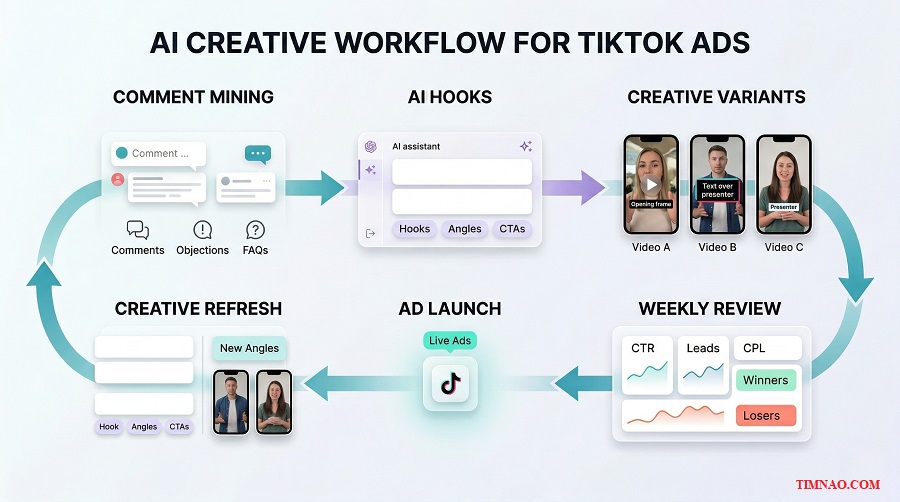
Use AI to turn real customer language into stronger hooks
The easiest place to start is the hook.
Most ads fail in the opening seconds because the beginning feels generic. It sounds like marketing copy instead of a real problem.
AI helps when you feed it the right raw material.
Do not start with “Write me a viral TikTok ad.”
Start with real inputs like:
- customer questions
- objections from sales calls
- comments on your videos
- support emails
- product reviews
- landing-page drop-off reasons
- reasons people say “not now”
Then ask AI to turn those into hook options.
For example, instead of:
“Write 10 TikTok hooks for my marketing service”
give it:
“Here are 8 objections people have before booking a TikTok ad audit. Turn them into 12 short hook ideas for beginner-friendly TikTok ads. Make them sound natural, direct, and mobile-first.”
That usually gives you better material because the prompt starts from real friction.
A simple hook workflow beginners can repeat every week
If you want something practical, use this routine:
Step 1: Collect raw language
Pull 10 to 15 phrases from real people.
Examples:
- “We are getting clicks but the leads are terrible”
- “Our ads look fine but sales are flat”
- “I do not know if the problem is the ad or the page”
Step 2: Ask AI for angle variations
Now ask for:
- direct hooks
- curiosity hooks
- mistake-based hooks
- comparison hooks
- urgency hooks
Step 3: Shortlist only the ones that sound human
Delete anything that feels too polished, too dramatic, or too vague.
Step 4: Rewrite lightly in your own voice
This is important. The final line should sound like your brand, not like a prompt output.
That last step is what keeps your creative from sounding mass-produced.
Use AI to make variants, not clones
Many beginners say they are “testing creatives,” but what they are actually doing is posting near-identical ads with tiny wording changes.
That is not very useful.
A stronger approach is to build creative variants that change the angle while keeping the offer consistent.
AI can help you do that faster.
Let’s say your offer is a free TikTok ad audit.
Instead of asking for five similar scripts, ask for five different approaches:
- one focused on wasted budget
- one focused on weak lead quality
- one focused on bad landing pages
- one focused on poor tracking
- one focused on over-targeting
Now you are testing messaging, not just wording.
That gives you clearer insight into what your audience actually cares about.
Match variants to funnel stage
This is where AI becomes more useful than many people realize.
You do not just need more ads. You need the right type of ad for the right audience temperature.
A cold audience may respond to:
- problem awareness
- hidden mistake angles
- simple before-and-after thinking
- beginner education
A warm audience may respond better to:
- proof
- objection handling
- trust-building
- stronger offers
- reminders
AI can help you create versions for both.
For example, you can ask it to:
- rewrite a cold ad for remarketing
- turn a problem-led script into a proof-led script
- create three CTAs for viewers who already clicked once
That is much more useful than asking for generic “high-converting ad copy.”
Creative refresh is where AI saves the most time
Creative fatigue is one of the most annoying parts of running TikTok ads.
An ad can work well for a while, then slowly weaken. CTR drops. Watch time softens. Lead cost starts creeping up. The offer has not changed, but the creative is getting stale.
This is where AI can be a very practical assistant.
You can use it to refresh:
- hooks
- opening scenes
- captions
- text overlays
- CTAs
- supporting proof lines
- voiceover phrasing
The key is to refresh the ad without destroying what already worked.
That means you do not throw everything away. You keep the winning structure and update the parts most likely to fatigue first.
A simple refresh checklist
Before replacing an ad completely, try updating one of these:
The first three seconds
Change the entry point, not the whole offer.
The framing
Move from “what this is” to “why this is failing.”
The proof element
Add a result, testimonial angle, or clearer trust signal.
The CTA
Make the next step clearer and more specific.
This is the kind of work AI can speed up well, especially if you already know which creative pattern worked before.
Which TikTok-native AI tools are worth knowing
If you want to stay closer to the platform, TikTok now has AI-supported tools inside its business ecosystem, including Symphony Creative Studio, Symphony Assistant, and Smart+ features inside TikTok Ads Manager.
For beginners, the most important mindset is not “Which AI tool is best?”
It is:
Which part of my workflow is slow, repetitive, or inconsistent right now?
If your bottleneck is ideas, use AI for hooks and angles.
If your bottleneck is volume, use AI for first-draft variants.
If your bottleneck is fatigue, use AI for creative refresh.
If your bottleneck is judgment, AI is not the answer. Better review habits are.
The rule that keeps AI from making your ads worse
Never publish AI output untouched when it sounds smoother than a real person would speak.
That is one of the fastest ways to make TikTok ads feel fake.
A good ad does not need perfect phrasing. It needs clarity, relevance, and the right emotional entry point.
So use AI for speed, but keep a human filter on top of it.
That is usually the difference between “more content” and “better performance.”
A/B tests and TikTok Analytics that actually lead to decisions
A lot of beginners say they are testing, but what they really mean is they are watching numbers move.
That is not the same thing.
Real testing helps you decide what to keep, what to cut, and what to improve next. If your reports do not lead to decisions, you are just collecting dashboards.
The goal is not to admire metrics. The goal is to make better calls faster.
Test one meaningful variable at a time
The biggest beginner mistake in A/B testing is changing too much at once.
If you change:
- the hook
- the visual style
- the CTA
- the audience
- and the landing page
you will not know what actually caused the result.
Keep it simpler.
A cleaner test changes one meaningful variable at a time, such as:
- one hook versus another
- one CTA versus another
- one landing page versus another
- one short-form offer versus one longer-form offer
That makes the outcome easier to read.
It also makes your next move more obvious.
What to test first if results are weak
If your campaign is struggling, do not test random things.
Test in the order that usually creates the biggest learning.
Start with the creative
This is often the fastest lever.
Test:
- hook
- angle
- proof style
- first-frame visual
- CTA framing
Then test the destination
If clicks are fine but conversion is weak, test:
- page version A versus B
- website versus Instant Form
- long form versus short form
- stronger trust elements versus minimal version
Test targeting later
Targeting matters, but many beginners hide behind it too early.
If the creative is unclear and the offer is weak, tighter targeting will not magically create better demand.
Start where the biggest signal usually lives.
Read TikTok Analytics like a funnel, not a scoreboard
TikTok gives you a lot of useful data inside TikTok Ads Manager and the TikTok Business Suite.
But the numbers only become useful when you connect them to the stage of the funnel they represent.
A simple way to read your data is this:
Early attention
Look at:
- thumb-stop strength
- first seconds retention
- video view behavior
This tells you whether people are stopping.
Mid-funnel interest
Look at:
- watch time
- CTR
- engagement quality
- landing page visits
This tells you whether people care enough to continue.
Final action
Look at:
- form starts
- form completions
- purchases
- qualified leads
- cost per result
- revenue quality
This tells you whether the campaign is creating actual business outcomes.
That structure matters because it helps you locate the real weakness.
Low watch time? Your opening or pacing may be weak.
Strong CTR but poor conversion? Your destination may be weak.
Many leads but weak close rate? Your qualification may be off.
That is how analytics become practical.
Do not pick winners based on volume alone
This is another place beginners lose money.
One ad may bring more leads. Another may bring fewer leads but much better ones.
If you only look at total lead count, you may scale the wrong creative.
You need to ask:
- Which ad brought better buyers?
- Which lead source replied faster?
- Which campaign created more booked calls?
- Which creative led to actual revenue?
That is especially important for service businesses, higher-ticket offers, and lead-generation campaigns.
The cheapest lead is not always the best lead.
Give tests enough room to breathe
One of the easiest ways to ruin a campaign is to panic too early.
When delivery starts, the platform is still learning. If you keep making edits too quickly, you make it harder to read performance clearly.
That is why it is smarter to let tests run long enough to show a real pattern before making major changes.
This does not mean “wait forever.”
It means:
- do not kill every test after a few hours
- do not rewrite the whole setup every day
- do not confuse early fluctuation with final truth
Beginners often want certainty too early. Good operators want cleaner signals.
A weekly review rhythm that leads to action
If you want your analytics to matter, use a simple review habit.
Daily quick check
Look for:
- obvious spend issues
- broken links
- major drop in CTR
- delivery problems
- unexpected lead quality issues
Twice-weekly decision check
Review:
- which creative is winning
- which angle is fading
- which page is converting better
- whether quality matches cost
Weekly learning review
Write down:
- one thing to keep
- one thing to pause
- one thing to test next
That last step is where most people fail.
They review data, but they do not turn it into a decision list.
Without that, reporting becomes busywork.
A beginner-friendly decision framework
If you are not sure what the numbers are telling you, use this:
If watch time is weak
Fix the opening.
If CTR is weak
Fix the angle, the promise, or the CTA.
If CTR is solid but conversions are weak
Fix the page, the form, or the message match.
If lead volume is good but quality is poor
Fix qualification, targeting, or the offer itself.
If performance was good and then slipped
Check for fatigue before changing the whole campaign.
This is a much calmer way to optimize than guessing from one metric.
A 14-day TikTok recovery plan you can actually follow
If your TikTok ads feel messy right now, you do not need a total reset.
You need a controlled recovery.
The goal of the next 14 days is not to build a perfect system. It is to stop the obvious waste, tighten the weak points, and create a repeatable rhythm you can keep using after the two weeks are over.
Days 1 to 3: find the main break in the funnel
Before making new ads, inspect what you already have.
Look at:
- the campaign objective
- the offer
- the landing page or form
- the Pixel and event setup
- the current creative
- the follow-up process after a lead comes in
Write down the first visible leak in each area.
For example:
- creative too generic
- page too slow
- no remarketing
- weak CTA
- leads not followed up quickly
Do not try to solve everything at once. Just identify the biggest issues clearly.
Days 4 to 6: rebuild your creative input
Now gather the material for stronger creative.
Collect:
- comments
- objections
- FAQs
- sales call notes
- common buyer hesitation
- reasons people click but do not convert
Then use AI to build:
- 10 to 15 hook options
- 3 different angles
- 2 CTAs for cold audiences
- 2 proof-based CTAs for warm audiences
Next, shortlist what sounds most natural and film or draft only the strongest ideas.
This is where a lot of performance improvements begin. Not in the ad account, but in the message.
Days 7 to 8: launch cleaner tests, not more chaos
At this point, do not flood the account with endless new ads.
Launch a smaller, cleaner set.
A practical beginner structure is:
- 2 to 3 fresh creatives
- 1 clear offer
- 1 clean destination
- 1 remarketing audience if available
This gives you enough variation to learn without spreading data too thin.
If you already know one older ad had potential, keep it as a reference point. Then compare the new versions against something real.
Days 9 to 10: fix the handoff after the click
Now review what happens after someone taps.
Ask:
- Does the page load fast on mobile?
- Does the headline match the ad?
- Is the CTA obvious?
- Is the form too long?
- Does the thank-you step set expectations clearly?
If your website is still slowing things down, test a simpler route.
For some businesses, a shorter path with an Instant Form may perform better at this stage. For others, a tighter landing page will still produce better-quality leads.
The point is not to defend your current setup. It is to improve the handoff.
Days 11 to 12: review quality, not just activity
By now, you should have enough early signal to review more intelligently.
Look at:
- CTR
- watch time
- form starts
- completed leads
- booked calls
- actual lead quality
Then compare the patterns.
Do not just ask:
“Which ad got the most response?”
Ask:
“Which ad brought the kind of response I actually want more of?”
That one question prevents a lot of bad scaling decisions.
Days 13 to 14: cut clutter and build your next testing loop
Now clean up the account.
Pause:
- obvious weak performers
- duplicate ideas that added no value
- ads with poor message match
- anything generating volume with no quality
Keep:
- one winner
- one challenger
- one fresh angle to test next
Then write your next round clearly:
- what you learned
- what you are keeping
- what variable you are testing next
That turns recovery into a system.
If you only have a few hours a week
You can still use this plan.
Just compress it like this:
Week 1
Audit the funnel, collect objections, write better hooks.
Week 2
Launch 2 to 3 cleaner creatives, fix the destination, and review quality.
It is slower, but the logic still works.
What success looks like after 14 days
You are not looking for perfection.
You are looking for signs that the system is getting healthier:
- your hooks are clearer
- your creative angles are more intentional
- your page or form is easier to complete
- your analytics are easier to interpret
- your testing is producing real decisions
- your ad account feels less random
That is a real win for a beginner.
Because once the process becomes clearer, performance usually gets easier to improve.
Turn this skill into revenue without pretending to be a guru
A lot of beginners make the same mistake after learning a useful marketing skill.
They jump straight into “agency mode.”
They start talking like an expert, promise big outcomes, and position themselves as if they have already mastered everything. That usually backfires. Clients can feel the gap very quickly, and it creates pressure you do not need.
A better path is much simpler: sell a small, useful outcome you can actually deliver.
If you can spot why TikTok ads are underperforming, improve a weak hook, fix a messy landing page handoff, or clean up a basic testing workflow, that is already valuable. You do not need to call yourself a guru to make that useful to someone else.
Start with service-sized problems, not giant promises
Beginners often think they need to sell “full-funnel TikTok growth.”
That is too broad.
It is much easier to win trust when you solve one narrow problem clearly.
Examples:
- weak ad hooks
- low-quality leads
- poor landing page handoff
- missing Pixel setup
- no remarketing structure
- confused testing workflow
- ad creative fatigue
These are easier to explain, easier to package, and easier to improve in a short time frame.
That matters because small, specific offers are easier for buyers to say yes to.
Four beginner-friendly ways to turn this skill into income
You do not need ten offers. You need one offer that is clear enough to be useful.
Here are a few realistic options.
Offer 1: TikTok ad audit
This is one of the easiest places to start.
You review:
- the campaign objective
- the offer
- the landing page or Instant Form
- the tracking setup
- the creative angles
- the remarketing gaps
Then you turn that into a short, practical action plan.
What makes this offer beginner-friendly is that you do not need to manage ad spend yet. You are diagnosing, not pretending to be a full media buyer.
A simple entry-level version could include:
- a 20 to 30 minute review
- a short Loom walkthrough
- 5 to 10 actionable fixes
- one priority list for the next two weeks
Who it helps:
- local service businesses
- small ecommerce brands
- coaches or consultants
- in-house teams that need a second pair of eyes
What proof you need:
- one strong sample audit
- a simple checklist
- one before-and-after improvement story, even if it started with your own account
This kind of offer is easier to sell than “I will scale your brand.”
Offer 2: Hook and creative variation sprint
Some businesses do not need someone to run the whole ad account. They need better creative inputs.
That opens the door to a much simpler service:
you help them generate stronger hooks, ad angles, and creative refresh ideas.
For example, you could offer:
- 20 hook ideas
- 5 ad angles
- 3 CTA options
- 2 remarketing rewrites
- one creative refresh suggestion pack
This works well because it solves a painful bottleneck. Many founders know they need better ads, but they struggle to come up with good ideas consistently.
If you are comfortable using AI to speed up ideation, this offer becomes even more practical. You are not selling AI output. You are selling better creative options, filtered and shaped by human judgment.
Who it helps:
- founders making their own ads
- small teams with no creative strategist
- agencies that need extra idea support
- businesses stuck with the same tired messaging
What proof you need:
- a swipe file
- a few sample scripts
- one clear example showing how you turn weak hooks into stronger ones
Offer 3: Tracking and remarketing cleanup
This is less glamorous, but often more valuable.
A lot of small businesses are running traffic without clean event tracking, audience exclusions, or basic retargeting flows. That means money leaks out quietly every week.
A beginner-friendly offer here could include:
- reviewing Pixel setup
- checking whether key events are firing
- mapping the basic funnel
- identifying missing Custom Audiences
- recommending exclusions
- outlining one simple remarketing path
This kind of work is especially helpful for businesses that already have traffic but poor follow-through.
Who it helps:
- brands already spending on ads
- ecommerce stores with abandoned carts
- service businesses collecting weak leads
- teams that know something is off but cannot see where
What proof you need:
- a checklist
- a simple “before vs after” structure
- confidence explaining where the leak is and why it matters
This is also a good offer if you prefer systems over content creation.
Offer 4: Monthly creative testing support
Once you understand the basics of hooks, testing, and creative refresh, you can package recurring support without pretending to be a big agency.
For example:
- weekly performance review
- 3 to 5 new creative test ideas
- a simple winner/loser summary
- one landing page suggestion
- one remarketing suggestion
This works because many businesses do not need a massive retainer. They need someone who can keep the testing rhythm alive.
Who it helps:
- busy founders
- lean marketing teams
- small brands that already produce content but do not optimize well
What proof you need:
- a repeatable review template
- a clear process
- a way to explain decisions simply
The value is not “I know everything about TikTok.”
The value is “I can help you stop wasting time and budget on the same mistakes.”
How to get your first signal without faking expertise
You do not need to wait until you feel like a top operator.
You need one or two proof assets.
Start with this:
- Audit your own funnel or a friend’s campaign
- Turn your findings into a clear checklist
- Record a short walkthrough
- Show what you noticed first, what you would fix first, and why
That becomes your sample.
You can also create:
- one mini case study
- one before-and-after landing page critique
- one “3 hook rewrites” example
- one remarketing flow diagram
These are much more credible than vague claims like “I help brands scale.”
Keep the positioning honest
The easiest way to sound trustworthy is to stay precise.
Say:
- “I help businesses find where TikTok leads are leaking”
- “I help improve hooks, handoffs, and remarketing”
- “I help teams test creative ideas faster and more clearly”
Do not say:
- “I guarantee viral growth”
- “I scale brands fast”
- “I know the secret to TikTok ads”
Honest positioning is not just better ethically. It also converts better with serious buyers.
Mistakes that quietly waste budget
Most wasted budget does not come from one dramatic disaster.
It comes from small habits that stay unchecked for too long.
That is why this part matters. These mistakes are easy to miss because campaigns can still look active while they are happening.
Mistake 1: Treating all clicks as good clicks
Not every click is useful.
Some clicks come from curiosity, low intent, or vague messaging. If the ad attracts the wrong type of attention, cheap traffic can still become expensive traffic.
A strong beginner habit is to ask:
- Did this campaign bring the right kind of visitor?
- Did they complete the next step?
- Were the leads actually usable?
If the answer is no, the click price does not matter much.
Mistake 2: Sending every ad to the homepage
This one wastes more budget than many people realize.
A homepage usually tries to serve too many audiences at once. Your ad is speaking to one problem, one offer, and one next step.
If someone clicks an ad about lead quality and lands on a generic homepage, the momentum drops immediately.
A better rule:
each ad should lead to the most relevant next step, not the most convenient page you already have.
Mistake 3: Editing too fast and too often
Beginners often panic after a weak day or two.
They change the audience, the creative, the CTA, the budget, and the landing page all at once. Then they wonder why nothing is easy to read anymore.
This wastes money because it interrupts learning and destroys clarity.
A better pattern is:
- let the test gather enough signal
- change one meaningful thing
- review what actually changed
Calm optimization usually beats frantic optimization.
Mistake 4: Reusing the same creative too long
One ad works, so you keep feeding it budget.
That seems logical until performance starts slipping and you realize the ad is tired.
Creative fatigue is quiet. It rarely announces itself dramatically at first.
You start seeing:
- softer CTR
- weaker watch time
- rising cost per lead
- flatter conversions
If you do not have fresh variations ready, you end up reacting late.
This is why creative refresh should be part of the system, not an emergency task.
Mistake 5: Ignoring warm traffic
If someone watched, clicked, visited, or started a form, that person is already more valuable than a brand-new stranger.
When you ignore remarketing, you force yourself to keep paying top price for first-touch attention.
This gets especially expensive when your offer needs trust before conversion.
Many businesses do not have a traffic problem. They have a follow-up problem.
Mistake 6: Making the form do too much work
Long forms, unclear questions, and unnecessary friction quietly reduce lead flow.
This does not mean every form should be ultra-short. It means the form should match the offer.
A simple lead magnet or free audit should not feel like a mortgage application.
A higher-intent consultation form should filter more carefully.
The mistake is forgetting that the form is part of the sales experience, not just data collection.
Mistake 7: Chasing broad reach when the handoff is weak
Some advertisers keep trying to scale when the system is not ready.
They think:
“If I just reach more people, something will work.”
But if the destination, tracking, or offer is weak, scaling simply multiplies inefficiency.
Before increasing spend, ask:
- Is the current funnel converting cleanly?
- Is lead quality acceptable?
- Do I know what is actually working?
If not, growth usually needs tightening first.
Mistake 8: Letting AI flood the account with low-quality ideas
AI can help you create more variations, but more is not automatically better.
A weak idea does not become strong because you turned it into 20 scripts.
This wastes budget in two ways:
- bad ads get tested unnecessarily
- good ideas get buried under noise
The fix is simple: use AI to expand options, then filter hard.
Mistake 9: Forgetting the boring compliance details
This is not the most exciting mistake, but it matters.
For business use on TikTok, things like music rights, account setup, disclosure, privacy expectations, and clean business information can affect what you can publish and how safely you can scale.
A lot of beginners focus only on performance and forget operational basics like:
- business account limitations
- access control
- using approved music from the Commercial Music Library
- keeping account ownership clear
- checking what the lead handoff process looks like
These details may not feel creative, but they protect the system.
Mistake 10: Looking at the dashboard but not making decisions
This is the quietest budget leak of all.
You check metrics. You notice trends. You open reports.
But then nothing changes.
No ad gets paused.
No landing page gets improved.
No hook gets rewritten.
No new test gets launched.
At that point, analytics become a ritual instead of a tool.
The purpose of reporting is not to feel informed. It is to decide what happens next.
What to do in the next 24 hours
If this article helped you see the weak spots more clearly, the worst next step is doing nothing because it all feels too big.
You do not need to rebuild everything today.
You need to make the next 24 hours useful.
Step 1: map your current TikTok funnel on one page
Keep it simple.
Write down:
- the offer
- the campaign objective
- the ad angle
- the destination page or form
- the follow-up step
- the final business outcome you want
Now circle the part that feels weakest.
Do not choose three things. Choose one.
That is your current leak.
Step 2: review one ad and one landing page side by side
Open your ad and your destination at the same time.
Ask:
- Does the page continue the same promise?
- Does the CTA still make sense after the click?
- Is the next step obvious?
- Would a beginner understand what to do in five seconds?
If the answer is no, write one fix.
Not ten. One.
Step 3: collect five real customer phrases
Pull them from:
- comments
- emails
- sales calls
- chat logs
- product reviews
- FAQs
These phrases are fuel for better hooks, better CTAs, and better creative variants.
This is one of the fastest ways to improve message quality without guessing.
Step 4: create three new hooks from those phrases
Do not try to make them brilliant.
Make them clear.
For example:
- “Getting clicks but no real leads?”
- “Your TikTok ad may not be the problem”
- “This landing page mistake kills lead quality fast”
That is enough to start testing better inputs.
Step 5: check whether your tracking is actually usable
You do not need a technical deep dive today.
Just confirm:
- Is the Pixel installed?
- Are the right events firing?
- Can you tell the difference between a click and a lead?
- Do you know what action counts as success?
If not, that becomes your next practical project.
Step 6: choose one small revenue path if you want to monetize the skill
If you want to turn this into income, do not wait until you feel fully ready.
Choose one small offer:
- ad audit
- hook rewrite pack
- remarketing cleanup
- testing support
Then create one sample asset today.
It can be:
- a checklist
- a Loom review
- a one-page audit
- a before-and-after rewrite
That is enough to move from learning to proof.
Keep the next move realistic
The goal of the next 24 hours is not mastery.
It is momentum.
If you map the funnel, identify one leak, rewrite three hooks, and choose one clear next action, you are already in a better position than most beginners who keep consuming advice without changing anything.
Better TikTok results usually do not come from one breakthrough trick.
They come from cleaner thinking, better handoffs, stronger creative choices, and a habit of fixing what is actually broken.
Disclaimer:
This article is for educational and informational purposes only. The strategies, examples, and tools mentioned here are intended to help beginners understand how TikTok ads, creative testing, AI workflows, and lead generation can work in practice. Results will vary depending on your offer, audience, budget, industry, execution, and market conditions. Nothing in this article should be taken as legal, financial, or business advice. Always review platform policies, privacy requirements, advertising rules, and music usage rights before launching campaigns or making commercial decisions.
Enjoyed this article and found it helpful? ☕✨ If it saved you time, sparked a new idea, or helped you improve your TikTok strategy, you can support my work here: Buy Me a Coffee 💛