
AI Market Research for Beginners: A Confident Roadmap to Smarter Decisions 🚀
AI market research is no longer just for big brands with large budgets and data teams. Today, even beginners can use it to understand customer needs faster, spot buying objections earlier, and make smarter marketing decisions without drowning in raw data.
In this guide, you’ll learn how to turn reviews, comments, surveys, and customer behavior into useful insights you can actually act on. Whether you run a small business, freelance service, or new online project, this article will help you cut through the noise and find practical ways to improve your message, offer, and results.
Why AI market research feels confusing at first
Why does AI market research seem harder than it should be?
For most beginners, the confusion starts with one simple problem: people use the same phrase to mean very different things.
Some people use “AI market research” to mean faster surveys. Others mean social listening, review analysis, customer interviews, competitor tracking, or website behavior analysis. Then there are tool companies using the phrase to describe anything from dashboards to chatbots. So when a beginner tries to learn, it can feel like everyone is talking about a different subject.
That is why the first step is to stop thinking about AI market research as one tool or one method. It is better to think of it as a practical way to answer business questions faster.
For example:
- Why are visitors reading your pricing page but not buying?
- Why do customers like your product but still hesitate at checkout?
- Why does one offer get clicks while another gets ignored?
- Why do people say they want one thing, then buy something else?
AI helps you sort, compare, summarize, and connect signals. It does not replace the need for a clear question. If your question is vague, the output usually becomes vague too.
A beginner-friendly way to think about it is this:
- Market research helps you understand what customers want, fear, expect, or avoid.
- AI helps you process larger amounts of feedback and behavior faster than doing it manually.
- The real goal is not “more analysis.” It is better decisions.
That shift matters. Many beginners start with the wrong expectation. They assume AI will magically tell them what to build, what to write, or what to sell. In reality, AI is far more useful when you already know what kind of decision you need help with.
What makes AI market research feel overwhelming?
There are three common reasons.
First, there is too much jargon. Terms like sentiment analysis, synthetic data, behavioral analytics, clustering, prompt-based coding, and predictive insights can make a simple process sound more technical than it really is.
Second, there are too many tools. A beginner sees survey tools, social listening tools, analytics dashboards, heatmaps, AI assistants, spreadsheets, CRM exports, and review scrapers all at once. That usually creates tool paralysis.
Third, the online advice is often written from the viewpoint of a large company. Big brands talk about multi-source data pipelines and enterprise dashboards. Most beginners do not need that. They need a clean way to understand a small set of customer signals and make one better move this week.
That is why the smartest starting point is not a full research system. It is a simple question tied to a real outcome.
A few good beginner questions look like this:
- What is the main objection stopping people from buying?
- What words do customers use when they describe the problem they want solved?
- Which part of my page or offer is creating confusion?
- What complaint keeps repeating across reviews or messages?
Those questions are easier to answer, easier to validate, and easier to turn into action.
What should a beginner focus on first?
Focus on one decision, not one platform.
That decision might be:
- rewriting a landing page
- improving a product description
- testing a new angle in your ads
- fixing a pricing objection
- reducing drop-off on an important page
Once that is clear, your research becomes simpler. You are no longer asking AI to “analyze the whole market.” You are asking it to help you understand one problem in context.
Here is a simple beginner framework:
- Choose one business question.
Example: “Why are people clicking but not booking a call?” - Collect one small batch of evidence.
Example: 20 customer comments, 10 sales call notes, 15 support questions, or one week of page behavior. - Use AI to organize the mess.
Ask it to group repeated objections, confusing phrases, desired outcomes, or hidden expectations. - Look for the business meaning.
Not just “what people said,” but what you should test next. - Make one change.
Update one page, one CTA, one pricing explanation, or one onboarding step.
That is already real market research. It is just done in a lighter, more modern way.
Today, beginners can do this with accessible tools rather than large research budgets. A short form in Google Forms or Typeform can help collect direct feedback. OpenAI can help summarize open-ended responses. And Hotjar can show where people get stuck on a page. The point is not to use all of them at once. The point is to choose the one that matches your question.
Once you understand that, AI market research feels less like a technical category and more like practical customer understanding with better speed.
That leads to the next important question: if you have access to surveys, social listening, and behavioral data, which one should you trust first?
Are surveys still useful, or are they too limited now?
Surveys are still useful. They are just often used too early.
A survey works best when you already know what you want to validate. It is great for structured questions such as:
- Which headline is clearer?
- Which feature matters most?
- How satisfied are people after purchase?
- What price range feels acceptable?
The strength of a survey is control. You choose the questions, the order, and the response format. That makes results easier to compare.
The weakness is also control. People can only respond to what you ask. If your questions are too narrow, you may completely miss the real issue.
Imagine a founder asking customers, “How satisfied are you with the product?” Most answers might look positive. But that does not reveal that buyers are confused during setup, disappointed by response time, or unsure whether they chose the right plan. A survey can measure a known problem well. It is weaker at discovering the problem you forgot to ask about.
So yes, surveys still matter. But for beginners, they work best after you already have a rough sense of what is going on.
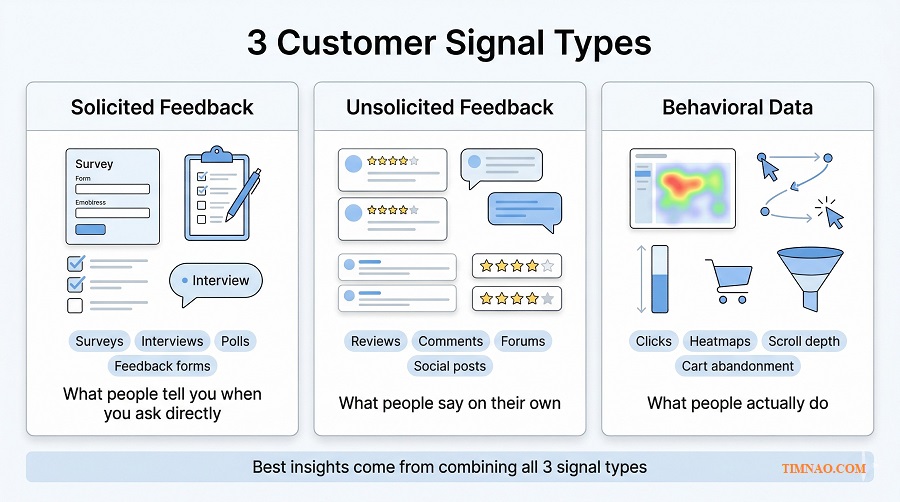
Social listening becomes more useful when you want to hear what people say without being prompted.
This includes:
- product reviews
- Reddit threads
- YouTube comments
- forum discussions
- app store reviews
- community posts
- public complaints on social platforms
- customer messages your team already receives
This kind of feedback is valuable because it is more natural. People often reveal frustrations, priorities, and emotional triggers more clearly when they are not filling out a formal questionnaire.
That is especially useful for beginners who need better customer language.
For example, a course creator may describe their product as “a complete productivity system.” But when reading comments and reviews, they may discover that beginners are really searching for something simpler: “a way to stop procrastinating without feeling overwhelmed.” That difference matters. One sounds broad and polished. The other sounds like a real problem people want solved.
Social listening is also good at spotting issues early. If the same complaint starts appearing in reviews, comments, and support messages, that is usually a sign worth paying attention to before it becomes a larger conversion or retention problem.
That said, social listening also has limits:
- loud voices are not always typical voices
- online conversations can be emotional and unbalanced
- context matters a lot
- sarcasm and slang can confuse AI summaries
So social listening is powerful for discovery, message development, and early warning signals. It is not always the right tool for making big population-level claims.
Why is behavioral data often the most honest signal?
Because behavior shows what people actually do.
This is where beginners often get their biggest breakthrough.
A person may say they like your product. They may even tell you the offer sounds strong. But if they abandon the checkout, ignore the CTA, or leave the page after ten seconds, the behavior is telling a different story.
Behavioral data includes signals such as:
- click patterns
- scroll depth
- abandoned carts
- time on page
- drop-off points
- repeat visits
- bounce patterns
- form completions
- session replays
- funnel exits
This kind of data does not tell you everything, but it helps you see where friction is happening.
For example:
- If many visitors stop at the pricing table, price may not be the only problem. The offer may be unclear.
- If users scroll but do not click, the message may be interesting but not convincing.
- If visitors reach the form and leave, the form may feel too long, too early, or too risky.
That is why behavioral data is such a strong reality check. It helps you move from assumptions to observable actions.
Tools like Hotjar make this easier because they combine heatmaps, replays, funnels, and feedback in one place. For beginners, that can be more useful than staring at raw analytics alone.
So what should you trust first as a beginner?
The honest answer is: trust the best source for the stage you are in.
Here is a practical way to choose.
If you have no customers yet
Start with:
- competitor reviews
- niche communities
- YouTube comments
- Reddit or forum discussions
- search trends through Google Trends
At this stage, you need language, pain points, and buying triggers more than formal measurement.
If you have traffic but low conversion
Start with:
- behavioral data
- page recordings
- heatmaps
- form abandonment
- top pre-sale questions
This helps you find friction close to the money.
If you already have customers
Start with a combination of:
- customer support messages
- reviews
- interview notes
- short post-purchase surveys
This gives you both unprompted feedback and structured validation.
If you sell a service or B2B offer
Start with:
- call notes
- sales objections
- proposal feedback
- email replies
- meeting questions
In service businesses, the richest insight is often sitting in conversations you already had.
So the real rule is not “always trust X first.” The better rule is this:
- use social listening to discover what people naturally care about
- use behavioral data to see where friction actually happens
- use surveys to validate a specific question after you know what to ask
That order helps beginners avoid one of the most common mistakes: collecting neat answers before they understand the messy reality.
And once you start collecting all these signals, another problem shows up fast. You can end up with more notes, more charts, and more summaries than before. That is where the next distinction becomes essential.
What counts as a real insight instead of just more data?
What is the difference between data, information, and insight?
This is where many beginner articles stay too abstract, so let’s make it simple.
Data is the raw signal.
Example: 42 people mentioned pricing in reviews.
Information is organized data.
Example: pricing was the second most common complaint, especially among first-time buyers.
Insight explains what that pattern means and what you should do next.
Example: first-time buyers are not rejecting the price itself; they are hesitating because they do not understand what is included, so the next test should be a clearer pricing explanation and comparison block.
That last step is what many people skip.
A dashboard can give you data. AI can summarize information. But insight is the part that changes action.
If nothing changes after you “learn” something, there is a good chance it was not an insight yet.
How can you tell if a finding is a real insight?
Use this test:
A real insight should help you make a clearer business decision.
Ask yourself:
- Does this explain something important?
- Does it reduce uncertainty?
- Does it point to a practical next step?
- Would this change the way I write, sell, design, price, or prioritize?
If the answer is no, then you may still be at the data or information stage.
A simple sentence starter helps here:
“Because of this, we should test…”
Examples:
- Because customers keep comparing us with cheaper alternatives, we should test a value comparison instead of another discount.
- Because buyers sound confused before purchase, we should test a simpler CTA and shorter feature explanation.
- Because visitors scroll but stop at the proof section, we should test stronger social proof earlier on the page.
That is how insight becomes useful.
What does a beginner-friendly insight look like in real life?
Here are three simple examples.
Example 1: Online store
Raw data: Many shoppers leave at checkout.
Not yet an insight: “Checkout abandonment is high.”
Better insight: Buyers do not trust shipping timing because delivery details appear too late, so the next move is to bring shipping clarity higher up the product page.
Example 2: Freelance service
Raw data: Leads ask many questions before booking.
Not yet an insight: “People need more information.”
Better insight: Prospects are not unsure about skill level; they are unsure about process and timeline, so the next move is to simplify the service workflow on the sales page.
Example 3: Digital product
Raw data: Reviews mention “too much information.”
Not yet an insight: “People think the course is long.”
Better insight: Beginners do not want more content; they want a clearer starting path, so the next move is to create a quick-start lesson and beginner roadmap.
Notice what all three examples have in common: they connect a pattern to an action.
How do you avoid “insight inflation” when using AI?
This matters because AI is very good at producing polished summaries that sound smarter than they are.
To avoid that trap:
- Do not confuse repetition with meaning.
Just because a theme appears often does not automatically make it strategically important. - Check more than one source.
If the same issue appears in reviews, support messages, and behavior data, it is much stronger. - Look for business impact.
A real insight should connect to revenue, conversion, churn, trust, or customer experience. - Ask for the next move.
Every time AI gives you a summary, ask: “What specific change should we test based on this?” - Verify the original evidence.
Read the comments, watch the recordings, or review the messages yourself before acting on a major conclusion.
That last point is important. AI can help you move faster, but human judgment is still what separates a polished summary from a useful decision.
And that is the real shift beginners should remember: the goal is not to collect more dashboards, more tags, or more charts. The goal is to become better at spotting what matters, sooner, and acting on it with more confidence.
From here, the article can move naturally into the next stage: how to use these signals to choose tools, workflows, and low-risk actions that actually improve results.
When synthetic data and sentiment analysis actually help
What is sentiment analysis actually good for?
Sentiment analysis sounds more advanced than it is.
At a beginner level, it simply means using AI to scan comments, reviews, support messages, or social posts and label the emotional direction behind them. In plain English, it helps you see whether people feel positive, negative, frustrated, disappointed, excited, skeptical, or confused.
That is useful when you have too much text to read manually.
For example, if you sell a skincare product and 300 reviews mention “gentle,” “burning,” “helped,” “too expensive,” and “works slowly,” sentiment analysis can help you group those reactions faster. Instead of reading line by line with no structure, you can start seeing patterns:
- people like the results but dislike the waiting time
- first-time buyers feel nervous about irritation
- repeat buyers complain less about price than new buyers
- one feature gets praise, but the packaging gets dragged down
That kind of pattern is practical. It can improve product pages, FAQs, support scripts, and ad angles.
What sentiment analysis is not good for is blind trust. It often struggles with:
- sarcasm
- slang
- mixed emotions
- niche communities
- cultural nuance
- short comments with vague wording
So the right beginner mindset is simple: use it to spot themes quickly, then verify the real meaning yourself.
When is sentiment analysis worth using?
Use it when you already have a decent amount of text and one clear question.
Good beginner use cases include:
- Review analysis
Find the most repeated positive and negative reactions. - Support message analysis
Spot recurring frustration before it becomes churn or refunds. - Social listening summaries
See whether conversations around your brand or category are shifting in tone. - Ad comment analysis
Understand whether people are confused, interested, annoyed, or price-sensitive. - Competitor review mining
Learn what customers love and hate about alternatives in your space.
A simple rule helps here: if the text is short, repetitive, and business-relevant, sentiment analysis can save you time. If the text is highly nuanced, emotional, or full of irony, use it more carefully.
A good workflow is:
- gather 50 to 200 comments, reviews, or messages
- ask AI to group them into emotional themes
- ask for representative phrases under each theme
- manually review a sample before changing anything important
That last step matters. Beginners often skip it because the AI summary looks clean. Clean does not always mean accurate.
What about synthetic data? Is it actually useful or just hype?
Synthetic data becomes helpful when you treat it as a simulation tool, not a replacement for real people.
In simple terms, synthetic data is AI-generated information that mimics patterns from real data without being a copy of actual individuals. That makes it useful for low-risk testing, early modeling, and privacy-friendly experimentation.
But beginners should not hear that and think, “Great, I never need customers again.” That is exactly where people go wrong.
Synthetic data helps most in situations like these:
- testing rough directions before spending on live research
- stress-testing possible scenarios
- generating early customer segments to explore messaging
- simulating responses to product or pricing changes
- filling small gaps in early planning when live data is limited
Let’s say you are planning a new service package. Before interviewing real prospects, you could use synthetic profiles to test different ways of presenting the offer:
- premium done-for-you
- budget starter package
- hybrid coaching + templates
This does not prove what real buyers will choose. But it can help you refine what to ask, what to compare, and what objections to investigate with actual people.
That is where synthetic data shines: early exploration.
When should beginners avoid relying on synthetic data?
Avoid using it as final proof.
It should not be your main source for decisions like:
- final pricing
- major product launch decisions
- category expansion
- brand positioning changes
- customer claims that need real-world validation
Why? Because synthetic outputs often reflect patterns, averages, and logic more neatly than real human behavior does. Real buyers are messy. They contradict themselves. They say they want healthier food, then order dessert. They claim price matters most, then buy the product with the clearest trust signals.
That human inconsistency is often where the best marketing insights live.
So the safest beginner rule is this:
- use synthetic data to explore possibilities
- use real conversations and behavior to validate what matters
If you remember that one distinction, you will avoid a lot of bad decisions later.
This matters even more once you stop analyzing text for curiosity and start using it to improve results. That is where customer conversations become much more valuable than “content.” They become fuel for decisions.
How to turn customer conversations into actions that save or make money
Why do customer conversations matter so much?
Because customers rarely describe their problems the way businesses describe their offers.
That gap is where a lot of lost sales happen.
A business may talk about “workflow optimization” while customers are really thinking, “I waste two hours every day and still feel behind.” A founder may say “AI-powered insight platform” while buyers are asking, “Can this help me stop guessing what customers want?”
When you study customer conversations closely, you start hearing:
- the pain they feel right now
- the outcome they actually want
- the objections blocking action
- the words they naturally use to explain both
That is gold for beginners because it helps in places that directly affect revenue:
- landing pages
- ads
- product descriptions
- pricing explanations
- email sequences
- sales calls
- onboarding flows
- support content
In other words, customer conversations are not just research material. They are working material.
What is the easiest way to turn raw conversations into something useful?
Use a simple four-step filter.
1. Collect the right conversations
Start with the places where customers already reveal intent, friction, or doubt:
- reviews
- support tickets
- sales call notes
- email replies
- DM questions
- chat logs
- YouTube comments
- community posts
- refund requests
- competitor reviews
You do not need perfect volume. Even 30 to 50 strong examples can teach you a lot if they are recent and relevant.
2. Sort by business relevance
Do not treat all comments equally.
Tag them by what they affect:
- conversion
- trust
- price sensitivity
- clarity
- onboarding
- retention
- product experience
- customer support
This makes the next step much easier because you stop drowning in random feedback.
3. Look for repeated tension
The most useful conversations are often not the loudest ones. They are the repeated ones.
For example:
- “I’m interested, but I’m not sure which plan I need.”
- “This sounds useful, but it feels too advanced for me.”
- “I like the product, but delivery took too long.”
- “I wanted fast help, but had to search too much.”
That repeated tension usually points to a fix.
4. Turn each pattern into one action
This is the part many people skip.
Do not stop at “customers are confused.”
Ask: confused about what, exactly, and where?
Do not stop at “price is an issue.”
Ask: is the price too high, or is the value too unclear?
Do not stop at “people want support.”
Ask: do they want faster responses, clearer steps, or more confidence before buying?
A helpful sentence is:
“If this pattern is true, the next thing we should change is…”
That forces the conversation to become operational.
What kind of actions usually create the fastest return?
For beginners, the fastest wins usually come from fixing friction close to the money.
That means:
- Rewrite weak messaging
If customers keep using one phrase and your page uses another, update the page first. - Clarify the offer
If people do not understand what is included, explain deliverables, timelines, and outcomes more clearly. - Reduce hesitation
Add examples, proof, guarantees, FAQs, or process clarity where doubt appears. - Improve the handoff
If people buy but then feel lost, your onboarding needs work. - Respond to repeated concerns earlier
If the same support question appears again and again, bring the answer forward before purchase.
Here is a simple example.
A freelancer notices prospects often ask, “How long will this take?” That may look like a scheduling question, but it often signals deeper uncertainty about process, effort, and expectations.
A smart fix is not just answering the question in email every time. It is updating the sales page to show:
- what happens first
- what the client needs to provide
- how long each phase takes
- when they can expect visible progress
That one change can improve trust, reduce friction, and save time on repeated explanations.
How do you build a simple insight-to-action habit each week?
Use a lightweight weekly routine.
Weekly conversation review
Step 1: Pull 20 to 30 recent customer signals
Mix sources if possible: reviews, chats, comments, call notes, support questions.
Step 2: Ask AI to cluster them into 3 to 5 themes
Keep the prompt narrow. Example: “Group these messages into repeated objections, desired outcomes, and trust issues.”
Step 3: Choose one theme with business impact
Not the most interesting theme. The one most likely to affect conversion, churn, or customer experience.
Step 4: Make one visible change
Update one headline, one CTA, one email, one product section, or one FAQ block.
Step 5: Watch the response
Look for better replies, fewer objections, cleaner support conversations, improved clicks, or stronger conversions.
This keeps research tied to action. It also stops you from turning customer feedback into a document that nobody uses.
That bridge between conversation and action is where beginners often gain the most. But it is also where they can get hurt if they move too fast and trust the wrong signals.
Where beginners get burned: privacy, bias, hallucinations, and bad signals
Why do beginners make avoidable mistakes with AI research?
Because AI makes shallow work feel deeper than it is.
A neat summary, a clean chart, or a confident-looking pattern can create false certainty. That is dangerous when you are working with customer data, public conversations, or automated analysis.
Most beginner mistakes fall into four buckets:
- privacy mistakes
- bias mistakes
- hallucination mistakes
- signal quality mistakes
You do not need to be paranoid. But you do need a few rules.
What privacy mistakes should beginners avoid first?
The first one is simple: do not paste sensitive customer data into tools carelessly.
That includes:
- full names
- email addresses
- phone numbers
- private order details
- medical, financial, or personal identifiers
- screenshots with visible account information
If you are analyzing feedback, clean it first. Remove anything that could expose a person unnecessarily.
A second mistake is assuming “public” always means “fair game.” Sometimes a post is technically public but still context-sensitive. If you are studying public conversations, be careful not to treat people like raw material just because the content is visible.
A third mistake is being creepy in execution. There is a difference between helpful personalization and “we know exactly what you did last Tuesday” energy. If your marketing feels invasive, trust drops fast.
A simple beginner rule works well here:
- anonymize first
- summarize second
- act third
How does bias sneak into beginner research?
Bias usually enters through the source, not just the model.
For example:
- your happiest customers may leave most of the reviews
- your angriest customers may dominate comments
- one platform may attract a very specific type of user
- your existing audience may not represent the market you want next
- old support data may reflect a version of the product you already changed
Then AI comes in and makes those patterns look official.
That is why source balance matters.
A better habit is to ask:
- where did this data come from?
- who is missing from it?
- is this current enough to trust?
- does another source confirm the same pattern?
You do not need perfect representativeness for every small business decision. But you do need to know when a pattern is probably local, temporary, or distorted.
What do hallucinations look like in market research work?
Hallucinations are not always wild nonsense. Sometimes they are subtle.
In research tasks, they often look like this:
- invented reasons behind real patterns
- overconfident summaries with weak evidence
- fake consistency across messy comments
- missing contradictions that matter
- “best practices” that were never actually present in the source material
For example, you upload 40 reviews and ask AI for the top buying objections. It gives you a neat list. That looks useful. But if you check the reviews, you may notice two problems:
- some objections were exaggerated because the model grouped unrelated complaints together
- a small but important issue got ignored because it appeared less often but mattered more commercially
That is why verification matters.
A practical beginner safeguard is the 3-check rule:
- Check the original comments behind the top conclusion
- Check one second source if available
- Check whether the conclusion points to a real action
If a summary fails one of those checks, do not treat it as a decision yet.
How do you spot bad signals before they waste your time?
Bad signals often have one of these traits:
- they are too old
- they are too small and noisy
- they come from one extreme group only
- they are not tied to any business goal
- they sound important but change nothing practical
For example, spending hours analyzing vague engagement comments may feel productive, but if your real problem is checkout drop-off, you are studying the wrong signal.
Good beginner research is usually narrower than expected.
Instead of asking, “What does the market think of my brand?” ask:
- What objection is blocking first purchase?
- What part of the offer feels unclear?
- What concern keeps repeating before people buy?
- What frustration appears after purchase and could hurt retention?
Those questions are easier to answer and far easier to act on.
Once you filter out privacy risks, bias, hallucinations, and low-quality signals, the process becomes much more useful. You stop treating AI as a magic answer machine and start using it as a practical assistant that helps you hear customers more clearly and respond more intelligently.
That sets up the final stretch of the article naturally: once the tools, signals, and risks are clear, the next step is building a realistic beginner action plan that turns all of this into steady progress instead of occasional random analysis.
A 7-day AI market research sprint for small teams
Who this sprint is for and what you need before starting
Once you understand the difference between signals, insights, and noise, the next step is not more theory. It is a simple routine you can actually finish.
This 7-day sprint is for small teams, solo founders, freelancers, consultants, and lean marketing teams that want better customer understanding without building a heavy research process. You do not need a research department. You need one clear business question, a small batch of real customer signals, and enough discipline to act on what you learn.
Before you begin, gather three things:
- one business question tied to results
- one source of customer language
- one source of behavior or market evidence
That is enough.
A good sprint question sounds like this:
- Why are visitors dropping off before checkout?
- Why are leads replying but not booking?
- What objection keeps slowing down first-time buyers?
- Which message angle sounds good to us but weak to customers?
A weak question sounds like this:
- What does the market think of us?
- How do we improve everything?
- What should our strategy be?
The first group leads to action. The second group usually leads to vague notes and pretty summaries.
If you have only one rule for this sprint, make it this one: do not research for curiosity alone. Research to make one better decision.
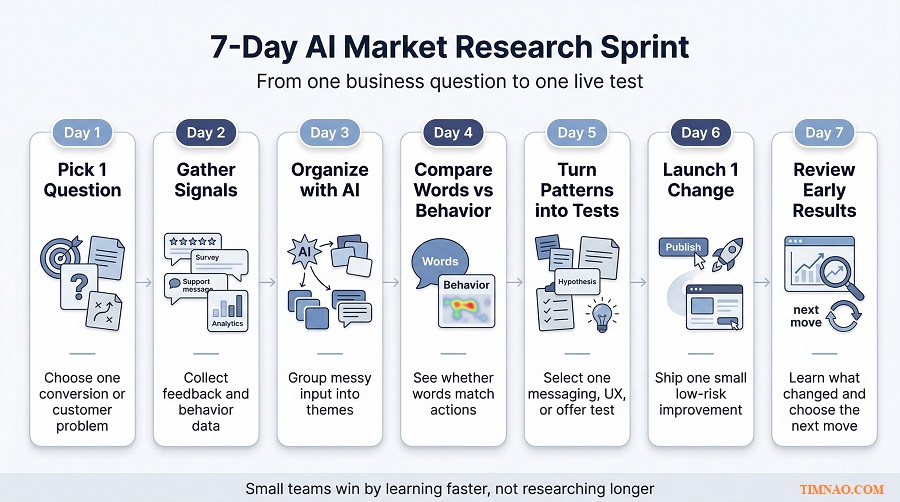
Day 1: Pick one business question worth solving
The biggest mistake beginners make is starting with too much ambition. They want to “understand the whole market,” “analyze all customer feedback,” or “build a full AI research workflow” in one go.
That usually ends in overwhelm.
Start with one question that sits close to revenue, trust, or friction. In small teams, the best questions are usually narrow and commercial.
Good examples:
- Why do visitors read the pricing page but not convert?
- Why do prospects ask the same questions before buying?
- Why do customers like the product but hesitate to recommend it?
- What complaint keeps repeating after purchase?
Write your question in one sentence. Then define what “better” would look like after the sprint.
For example:
- clearer messaging on one page
- fewer repeated objections in sales calls
- one stronger email angle
- one better FAQ block
- one cleaner onboarding step
That keeps the sprint grounded. You are not trying to become an insight machine in seven days. You are trying to reduce one point of uncertainty.
Day 2: Gather real signals, not random noise
Now collect evidence, but do it with intent.
You are looking for signals that connect directly to your question. That may include:
- customer reviews
- support tickets
- chat logs
- pre-sale emails
- call notes
- refund requests
- onboarding questions
- product comments
- public conversations in your niche
- search demand clues from Google Trends
At this stage, smaller and cleaner is better than bigger and messier.
A practical target is 30 to 100 pieces of evidence. That is enough to surface patterns without drowning you in text. If you have more, fine. But do not delay the sprint because your dataset is not perfect.
As you collect, remove anything that does not help answer your question. Old complaints from an outdated version of the product, unrelated feature requests, duplicate comments, and off-topic chatter can all make the analysis look richer than it really is.
A simple filter helps:
- Relevant: directly connected to the question
- Recent: still reflects the current offer or experience
- Repeated: appears more than once
- Actionable: could lead to a change you can actually test
That keeps the sprint practical from the start.
Day 3: Organize the feedback with AI
This is where AI saves time, but only if you ask it to do a narrow job.
Do not ask it to “analyze everything.” Ask it to sort and structure what you already collected.
Useful prompts at this stage include:
- group these comments into repeated objections
- separate pain points from desired outcomes
- show me the language people use before they hesitate
- find the top trust issues in these messages
- cluster these comments into 4 to 6 themes
You can do this with OpenAI or another data-friendly AI tool, but keep the task specific. The more precise your question, the more useful the structure becomes.
What you want by the end of Day 3 is not a giant report. It is a short list like this:
- top 3 recurring frustrations
- top 3 desired outcomes
- top 2 trust blockers
- repeated phrases customers use naturally
- gaps between how customers speak and how the brand speaks
That list becomes your working material.
One warning here: do not let the neatness of the summary trick you into overconfidence. AI is great at grouping patterns. It is not automatically right about meaning. You still need to read samples from each group and check whether the interpretation matches the original comments.
Day 4: Compare words with behavior
This is the day where the sprint usually gets interesting.
Customer language tells you what people say. Behavioral signals tell you what they actually do. When those two line up, the signal gets stronger. When they do not line up, you often find the real opportunity.
For example:
- customers say the offer looks useful, but they stop at the pricing section
- customers say they want more information, but they do not scroll to the section that already explains it
- customers complain about price, but their actual hesitation starts where trust should have been built
That is why Day 4 matters. It keeps you from overreacting to surface comments.
Look at behavior through the simplest lens possible:
- where people pause
- where people leave
- where they click
- where they ignore
- where they return
- where they ask for help
Tools like Hotjar can make this easier because they help you review heatmaps, recordings, feedback, and page friction without needing a complex analytics setup. But the main point is not the tool. The main point is the comparison.
Ask yourself:
- does the behavior support the complaint?
- does the behavior reveal a hidden issue underneath the complaint?
- is the real problem clarity, trust, timing, or value?
This is where raw feedback starts turning into usable direction.
Day 5: Turn patterns into test ideas
By now, you should have more than observations. You should have a short list of tensions you can work with.
Now turn each one into a practical test.
A simple way to do that is to write three columns:
- What we noticed
- What it probably means
- What we should test next
For example:
- Visitors stop at pricing
→ they may not understand what is included
→ test a clearer pricing breakdown and comparison - Leads keep asking how the process works
→ trust is being delayed by uncertainty
→ test a simple “how it works” section earlier - Reviews praise outcomes but mention a steep learning curve
→ the product promise is strong, but the first steps feel too heavy
→ test a quick-start path or a beginner onboarding flow
At this stage, do not aim for ten ideas. Aim for three good ones:
- one messaging test
- one clarity or UX test
- one trust-building test
That is enough for a small team to move without getting scattered.
Day 6: Ship one low-risk change
This is the day that separates useful research from shelf research.
Choose one change you can publish fast without breaking anything important. Good low-risk changes include:
- rewriting one headline
- adding one FAQ block
- clarifying one pricing section
- updating one CTA
- changing the order of one page section
- adding one trust element
- simplifying one onboarding email
Do not try to redesign the whole site because the sprint gave you one pattern. Keep the move proportional to the evidence.
A helpful rule is: the smaller the evidence base, the smaller the change.
If you only analyzed 30 comments, do not reposition the whole brand. But you can absolutely improve one page, one email, or one support explanation.
This is also where small teams have an advantage. You do not need five approvals and three meetings to test one better explanation. You can learn faster precisely because the system is lighter.
Day 7: Review what changed and decide the next move
The sprint does not end with a dramatic conclusion. It ends with a cleaner next step.
Look at early signals, not final certainty.
That may include:
- better click-through on a page
- fewer repeated objections
- more qualified replies
- lower support confusion
- improved time on key sections
- stronger conversion from one stage to the next
You are not trying to prove a lifetime truth in one week. You are trying to improve the quality of your next decision.
At the end of Day 7, answer these three questions:
- What changed in the customer signal?
- What still feels uncertain?
- What should we test next week?
That turns the sprint into a repeatable habit instead of a one-off exercise.
What is the low-risk starter path?
If you are a solo operator or very small team, start with your own existing customer evidence only.
That means:
- customer emails
- support messages
- sales call notes
- reviews
- form responses
- landing page behavior
This path is low-risk because the data is already close to your business reality. You are not guessing from broad market noise. You are learning from people already near the product.
What is the higher-leverage path?
Once you can run the basic sprint well, add one outward-looking signal source.
That could be:
- competitor reviews
- category conversations
- search behavior
- recurring public questions in your niche
This gives you more context, but only after your internal signal loop is strong enough. In other words, first learn to hear your own customers clearly. Then widen the lens.
What matters most as AI market research gets easier
Easy tools do not remove the need for judgment
As AI tools become easier to use, the real bottleneck shifts.
It is no longer access. Small teams can now summarize feedback, compare themes, explore search interest, visualize data, and review user behavior much more easily than before. The harder part is deciding what matters, what is misleading, and what deserves action.
That is why better tools do not automatically create better decisions.
If a beginner runs five dashboards, ten summaries, and three sentiment analyses without a business question, the result is not sophistication. It is just faster confusion.
What matters most now is judgment:
- knowing which question to ask
- knowing which signal is worth trusting
- knowing when a pattern is still too weak
- knowing when a small fix is smarter than a big strategy shift
As AI gets easier, judgment becomes more valuable, not less.
Speed matters, but learning speed matters even more
Many people think the goal is fast answers. It is not. The real goal is fast learning.
There is a difference.
Fast answers can still be wrong. Fast learning means you shorten the time between:
- noticing a pattern
- testing a response
- seeing what changed
- refining the next move
That loop is where small teams can become surprisingly competitive.
A large company may still have more data, bigger teams, and stronger tooling. But a small team can often move from signal to action much faster. If it listens well, tests cleanly, and keeps learning, that speed becomes a real advantage.
This is one of the biggest shifts in AI market research. The old model treated research as a stage. The newer model treats it as an ongoing loop.
That is a healthier mindset for beginners. You do not need one giant research project. You need a rhythm.
Small teams can win by building an insight-to-action loop
This is the real opportunity as AI market research becomes more accessible.
You do not need to outspend bigger competitors on research. You need to become better at closing the distance between understanding and action.
That means building a lightweight loop:
- hear customer signals
- organize them quickly
- compare them with behavior
- choose one meaningful action
- measure the response
- repeat
The teams that do this consistently will usually learn faster than teams that only research occasionally.
This is also why beginner-friendly AI market research should stay close to operations. It should help improve actual things:
- pages
- offers
- copy
- onboarding
- retention
- customer support
- product communication
When research stays close to these decisions, it creates momentum. When it becomes a side project, it usually slows down and gets ignored.
The best marketers will become synthesizers, not just tool users
As more people gain access to the same tools, the difference shifts from access to synthesis.
That means the strongest marketers and founders will not just be the ones who can run prompts, dashboards, or recordings. They will be the ones who can combine different signals into one clear direction.
For example:
- a search trend alone is not enough
- a batch of reviews alone is not enough
- a heatmap alone is not enough
- a survey alone is not enough
But together, these signals can reveal something useful.
Maybe customers are searching for simplicity, reviews mention overwhelm, and behavior shows users dropping off at dense sections of the page. Suddenly the message becomes clear: this is not mainly a pricing problem or a traffic problem. It is a clarity problem.
That is synthesis.
And that is why AI market research, even as it gets easier, still rewards human thinking. Someone still needs to connect the dots, weigh context, and choose the next move.
Keep the human being in view
This may be the most important point of all.
As tools become faster, it becomes easy to treat customers like clusters, segments, and signals only. But behind every review, hesitation, click, complaint, or search is a real person trying to solve a problem, avoid a mistake, save time, reduce stress, or make a better decision.
That perspective changes the quality of the work.
Instead of asking, “How do we optimize this funnel?” you also ask, “Where is this experience confusing or unfair?”
Instead of asking, “What message converts best?” you also ask, “What promise is truly clear and helpful?”
In practice, this makes your research better. It keeps you from chasing shallow wins that hurt trust later. And in a world where many businesses can access similar AI tools, trust and usefulness become even more important.
That is why the future does not belong to the teams with the flashiest workflow alone. It belongs to the teams that combine speed with judgment, and technology with a real understanding of people.
What beginners should remember
- Start with one narrow business question, not a vague goal like “understand the market.”
- Run AI market research as a weekly loop: gather signals, organize them, compare with behavior, test one change, and learn fast.
- Keep the first sprint small enough to finish in seven days and useful enough to influence one real decision.
- Use AI to speed up sorting and synthesis, but keep human judgment for meaning, priority, and action.
- As tools get easier, the winning skill is not tool access. It is the ability to connect multiple signals into one clear next move.
- Small teams do not need enterprise research stacks to compete. They need better listening, faster testing, and a cleaner insight-to-action habit.
- The best long-term advantage comes from understanding real people better and responding more clearly, not from generating more dashboards.
Disclaimer:
This article is for educational and informational purposes only. It is not legal, financial, privacy, compliance, or business advice. AI market research tools, platform features, and best practices can change over time, so always verify important decisions with current official sources and, where necessary, a qualified professional. Any examples in this article are provided for illustration only and may not reflect results in every business, market, or industry.
Enjoyed this article and found it helpful? ☕✨
If it saved you time or gave you a useful idea, you can support my work here: Buy Me a Coffee 💛