

Claude AI Automation for Beginners: 5 Powerful Systems You Can Build This Week 🚀
Claude AI automation can help beginners turn repeated tasks into simple systems that save time, improve quality, and create realistic income opportunities.
Instead of using AI for random one-off prompts, you’ll learn how to build workflows that produce useful results again and again: client briefs, content packages, proposals, email sequences, market reports, and more. The goal is not to “get rich quick” with AI, but to use Claude as a practical assistant inside a clear business process.
If you’re new to AI tools, this guide will show you how to start small, avoid common mistakes, and build your first Claude-powered workflow step by step.
Why Claude AI Automation Is a Beginner-Friendly Income Skill
Claude AI automation is one of the most beginner-friendly AI skills because it does not require you to start with coding, complex software, or a big audience.
At the beginner level, your goal is simple: use Claude to turn repeated work into a clear, reusable process.
That repeated work could be writing client emails, summarizing research, preparing content briefs, creating proposals, reviewing documents, repurposing videos, or planning social media posts. These are not “futuristic” tasks. They are normal business tasks that freelancers, creators, consultants, coaches, and small business owners already need every week.
The income opportunity comes from one practical idea:
If you can help someone save time, improve quality, or deliver work faster, you have something valuable.
Claude is not the business. Claude is the engine inside the business.
A beginner often thinks, “How do I make money with AI?”
A better question is:
“What useful result can I produce faster and more consistently with AI?”
That shift matters.
If you only chase “AI money-making hacks,” you will keep jumping from tool to tool. But if you learn how to build small systems, you can reuse the same skill across many offers.
For example:
- A copywriter can build a content repurposing system.
- A consultant can build a client research system.
- A coach can build a lead nurture email system.
- A virtual assistant can build a weekly reporting system.
- A creator can build a script-to-post workflow.
None of these require you to become an AI engineer first.
They require you to understand the work, break it into steps, and guide Claude properly.
The Real Skill Is Building Repeatable Systems
A one-time prompt is helpful, but it is not yet automation.
For example, this is a one-time prompt:
“Write me a LinkedIn post about productivity.”
It may produce something usable, but next time you will probably rewrite the prompt again. You will tweak the tone, add more context, fix the structure, and spend time cleaning up the output.
A system is different.
A system says:
- Here is the audience.
- Here is the goal.
- Here is the format.
- Here is the tone.
- Here are examples of good output.
- Here is the quality checklist.
- Here is what to do when information is missing.
That is when Claude becomes useful in a serious way.
You are no longer “asking AI for help.” You are designing a repeatable workflow.
Think of it like making coffee.
If you make coffee randomly every morning, the taste changes each time. But if you control the beans, water, temperature, timing, and cup size, the result becomes consistent.
Claude works the same way.
Better inputs create better outputs.
Why Beginners Should Start With Services, Not Complicated Products
Many beginners immediately want to build a SaaS product, launch a course, or create a passive income business.
Those can work later, but they are not always the best first move.
A beginner-friendly path is to start with a service because services give you fast feedback.
You offer a useful result to a real person or business. They tell you what they like, what is missing, and what they would actually pay for. Then you improve the workflow.
For example, instead of trying to build a full AI content platform, you could offer:
- “I turn one long video into 10 LinkedIn posts.”
- “I create weekly competitor research briefs for small SaaS teams.”
- “I build personalized email sequences for coaches.”
- “I turn messy notes into polished client proposals.”
These offers are easier to test.
You do not need a huge audience. You need one clear problem, one useful output, and one workflow that helps you deliver it better than doing everything manually.
Later, if the same workflow keeps working, you can turn it into a template, prompt pack, workshop, digital product, or internal business asset.
The Beginner Advantage: You Can Move Faster Than Large Teams
Large companies often move slowly. They need approvals, meetings, policies, budgets, and long implementation timelines.
A beginner, freelancer, or solo operator can move faster.
You can choose one workflow today, test it this week, and improve it next week.
That speed is an advantage.
But speed only helps if you stay practical. Do not try to automate your entire business at once. Start with one repeated task that has a clear before-and-after result.
A good first Claude automation task usually has these traits:
- You do it often.
- It follows a pattern.
- It takes too much time manually.
- The output has a clear structure.
- Human review can improve the final result.
If a task is completely chaotic, highly emotional, or depends heavily on personal judgment, do not automate it first.
Start with structured work.
Structured work is where beginners win.
The Three-Layer AI Workflow Model: Inputs, Thinking, Outputs
A simple way to understand Claude AI automation is to divide every workflow into three layers:
- Inputs
- Thinking
- Outputs
This model is useful because it stops you from blaming Claude for every weak result.
Many bad outputs are not caused by “bad AI.” They happen because the input was vague, the thinking process was unclear, or the output format was not defined.
Once you understand these three layers, you can improve your workflow step by step.
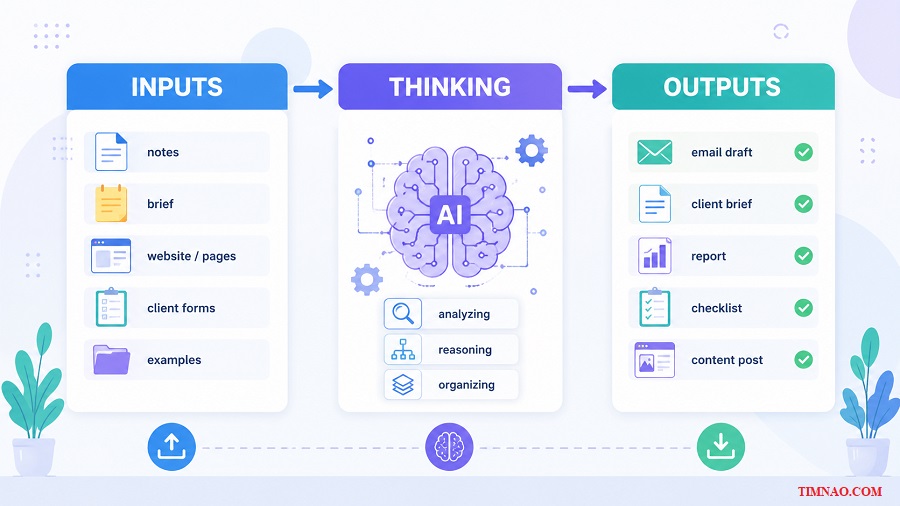
Layer 1: Inputs
Inputs are everything Claude receives before it creates the answer.
This may include:
- Your instruction
- Client notes
- Website copy
- Brand guidelines
- Source documents
- Examples
- Audience details
- Product information
- Desired tone
- Output format
Beginners often give Claude weak inputs and expect polished results.
For example:
“Write a proposal for my client.”
That is too vague.
Claude does not know who the client is, what they need, what service you offer, what the budget is, what tone you want, or what the proposal should include.
A better input would be:
Client type: B2B SaaS startup
Client problem: They need more qualified demo bookings
Service offered: LinkedIn content strategy and founder-led content system
Goal of proposal: Explain the problem, show the 3-step approach, list deliverables, and invite them to book a kickoff call
Tone: Professional, clear, confident, not too salesy
Format: Executive summary, challenge, approach, deliverables, timeline, investment, next step
Now Claude has something to work with.
The lesson is simple:
Better inputs reduce editing time.
Before you ask Claude to create anything, ask yourself:
“What information would a skilled human need to do this well?”
Then give Claude that information.
Layer 2: Thinking
The thinking layer is how Claude works through the task.
You cannot fully control every internal step, but you can guide the process.
For simple tasks, one direct prompt may be enough. For more complex tasks, you should ask Claude to work in stages.
For example, if you want a content strategy, do not ask:
“Create a full content strategy for my business.”
That usually produces a generic answer.
Instead, guide the thinking:
- Analyze the target audience.
- Identify their main problems.
- Group those problems into content themes.
- Suggest topic ideas for each theme.
- Build a 30-day content plan.
- Review the plan for practicality.
This creates better results because each stage has a clear job.
The thinking layer is especially important for work like:
- Research analysis
- Strategy planning
- Proposal writing
- Content planning
- Competitor comparison
- Lead nurturing
- Client onboarding
In these tasks, the quality of the final output depends on the quality of the reasoning path.
A useful beginner habit is to say:
“Before writing the final output, first analyze the situation and identify the most important points.”
This helps Claude avoid jumping too quickly into generic writing.
Layer 3: Outputs
The output layer is the final deliverable.
This is where many beginners lose time because they forget to specify the format.
Claude may give a good answer, but if the answer is in the wrong structure, you still have to fix it manually.
For example, if you need an email, ask for:
- Subject line
- Preview text
- Email body
- CTA
- Optional follow-up version
If you need a client brief, ask for:
- Company snapshot
- Likely business goals
- Possible challenges
- Opportunity areas
- Smart discovery questions
If you need social content, ask for:
- Hook
- Main point
- Supporting example
- Takeaway
- CTA
Do not say, “Make it organized.”
Tell Claude exactly what organized means.
Here is a practical output instruction:
Output format:
- Use clear section headings.
- Keep each section under 120 words.
- Use bullet points where helpful.
- Avoid generic claims.
- End with 3 practical next steps.
This small detail can save you a lot of editing.
A Simple Example: Turning Raw Notes Into a Client Brief
Let’s say you are a freelancer preparing for a discovery call.
Your raw input is messy:
Client runs an online fitness coaching business.
They sell 12-week programs.
Mostly active on Instagram.
Wants more leads.
Website feels unclear.
Audience seems to be busy women aged 30–45.
They mentioned low conversion from profile visits.
A weak prompt would be:
“Make a client brief.”
A better workflow would be:
- Ask Claude to extract the business profile.
- Ask Claude to identify possible conversion problems.
- Ask Claude to suggest discovery questions.
- Ask Claude to format everything into a one-page call prep brief.
The final output becomes much more useful because the workflow has structure.
That is the three-layer model in action:
- Input: messy client notes
- Thinking: extract, analyze, organize
- Output: one-page discovery call brief
Once you understand this, Claude becomes easier to use and easier to monetize.
Use the Prompt Stack Before You Automate Anything
Before connecting Claude to automation tools, build a strong prompt stack.
This is important because automation multiplies whatever you already have.
If your prompt is weak, automation will produce weak results faster. If your prompt is strong, automation can save serious time.
A prompt stack is a layered prompt structure that you can reuse and improve.
Instead of writing one long messy instruction, you organize your prompt into clear parts.
A beginner-friendly prompt stack has five layers:
- Role
- Task
- Context
- Examples
- Output rules
Let’s look at each one.
Layer 1: Role
The role tells Claude what kind of expert it should act like.
A weak role is:
“You are a writer.”
A stronger role is:
“You are a senior B2B content strategist who writes practical LinkedIn content for SaaS founders.”
Specific roles create better outputs.
Use roles that match the result you want:
- Senior email copywriter
- Market intelligence analyst
- Client onboarding strategist
- E-commerce product copywriter
- Business proposal consultant
- SEO blog editor
- Customer research analyst
The role should not be decorative. It should guide the way Claude thinks and writes.
Layer 2: Task
The task tells Claude exactly what to do.
Avoid broad instructions like:
“Help me with marketing.”
Use clear action verbs:
- Analyze
- Extract
- Rewrite
- Compare
- Summarize
- Turn into
- Create
- Review
- Improve
- Classify
For example:
“Turn the raw notes below into a one-page client onboarding brief for a discovery call.”
That is much clearer.
Layer 3: Context
Context is the background Claude needs to avoid generic output.
This may include:
- Who the audience is
- What the client sells
- What the business goal is
- What has already been tried
- What the offer includes
- What tone is appropriate
- What constraints matter
Context is often the difference between beginner-level AI output and professional output.
For example, “write an email” is generic.
But “write an email to a warm lead who attended a webinar, asked about pricing, and runs a 12-person HR team” is much more useful.
Layer 4: Examples
Examples are one of the most powerful parts of the prompt stack.
If you want Claude to match a style, show it the style.
If you want a certain format, show the format.
If you want a specific level of detail, show what “good” looks like.
You do not need many examples. Even one or two strong examples can improve the output.
For example:
Example style:
Bad: “Our solution helps businesses grow with AI.”
Good: “We help small accounting firms turn messy client documents into organized monthly reports without hiring another assistant.”
This teaches Claude what specificity looks like.
Layer 5: Output Rules
Output rules tell Claude how to deliver the final result.
Include things like:
- Length
- Structure
- Tone
- Formatting
- What to avoid
- What to include
- How many options to provide
For example:
Output rules:
- Keep the brief under 500 words.
- Use H2-style section labels.
- Include exactly 5 discovery questions.
- Avoid hype and vague claims.
- Use plain English.
This makes the result easier to use immediately.
A Reusable Prompt Stack Template for Beginners
You can copy this structure and adapt it for your own workflow:
ROLE:
You are a [specific expert role].

TASK:
Your task is to [specific action].

CONTEXT:
Audience:
Goal:
Business type:
Important details:
Constraints:

SOURCE MATERIAL:
[Paste notes, transcript, article, form response, or client information]

EXAMPLES:
[Optional: paste 1–2 examples of good output or style]

OUTPUT RULES:
- Format:
- Length:
- Tone:
- Must include:
- Must avoid:
This template may look simple, but it is powerful because it forces you to think clearly before asking Claude to work.
That clarity is what makes automation possible later.
Why This Should Come Before Tools Like Zapier, Make, or n8n
Tools like Zapier, Make, and n8n are useful for connecting apps together.
But beginners often make the mistake of starting there too early.
They try to connect forms, spreadsheets, email tools, CRMs, and AI prompts before the core workflow is actually good.
That creates a messy system.
A better order is:
- Build the prompt manually.
- Test it with real inputs.
- Improve the weak parts.
- Save the best version.
- Only then connect it to automation tools.
Manual first. Automated later.
This protects you from building a complicated system that produces average work.
A simple manual workflow that creates good output is better than a fully automated workflow that creates junk.
The next step is where this becomes even more practical: turning your prompt stack into one complete production workflow that can be tested, improved, and eventually sold as a service.
Build One Production Workflow With the CRAFT Prompt Framework
The CRAFT Prompt Framework is useful because it keeps beginners from writing random prompts and hoping for the best.
CRAFT stands for:
- Context
- Role
- Action
- Format
- Tone
A production workflow is different from a normal prompt. A normal prompt helps you complete one task. A production workflow helps you complete the same type of task again and again with predictable quality.
For example, if you help coaches write email newsletters, you do not want to invent a new prompt every time. You want a reusable system that turns raw ideas into a polished newsletter draft.
That is where CRAFT becomes practical.
Start With One Clear Job, Not a Big Automation Dream
Before writing the prompt, define the job.
Do not start with:
“I want to automate my content business.”
That is too broad.
Start with something specific:
“I want to turn a rough voice note into a 700-word email newsletter for busy coaches.”
That is much easier to build.
A good beginner workflow should answer five questions:
- Who is this output for?
- What problem should it solve?
- What information does Claude need?
- What should the final output look like?
- What would make the output unusable?
This keeps your workflow grounded.
For example, if you are creating a client proposal workflow, the job might be:
Turn a completed client intake form into a clear proposal that explains the client’s problem, your recommended approach, deliverables, timeline, price, and next step.
Now you know what the workflow must produce.
Build the Prompt Around CRAFT
Here is how each CRAFT element works in a real workflow.
Context gives Claude the background.
This includes the client, audience, goal, offer, constraints, and source material. Without context, Claude will fill gaps with generic assumptions.
Role tells Claude what kind of expert it should act as.
A weak role is:
“You are a helpful assistant.”
A stronger role is:
“You are a senior business proposal consultant who writes clear, outcome-focused proposals for service businesses.”
Action tells Claude what to do.
Use precise verbs: analyze, extract, rewrite, structure, compare, convert, review, improve.
Format tells Claude what the final answer should look like.
This is where you define sections, word count, bullets, tables, email structure, or checklist format.
Tone controls the voice.
For beginner-friendly business writing, useful tone words include clear, practical, warm, confident, honest, and not hype-driven.
A simple CRAFT prompt might look like this:
CONTEXT:
I am creating a proposal for a small business client who needs help improving their email marketing. The client wants more repeat purchases from past buyers.

ROLE:
You are a senior email marketing consultant who writes practical, outcome-focused proposals.

ACTION:
Turn the client notes below into a proposal draft.

FORMAT:
Use these sections:
1. Executive Summary
2. The Challenge
3. Recommended Approach
4. Deliverables
5. Timeline
6. Investment
7. Next Step

TONE:
Clear, professional, friendly, confident, not pushy.

CLIENT NOTES:
[Paste notes here]
This is already much better than asking, “Write a proposal.”
Add a Quality Review Step
A production workflow needs a review step.
This is where many beginners make mistakes. They generate an output, skim it, and send it. That is risky, especially for client work.
After Claude creates the first draft, ask it to review the output against specific standards.
For example:
Review the proposal above using this checklist:
- Is the client problem clearly stated?
- Are the deliverables specific?
- Is the language practical and not vague?
- Is the next step clear?
- Are there any claims that need more support?
Revise the proposal based on the checklist. Output the improved version only.
This review step makes a big difference.
It does not replace your human judgment, but it catches obvious weaknesses before you spend time editing.
Test the Workflow With Real Inputs
Do not trust a workflow after one good result.
Test it with at least three different inputs:
- A clean, complete input
- A messy but usable input
- A weak input with missing details
This shows you where the workflow breaks.
If the output becomes generic when details are missing, add an instruction like:
If important information is missing, list the missing details before writing the final output.
That one rule can protect your workflow from producing fake certainty.
Save the Workflow Like a Business Asset
Once your workflow works, save it somewhere easy to reuse.
You can store it in Notion, Google Docs, or a simple folder.
Include:
- Workflow name
- Purpose
- Required inputs
- Prompt stack
- Review checklist
- Example output
- Notes for improvement
This turns your prompt into an asset.
The more workflows you build, the more valuable your AI skill becomes.
5 Claude AI Automation Systems Worth Building First
Not every workflow is worth building first. Beginners should avoid workflows that are too vague, too technical, or too dependent on perfect data.
The best starting systems are practical, easy to explain, and useful to real people.
Here are five Claude AI automation systems worth building before you try anything complicated.
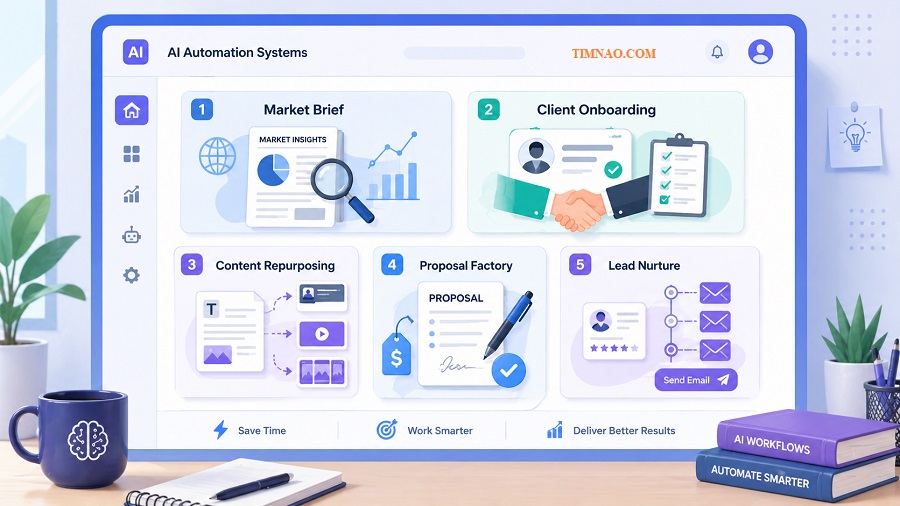
1. Weekly Market Intelligence Brief
A weekly market intelligence brief helps a business understand what is changing in its industry.
This is useful for consultants, agency owners, coaches, startup teams, investors, and niche creators.
The workflow is simple:
- Collect useful industry updates.
- Ask Claude to summarize the key developments.
- Ask Claude to identify themes.
- Ask Claude to explain why those themes matter.
- Turn the result into a short weekly brief.
The beginner-friendly version can be manual. You collect links or notes yourself, paste them into Claude, and create the brief.
Later, you can connect the process to tools like Zapier, Make, n8n, or Google Sheets if the workflow proves useful.
The key is not just summarizing news. The valuable part is explaining the implication.
A weak brief says:
“Here are five updates from the industry.”
A stronger brief says:
“Here are three changes that matter, why they matter, and what a business should watch next.”
That is a sellable difference.
2. Client Onboarding Intelligence System
This system helps freelancers, consultants, and agencies prepare before a client call.
Instead of showing up with only basic notes, you use Claude to create a structured onboarding brief.
Inputs might include:
- Client website copy
- Intake form answers
- LinkedIn profile details
- Business goals
- Known challenges
- Notes from previous messages
The output could include:
- Business summary
- Target audience guess
- Possible pain points
- Competitor observations
- Strategic opportunities
- Discovery call questions
This is useful because clients notice preparation.
If you ask better questions on the first call, you look more professional. You also understand the project faster.
A beginner can use this system for their own clients. Later, it can become a paid service for other freelancers or small agencies.
3. Content Repurposing Engine
A content repurposing engine turns one long piece of content into several smaller pieces.
For example, one YouTube video can become:
- One email newsletter
- Three LinkedIn posts
- One short video script
- One carousel outline
- One blog outline
- Five tweet-style insights
This is valuable because many creators and businesses already have content. Their problem is not always creating more from scratch. Their problem is reusing what they already have.
A good content repurposing workflow should not simply chop content into pieces.
Each platform needs a different style.
A LinkedIn post needs a clear hook and business lesson. An email newsletter needs a more personal tone. A short video script needs spoken language. A blog outline needs SEO structure.
This system is beginner-friendly because the source material already exists. Claude is not inventing from nothing. It is transforming and adapting.
4. Proposal Factory System
A proposal factory helps service providers create customized proposals faster.
This is perfect for freelancers, consultants, agencies, coaches, and business development teams.
The workflow starts with a structured intake form.
Useful intake fields include:
- Client type
- Industry
- Main problem
- Desired result
- Timeline
- Budget range
- Service offered
- Proof point
- Recommended next step
Claude then turns that information into a proposal draft.
The important detail: a proposal should focus on the client’s desired outcome, not just your tasks.
A weak proposal says:
“I will create content for your business.”
A better proposal says:
“The goal is to help your business publish consistent founder-led content that attracts better-fit prospects and supports your sales conversations.”
Same service. Much stronger positioning.
This system can save hours and improve consistency.
5. Lead Nurture Email System
A lead nurture system helps businesses follow up with prospects who are not ready to buy immediately.
Many leads do not convert because the business gives up too early. A useful email sequence keeps the conversation alive without being annoying.
A simple sequence might include:
- Welcome email
- Value email
- Case study email
- Soft offer email
- Follow-up email
Claude can help customize emails based on the lead’s role, problem, goal, and business type.
This matters because personalization makes the email feel relevant.
A generic message says:
“We help businesses grow.”
A personalized message says:
“Since you mentioned that most of your leads come from Instagram but few book calls, the first place I would look is your profile-to-consultation path.”
That feels much more useful.
Beginners can start by writing these manually with Claude. Once the structure is proven, the workflow can be connected to an email platform or CRM.
Where the Money Comes From: Services, Retainers, and Digital Products
Claude AI automation becomes an income skill when you package your workflow into something people understand and want.
The mistake is trying to sell “AI automation” as a vague concept.
Most clients do not wake up thinking, “I need a Claude workflow.”
They think:
- “I need more leads.”
- “I need better content.”
- “I need faster proposals.”
- “I need to follow up with prospects.”
- “I need to understand my competitors.”
- “I need to save time on repetitive work.”
Your job is to connect Claude automation to a business outcome.
Start With Services for Fast Feedback
Services are usually the best starting point for beginners because they are easier to sell and easier to improve.
You can offer a clear done-for-you result, such as:
- Weekly market intelligence brief
- Client onboarding research brief
- Content repurposing package
- Proposal writing package
- Lead nurture email sequence
A service gives you real-world feedback quickly.
You learn what clients care about, what details they provide, what they misunderstand, and what output quality they expect.
This feedback helps you improve the workflow.
For pricing, avoid thinking only in terms of hours. Think about value, speed, clarity, and usefulness.
If your workflow helps a client save five hours and get a better result, that is worth more than “one AI-generated document.”
Move Into Retainers When the Need Repeats
A retainer is a recurring monthly service.
This works when the client needs the same type of output every month.
Examples:
- Four newsletters per month
- Weekly content repurposing
- Monthly competitor monitoring
- Monthly market intelligence brief
- Ongoing email campaign support
- Monthly sales enablement assets
Retainers are powerful because they create predictable income.
They also make your workflow better over time. The more you serve the same type of client, the more patterns you notice. Your prompts improve. Your review checklist improves. Your delivery process improves.
A beginner-friendly retainer could be:
“Monthly Content Repurposing System: turn four long-form pieces into weekly LinkedIn posts, newsletter drafts, and short video scripts.”
That is easier to understand than:
“AI-powered content automation.”
Specific offers sell better.
Turn Proven Workflows Into Digital Products Later
Digital products are attractive because they can scale, but beginners should not rush into them too early.
A digital product works best after you have already used the workflow in real situations.
Then you can package what you know into:
- Prompt packs
- Workflow templates
- SOPs
- Notion dashboards
- Mini-courses
- Client intake forms
- AI system blueprints
For example, after building proposal workflows for several clients, you could sell:
“Proposal Factory Template for Freelance Consultants”
This could include the intake form, CRAFT prompt, proposal structure, review checklist, and example outputs.
That product is stronger because it comes from tested experience, not theory.
A Simple Income Path for Beginners
If you are starting from zero, keep the path simple.
First, choose one workflow.
Second, use it to create a useful sample.
Third, offer it as a service to a specific type of person.
Fourth, improve it after every delivery.
Fifth, turn repeat clients into retainers.
Sixth, package the workflow into a digital product only after you know it works.
That path is not flashy, but it is realistic.
The goal is not to become an AI millionaire overnight. The goal is to build a skill that helps you produce useful work, solve real problems, and create income opportunities with less wasted effort.
Once you understand how to build and package these workflows, the next important step is learning what can go wrong, because the fastest way to protect your reputation is to know the common mistakes before they happen.
Pitfalls That Make AI Workflows Look Amateur
Claude AI automation becomes powerful when it helps you produce better work with less friction. But it can also make weak work faster.
That is where many beginners get into trouble.
They build a workflow, get excited because the first result looks “good enough,” and immediately start using it for client work, content, emails, or offers. A few days later, they notice the problems: the writing sounds generic, the facts are thin, the structure feels repetitive, or the output needs so much editing that the workflow does not really save time.
The goal is not to avoid mistakes forever. The goal is to spot the most common ones early, so your work looks professional instead of rushed.
Automating Before You Understand the Manual Process
One of the biggest beginner mistakes is trying to automate a task you do not understand yet.
If you cannot describe the manual process clearly, Claude will not magically create a reliable workflow for you.
For example, if you want to automate proposal writing, you should first understand what a strong proposal includes:
- The client’s real problem
- The outcome they want
- Your recommended approach
- Clear deliverables
- Timeline
- Pricing
- Next step
If you skip that thinking and simply ask Claude to “write a proposal,” the result may look polished, but it will probably feel shallow.
A simple rule:
Before automating a task, write down how you would do it manually.
You do not need a long document. A short checklist is enough.
For example:
- Read the client notes.
- Identify the business problem.
- Clarify the desired outcome.
- Match the service to the problem.
- Write the proposal in clear sections.
- Review for specificity and missing details.
Once you can explain the manual process, you can turn it into a Claude workflow.
Using One Giant Prompt for a Complex Task
Beginners often try to solve everything with one massive prompt.
They include the role, task, context, examples, tone, output format, review criteria, and ten different instructions in one block. Sometimes this works. Often, it creates bloated, inconsistent output.
Complex work usually needs stages.
A competitor research report, for example, should not be created in one single step. A better workflow might look like this:
- Extract key company information.
- Identify competitors.
- Compare positioning.
- Summarize pricing or offer differences.
- Highlight strategic opportunities.
- Create the final brief.
Each stage has one job.
This makes the workflow easier to fix. If the final report is weak, you can check where the problem started. Was the extraction poor? Was the comparison too generic? Was the final formatting unclear?
A giant prompt hides the problem. A staged workflow reveals it.
Giving Claude Vague Quality Standards
Many people tell Claude to write something “high quality,” “professional,” or “engaging.”
Those words sound useful, but they are too vague.
Claude needs specific standards.
Instead of saying:
Make this professional.
Say:
Use plain English, avoid hype, include specific business outcomes, keep paragraphs under four sentences, and end with one clear next step.
Instead of saying:
Make this more valuable.
Say:
Add practical examples, remove generic advice, explain what the reader should do next, and include one realistic beginner scenario.
The clearer your quality standard, the better the output.
A useful trick is to define what “bad” looks like too.
For example:
Avoid:
- Generic claims like “boost productivity”
- Fake urgency
- Overly formal language
- Long paragraphs
- Advice that sounds good but cannot be applied
This helps Claude understand the boundary.
Skipping the Human Review Layer
Claude can draft, organize, and improve. But it should not be treated as the final decision-maker for important work.
Human review is where your judgment adds value.
Before sending or publishing AI-assisted work, check:
- Is the information accurate?
- Does it match the client or audience?
- Are there unsupported claims?
- Does the tone sound natural?
- Is the structure easy to read?
- Is the next action clear?
- Would you be comfortable putting your name on it?
This matters even more if the output is for a client.
Clients are not paying for “AI output.” They are paying for useful work. Your job is to make sure the final result is relevant, polished, and safe to use.
A good workflow should save time, not remove responsibility.
Making Every Output Sound the Same
AI-generated work often becomes recognizable when every output has the same rhythm.
The same opening. The same bullet structure. The same transitions. The same “not just X, but Y” phrasing. The same motivational ending.
That is why your workflow needs variety.
For content workflows, ask Claude to vary:
- Opening style
- Sentence length
- Examples
- Section length
- CTA style
- Paragraph rhythm
You can also give it style examples from your own writing.
If you are writing a blog post, for example, you might say:
Use a natural blog-author voice. Keep it practical and direct. Avoid sounding like a corporate report. Use short paragraphs, but vary sentence rhythm so the article does not feel mechanical.
The goal is not to hide that AI helped. The goal is to make the final piece feel useful and human.
Over-Automating Too Early
Automation tools are exciting, but they can make a messy workflow harder to fix.
If your manual Claude workflow is not reliable yet, connecting it to forms, spreadsheets, email tools, or CRMs will not solve the problem. It will only send weak outputs through more channels.
Start manually.
Test the workflow inside Claude first. Use real inputs. Improve the prompt. Add a review step. Save examples of good output.
Only automate after the workflow is stable.
A simple rule:
Manual quality first. Automation second.
Underpricing Because AI Helped You Work Faster
Some beginners think, “If Claude helped me do this faster, I should charge less.”
That is the wrong lesson.
Clients usually care about the result, not how many hours you spent typing.
If your workflow helps you deliver faster while maintaining quality, that efficiency is part of your business advantage. It should improve your margin, not automatically reduce your price.
Of course, do not overcharge for weak work. But do not punish yourself for building a smarter process.
Price based on:
- The value of the result
- The client’s problem
- The quality of the deliverable
- The speed of delivery
- Your expertise and review
AI can help you produce the work. It does not remove the value of your judgment.
Your Start-This-Week Plan
The best way to learn Claude AI automation is not to read ten more articles. It is to build one small workflow and test it.
This plan is designed for beginners who want something practical, not overwhelming.
You do not need to finish a perfect system this week. You only need to create a working version that teaches you what to improve next.
If You Have 1 Hour Per Day
Use this plan if you can spend about one focused hour each day for a week.
Day 1: Choose one repeated task
Pick a task that is useful and easy to define.
Good options:
- Turn notes into a client brief
- Turn a transcript into social posts
- Turn an intake form into a proposal
- Turn product details into descriptions
- Turn research notes into a weekly update
Do not choose something too large like “automate my whole agency.”
Choose one output.
Day 2: Write the manual process
Write the steps you would follow if you did the task yourself.
Keep it simple.
For example:
- Review the client notes.
- Identify the main problem.
- Clarify the desired outcome.
- Suggest the best structure.
- Draft the document.
- Review for missing details.
This becomes the backbone of your workflow.
Day 3: Build the CRAFT prompt
Use Context, Role, Action, Format, and Tone.
Do not worry about perfection. Your first version is only a draft.
The goal is to create a prompt that can produce a usable first output.
Day 4: Test with one real input
Use a real example, not fake sample data if possible.
Run the workflow and review the result carefully.
Ask:
- What was useful?
- What was too generic?
- What was missing?
- What needed manual editing?
- Did the format match what I wanted?
Write down the issues.
Day 5: Improve the prompt
Update the prompt based on what went wrong.
If the output was too vague, add more context requirements.
If the structure was messy, tighten the format rules.
If it made assumptions, tell Claude to flag missing information instead.
Small improvements matter.
Day 6: Add the quality review step
Create a checklist Claude must use after drafting.
For example:
Review the output for:
- Specificity
- Clear structure
- Missing details
- Generic claims
- Practical next steps
- Tone consistency
Then ask Claude to revise the output based on that checklist.
Day 7: Package the workflow
Save the workflow as a reusable asset.
Include:
- Workflow name
- Use case
- Required inputs
- Prompt
- Review checklist
- Example output
- Notes for future improvement
At the end of the week, you should have one workflow you can reuse.
That is real progress.
If You Only Have 2–3 Hours This Week
Keep it lighter.
Do three things:
- Choose one repeated task.
- Build one CRAFT prompt.
- Test it with one real input.
That is enough.
Do not spend your limited time designing a big system. Spend it learning from one practical test.
A small workflow you actually use is better than a beautiful automation plan you never finish.
If You Already Have Clients or an Audience
Start with a workflow that improves delivery.
The best options are usually:
- Client onboarding brief
- Proposal factory
- Content repurposing engine
- Weekly insight report
- Lead nurture email draft
These are close to money because they support sales, delivery, or client retention.
For example, if you are a freelancer, build a proposal workflow first. It can help you respond faster to opportunities.
If you are a creator, build a content repurposing workflow first. It can help you publish more consistently from ideas you already have.
If you are a consultant, build a client research brief first. It can help you prepare faster and look more professional.
If You Are Starting From Zero
If you do not have clients yet, use a personal project.
Choose a niche you understand or want to learn.
For example:
- AI tools for real estate agents
- Content ideas for fitness coaches
- Weekly market updates for crypto beginners
- Email ideas for online course creators
- Competitor research for local service businesses
Create sample outputs.
These samples become proof of skill.
You can use them in outreach, portfolio pages, social posts, or conversations with potential clients.
Do not wait until someone hires you to practice. Build the proof first.
What “Done” Looks Like This Week
By the end of the week, you do not need a complete business.
You need:
- One workflow
- One prompt stack
- One review checklist
- One sample output
- One clear use case
- One idea for who might need it
That is enough to move from learning to building.
The next week, you can improve the workflow, create another sample, or offer it to a real person.
Progress comes from repetition.
Build once. Test once. Improve once. Then repeat.
What This Means for Your First Claude Workflow
Claude AI automation is not about replacing your thinking. It is about turning your thinking into a repeatable process.
If you are a beginner, start small. Choose one task, build one workflow, and test it with real inputs. Do not rush into complex automation before the basic workflow creates good results manually.
The most professional AI workflows include clear inputs, staged thinking, specific output rules, and a quality review step. These pieces protect you from generic results and make your work easier to reuse.
Remember these practical points:
- Automate tasks you understand manually first.
- Split complex work into stages instead of using one giant prompt.
- Define quality with specific rules, not vague words like “professional.”
- Review important AI-assisted work before sending or publishing it.
- Start with services if you want fast feedback and realistic income opportunities.
- Turn proven workflows into retainers or digital products later.
The simple path is usually the strongest one.
Build one useful Claude workflow this week. Make it clear. Test it honestly. Improve it based on real results.
That is how a beginner starts turning AI from an interesting tool into a practical income skill.
Disclaimer
This article is for educational purposes only and does not guarantee income, clients, business results, or specific outcomes from using Claude AI automation. AI tools can help you work faster and build better workflows, but your results will depend on your skills, niche, offer, pricing, consistency, market demand, and the quality of your human review.
Always check AI-generated content for accuracy, originality, legal compliance, and suitability before using it in client work, marketing, business decisions, or public publishing. This article is not financial, legal, or professional business advice.
Enjoyed this guide? ☕✨
If it helped you understand Claude AI automation more clearly, you can support my work by buying me a coffee. Your support helps me create more beginner-friendly guides, practical workflows, and useful AI resources.