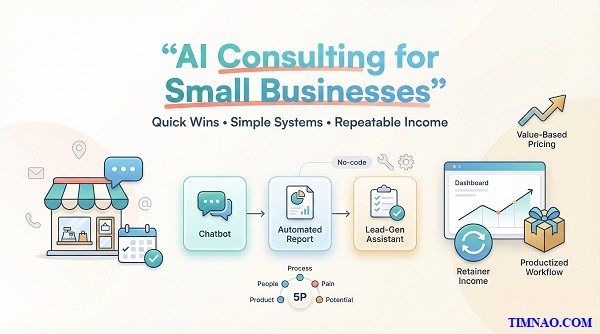
AI consulting for small businesses: a friendly, powerful starter system 🚀
AI consulting for small businesses is one of the fastest, most realistic ways to turn AI into practical results—without needing to code or “be a tech genius.” In this guide, you’ll learn a simple starter system to spot high-value problems, build a small working automation, and package it into a service owners actually want. No hype—just a clear plan you can start this week and grow into real opportunities.
Why AI consulting for small businesses is a smarter first move than “big clients”
When people imagine “AI consulting,” they often picture enterprise clients: big budgets, long contracts, impressive case studies.
That path exists. But for beginners, it’s usually the slowest way to learn—because big clients don’t just buy results. They buy process, compliance, and internal alignment too.
Small businesses are different. Their problems are obvious, their systems are often messy, and the decision-maker is usually one person you can talk to today.
Big clients come with “invisible requirements”
Even if a large company likes you, the work often comes with extra layers:
- approvals and vendor onboarding
- security/compliance checks
- multiple stakeholders (marketing, IT, ops, legal)
- longer timelines and more revisions
None of this is wrong. It’s just heavy—especially when you’re still learning to scope, test, and deliver.
Small businesses usually want something simpler:
- “Stop me from missing messages.”
- “Reduce no-shows.”
- “Make bookings smoother.”
- “Put my leads in one place.”
That clarity is a beginner’s best friend.
Small businesses pay for outcomes, not buzzwords
A small business owner doesn’t wake up wanting “AI.” They wake up wanting less chaos.
So you don’t need to pitch “AI strategy.” You can pitch relief:
- faster replies
- fewer mistakes
- cleaner tracking
- fewer repetitive tasks
A simple reframe helps a lot:
Don’t sell: “AI automation.”
Do sell: “A system that replies faster and captures every lead.”
You’re not selling a screwdriver. You’re selling the shelf that holds the books.
Your unfair advantage as a beginner: simple systems win
Beginners often think they’re behind because they can’t build custom models.
But most small businesses don’t need custom models. They need:
- the right questions asked upfront
- the right information captured consistently
- the next step triggered automatically
That’s it.
And simple systems are often more valuable than complex ones because:
- the owner can understand them
- the staff can actually use them
- they’re easy to maintain
- they break less often
“Proof” is easier with small businesses
Big clients want proof before they hire you.
Small businesses can become your proof quickly—because the before/after is easy to measure.
Early “proof signals” you can create in a week:
- response time drops (hours → minutes)
- fewer missed leads (DMs → a single tracker)
- fewer no-shows (reminders added)
- fewer repeated questions (FAQ answers ready)
And once one owner feels the difference, referrals happen naturally—because owners talk.
Mini example (3–6 lines)
A local gym owner is drowning in Instagram DMs.
You set up:
- an auto-reply that collects name + goal + preferred time
- a simple lead sheet that saves every inquiry
- a reminder to follow up in 24 hours
It’s not “fancy AI.” It’s a calmer business day—and that’s what people pay for.
Next, let’s make sure you can spot the right problem fast, without guessing or overbuilding.
The 5P scan: Product, People, Process, Pain, Potential (your 10-minute client “x-ray”)
Most beginners jump straight to tools. The better move is to understand the business first—because the best “AI solution” is usually the simplest fix in the most painful spot.
The 5P scan gives you a quick, repeatable way to understand any business in about 10 minutes.
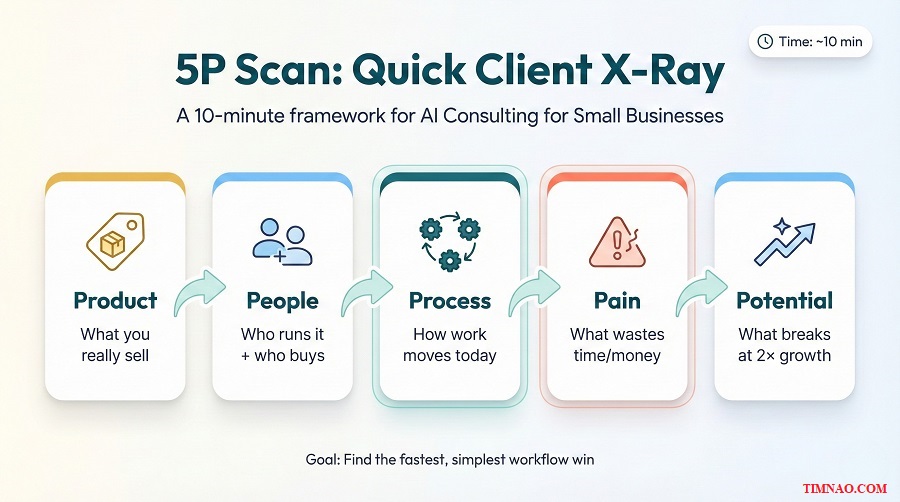
The 10-minute setup (what to write down)
Open a note and write five lines:
- Product:
- People:
- Process:
- Pain:
- Potential:
Your goal is to leave with:
- one problem to solve first
- one simple system idea
- one success signal (how you’ll measure “better”)
Product: what are they really selling?
Ask:
- “Why do customers choose you over others?”
- “What do people mention in reviews?”
- “What’s the promise you want customers to feel?”
Listen for the real value:
- speed, trust, comfort, craftsmanship, convenience, status
Why it matters:
If you understand the “real product,” you’ll design systems that support it.
Example:
A bakery isn’t only selling bread. It’s selling comfort and routine. So your automation should feel warm and simple, not robotic.
People: who runs the day-to-day, and who are the customers?
Ask:
- “Who answers messages most days?”
- “What tools do you already use daily?”
- “How do customers prefer to contact you?”
You’re checking for fit:
- owner/staff tech comfort
- customer channel preference (DM, phone, WhatsApp, email)
- who makes decisions
Beginner rule:
Build for the busiest person—and for the channel customers already use.
Process: where does work start, and where does it end?
Ask:
- “Walk me through what happens after a new inquiry.”
- “Where do you save details right now?”
- “What step gets forgotten most often?”
Look for patterns like:
- copy/paste replies
- details scattered across DMs, notes, spreadsheets
- “we just wing it” workflows
That’s where your automation can quietly “hold the process together.”
Mini walkthrough (3–6 lines)
A photographer gets leads via DMs, then forgets to follow up.
Process fix: a short form + auto-confirmation + a lead tracker.
Same business, fewer dropped conversations.
Pain: what’s costing time, money, or sanity every week?
Ask:
- “What annoys you every week?”
- “Where do things slip through the cracks?”
- “If you could delete one task, what would it be?”
Common pains you can solve quickly:
- missed messages
- no-shows
- double booking
- lost customer history
- repeating the same answers
Beginner tip:
Pick one pain that unlocks the next two. Don’t try to fix the whole business at once.
Potential: what breaks first if business grows?
Ask:
- “If you doubled next month, what would break first?”
- “What would you struggle to keep up with?”
This helps you choose problems that matter, not “nice-to-haves.” If the owner says “messages” or “follow-up,” you’ve found an automation-friendly target.
Turn the scan into a one-sentence diagnosis (your consultant voice)
After the 5P scan, you should be able to say:
- “You’re losing leads in DMs. If we capture inquiries into one tracker and reply instantly, you’ll stop missing customers.”
- “No-shows are the leak. A reminder flow will save hours and stabilize revenue.”
- “Your work is fine, but tracking is messy. A weekly snapshot will help you decide faster.”
Clear. Human. Actionable.
Now let’s talk tools—only the ones you need to build your first working system.
Your starter toolbox: ChatGPT + Make + Zapier + Notion AI (no coding required)
You don’t need ten tools. You need four roles covered: writing, automation, integration, and organization.
Here’s a starter set that’s beginner-friendly and powerful:
- ChatGPT for writing, rewriting, clarifying, and drafting system text fast.
- Make for building multi-step automations visually.
- Zapier for quick “if this, then that” workflows across many apps.
- Notion + AI for turning messy info into usable docs, trackers, and simple dashboards.
The rule that keeps you focused: job → data → next step
Whenever you’re stuck, ask:
- What job do we want done?
- Where is the data coming from?
- What should happen next?
If you can answer those, you can build something useful—without “AI overthinking.”
ChatGPT: write the words that make the system work
ChatGPT is not just for blog posts. In consulting, it helps you produce the “glue” text quickly:
- FAQ answers for a chatbot
- friendly auto-replies
- intake form questions that capture the right details
- simple SOPs (“how to run this in 3 steps”)
- rewriting client notes into clear instructions
Beginner prompt pattern (copy this):
- “Write this for a [business type].”
- “Tone: [friendly/professional].”
- “Goal: [reduce back-and-forth / confirm booking / collect missing info].”
- “Keep it under [X] sentences.”
Short prompts + clear goals = usable output.
Make vs Zapier: how to choose in 30 seconds
Use Zapier when:
- you want speed
- the automation is 1–3 steps
- you don’t need branching logic
Use Make when:
- you want a multi-step chain
- you need conditions (“if this, do that”)
- you want more control over the flow
Both are valid. As a beginner, start with the simplest tool that can work.
Notion AI: your client “operating system”
Notion becomes your clean workspace for:
- a lead tracker
- a FAQ database
- a project checklist
- a delivery doc (“what we built, how to use it”)
Notion AI helps you keep it readable by:
- summarizing messy notes
- turning bullets into client-friendly pages
- rewriting instructions in simpler language
This matters because clients don’t just buy the automation—they buy the feeling that everything is finally organized.
A starter workflow you can build in one afternoon (and reuse forever)
If you want one beginner build that teaches you the basics, do this:
Lead capture → auto reply → tracking
- Customer submits info (via a simple form or DM capture)
- Data goes into one tracker (Notion or a spreadsheet)
- Customer receives a confirmation message instantly
- Owner gets notified so they can follow up
Where each tool fits:
- ChatGPT: writes the questions + confirmation message
- Zapier or Make: moves data + triggers messages
- Notion: stores and tracks lead status
“Done” means you can run 5 test leads end-to-end with zero manual steps.
Practical guardrails (so your first builds don’t blow up)
Keep it simple and safe:
- use the client’s official accounts, not your personal ones
- limit access to only what you need
- add a fallback (“if unclear, notify a human”)
- document the workflow in plain English
- test with realistic examples before going live
That’s how you deliver something that feels reliable—not experimental.
Pick one quick-win service: chatbot, automated report, or lead-gen assistant
If you sell “AI consulting” as a vague promise, two things happen: clients don’t understand what they’re buying, and you don’t know what to build first. A quick-win service solves both. It’s a small deliverable with one clear outcome—easy to explain, fast to build, and simple to repeat.
Below are three beginner-friendly offers. Pick one for your first 3–5 projects. Consistency is what makes you look experienced.
Option A: A simple customer support chatbot (for repetitive questions)
Best for businesses that answer the same questions all day (hours, pricing, location, booking steps).
What you offer (in plain English)
- “I’ll set up a chatbot that answers your top questions and captures leads after hours.”
What you deliver
- A cleaned FAQ list (10–25 Q&As)
- A tone guide + rules (what to say / what NOT to guess)
- A working bot + a “talk to human” fallback
Done looks like
- Customers get correct answers for common questions
- Weird questions get escalated (no confident guessing)
Mini example (3–6 lines)
A clinic gets nonstop questions about price ranges and availability.
Your bot answers FAQs and ends with “Want to book?”
If yes, it collects name + preferred time and saves it to a tracker.
Staff stop copy/pasting the same replies.
Helpful tools
- Drafting answers: ChatGPT
- Bot platforms (choose one): Tidio, Landbot, ManyChat
- Optional automation: Zapier or Make
Client inputs you need (keep it simple)
- 10–25 FAQs (or their website copy you can turn into FAQs)
- official policies (pricing ranges, hours, booking rules)
- where the bot should hand off to a human (email, WhatsApp, DM)
Option B: An automated weekly report (for owners who want clarity)
Best for owners who track everything in spreadsheets but rarely act because it’s too messy.
What you offer
- “Every week you get a one-page snapshot: what changed, what matters, what to do next.”
What you deliver
- A one-page report template (Notion or a Doc)
- An automation that updates it weekly
- A short “what this means” summary (human language, not jargon)
Keep the report tiny
- 1–2 core metrics (appointments booked, qualified leads, repeat customers)
- 2 supporting numbers (no-shows, ad spend, top service)
- 3 next actions (simple suggestions)
Done looks like
- The owner receives it on schedule (ex: Monday 9am)
- Numbers match the source data
- It helps them decide faster
Helpful tools
Client inputs you need
- where the numbers live (Sheets, POS exports, form results)
- which metric matters most (pick ONE)
- who should receive the report and how (email, Notion page, Slack later)
Option C: A lead-gen assistant (for service businesses losing leads)
Best for businesses where leads arrive in DMs, phone calls, or scattered forms—and follow-up is inconsistent.
What you offer
- “We’ll capture every inquiry, reply instantly, and keep a clean pipeline so you never lose leads.”
What you deliver
- A simple intake form (or DM capture)
- A tracker (Notion database or Google Sheet)
- Instant confirmation to the lead + notification to the owner
- A follow-up reminder (so leads don’t die silently)
Done looks like
- A lead enters → gets a fast response → appears in the tracker with a clear status
Helpful tools
Client inputs you need
- what counts as a “qualified” lead (budget? area? time window?)
- the next step after inquiry (call booking? quote? visit?)
- response tone (friendly, premium, playful—match their brand)
Choose your “one offer” in 60 seconds
- Lots of repetitive questions? → Chatbot
- Decisions are slow because data is messy? → Weekly report
- Leads slip through the cracks? → Lead-gen assistant
Pick one and move on. Next, you’ll build proof so you can sell with confidence—without overexplaining.
Build proof fast: a 7-day mini portfolio (ship one working workflow)
Your first portfolio doesn’t need design. It needs evidence. One workflow that runs end-to-end is more convincing than ten screenshots of half-built ideas.
Your mini portfolio should answer three questions instantly:
- What problem does this solve?
- What happens automatically now?
- What result should I expect?
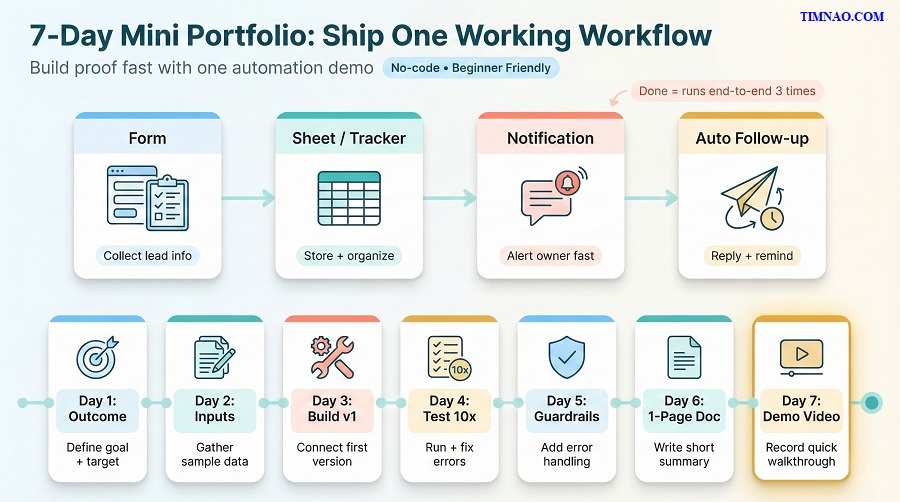
The one-workflow rule (how beginners actually finish)
Choose a single workflow and make it complete:
- a trigger (form submit, new message, new row)
- data capture (tracker entry)
- an action (reply, notify, schedule, summarize)
- a readable output (email, Notion page, report)
If you can’t explain it in one sentence, it’s too big.
The 7-day build plan (45–60 minutes/day)
Day 1 — Define the outcome
- Write: “I help [business] get [result] using [system].”
- Choose one success signal (ex: “reply time under 2 minutes” or “no missed leads”).
Day 2 — Collect realistic inputs
- Chatbot: 15 FAQs
- Report: a tiny dataset (even dummy numbers)
- Lead-gen: a 5-question intake form
Day 3 — Build v1 (ugly is fine)
- Make it run end-to-end once.
- No polish. No extras.
Day 4 — Test 10 cases
- Try normal inputs + messy inputs.
- Fix the top 3 break points.
Day 5 — Add guardrails
- Fallbacks: “If missing info, ask once.” “If unclear, notify a human.”
- Tighten wording so it’s short and friendly.
Day 6 — Document in one page
Include:
- what it does
- who it’s for
- setup checklist
- how to edit basic text
- what to do when it fails
Day 7 — Record a 60–90 second demo
Show:
- the trigger
- the automation running
- the final output
That’s enough to start conversations.
If you’re busy: the 2–3 hours/week version
- Weekday 1: Day 1 + Day 2 (planning + inputs)
- Weekend: Day 3 + Day 4 + Day 5 (build + test + guardrails)
- Weekday 2: Day 6 (one-page doc)
- Weekend: Day 7 (demo)
Slower pace, same proof.
A portfolio page template (copy/paste)
- Title: Lead-gen assistant for [niche]
- Problem: Leads get lost and follow-up is inconsistent.
- Solution: Form → tracker → instant reply → owner notification → follow-up reminder.
- Tools: ChatGPT, Zapier/Make, Notion/Sheets
- Result: Every lead is captured, responded to, and visible in one place.
- Demo: (video or screenshots)
- Limit: Escalates to a human when info is unclear.
Once you’ve built proof, packaging and pricing becomes much less scary—because you’re selling something real.
Packaging & pricing: 3 tiers that sell outcomes (and stop scope creep)
Beginners often price by hours, then get trapped by endless “quick changes.” Packaging fixes that. You sell outcomes with boundaries, and clients can choose without long negotiations.
Name tiers by outcome (not Bronze/Silver/Gold)
Clear names make buying easier:
- “Quick Reply Setup”
- “Lead Capture + Follow-up”
- “Smart Inbox System”
Your package name should answer: “What do I get?”
Tier 1: Setup (quick win)
This is the “get it working” offer.
Include
- 1 core workflow (ex: form → tracker → notifications)
- 1 revision round
- basic handover notes (short)
Exclude
- major redesigns, migrations, advanced segmentation
Best for
- owners who want relief this week
Tier 2: System (reliable day-to-day)
This is where most clients land.
Include
- Tier 1, plus:
- 2–3 extra automations (follow-up reminder, status tagging, simple routing)
- testing (10 cases)
- 2 revision rounds
- a 1-page operating guide
Best for
- businesses with enough volume that consistency matters
Tier 3: Growth (coverage + improvement)
This isn’t “more features.” It’s “more of the workflow handled” plus light monitoring.
Include
- Tier 2, plus:
- multiple channels (ex: web form + DMs)
- a weekly snapshot (leads captured, reply time, no-show count)
- a monthly optimization pass (small improvements, defined limits)
Important boundary
Avoid “unlimited.” Use a clear cap:
- “Up to 2 small changes/month” or “Up to 60 minutes/month.”
A simple pricing method (so you don’t guess)
Estimate your work in three buckets:
- Build time (setup + testing)
- Tool cost (subscriptions/connectors you cover)
- Complexity buffer (15–30% for surprises)
Then align with value:
- If it protects revenue (leads/bookings), you can price higher than “nice-to-have” dashboards.
Beginner time estimates you can start with:
- Tier 1: 3–6 hours
- Tier 2: 6–12 hours
- Tier 3: 12–20 hours (only when you’re confident)
How to present tiers on a call (so it feels human, not salesy)
Try this simple flow:
- Confirm the pain: “So the biggest leak is missed leads, right?”
- Offer the ladder: “We can do a quick fix, a reliable system, or a growth version.”
- Start at the middle tier: it’s usually the best balance.
- Down-sell if needed: “If budget is tight, we start with Setup.”
- Up-sell only when justified: “If you want DM + form coverage, that’s Growth.”
Stop scope creep with a “3-line agreement”
Add these lines to every proposal:
- Deliverables: (bullet list)
- Revisions: “Includes X revision rounds.”
- Add-ons: “Anything outside scope is quoted separately.”
Then use a friendly script when they ask for extras:
- “Yes, we can add that. It’s outside this package, so I’ll quote it as a small add-on.”
- “Let’s finish the core workflow first, then we can decide what’s worth adding next.”
Example tier ladder (lead-gen assistant)
- Tier 1 — Capture: form + tracker + instant messages
- Tier 2 — Follow-up: Tier 1 + reminders + status updates + SOP
- Tier 3 — Convert: Tier 2 + DM routing + weekly snapshot + monthly tweaks
Simple ladder, clear outcomes, fewer surprises.
Grow income sustainably: retainers, productized workflows, and value-based pricing
If your first projects go well, the next challenge isn’t “Can I build this?” It’s “Can I keep doing this without burning out?”
The most stable AI consulting income usually comes from one of three models:
- Retainers (ongoing care + small improvements)
- Productized workflows (repeatable packages you can deliver fast)
- Value-based pricing (charging based on outcomes, not hours)
You can mix them later, but start with one primary model so your business feels simple.
Retainers: the easiest way to stop chasing new projects every month
A retainer is basically: “I’ll keep this system healthy, updated, and useful.”
Small businesses love this because they don’t want to become the “tech person.” They want the automation to keep working while they run the business.
What a beginner-friendly retainer includes
- Monitoring: “Is it still running?”
- Small fixes: reconnect accounts, update a form field, tweak a message
- Light improvements: refine prompts, add one shortcut, simplify steps
- Support: a clear way to report issues (email or a simple form)
What it should NOT include
- Unlimited new systems
- “Anything AI-related”
- Major rebuilds or platform migrations
If you keep it tight, retainers become calm, predictable work.
Offer 2–3 options so clients can choose quickly.
- Care Plan (light): monthly health check + 1 small fix
- Care + Improve (standard): health check + up to 2 small changes + priority support
- Ops Partner (premium): weekly check-ins + monthly optimization + simple reporting
Keep “small change” defined. Example:
- up to 30–60 minutes per change
- no new integrations unless quoted
A monthly retainer checklist (so you look professional)
You can do this in 20–45 minutes for most setups:
- Run 3 test cases end-to-end
- Check connections (accounts, permissions, limits)
- Review failures or edge cases
- Update one message template (if needed)
- Send a short “system status” note
That “system status” note is retention magic. Clients stay when they feel looked after.
First steps this week (to land your first retainer)
- Add a “Care option” at the end of your project delivery
- Explain it as insurance, not upselling: “If you want, I can maintain this monthly so you don’t have to worry.”
- Offer a 30-day trial at a simple rate (limited scope)
Realistic time-to-first-signal: 2–4 weeks after a system goes live (when the client realizes they don’t want to maintain it themselves).
Productized workflows: build once, deliver many (without being generic)
Productized workflows are your “repeatable packages.” The value is not that they’re identical—it’s that you’ve built a reliable core that you can customize quickly.
Think like a chef:
- same base recipe
- different seasoning for each client
Examples that productize well
- Lead capture + follow-up system for service businesses
- FAQ chatbot + handoff system for high-message businesses
- Weekly snapshot report for owners who need visibility
- Intake + onboarding workflow for agencies/coaches
What makes a workflow truly productized
- You have a default build template in Make or Zapier
- You have a standard intake form
- You have a standard tracker (often in Notion or Google Sheets)
- You have a delivery checklist + one-page guide
- You know the top 10 failure points and how to prevent them
When you can deliver the same “type” of project in fewer hours, your income goes up without raising stress.
You sell the outcome, then customize the details:
- outcome: “capture every lead and follow up automatically”
- customization: tone, qualifying questions, routing rules, handoff channel
A client doesn’t want a unique workflow for the sake of uniqueness. They want a system that fits their reality.
First steps this week (to productize your first offer)
- Choose one offer (chatbot, report, or lead-gen assistant)
- Create a “base build” you can duplicate
- Write a reusable intake form (5–10 questions)
- Save 3 message templates in a swipe file (friendly, professional, premium)
Use ChatGPT to generate the first drafts, then edit them to sound human and specific.
Realistic time-to-first-signal: 3–6 weeks (once you’ve delivered the second or third similar project and realize it’s getting faster).
Value-based pricing: charge for outcomes, not “how long it took”
Hourly pricing sounds fair—but it punishes you for getting better. The more efficient you become, the less you earn.
Value-based pricing flips the logic:
- You price based on the result and the business impact
- Your time still matters, but it’s not the headline
What value-based pricing looks like in small businesses
- A system that saves 5 hours/week is valuable
- A system that prevents missed leads is valuable
- A system that reduces no-shows is valuable
You don’t need complicated math. You need a clear story.
A beginner way to estimate value (no awkward spreadsheet)
Ask 3 simple questions:
- “How many leads do you get a week?”
- “How many do you think you lose from slow follow-up or messy tracking?”
- “What is one customer worth to you (roughly)?”
Then connect the dots:
- “If we save even 2 customers a month, this system pays for itself.”
Keep it calm. No hype. You’re not promising miracles—you’re improving the process.
How to present value-based pricing without feeling pushy
Try this script:
- “I’m not pricing by hours because the goal isn’t my time—it’s your outcome.”
- “This is a fixed package with clear deliverables and limits.”
- “If you want more later, we add it as a scoped add-on.”
Clients feel safer with a fixed number and a clear boundary.
A practical hybrid pricing model (great for beginners)
If you’re transitioning from “I’m new” to “I’m solid,” do this:
- Fixed setup fee (package price)
- Optional monthly care plan (retainer)
That combo is simple, honest, and sustainable.
The “one-page business” habit (so you don’t drift)
Once a month, update one page:
- Your single best offer (one sentence)
- Your standard deliverables (bullet list)
- Your price tiers (3 options)
- Your retainer menu (2–3 options)
- Your next 10 outreach targets
It keeps your consulting business from turning into random projects.
At this point, you’ve got the skill and the structure. Now let’s make it easy to start—today.
Start today: 3 actions in the next 24 hours (plus the takeaways)
If you’re overwhelmed, the fix is always the same: reduce the next step until it feels almost too easy.
Here are three actions you can do in the next 24 hours that create momentum without forcing you into “sales mode.”
Action 1: Choose your one offer and write a one-sentence promise
Pick one:
- chatbot
- automated report
- lead-gen assistant
Then write:
- “I help [type of small business] get [specific result] by setting up [simple system].”
Examples:
- “I help local clinics reduce missed appointments by setting up automated reminders and a simple rescheduling flow.”
- “I help gyms capture every inquiry by turning DMs into a tracked lead pipeline with instant replies.”
Keep it plain. Plain sells.
Action 2: Build a tiny demo (one workflow, one outcome)
You don’t need a full portfolio site. You need one working example.
Pick one of these “easy demos”:
- Form → tracker → instant confirmation
- FAQ list → chatbot answers → human handoff
- Spreadsheet → weekly summary → email delivery
Tools you can use (keep it beginner-simple):
- writing: ChatGPT
- automation: Zapier or Make
- tracker: Notion or Google Sheets
- form (if needed): Tally or Typeform
“Done” means: you can run it 3 times in a row without touching anything manually.
Action 3: Send five “useful” messages (no pitching)
Your goal is not to sell. Your goal is to start conversations with the right people.
Send 5 short messages to owners you already have access to:
- a friend’s business
- a local page/group
- a past colleague who runs a side business
- a business you regularly visit (cafe, salon, gym)
Use this two-liner:
- “Hey! I’m building simple automations that reduce missed leads/no-shows for small businesses.”
- “If I show you a quick demo, can you tell me if it matches your workflow?”
That’s it. Curiosity beats pitching.
Key takeaways (save this as your checklist)
- Small businesses are a beginner-friendly starting point because decisions are fast and wins are easy to measure.
- Pick one quick-win offer and repeat it until you can deliver it confidently.
- Build proof by shipping one working workflow end-to-end, not a bunch of half-demos.
- Sustainable income comes from retainers, productized workflows, and clear value-based packaging.
- If you feel stuck, reduce the next step: one offer, one demo, five messages.
Now, let’s answer the beginner questions that usually pop up right here.
FAQs: Beginner Questions About AI Consulting for Small Businesses Answered
Do I need to know coding to become an AI consultant?
No. Many small business problems are workflow problems, not software problems.
If you can:
- map a process
- capture data consistently
- trigger the next step automatically
…you can deliver real value with no-code tools like Zapier and Make. Coding becomes useful later, but it’s not required to start.
What’s the fastest service to sell as a beginner?
Usually the lead-gen assistant or a simple follow-up system.
Why?
- owners feel the pain immediately
- the result is easy to explain (“no more lost leads”)
- you can build a working demo quickly
A chatbot can also sell fast, but only when the business gets lots of repetitive questions.
How do I avoid sounding like I’m selling “AI hype”?
Don’t lead with “AI.”
Lead with the business outcome:
- faster replies
- fewer no-shows
- cleaner tracking
- fewer repetitive tasks
Then mention AI only as part of how the system works:
- “We’ll automate the follow-up and use AI to draft responses faster.”
What niche should I start with?
Start where you already understand the workflow.
Good beginner niches:
- gyms and fitness studios
- salons and beauty services
- clinics and dental practices
- photographers and videographers
- home services (cleaning, repair, landscaping)
Familiarity reduces mistakes, and you’ll sound more human in your recommendations.
What if a client asks for something too advanced?
Say yes to the outcome, not the complexity.
Try:
- “We can get 80% of the result with a simpler version this week.”
- “If you need the advanced version, I can quote Phase 2 once Phase 1 is stable.”
Clients usually prefer a working simple system over a fancy unstable one.
How do I handle mistakes without losing trust?
Be calm, specific, and quick.
Use this structure:
- what happened (plain language)
- what you’re doing now
- how you’ll prevent it next time
Example:
- “The automation didn’t run because a connection expired. I reconnected it, tested it, and added a monthly health check so it won’t surprise you again.”
Most clients don’t expect perfection. They expect responsibility.
How long until I see real income?
It depends on your consistency and your local network, but here’s a realistic range:
- first “signal” (someone interested / a call booked): 1–2 weeks
- first paid project: 2–6 weeks
- stable monthly income: 2–4 months (with repeatable offers + basic outreach)
If you build a demo and talk to real owners weekly, the timeline shrinks.
Should I use Make or Zapier as my main tool?
Either is fine.
Simple rule:
- choose Zapier for quick, straightforward automations
- choose Make for more complex, multi-step workflows
Start with whichever feels less intimidating. Your consulting skill is the workflow thinking, not loyalty to a platform.
Do I need a website before I get clients?
No.
For your first clients, you need:
- one working demo (video or live)
- a one-page description of your offer
- a way to contact you
A website helps later, but it’s not the bottleneck at the start.
What should I say when someone asks, “What do you do?”
Keep it simple and outcome-focused:
- “I set up simple automations for small businesses so they don’t miss leads and spend less time on repetitive admin.”
If they ask how:
- “Usually it’s a form/DM capture, a tracker, and automated follow-up—plus a monthly check so it stays reliable.”
That’s human. That’s clear. That gets conversations started.
Disclaimer:
This article is for educational and informational purposes only. It does not provide legal, financial, tax, accounting, or professional advice, and it should not be relied on as a substitute for advice from qualified professionals. Any examples, workflows, tools, pricing ideas, or results mentioned are illustrative and may not reflect what you will achieve—outcomes vary based on your skills, effort, market conditions, and each business’s situation. When working with clients, you are responsible for following applicable laws, platform terms, privacy regulations, and data/security best practices, and for obtaining proper permissions before accessing or automating any accounts or customer data. All product names and trademarks belong to their respective owners; references are for identification only and do not imply endorsement.
If this guide helped you take a real step toward AI Consulting for Small Businesses, you can support the blog by buying me a coffee ☕✨ It keeps new beginner-friendly tutorials coming (with zero fluff).
👉 Buy me a coffee here: https://timnao.link/coffee
Thank you for cheering me on — it truly means a lot 🙏💛