
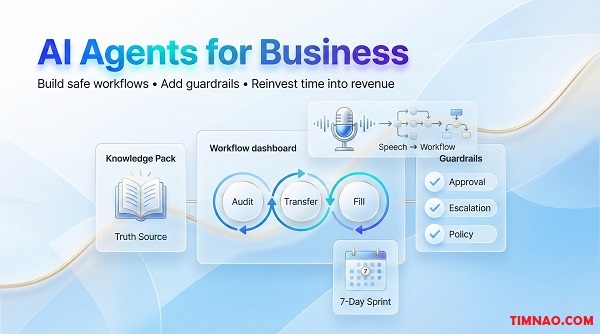
AI agents for business: a calm, powerful playbook to earn more time (and money) 🤖
AI agents for business can feel like a shortcut—until one “helpful” automation almost breaks a refund policy and costs you a customer. This guide shows you a calmer, safer way to use AI: pick the right workflow, add guardrails, and turn saved hours into real outcomes like faster responses, fewer mistakes, and more time for revenue work.
The day my “AI agent” almost refunded the wrong customer
Daisy runs a small online store. Nothing huge—just a Shopify site, a couple of best-selling products, and a lean team: one part-time support helper, one part-time fulfilment helper, and Daisy doing “everything else.”
Her problem wasn’t lack of ideas. It was context switching.
- A customer asks where their package is.
- Another wants to change the shipping address.
- Someone else asks for a refund.
- Meanwhile, a supplier sends an invoice.
- A creator partnership needs a follow-up email.
By Thursday, Daisy felt like she spent the whole week “working” but didn’t move anything important forward.
So she did what most busy founders do: she tried to automate support with an AI assistant.
She set up a simple workflow:
- New email arrives
- AI drafts a reply
- Daisy quickly approves and sends
For two days it was amazing. Replies went out faster. Customers were happier. Daisy felt like she found a cheat code.
Then the third day happened.
A customer emailed:
“Hi, I want a refund. The item arrived late and I already bought another one.”
Daisy had a refund policy. It was clear:
- Refund allowed within a time window
- Only for unopened items
- Late delivery alone doesn’t automatically qualify
But the AI, trying to be “helpful,” drafted a reply that basically said:
“Sorry for the delay—of course we can refund you right away.”
Daisy caught it before sending. No money lost. No drama.
But it was a wake-up call: AI doesn’t fail the way humans fail.
A human might say, “I’m not sure, let me check.”
AI might say, “Absolutely!” with the confidence of someone who didn’t read your policy.
That’s the moment Daisy stopped chasing “automation” and started building systems.
If you’re new to AI agents, here’s the simplest rule that will save you from expensive mistakes:
Let AI handle tasks. Keep decisions with humans (at least at first).
When you start there, AI becomes a power tool, not a liability.
How Daisy redesigned the workflow in 30 minutes
Instead of asking AI to “handle refunds,” she changed the job:
Old goal: “Respond to refund emails automatically.”
New goal: “Triage refund emails and draft a reply that follows policy, then escalate when needed.”
She added three guardrails:
- Refund keyword trigger → escalate
If the email includes “refund,” “chargeback,” “dispute,” or “cancel,” it gets labeled “Needs Review.” - Policy-first draft
The AI must use a short policy checklist before drafting anything:
- Is the order within the window?
- Is the item unopened?
- Is there proof of damage?
- Two-button approval
Daisy either:
- clicks “Approve + Send,” or
- clicks “Edit + Send,” or
- routes to her support helper
That’s it.
Same AI. Same tools. Totally different outcome.
The business impact (what actually changed)
Within a week, Daisy didn’t feel like she had “an AI employee.” She felt like she had a calmer inbox.
- Support replies were faster (without giving away money)
- Fewer mistakes made it to customers
- Daisy got back 3–5 hours per week
And here’s the part most people miss: she didn’t use those hours to “do more admin.”
She used them to follow up with customers who didn’t finish checkout, and to test a simple upsell bundle.
That’s how AI becomes money—not by existing, but by creating time you reinvest into value.
Next, let’s make sure you’re building the right mental model—because if you think AI agents are “magic employees,” you’ll design the wrong thing and get burned.
AI agents for business are task machines, not magic employees
A lot of beginner frustration comes from one misunderstanding:
“I built an agent, but it doesn’t work like a real employee.”
That’s because a job title (“support agent,” “marketing manager,” “ops lead”) is actually a bundle of different tasks.
Some tasks are predictable. Some require judgment. Some require taste. Some require accountability.
AI is great at certain types of tasks—and risky at others.
A beginner definition that keeps you grounded
An AI agent (for most small businesses) is:
- a system that takes an input (email, form, transcript, spreadsheet row)
- applies rules and context
- produces an output (draft reply, summary, label, next step, update)
Sometimes it’s simple (drafting and classifying).
Sometimes it’s more advanced (routing work across tools).
But it’s not a human. It doesn’t “understand your business” unless you give it clear context.
To avoid the refund mistake Daisy almost made, decide what level of power the AI gets.
Level 1 — Suggest
AI drafts or proposes. You decide.
Level 2 — Prepare
AI drafts + fills forms/fields. You approve.
Level 3 — Execute with limits
AI can take actions, but only inside strict rules.
Level 4 — Execute freely
AI can act independently (rarely a good idea for beginners).
If you’re a beginner, Level 1 or Level 2 is where you win fastest.
Why? Because you get:
- speed
- consistency
- fewer errors
- and you still protect trust
What AI is actually good at (quick cheat sheet)
Think of AI like a strong assistant for language and patterns.
It’s great at:
- summarizing long messages
- turning messy thoughts into structure
- drafting first versions (emails, replies, briefs)
- classifying requests (billing vs shipping vs product question)
- extracting key info (order number, intent, urgency)
It struggles with:
- policy nuance unless you provide rules
- edge cases that require common sense
- anything that involves money movement
- anything that creates legal/compliance risk
Where to start: “triage agents” beat “decision agents”
If you want results without chaos, start with an agent that does triage:
- label the request
- identify urgency
- draft a reply
- route to the right person
- log the outcome
Triage is where small businesses bleed time. And it’s safer than letting AI “decide.”
A simple tool stack for beginners (no fancy engineering required)
You don’t need to build custom software to get value.
Here are common “beginner-safe” building blocks:
- An AI tool for drafting and reasoning: ChatGPT
- An automation connector for triggers and routing: Zapier or Make
- A place to store structured info: Airtable or Notion
But tools are the last step. The real leverage comes from choosing one specific task and tightening the workflow.
The “one-task test” (use this to avoid building a monster)
Before you build anything, ask:
- What is the exact input?
- What is the exact output?
- What rules must never be broken?
- What should trigger escalation to a human?
If you can’t answer those in plain English, you’re not ready to automate that workflow yet.
Now that you have the right mental model, the next step is choosing the right workflow—because copying someone else’s chatbot is a fast way to waste time. Let’s find your “AI Sweet Spot.”
Find your AI Sweet Spot before you copy anyone’s chatbot
Here’s what happens when most businesses “adopt AI”:
They add a chatbot because “everyone has one.”
It answers a few FAQs.
It doesn’t improve revenue.
It creates new support tickets when it gets confused.
The issue isn’t the chatbot. It’s the strategy.
If you want AI to create real outcomes—more leads, fewer refunds, better retention—you need to find your AI Sweet Spot.
What “AI Sweet Spot” actually means
Your sweet spot is the overlap of three things:
- What AI is strong at
Drafting, summarizing, classifying, searching structured knowledge. - What your business is uniquely good at
Your niche expertise, your product taste, your delivery experience, your relationships, your brand voice. - What the market still wants (but isn’t getting)
Fast response, clear guidance, better follow-up, fewer mistakes, smoother onboarding, better personalization.
When you operate in that overlap, you get two benefits:
- real ROI (time saved, conversion improved, fewer errors)
- defensibility (competitors can copy tools, but not your context and execution)
The trap: “AI everywhere” vs “AI where it pays”
Beginner mistake: try to automate everything.
Better move: choose one workflow that hits at least one of these:
- reduces a repeated cost (time, outsourcing, errors)
- increases a revenue lever (leads, conversions, upsells, retention)
You’re not trying to be “an AI company.”
You’re trying to build a more profitable operation.
A 10-minute Sweet Spot exercise (beginner-friendly)
Open a note and answer these quickly:
A) What do people ask before buying?
Examples:
- “Is this right for my situation?”
- “How long does shipping take?”
- “What happens if it doesn’t work?”
B) Where do leads drop off?
Examples:
- they request a quote but don’t respond
- they add to cart but don’t check out
- they start onboarding but don’t finish
C) What drains your time that customers don’t value?
Examples:
- copying notes into CRM
- preparing weekly updates
- chasing missing info
D) What work is hard to delegate because it needs your judgment?
Examples:
- choosing the right recommendation
- handling tricky support cases
- writing in your brand voice
Now pick one workflow that is:
- frequent enough to matter
- safe enough to test
- close enough to revenue to feel the impact
Real Sweet Spot examples (so you can borrow the pattern)
These are examples of “sweet spot thinking,” not templates.
Example 1: Ecommerce — Support triage + policy-safe drafts
Outcome:
- faster replies
- fewer refunds given away
- higher customer trust
Example 2: Local services — Lead qualification + quote prep
Outcome:
- fewer wasted calls
- higher close rate
- cleaner scheduling
Example 3: Coaching/education — Onboarding + progress tracking
Outcome:
- higher retention
- fewer drop-offs
- less repetitive explanation
Example 4: Small agency — Meeting-to-task system
Outcome:
- fewer missed deliverables
- faster delivery
- less “what did we decide?” chaos
Notice the pattern: these aren’t “chatbots.”
They’re workflows tied to money, time, or quality.
A simple “Sweet Spot score” to choose the best first project
Give each workflow a score from 1–5:
- Frequency: How often does it happen?
- Time cost: How long does it take each time?
- Error cost: How painful are mistakes?
- Revenue impact: Does it affect leads, conversions, retention, upsells?
- Safety: Can you run it with Suggest/Prepare authority?
Pick the workflow with:
- high frequency or high time cost
- meaningful revenue impact
- high safety (low risk)
That’s your best “first agent.”
Don’t copy a chatbot—copy a business outcome
If your goal is: “We need a chatbot,” you’ll end up with a chatbot.
If your goal is: “We need faster, safer support replies,” you’ll build a system that improves trust and reduces losses.
If your goal is: “We need better follow-up,” you’ll build an agent that increases conversions.
Outcomes first. Tools second.
In the next section, we’ll turn that chosen sweet-spot workflow into a repeatable build process using a simple loop you can reuse for every future agent.
Audit–Transfer–Fill: the quick-win loop that actually changes cash flow
If you’ve ever tried to “use AI” and ended up with more tabs, more half-finished experiments, and zero measurable results… you’re not alone.
Most people make the same mistake: they start with a tool (“Let’s add an agent!”) instead of starting with a leak (“Where is time or money slipping away every week?”).
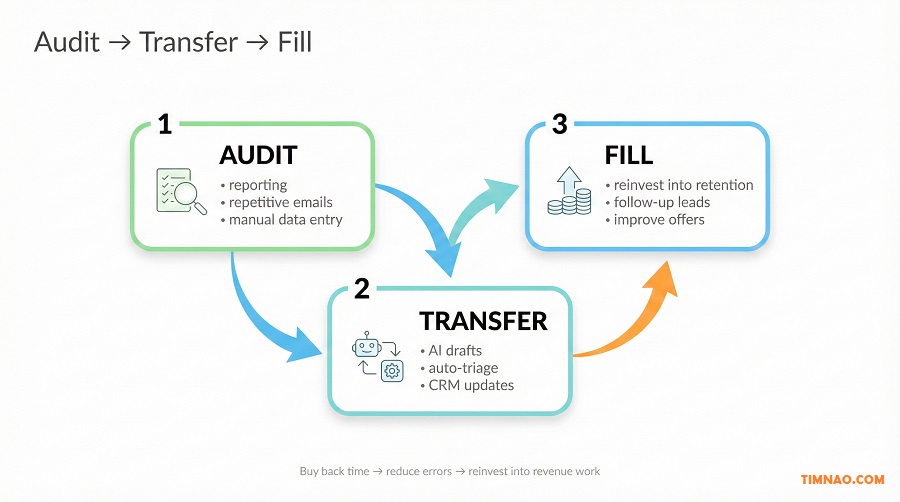
That’s why Audit–Transfer–Fill works so well for beginners. It forces you to do the boring-but-profitable thing: pick one repeatable workflow, automate the safe parts, and reinvest the time into something that actually moves revenue.
Why this loop affects cash flow (not just convenience)
Cash flow improves when at least one of these happens:
- You reduce labor hours (yours or your team’s)
- You reduce costly mistakes (refunds, missed follow-ups, wrong invoices)
- You respond faster (more conversions, fewer churn cancellations)
- You ship improvements sooner (better offers, better retention)
Audit–Transfer–Fill connects AI to those outcomes directly. Not “AI for AI’s sake.”
Step 1: Audit — find the work that quietly steals your week
An audit isn’t a productivity journal. It’s a profit investigation.
Here’s a simple way to do it without overthinking:
- Pick one business area: Support, Sales, Ops, or Content/Marketing
- For 3–5 days, list repetitive tasks as they happen
- For each task, record three numbers:
- Minutes per time
- Times per week
- Mistake cost (low/medium/high)
You’re looking for tasks that are:
- frequent
- annoying
- rule-based
- and not “creative leadership” work
Beginner-friendly example (Support):
- “Where is my order?” replies: 4 minutes × 30/week
- “How do I use this?” replies: 6 minutes × 15/week
- “Change address” requests: 8 minutes × 8/week
That’s already a big chunk of time. And it’s usually the kind of time that breaks your attention and makes everything else slower.
The fastest “high-ROI” filter: Time × Frequency × Stress
If you’re not sure what to pick, score each task 1–5 on:
- Time (how long it takes)
- Frequency (how often it happens)
- Stress (how much it interrupts focus)
Add them up. Start with the highest score.
Why include stress? Because stress isn’t just a feeling—it’s the cost of constant context switching. And context switching destroys the deep work that increases revenue.
Step 2: Transfer — move only the safe, repeatable parts to AI
“Transfer” does not mean “hand the whole job to AI.”
It means:
- split the workflow into steps
- identify which steps are safe to delegate
- keep risk steps under human control (especially money decisions)
A beginner-safe way to split tasks is:
- Collect (gather needed info)
- Classify (what type of request is this?)
- Draft (write first version)
- Route (send to correct person/label)
- Record (log outcome)
AI is excellent at Classify + Draft + Record.
It’s okay at Collect (if you force a checklist).
It’s risky at actions that create irreversible consequences.
What “Transfer” looks like in real life
Here are three realistic transfers that pay off quickly:
1) Support inbox triage (safe and high-impact)
- AI labels tickets: shipping, refund, product use, billing
- AI drafts a reply using your approved policy text
- Anything with “refund/chargeback/legal” gets escalated
2) Sales follow-up (high ROI with guardrails)
- AI summarizes lead call notes
- AI drafts a follow-up email with next steps
- You approve before sending
3) Weekly reporting (boring, repetitive, perfect for automation)
- AI takes numbers from your spreadsheet/CRM
- Produces a short weekly summary: wins, risks, next actions
- Logs it in Notion/Airtable for tracking
If you want to connect apps, tools like Zapier or Make can move data between your inbox, CRM, and database without you copying and pasting all day.
Step 3: Fill — reinvest the saved hours into work that creates money
This is the step that turns “AI automation” into real business growth.
Without Fill, the time you save disappears into random tasks. With Fill, you intentionally spend it on a revenue lever.
Here are Fill options that tend to show results fast:
- Follow-up block (30–45 minutes, twice/week): close open loops with leads and partners
- Retention improvement: identify customers at risk and reach out proactively
- Offer clarity: rewrite your best-selling product page using customer questions as headings
- Upsell bundle test: create one bundle and offer it post-purchase
- Referral ask system: ask happy customers in a consistent, non-cringy way
Daisy didn’t “become an AI business.”
She used saved time to build a small retention workflow and improve her offers—things that directly affect cash flow.
A beginner KPI that keeps you honest: “hours bought back”
If you track only one metric at the start, track this:
- Hours bought back per week = minutes saved × frequency ÷ 60
Then decide a rule:
- “At least 50% of bought-back hours must go to Fill work (revenue or retention).”
That rule alone prevents the common failure mode: becoming an efficient machine for tasks that don’t matter.
Tiny warning (that saves you weeks)
If your first agent requires:
- complex permissions
- messy data across five systems
- sensitive decisions (refunds, legal, compliance)
- or dozens of edge cases…
It’s not a “first agent.” It’s a second or third.
Start with one clean lane. Prove value. Then expand.
And to expand safely, you need the next concept: guardrails. Because your AI will never be perfect—and it doesn’t need to be, as long as the system is.
Deterministic vs probabilistic: design the guardrails first
Here’s the simplest way to think about AI reliability:
- Some parts of your workflow should behave like a calculator.
- Some parts can behave like a creative assistant.
The problem is when you mix them up.
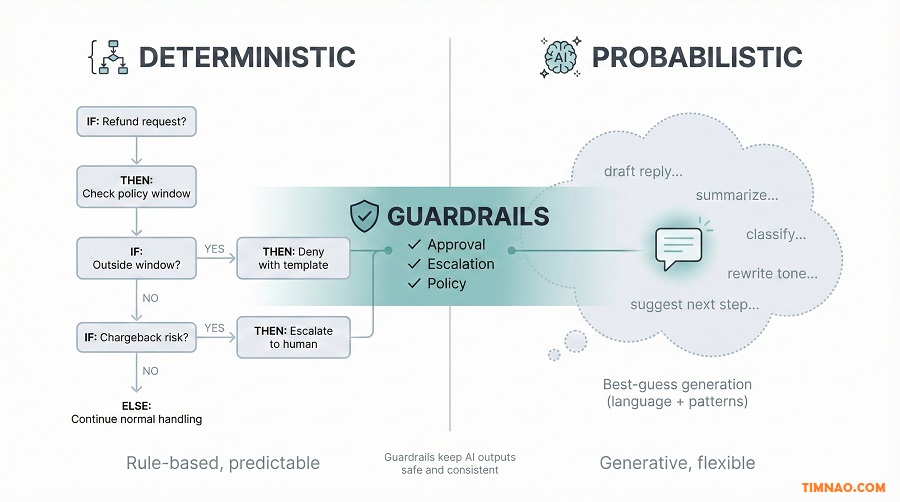
Deterministic vs probabilistic (plain-English explanation)
Deterministic = predictable rules.
If X happens, do Y. Always.
Examples:
- “If the order is older than 30 days, don’t offer a refund.”
- “If the email contains ‘chargeback,’ escalate to owner.”
- “If the customer is VIP, route to priority queue.”
Probabilistic = best-guess generation.
It outputs what seems most likely based on patterns.
Examples:
- drafting an empathetic reply
- summarizing a messy conversation
- classifying a request when the customer isn’t clear
- proposing options for next steps
A healthy AI system uses both:
- deterministic rules to set boundaries
- probabilistic AI to handle language and ambiguity inside those boundaries
The rule for beginners: “AI can write, rules can decide”
If you’re new, you’ll avoid most disasters by following this:
- Let AI write drafts and structure information
- Let rules decide what is allowed, escalated, or blocked
This is how you prevent the “confident refund” problem.
7 guardrails that make AI feel safe (and human-approved)
You don’t need all of these. Pick 3–5 for your first build.
- Allowed actions list
Write exactly what the AI can do:
- draft replies
- ask for missing info
- label and route tickets
- create a draft record in a database
- Forbidden actions list
Write what it must never do:
- approve refunds
- promise delivery dates not in policy
- confirm legal/compliance claims
- change addresses without verification
- Escalation triggers (keyword + context)
Examples:
- refund, chargeback, dispute
- angry language
- “lawyer,” “complaint,” “scam”
- large order value
- repeat customer issues
- Human approval checkpoints
A simple rule:
- Anything customer-facing is approved until trust is earned
- Anything involving money is always approved
- Structured outputs
Instead of free-form text, require the AI to output a predictable format, like:
- Issue type:
- Summary (1 sentence):
- Policy check: pass/fail + why
- Draft reply:
- Recommended action: send / escalate
This prevents the AI from “wandering” and makes review faster.
- Confidence behavior (what to do when unsure)
Teach the system a default:
- “If missing key info, ask one clarifying question.”
- “If conflicting policy signals, escalate.”
- Logging + weekly review
Save:
- what came in
- what the AI produced
- what decision you made
- what happened afterward
Then review a small sample weekly. This is how quality improves without giant rebuilds.
A practical way to test without risking customers
Before you automate, do a “shadow mode” test:
- Run 20–50 real examples through the AI
- Don’t send outputs—just compare them to what you would do
- Highlight:
- where it breaks policy
- where it lacks context
- where it uses the wrong tone
- Update your rules + truth source (more on that next)
Shadow mode is boring. It’s also why professional systems feel reliable.
Where beginners over-trust AI (and what to do instead)
These are common danger zones:
- Refunds and billing exceptions
- Instead: AI drafts + flags + you approve
- Medical/legal/financial promises
- Instead: AI routes to approved template language or escalates
- Pricing and discounting
- Instead: deterministic maximums and approval steps
- Anything that affects reputation publicly (reviews, social replies)
- Instead: drafts only, human review
You don’t jump from “draft emails” to “run my business.”
You earn trust in stages:
- Week 1–2: Suggest mode only
- Week 3–4: Prepare mode (fills fields, drafts, you approve)
- Later: Execute-with-limits for narrow actions (labeling, routing, internal tasks)
That’s how you get speed without anxiety.
Now, here’s the part that decides whether your agent gets smarter over time—or keeps making the same mistakes: your knowledge.
From Data Mess to Data Success: make your knowledge usable
Most AI projects fail for a boring reason:
Your business knowledge is scattered.
- Some rules are in someone’s head
- Some are in an old Google Doc
- Some are in a Slack message from last year
- Some are “we usually do it this way”
- Some contradict each other
AI can’t fix that. It will amplify it.
If you want your AI agent to behave consistently, you need a usable knowledge source—not a perfect one.
The goal isn’t “more data.” It’s “clean answers.”
Beginners often think they need a giant knowledge base.
You don’t.
You need:
- fewer contradictions
- clearer policies
- and examples of the “right answer”
A small, clean knowledge source beats a huge messy one every time.
The Minimum Viable Knowledge Pack (MVKP)
For your first agent, create a single document (or Notion page) that includes:
- What you sell (1–3 paragraphs)
- Top 10 FAQs (short, direct answers)
- Policy rules (refund, shipping, warranty, escalation)
- Tone guide (how you speak to customers)
- Approved phrases (especially for sensitive topics)
Tools like Notion work well for this because it’s easy to update and keep in one place. If you prefer structured tables (great for logging and tracking), Airtable is also a solid option.
The key is not the tool. It’s the discipline of “one source of truth.”
Turn tribal knowledge into written rules (without a huge project)
Here’s a quick method that doesn’t feel like homework:
- Pick one workflow (support triage, sales follow-up, onboarding)
- Ask: “What do we do 80% of the time?”
- Write those rules in bullets
- Add a short section: “When to escalate to a human”
That’s enough to start.
You can refine over time, but you need a baseline.
A simple structure that keeps policies consistent
When writing policy, use this format:
- Rule: What is allowed?
- Reason: Why does the rule exist?
- Example: One real scenario
- Escalate when: What makes it unusual?
Example (refund policy snippet):
- Rule: Refunds only within 30 days for unopened items
- Reason: Hygiene and resell constraints
- Example: Customer changed mind after 10 days, unopened → refund ok
- Escalate when: Customer claims damage, missing order, or chargeback threat
This format helps both humans and AI behave consistently.
“Good answers library”: the fastest way to improve agent quality
If you want an agent to sound like you, don’t only feed it rules. Feed it examples.
Create a small library of:
- 10 great support replies
- 5 great “no, but kindly” replies
- 5 great escalation replies
- 5 great follow-up emails
Then reuse the pattern.
You can store these in:
- Notion pages
- Google Docs
- or a simple database in Airtable
The point is: your AI learns “how you talk” from examples, not from you hoping it guesses.
Keep knowledge current without turning it into a job
Knowledge bases fail when they become a second business to manage.
Use a tiny maintenance habit:
- Every Friday, review 10 AI outputs
- If you edited something, ask: “Why?”
- Update the knowledge pack with:
- one new rule
- or one better example
Ten minutes. Consistent improvements.
The beginner mistake: feeding the AI everything
More context isn’t always better. It can confuse the model or dilute priorities.
Instead of dumping your whole history, give the agent:
- the specific policy page it needs
- the relevant product info
- and the examples for this workflow
Short, focused context tends to produce more reliable outputs.
Data safety basics (quick and practical)
Even if you’re a small team, treat customer data respectfully.
Beginner-safe habits:
- don’t paste full credit card details into AI tools (ever)
- minimize personal info in prompts (use order IDs rather than addresses)
- store logs securely (access limited to your team)
- keep “money actions” behind approval steps
You don’t need to be paranoid. You just need to be intentional.
The real win: knowledge becomes an asset
Once you have a clean knowledge pack, three things get easier:
- training new team members
- building future automations
- keeping customer communication consistent
That’s an asset you can reuse forever—no matter which AI model or tool you use next.
And now you’re ready for the next stage: capturing workflows faster, building systems that compound, and turning them into real opportunity (either inside your business or as a service).
Speech-to-Workflow: capturing processes at 3x speed with voice
If you’ve ever tried to “document your process,” you know the pattern:
You open a blank doc.
You stare at it.
You type two lines.
Then a customer message pops up, and the doc becomes a sad little tab you never return to.
This is why “speech-to-workflow” is so underrated for beginners. Most of us can explain a process out loud way faster than we can write it cleanly.
The goal isn’t to create a perfect operations manual. The goal is to capture enough clarity so your AI agent can behave consistently—without guessing.
The easiest way to start: “teach a new hire” out loud
Here’s the prompt you should say into your voice note:
“Pretend you’re new on my team. I’m going to explain how we do X. Stop me if something is unclear.”
Then talk through the process like you’re onboarding someone. You’ll naturally include the stuff that matters:
- what triggers the workflow
- what information you look for
- what decisions you make
- what mistakes you avoid
- when you escalate to a human
That’s exactly the structure an AI agent needs.
A beginner-friendly voice capture workflow (no fancy setup)
Pick any voice-to-text method you like. Then do this:
- Record 3–7 minutes (keep it short on purpose)
- Transcribe it (most tools can do this; don’t obsess over perfect punctuation)
- Paste the transcript into your AI tool (e.g., ChatGPT)
- Ask for three outputs:
- a simple SOP (step-by-step)
- decision rules (“if this, then that”)
- a checklist for quality control
That’s it. In 15 minutes, you’ll have a first draft that would normally take you hours.
The “3 outputs” that turn a voice note into an actual workflow
When you paste your transcript into your AI tool, ask something like:
- “Turn this into a clear SOP with 6–12 steps.”
- “Extract decision rules and escalation triggers.”
- “Create a checklist we can use to review outputs.”
These three outputs make your process usable.
Example: turning a refund explanation into an agent-ready workflow
Say you record a voice note about refunds. Your AI output should look like this (simplified):
SOP (steps)
- Confirm order number and purchase date
- Check if within refund window
- Confirm item condition requirements
- Identify reason for refund
- Decide: approve / deny / escalate
- Draft customer reply using approved tone
- Log outcome and tags (reason, product, resolution)
Decision rules
- If outside the window → deny using template A
- If damage claim → escalate + request photos
- If “chargeback” mentioned → escalate immediately
- If VIP customer → route to priority review
QC checklist
- Did we confirm order details?
- Did we follow refund window rules?
- Did we avoid promising exceptions?
- Is tone calm and respectful?
This is the difference between “we have an AI” and “we have a system.”
The fastest way to improve quality: capture exceptions on purpose
Your first transcript will cover the “happy path.” Real life is messy, so you also want exceptions.
Use this follow-up voice note prompt:
“Now I’m going to list weird cases and what we do.”
List 5–10 edge cases you’ve actually seen. Things like:
- customer is angry
- package is delayed
- they used the product but want a refund
- they’re missing the order number
- they’re asking for a policy exception
Exceptions are where AI systems break—so giving them explicit rules is a cheat code.
A practical “Process Capture Script” you can reuse
Next time you want to build an agent, record this:
- “What triggers this workflow?”
- “What info do I need before I act?”
- “What are the steps I follow 80% of the time?”
- “What are the top 5 exceptions?”
- “What must never happen?”
- “When do I escalate to a human?”
- “What does ‘done’ look like?”
If you answer those out loud, you’ll create cleaner workflows than most people who try to write from scratch.
Where this saves money (not just time)
Speech-to-workflow isn’t a cute productivity trick. It directly reduces:
- training time for new hires
- mistakes caused by “everyone doing it differently”
- back-and-forth clarifying questions
- inconsistent customer responses that create distrust
And once your process is captured, building agents becomes much easier—you’re no longer starting from a blank page.
Next, let’s talk about the part most people really care about: how to turn these skills into real income—without pretending you’re some kind of AI guru.
Three realistic ways to monetize this (without pretending you’re a ‘guru’)
Let’s keep this grounded.
You don’t need to sell “AI magic.” You sell time savings, fewer mistakes, and smoother operations—because those are measurable, and businesses pay for measurable.
Below are three paths that work even if you’re a beginner.
1) The “One-Workflow Agent Setup” service (best for getting first clients)
Who this fits: beginners with no audience, comfortable reaching out to small businesses
What you sell:
“In one week, I’ll help you automate one workflow so it saves 3–5 hours/week—with safety guardrails.”
That’s a believable promise. It’s also easier to deliver than “I’ll transform your entire company with AI.”
What you deliver (simple package)
- 1 “truth source” document (policies + FAQs + tone)
- 1 agent workflow in Suggest/Prepare mode
- 1 lightweight automation (optional) via Zapier or Make
- a 15-minute training + a weekly review checklist
Great beginner workflows to sell
- support inbox triage + drafts
- lead qualification + follow-up drafts
- meeting notes → tasks + CRM update
- weekly reporting summary (sales/support/ops)
How to price without hype
- Fixed setup fee (clear deliverable)
- Optional monthly “maintenance + improvement” fee
First measurable win
- hours saved per week (tracked for 2 weeks)
- response time improved (support or leads)
How to land the first 1–3 clients
- Pick one niche you understand (ecommerce, local services, coaching, agencies)
- Offer a free 20-minute workflow audit
- Show a “before/after” demo using their own example (shadow mode)
Even one successful case study becomes your marketing.
2) Freelancers who productize internal agents (earn more by delivering faster)
Who this fits: freelancers, VAs, marketers, small agencies
This path is sneaky powerful because you don’t need to “sell AI.” You use it to increase your capacity and quality.
What changes when you build internal agents
- You deliver work faster → you can take more clients
- You reduce revisions → fewer unpaid hours
- You standardize quality → easier to delegate and scale
Internal agents that pay off quickly
- “Client voice + style” writing assistant (drafts emails, landing pages, ad variations)
- content brief generator (topic → outline → SEO-friendly structure)
- meeting-to-deliverables agent (transcript → tasks → timeline)
- proposal generator (past wins + scope + pricing rules)
Tools are flexible here:
- ChatGPT for drafting and structuring
- Notion as your internal knowledge hub (client voice, offers, SOPs)
- Airtable if you want trackable systems (projects, deliverables, approvals)
First measurable win
- reduce delivery time by 20–30% on one client project
- cut revisions by standardizing “first draft quality”
What to tell clients
You don’t need to say “I use AI.” You can say:
- “I have a system that speeds up drafts while keeping quality high.”
That’s honest and professional.
3) Productized templates + micro-systems (small digital assets that compound)
Who this fits: someone who wants to build assets (not just bill hours)
Once you’ve built 3–5 workflows in a niche, you’ll notice patterns. That’s where productization becomes possible.
Examples of sellable micro-assets
- “Support triage system for Shopify stores”
- “Lead follow-up system for local service businesses”
- “Onboarding workflow for coaches”
- “Weekly reporting dashboard prompts + templates”
What you actually sell
- a Notion/Airtable template
- prompt packs tied to real workflows
- SOPs + checklists
- automation map (“if you use tool A + tool B, connect like this”)
No hype. Just useful systems.
First measurable win
- sell to 5–20 customers at a low price
- use feedback to improve and raise price gradually
This is slower than services, but it compounds. And it’s easier once you’ve done real implementation work.
Now that you’ve got monetization paths, let’s lock in execution. The next section is a 7-day sprint you can actually finish—without getting lost in tool land.
A 7-day sprint to launch your first agent system
This sprint is designed for beginners. It intentionally avoids big architecture decisions.
Your goal by Day 7:
- one workflow
- one knowledge pack
- one agent in Suggest/Prepare mode
- one simple review habit
That’s a real system, not a demo.
Day 1 — Choose the workflow and define “done”
Pick a workflow that happens at least weekly, ideally daily.
Good options:
- support triage + drafts
- lead follow-up drafts
- meeting notes → tasks
- weekly reporting summary
Now write a “done statement” in one sentence:
- “Common support tickets get a policy-safe draft reply in under 5 minutes.”
If you can’t define done, you’ll drift.
Day 2 — Do a micro-audit (30 minutes, not a full life overhaul)
For this single workflow, list the steps you currently do.
Then label each step:
- Safe to delegate (drafting, summarizing, classifying)
- Needs human approval (anything customer-facing at first)
- Never delegate yet (refund approvals, discounts, legal promises)
This becomes your first guardrail map.
Day 3 — Build your Minimum Viable Knowledge Pack
Create a one-page doc. Keep it short and clear.
Include:
- the top FAQs relevant to this workflow
- policy rules (especially “no” rules)
- escalation triggers
- brand voice: “we are calm, direct, helpful”
If you’re storing it in a system:
Day 4 — Create the agent prompt (Suggest mode)
In your AI tool, create a single instruction that forces structure.
Ask for output like:
- Issue type
- Summary
- Policy check (pass/fail)
- Draft reply
- Escalate? (yes/no + why)
Now test it with 10 real examples from your inbox or past messages.
Don’t automate yet. Test quality first.
Day 5 — Add guardrails and “escape hatches”
This is where beginners level up.
Add:
- forbidden actions list
- escalation keyword list
- “when unsure, ask one question” behavior
- tone rules (no overpromising, no fake certainty)
Then re-test with the same examples and compare improvements.
If the AI keeps making the same mistake, it’s usually one of these:
- your policy text is unclear
- you didn’t define escalation clearly
- you asked for too much in one step
- you didn’t force structured output
Fix the system, not the vibe.
Day 6 — Add one light automation (optional, but satisfying)
If you want automation, keep it tiny.
Examples using Zapier or Make:
- new email → send to AI → return draft → save as “needs approval”
- new form submission → summary → create a task
- new meeting transcript → action items → log to database
Rule: one trigger, one output.
If you build five automations at once, you’ll spend the day debugging instead of shipping.
Day 7 — Launch with a review habit (this is what makes it compound)
On Day 7, you go live—carefully.
Operating rule for week 1:
- AI drafts
- human approves
- everything sensitive escalates
Then schedule a weekly review:
- sample 10 outputs
- note repeated edits
- update knowledge pack with one improvement
That’s how your agent gets better without “rebuilding.”
What “success” looks like after 7 days
You should be able to say:
- “This workflow saves us X hours/week.”
- “Mistakes dropped because responses are consistent.”
- “We have a knowledge pack we can reuse.”
That’s a real foundation—whether you’re using it to grow your business or sell it as a service.
Next, we’ll close with the five reminders that keep you from scaling chaos. This is the part that separates calm systems from fragile automations.
The 5 things to remember before you scale
Scaling AI agents isn’t about stacking more automations. It’s about protecting reliability as complexity grows.
Here are the five reminders that keep things sane.
1) Scale workflows, not tools
Tools change. Workflows last.
If you build your business around “this one platform,” you’ll rebuild everything when the platform changes.
Instead:
- document the workflow
- keep your knowledge pack clean
- keep your guardrails clear
Then tools become replaceable parts.
The fastest way to lose trust is letting AI take actions you don’t review.
Move up the authority ladder only when:
- outputs are consistently correct
- exceptions are handled safely
- you have logging + a review habit
A good rule:
- if a mistake would cost money or reputation, keep human approval
3) Keep a single source of truth (or you’ll train confusion)
If your policy exists in five places, your agent will behave inconsistently.
Pick one location for:
- policies
- FAQs
- tone and templates
- escalation rules
Update it weekly, lightly. Consistency beats volume.
4) Build for “boring success,” not flashy demos
A flashy demo is: “Look, it can talk like a human!”
A boring success is:
- fewer missed follow-ups
- faster support resolution
- fewer refunds given away
- weekly reporting that actually gets read
Boring success is what pays.
5) Reinvest saved time on purpose—or nothing changes
This is the quiet killer of AI projects.
If you don’t decide how to spend the hours you bought back, they disappear.
Pick one Fill habit:
- a follow-up block
- retention outreach
- offer improvement
- partnership outreach
- shipping one small product enhancement weekly
That’s how time becomes revenue.
Quick takeaways you can act on today
- Record one 5-minute voice note explaining a workflow, then convert it into an SOP + decision rules in your AI tool.
- Start your first agent in Suggest mode with structured outputs and clear escalation triggers.
- Build a one-page knowledge pack that your agent can follow consistently.
- Track “hours bought back per week,” then reinvest at least half into a revenue lever.
- Scale only after you have logging and a weekly review habit.
Disclaimer:
This article is for educational and informational purposes only. It does not provide legal, financial, or professional advice, and it should not be relied on as a substitute for advice from qualified professionals. Any examples, workflows, or automation ideas discussed are illustrative and may not fit your specific business, tools, industry rules, or compliance requirements. AI outputs can be inaccurate or incomplete—always review and validate results, especially for customer-facing messages, pricing, refunds, contracts, and sensitive data. You are responsible for how you implement AI, how you handle customer information, and for complying with applicable laws, platform policies, and data privacy requirements.
If this guide helped you build safer AI Agents for Business (and saved you a few hours), you can support my work by buying me a coffee ☕✨ Every coffee helps me write more practical, beginner-friendly playbooks like this—no fluff, just real systems you can use. 🙌
👉 Buy me a coffee here: https://timnao.link/coffee