

AI in Real Estate: The Surprisingly Powerful Beginner Q&A Playbook 💡
AI in real estate can feel overwhelming at first—but it doesn’t have to be. In the next few minutes, you’ll get clear, beginner-friendly answers to the questions people actually ask, plus practical steps you can use to generate leads faster, automate busywork, avoid costly mistakes, and build simple systems that create real earning opportunities.
AI in Real Estate: Why Beginners Feel Stuck (and How It Hurts Income)
Why does AI feel “too technical” even when the tools look simple?
Most beginners don’t struggle because they can’t use tools like ChatGPT. They struggle because they don’t know where AI belongs inside a real estate workflow.
Real estate is full of moving parts:
- Leads arrive from multiple channels
- Clients ask emotional questions, not just factual ones
- You juggle scheduling, paperwork, coordination, and negotiations
- Small mistakes can create legal, financial, or reputational problems
So when someone says “use AI,” the beginner brain asks: Use it for what, exactly?
That missing “what” creates random experimenting:
- Try a chatbot today, a pricing tool tomorrow
- Copy prompts from YouTube without adapting them
- Get generic outputs that don’t match local market reality
- Lose confidence and stop using AI completely
The fix isn’t “learn more AI.” The fix is: choose one workflow and one measurable outcome.
What’s the most common trap beginners fall into?
The biggest trap is treating AI like a magic button instead of a business tool.
Beginners often do something like:
- Paste a vague request into AI (“Write a listing description”)
- Receive something that sounds polished but generic
- Feel disappointed, assume AI is overhyped
- Move on without improving inputs
AI is not magic. It’s more like a power tool:
- If you hold it correctly, you cut your workload in half
- If you hold it wrong, you ruin the piece you’re working on
In real estate, the “piece” might be a client relationship.
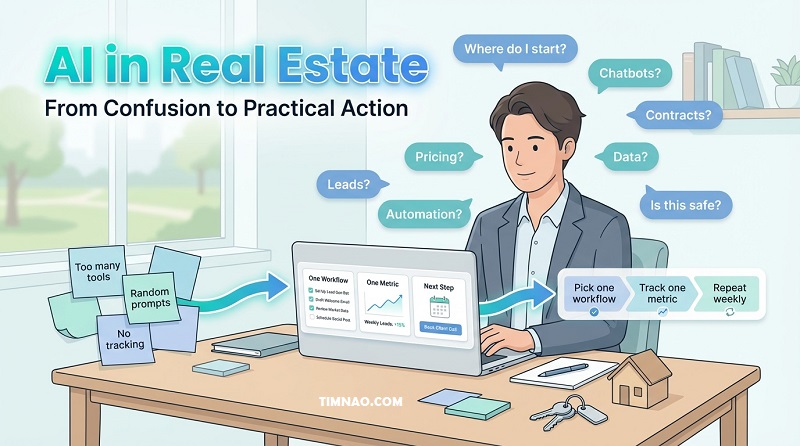
How does this confusion hurt income, specifically?
Confusion isn’t just annoying—it’s expensive. Here’s how it usually hits your money:
1) Slower lead response → fewer conversions
If you reply late or inconsistently, you lose the lead. AI can help you respond faster, but beginners often don’t set up a reliable follow-up system.
2) Generic marketing → weak trust
AI-generated content without real details sounds like everyone else. In real estate, “everyone else” is your competition.
3) Time leaks → fewer showings, fewer offers
Beginners drown in admin: rewriting messages, chasing documents, organizing notes. AI can reduce this, but only if you use it intentionally.
4) Bad decisions from bad data → avoidable losses
If you rely on messy inputs (wrong numbers, missing fields), AI can confidently steer you wrong—pricing, comps, tenant screening workflows, maintenance urgency.
A helpful mindset is: AI is either saving you time or making you money (preferably both).
If it’s doing neither, you don’t need another tool—you need a clearer workflow.
What’s a “beginner-safe” way to think about AI in real estate?
Use this simple rule:
Start with low-risk, high-frequency tasks.
These are tasks you do constantly, and mistakes are unlikely to create legal trouble.
Great beginner-safe use-cases:
- Drafting and personalizing follow-up messages
- Turning messy notes into a clean CRM update
- Creating listing descriptions from verified facts
- Summarizing long emails or inspection notes into action items
Avoid (at first) high-stakes, high-risk use-cases:
- Legal interpretation of contracts
- Anything involving protected class language
- “Fully automated” pricing without your review
- “Autopilot” screening decisions without clear compliance guardrails
What outcomes should a beginner aim for in the first 30 days?
Pick one outcome that directly affects earnings or hours. Here are realistic targets:
- Cut response time to new leads by 50%
- Faster replies = more appointments = more deals
- Publish 2–3 high-quality pieces of content per week
- Build inbound leads and local trust over time
- Reduce admin time by 3–5 hours per week
- More time for showings, calls, negotiations
- Standardize your workflows (SOPs)
- Less mental fatigue, fewer mistakes, more consistency
If you’re stuck choosing, start with lead response. It’s the quickest path to measurable income.
A quick “stuck diagnosis” checklist (use this before buying any AI tool)
If you answer “no” to any of these, you don’t need a new tool yet—you need a clearer system.
- Do I have one workflow I’m improving (lead follow-up, listing creation, tenant retention)?
- Do I track one metric (reply rate, booked calls, showings scheduled, vacancy days)?
- Do I have a “facts file” (verified details) so AI doesn’t guess?
- Do I have a quick review step before anything goes to clients?
- Do I store my best prompts/templates in one place (e.g., Notion or Google Sheets)?
If you build those basics first, AI becomes useful fast—and it stops feeling like chaos.
Now that we’ve addressed why the confusion happens (and why it costs money), the next step is to understand a simple mental model you can apply to every AI tool—without needing technical knowledge.
The Input → Prediction → Judgment Loop (a 2-Minute Mental Model)
What does AI actually do in real estate (in plain English)?
In most real estate situations, AI does one core job:
It produces a prediction.
That prediction might appear as:
- A forecast (pricing, demand, churn risk)
- A recommendation (who to call first, what to say next)
- A generated draft (message, description, summary)
- A classification (hot lead vs cold lead, urgent vs non-urgent maintenance)
What it does not do is take responsibility.
That’s why you need the loop.
What is the Input → Prediction → Judgment Loop?
Here’s the loop you should use every time you touch AI:
- Input: What you feed into the tool
- Prediction: What the tool outputs (draft, forecast, recommendation)
- Judgment: Your human decision and accountability
- Feedback: What happened after you acted (so the system improves)
Beginners often use only steps 1 and 2. That’s why their results feel unreliable.
Why is “judgment” the most important step for income?
Because judgment is where you protect:
- Trust (client relationships)
- Accuracy (facts, pricing, availability)
- Compliance (especially for housing-related language)
- Reputation (your brand voice)
Judgment is also where you create advantage. Two agents can use the same AI tool. The one who applies better judgment wins.
Can you give a concrete beginner example (lead follow-up)?
Yes. Here’s a simple example you can copy today.
Scenario: A lead messages: “Is the 2-bedroom on Pine Street still available?”
Input (good):
- Verified availability (yes/no)
- Verified key facts (price, move-in date, parking)
- The lead’s intent (rent/buy, timeline, budget if known)
- Your preferred tone (friendly, professional, concise)
- Your next step goal (schedule a tour today)
Prediction (AI output):
- A short reply confirming availability
- Two qualifying questions
- A suggested tour time window
- A fallback option (call/text)
Judgment (you check):
- Is it actually available right now?
- Are the facts correct?
- Is the message compliant and not making promises you can’t keep?
- Does it sound like you?
Feedback (you track):
- Did they respond?
- Did they book a tour?
- Did they ghost?
- What message variant worked better?
This is how AI becomes a conversion tool instead of a text generator.
How do I improve the “input” without making it complicated?
Use a simple input template you can reuse. Keep it short and structured:
Prompt skeleton (copy/paste):
- Role: “You are a real estate [agent/property manager/investor assistant].”
- Audience: “Write to a [buyer/renter/seller/investor].”
- Facts (verified): [bullet list]
- Context: [their message + what we know]
- Constraints: “Keep it under 80 words. Friendly, confident. Ask 2 questions. Offer 2 next steps.”
- Output format: “Return 2 variations: text message + email.”
Store this skeleton in Notion and create versions for common situations.
What’s the difference between a “draft” and a “decision” in AI outputs?
This is a critical beginner distinction.
- A draft is something you can revise before sending (messages, descriptions, summaries).
- A decision is something that changes money or risk (pricing recommendations, screening outcomes, investment analysis).
As a beginner, use AI heavily for drafts. Use it carefully for decisions.
When you do use AI for decisions, add guardrails:
- Require verified inputs
- Require your review
- Require a second check for high-impact numbers
- Track outcomes consistently
What does “feedback” look like if I’m not technical?
Feedback is just tracking outcomes in a simple way.
You can do it in a basic spreadsheet (Google Sheets) with columns like:
- Lead source
- First response time
- Message version (A/B)
- Outcome (replied / tour booked / no response)
- Notes (what they cared about)
Then once a week, ask AI:
- “Summarize patterns from these outcomes.”
- “What 3 changes should I make to increase replies?”
- “Rewrite my top-performing message in 3 tones.”
That weekly loop is where your results compound.
How do I know if an AI workflow is working (so I don’t fool myself)?
Use one metric per workflow. Keep it simple:
For lead follow-up:
- Reply rate
- Time-to-first-response
- Tours booked per 10 leads
For listings:
- Click-through rate (if you have it)
- Inquiry volume per listing
- Days on market change (if you can track)
For property management:
- Maintenance resolution time
- Tenant satisfaction signals
- Renewal rate
If you can’t measure it, you can’t improve it—and AI becomes busywork.
Next, we’ll talk about the “fuel” behind this loop: your data. This is where beginners either unlock consistent results or get burned by “garbage in, garbage out.”
Big Data 2.0, Structured vs Unstructured Data, and ‘Garbage In, Garbage Out’
Do I really need “Big Data” to benefit from AI in real estate?
No—and thinking you do is one of the biggest beginner delays.
Most beginners imagine AI requires:
- thousands of records
- expensive software
- complex dashboards
In reality, your first wins come from small, clean, relevant data connected to a single workflow:
- lead messages and outcomes
- listing facts and inquiry results
- maintenance requests and resolution times
- renewal conversations and churn outcomes
You don’t need big data. You need right data.
What is “Big Data 2.0” in beginner-friendly terms?
A useful way to think about modern data work is:
- Old mindset: “Collect lots of data and store it.”
- New mindset (Big Data 2.0): “Use data continuously to improve decisions and operations.”
So instead of building a giant database “someday,” you focus on:
- capturing the right inputs today
- making decisions faster and better
- learning from outcomes weekly
In real estate, this matters because small improvements compound:
- faster follow-up → more appointments
- better qualification → fewer wasted tours
- smarter maintenance → fewer emergencies
- better pricing review → fewer vacancy days
What’s the difference between structured and unstructured data?
This distinction helps you understand where AI shines.
Structured data = organized fields (spreadsheet style)
Examples:
- price, beds, baths, sqft, HOA, year built
- rent, vacancy, maintenance cost, renewal date
- lead source, response time, conversion stage
Unstructured data = messy content (text/images/docs)
Examples:
- inquiry messages and email threads
- inspection reports (PDFs)
- lease documents
- photos and videos of a property
- call transcripts and notes
Real estate is loaded with unstructured data. That’s why tools like ChatGPT and Claude are so helpful: they can turn messy text into structured action.
How does unstructured data turn into something useful for income?
Here are three beginner examples you can implement quickly:
Example 1: Lead messages → CRM-ready notes
- Input: 10 messy inquiries
- Output: a structured summary per lead:
- intent, budget, timeline, must-haves, objections, next step
Example 2: Inspection notes → repair plan
- Input: inspection text
- Output: grouped action items:
- urgent, recommended, optional
- estimated effort
- questions to ask contractors
Example 3: Maintenance tickets → patterns
- Input: past tickets
- Output: “top recurring issues by building/system,” plus suggested preventative checks
This is where AI saves hours and prevents losses.
What does “garbage in, garbage out” look like in real estate?
It looks like confident mistakes.
Common “garbage” inputs:
- Wrong square footage
- Outdated rent comps
- Missing HOA fees
- Inconsistent property type labels (SFR vs SFH vs Single Family)
- Leads with incomplete contact info
- Notes written differently by different team members
Then AI outputs:
- Misleading descriptions
- Incorrect pricing suggestions
- Bad prioritization (“call this lead first” based on junk signals)
AI doesn’t know your data is messy. It assumes it’s true.
What’s the simplest way to prevent garbage inputs as a beginner?
Use a “facts file” and a minimum required field list.
Step 1: Create a facts file (per listing or property)
Store only verified info:
- address (or internal identifier)
- beds/baths/sqft
- key features (confirmed)
- availability date
- price/rent and what it includes
- restrictions (pets, parking, utilities)
You can store this in Notion or Google Sheets.
Step 2: Define minimum required fields
If a record lacks these, AI shouldn’t act on it:
- client name + contact method
- property identifier
- timeline (even “unknown” is a value if standardized)
- budget range (or “not provided”)
Step 3: Standardize your labels
Pick one format and stick to it:
- “2 bed / 1 bath” (not 2BR sometimes, two-bedroom other times)
- one date format
- one address format
This sounds boring, but it’s one of the highest ROI moves you can make.
How do I clean data without being a data analyst?
You don’t need technical cleaning. You need consistency.
Use this “15-minute weekly data cleanup” habit:
- Pick your workflow sheet (leads, listings, maintenance)
- Filter for missing required fields
- Fix the top 10 records only
- Remove duplicates
- Add outcome tags (replied, booked, leased, churned)
Then ask AI:
- “What missing fields show up most often?”
- “Suggest a better intake form/questions to reduce missing info.”
Over time, your system becomes easier, not harder.
What data should I never paste into public AI tools?
As a safe rule, avoid pasting:
- full names with addresses
- IDs, bank details, private lease terms
- confidential owner information
- anything you wouldn’t want forwarded to the wrong person
Instead:
- anonymize (“Client A,” “Unit 3B”)
- remove identifiers
- keep your “facts file” internal
This protects your business and your clients.
What’s the “small dataset” a beginner should build first?
Choose one based on your role:
If you’re an agent (sales/leasing):
- last 50 leads
- response time
- channel
- message type used
- outcome (reply/tour/offer)
If you’re a property manager:
- last 50 maintenance requests
- category
- time to resolve
- cost band
- repeat issue? (yes/no)
If you’re an investor:
- last 20 deal reviews
- key assumptions (rent, vacancy, capex)
- decision (pursued/pass)
- result (if known)
Small datasets + consistent feedback beat big messy datasets every time.
A short transition: what comes after data basics?
Once your data inputs are clean enough and your loop is working, AI becomes much more than “writing help.” It becomes an operating system for:
- faster lead handling
- clearer decision-making
- less admin drag
- consistent performance you can repeat month after month
When you’re ready, the next sections typically move into practical Q&A (chatbots, document automation, predictive analytics) and then direct money applications (lead gen, pricing, retention). For now, you have the foundation that makes those sections actually work.
Generative AI and Large Language Models: Where GPT Fits in Your Workflow
What does “generative AI” actually mean for a beginner in real estate?
Generative AI is the kind of AI that creates content—usually text. In real estate, that matters because your income depends on communication and follow-through: replying to inquiries, explaining options, writing listings, summarizing docs, and keeping next steps moving.
The beginner-safe rule is simple:
- AI drafts and organizes.
- You verify facts and make the final call.
If you remember nothing else, remember this: the best use of AI is to help you move faster without lowering trust.
What is an LLM, and why do people keep mentioning “GPT”?
An LLM (Large Language Model) is trained to understand and generate language. “GPT” is a popular type of LLM, and tools like ChatGPT let you use it without coding.
In practice, it’s a fast assistant for:
- personalized replies and follow-ups
- listing descriptions from verified details
- summarizing long emails, notes, and PDFs into action items
- turning messy conversations into structured CRM notes
- generating scripts for calls, tours, and objections
LLMs are especially useful in real estate because the raw material of your business is words: questions, concerns, options, and next steps.
Where should GPT sit inside my workflow so it actually saves time?
If you use GPT everywhere, you’ll get noise. Place it in a few reliable “slots”:
- Prep (before you act): draft replies, call scripts, showing confirmations
- Cleanup (after you act): recap emails, call summaries, task lists
- Structure (between systems): convert messages into CRM-ready fields
A helpful test: if a task feels repetitive, text-heavy, or “I’ve written this 100 times,” GPT probably belongs there.
What’s the fastest beginner workflow to implement this week?
Start with lead response, because it affects appointments quickly.
A simple loop:
- Paste the lead message + your verified facts
- Ask for two versions (text + email)
- Review, send, and log the outcome (replied / booked / no response)
To make this measurable, track two numbers for one week:
- time to first response
- replies per 10 leads
Even small gains here can create a noticeable bump in tours booked.
What should my default prompt template look like (so I stop guessing)?
Use a repeatable template. Copy this and save it:
- Role: “You are a helpful real estate [agent/property manager] writing on my behalf.”
- Audience: “[Buyer/renter/seller/investor] who is inquiring about [property/area].”
- Verified facts (only use these):
- [bullet list]
- Context: “Their message: ‘…’ My goal: [book a tour / schedule a call / send options].”
- Constraints: “Keep it under [X] words. Friendly, clear, no hype. Ask [2–3] qualifying questions.”
- Output: “Give me 2 variations and a subject line if email.”
This template works because it forces clarity: audience, facts, goal, constraints.
How do I stop GPT from inventing details?
Use constraints and verification:
- Verified Facts block: “Only use these facts. Do not add anything else.”
- Missing Info list: “Before writing, list what you need me to confirm.”
- Safety scan: “Flag any sentence that sounds like a promise or an unverified claim.”
If you want an extra safeguard, ask for a “confidence tag”:
- “Mark any line that depends on assumptions with [CHECK].”
That makes your review faster.
How can GPT help me turn calls and tours into organized follow-ups?
This is a hidden goldmine because most beginners lose deals in the “messy middle.”
After a call or viewing, paste rough notes and ask GPT to output:
- Client summary: must-haves, dealbreakers, timeline, budget (if known)
- Objections: what they worried about
- Next steps: 3 actions with deadlines
- A recap message: short text + email version
Then you paste the summary into your CRM and send the recap within the same day. This alone can make you look “10x more professional” without extra work.
Which prompts should I save as reusable assets?
Save a small “prompt pack” so you don’t restart every day:
- Lead reply + 3 qualifying questions
- Post-viewing recap + next step
- Listing description from verified facts
- Objection replies (price, timing, fear)
- CRM update from notes
- “Explain this like I’m new” market explanation (rates, inventory, comps)
Store them in Notion or Google Sheets with a few tone options (friendly, direct, warm).
How do I keep it sounding human (not AI-ish)?
Four quick fixes:
- paste 2–3 real messages you wrote and say “match this voice”
- tell GPT “no hype, no buzzwords, short sentences”
- include local specifics (landmarks, commute, real constraints)
- add one personal line after the draft (a sentence only you would say)
If you want a one-step “humanizer,” ask:
- “Rewrite this as if I’m texting someone I genuinely want to help.”
Beginner Q&A: Chatbots, Document Automation, and Predictive Analytics
What’s the difference between a chatbot and using ChatGPT manually?
Manual ChatGPT is you asking for help on demand. A chatbot is a guided flow that handles common questions and collects info automatically.
Start manual while you learn your best scripts. Then convert the repeats into a chatbot flow when you’re ready.
A simple progression that works for beginners:
- manual GPT drafting
- saved templates and SOPs
- chatbot for FAQs + lead capture
- automation only after the flow is proven
Do I need coding to use a chatbot for real estate?
No. The bigger challenge isn’t code—it’s designing a useful conversation.
Begin with:
- 6–10 FAQs (availability, pets, parking, utilities, deposit, viewing times)
- 5 qualifying questions (budget, timeline, location, must-haves, move-in date)
- 2–3 next steps (book a tour, call, request shortlist)
If your script is good, the tool choice is secondary.
What does a “good beginner chatbot flow” look like?
Here’s a starter flow you can copy (keep it simple):
- Greeting + purpose
- “Hi! I can help you check details and book a tour. What are you looking for?”
- Route
- “Are you looking to rent or buy?” (two buttons)
- Qualify
- budget range
- move-in / purchase timeline
- preferred areas
- must-haves (beds, parking, pets)
- Offer next step
- “Want to tour this week or get a shortlist first?”
- Human handoff
- “Great—what’s the best number to text you? I’ll take it from here.”
The key is the handoff. A chatbot should not trap people in a maze. It should move them to a human quickly once intent is clear.
What are the safest chatbot jobs for a beginner?
Pick low-risk, high-frequency jobs:
Safe:
- collect contact details + preferences
- offer time windows for tours (only if your schedule is accurate)
- share verified listing facts from your facts file
- route the lead (buyer vs renter vs seller vs investor)
Avoid:
- promising availability without checking
- negotiating terms
- answering legal questions
- “recommending” based on sensitive assumptions
If you’re unsure, default to: “Let me connect you with a human.”
How does document automation help if I’m not running a big team?
Because it reduces friction and mistakes—two silent profit killers.
Beginner-friendly automation tasks:
- summarize a lease or addendum into “key points + questions to ask”
- turn inspection notes into “urgent / soon / later” actions
- create a transaction checklist from a messy email thread
- rewrite unclear client emails into a clean “what they want + what we need next” list
Even solo operators benefit because you move faster and look more organized.
What is a “facts file,” and how do I build one quickly?
A facts file is a short, verified reference that prevents incorrect outputs.
For a listing:
- price, availability, utilities included
- pet policy, parking, restrictions
- key features you can prove (not guesses)
For an area guide:
- schools (only if you’re allowed to discuss; follow local guidance)
- commute landmarks
- lifestyle notes (parks, shopping, noise considerations)
Keep facts files in Notion so you can reuse them across messages and content.
Predictive analytics sounds scary—what does it mean in plain English?
It means: “use past patterns to guess what’s likely next.”
Beginner-friendly predictions:
- which leads are most likely to respond
- which listings are mispriced based on inquiry volume
- which tenants are at risk of non-renewal
- which maintenance categories keep repeating
The practical goal is prioritization. Predictive analytics helps you spend time where the payoff is higher.
What’s the easiest predictive system I can build with a spreadsheet?
Start with lead prioritization in Google Sheets.
Example scoring:
- +2 budget provided
- +2 timeline under 60 days
- +1 answered qualifying questions
- +1 engaged after follow-up
- -2 no reply after 2 touches
Then use the score to decide:
- call the top tier
- text the middle
- nurture the bottom tier with weekly updates
Review weekly and update rules based on outcomes (not feelings).
AI gives me too many options—how do I avoid analysis paralysis?
Use constraints:
- “Give only the top 3 options.”
- “Recommend 1 and explain why.”
- “If it requires facts I don’t have, ask me questions first.”
Also set a time box:
- “I’ll spend 15 minutes deciding, then I act.”
This keeps AI serving action, not procrastination.
Money-Making Q&A: Lead Gen, Deal Analysis, Dynamic Pricing, and Retention
What’s the fastest way AI can increase my income this month?
Convert more of the leads you already receive.
Build a simple conversion system:
- reply fast with a helpful, specific message
- ask 2–4 qualifying questions
- offer one clear next step (tour/call/shortlist)
- run a follow-up sequence (Day 1, 2, 4, 7)
Here’s a beginner follow-up schedule that doesn’t feel spammy:
- Day 1: quick check-in + one question
- Day 2: value add (one relevant listing or tip)
- Day 4: choice close (two tour times)
- Day 7: polite breakup (“No worries if timing changed—want me to close this out?”)
Draft the sequence in ChatGPT, then personalize each send.
What should my first response message include to boost replies?
A high-converting first reply usually has four parts:
- confirm you understood what they want
- share one verified detail (to build trust)
- ask 1–2 easy questions
- offer a next step
Example structure:
- “Yes, it’s available as of [date]. Are you looking to move in within 30 or 60 days? Want to tour this week or get a shortlist first?”
Use GPT to generate 3 tone options (warm, direct, professional), then pick one and stay consistent.
How do I create marketing content that actually brings clients (not just likes)?
Specificity beats volume.
Use this structure:
- a real problem (“Why good buyers lose offers”)
- the misunderstanding (what most people do wrong)
- a short checklist (3–5 bullets)
- a simple call-to-action (“Message me your timeline and I’ll send a plan.”)
Then repurpose efficiently:
- one post becomes a short email
- the email becomes 3 story prompts
- the story prompts become a script for a short video
GPT is excellent at repurposing as long as you feed it your original idea and your voice.
How can AI help me follow up without sounding spammy?
Build a small message library and rotate it.
Must-have follow-up types:
- quick check-in (1 line)
- value add (new match, price change, useful tip)
- choice close (two tour times)
- polite breakup (keeps door open)
Rule: every follow-up includes either new info or a yes/no question. AI drafts; your rule keeps it human.
Can AI help with deal analysis if I’m not confident with numbers?
Yes—use it as a translator and a “blind-spot detector.”
Beginner-safe process:
- model the deal in Google Sheets
- ask GPT to explain each line item and list assumptions to verify
- run simple stress tests:
- vacancy +2%
- rent -5%
- repairs +$X
- verify inputs, then decide
If you want to go one step further, ask:
- “List the top 10 questions I should ask before I trust these numbers.”
What is dynamic pricing, and how do I use it safely?
Dynamic pricing means adjusting rent/price based on signals instead of setting it once and hoping.
Beginner-safe approach:
- review comps weekly
- track inquiry volume
- adjust in small steps
- set a floor/ceiling you won’t cross without review
A simple testing plan:
- hold price for 7 days and track inquiries
- if low, test a small adjustment (or adjust incentives first)
- if high, hold and improve screening/scheduling speed
- document what happened so you learn your market
AI can summarize comps and suggest tests, but you approve changes.
How can AI reduce vacancy time?
Vacancy drops when your pipeline moves faster.
A simple “vacancy speed” checklist:
- facts file ready before listing goes live
- two listing descriptions (test which performs better)
- instant reply + scheduling option (only if accurate)
- daily review: top leads first
- post-showing recap within 2 hours
- weekly review: what step causes the most drop-off?
You don’t need perfect automation. You need fewer bottlenecks.
How can AI improve retention (tenants or past clients)?
Retention is underrated profit.
For property managers:
- renewal check-in scripts 60–90 days out
- maintenance follow-ups that confirm resolution
- short “what changed this month” updates
For agents:
- quarterly market recaps in plain English
- “next steps” check-ins for people who paused
- referral-friendly messages that focus on helping, not begging
A simple retention calendar:
- Month 1: helpful recap
- Month 2: “are you still looking?” check-in
- Month 3: fresh options + next step
AI drafts the message; you schedule it and track responses.
Myths, Red Flags, and Compliance Traps (Bias, Security, and Bad Data)
Myth: “AI will replace agents and managers, so I should wait until it’s ‘perfect’”
This myth keeps beginners stuck in the worst place: doing everything manually while competitors quietly build systems.
AI doesn’t need to be perfect to be profitable. It needs to be useful in one workflow:
- replying faster
- summarizing paperwork
- organizing leads
- producing consistent follow-ups
Safer alternative: Pick one process you already do every day and let AI do the first draft. You keep judgment and final approval.
Myth: “If AI sounds confident, it must be correct”
Large language models can produce polished answers that feel true even when they’re wrong. In real estate, that’s risky because one wrong detail can cost a deal or damage trust.
Common examples:
- invented HOA fees or restrictions
- incorrect availability dates
- “helpful” assumptions about renovations, permits, zoning, or schools
- wrong interpretations of lease clauses
Simplest safe fix (use this every time):
- Create a “Verified Facts” block (from your facts file)
- Add the instruction: “Only use these facts. If information is missing, ask me questions.”
- Before sending anything, run a 10-second check: dates, price, availability, constraints
If you’re using ChatGPT or Claude, treat output as a draft, not a truth source.
Red flag: “Copy-paste client personal data into AI tools”
Beginners often paste entire email threads, IDs, lease documents, or screenshots into AI without thinking. Even if your intent is innocent (“summarize this”), you may be exposing sensitive data.
Examples of sensitive data to avoid pasting:
- full names tied to addresses
- ID numbers, bank info, payment details
- private lease terms or owner financials
- access codes, lockbox codes, security system details
Safer alternative: Anonymize and minimize.
- Replace names with “Client A / Client B”
- Replace addresses with “Property 1 / Unit 3B”
- Remove attachments and paste only the sections you need summarized
- Keep your “facts file” inside your own system (e.g., Notion) and share only what’s necessary for the task
If you work in a team, agree on a simple policy: “No identifiers in public AI tools.”
Compliance trap: Fair housing and “helpful” language that crosses the line
This is the area where beginners can accidentally create serious problems. AI can generate phrases that sound friendly but may be inappropriate or noncompliant depending on your jurisdiction and context.
Risky categories include:
- suggesting neighborhoods based on personal characteristics
- describing who a property is “perfect for” in ways that imply preference
- discussing schools, safety, or demographics in a biased way
- steering language (“you’d love it here because…”)
Safer alternative: Use neutral, property-based language.
- Talk about verified property features: layout, price, amenities, rules
- Talk about objective location facts: commute time estimates, distance to landmarks, transit lines
- If asked about sensitive topics, pivot to objective resources or encourage the client to decide based on their own priorities
Practical workflow:
- Draft with AI
- Quick “compliance pass”: remove subjective/steering language
- Keep the message focused on features + next step (tour/call)
Myth: “Automation means I can remove myself from the process”
Automation can save time, but over-automation can quietly destroy conversions.
What over-automation looks like:
- a chatbot that never hands off to a human
- an email sequence that keeps sending even after the client replies
- auto-pricing changes without review
- templated messages that ignore what the lead actually asked
Safer alternative: Automate the boring parts, not the relationship.
Use automation to:
- draft messages
- remind you to follow up
- tag leads
- schedule tasks
Keep humans for:
- nuance, objections, negotiation
- exceptions and edge cases
- final review of facts and compliance
If you use automations like Zapier, start with “assistive automation,” not “autopilot automation.”
Red flag: “Garbage in, garbage out” disguised as ‘AI strategy’
Bad data doesn’t always look “bad.” Sometimes it’s just inconsistent.
Examples:
- “2BR” vs “two bed” vs “2 bed”
- missing budgets and timelines
- wrong square footage copied from old listings
- untracked outcomes (“they ghosted” but not recorded)
Then you ask AI to prioritize leads, and it does so based on weak signals.
Simplest safe fix: Standardize three fields first.
- Timeline: (0–30 days / 31–60 / 61–90 / 90+ / unknown)
- Budget: (range or “not provided”)
- Intent: (rent / buy / sell / invest)
If you track these consistently in Google Sheets, your AI outputs become dramatically more useful.
Myth: “More tools = more results”
Buying multiple AI tools doesn’t fix a broken workflow. Beginners often tool-hop because it feels productive, but it’s usually avoidance.
Safer alternative: One workflow, one metric, one prompt pack.
- Choose a workflow (lead follow-up)
- Choose a metric (reply rate)
- Build a prompt pack (first reply + follow-up sequence)
- Improve weekly
When that works, then add the next workflow.
Red flag: Using AI for legal interpretation or promises
AI can summarize and organize, but it shouldn’t be treated as a legal advisor or a guarantee engine.
Risky behaviors:
- “The contract says you can definitely…”
- “This property will appreciate because…”
- “You’ll get approved if…”
Safer alternative: Use AI to generate questions, not conclusions.
- “Summarize this clause in plain English and list questions to confirm with a professional.”
- “Create a checklist of items I should verify.”
That keeps you helpful without making promises you can’t back up.
Here’s the good news: once you avoid these traps, AI becomes a steady advantage, not a stress source. Next, let’s turn everything you’ve learned into a simple 30-day plan you can actually follow.
A Simple 30-Day Roadmap: From First Prompt to Repeatable SOPs
What should I build first if I want results fast (and minimal risk)?
Start with a workflow that directly affects income and requires low technical setup.
Best beginner choice:
- Lead response + follow-up system
Why?
- It’s high-frequency
- It’s measurable
- It compounds quickly
- It doesn’t require coding
Your goal for the first month is not “AI transformation.” It’s:
- faster response
- more consistent follow-up
- cleaner notes
- fewer dropped leads
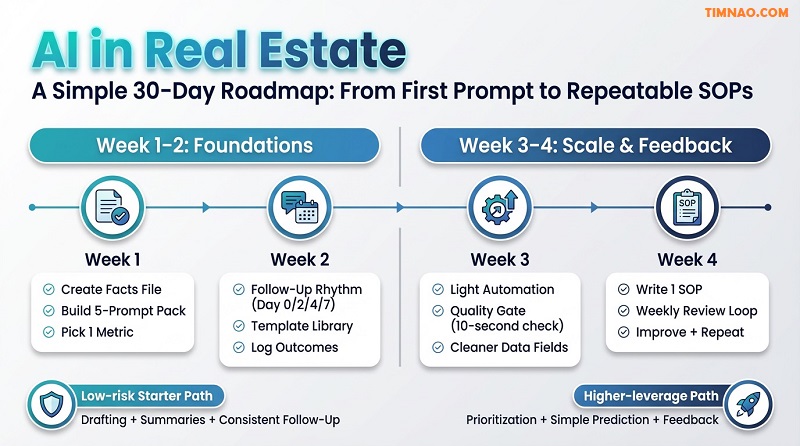
Week 1: Build your “Facts File” and Prompt Pack (foundation)
This week is about reducing errors and making AI outputs reliable.
Step 1: Create a facts file template
Store this in Notion (or a simple doc) and duplicate it per listing/property.
Facts file fields:
- Availability date (verified)
- Price/rent + what it includes (verified)
- Beds/baths/sqft (verified)
- Pet policy, parking, restrictions (verified)
- Key features you can prove (verified)
- Tour instructions (your process, not sensitive codes)
Step 2: Build a “Prompt Pack” (5 prompts only)
Save these prompts in one place so you reuse them daily:
- First reply (text + email)
- Includes 2 qualifying questions + next step
- Follow-up #1 (Day 2)
- Short check-in + one question
- Follow-up #2 (Day 4)
- Value add + two tour options
- Post-viewing recap
- Summary + next steps + deadline
- CRM update from notes
- Turn messy notes into structured fields
Use ChatGPT or Claude to draft these once, then edit to match your natural voice.
Step 3: Set one metric
Choose one:
- response time (minutes)
- reply rate (replies per 10 leads)
- tours booked per 10 leads
Write it down. If you don’t measure, you’ll drift.
Week 2: Install the Follow-Up Rhythm (where most money is lost)
Most beginners don’t lose deals because of bad sales skills. They lose deals because they stop following up consistently.
Build a simple 4-touch follow-up sequence
- Day 0: First reply (within minutes if possible)
- Day 2: Check-in + one question
- Day 4: Value add + two tour times
- Day 7: Polite “close the loop” message
Guidelines to keep it human:
- Each follow-up must add value or ask a yes/no question
- Avoid long paragraphs
- Keep one clear next step
Make it easy to execute
- Save templates as text snippets wherever you work
- Personalize only 1–2 lines (their need + your next step)
- Log each touch quickly (one word: “sent”)
This is where you’ll feel the first real win: more replies without working more hours.
Week 3: Add Light Automation (only after the workflow works manually)
Automation should remove friction, not remove thinking.
Start with simple “assistive automation”:
- When a new lead arrives → create a row in Google Sheets
- Add a task reminder for Day 2 / Day 4 follow-up
- Store the conversation summary in your notes system
If you want to connect tools, Zapier can help—but keep it minimal:
- one trigger
- one action
- no complicated chains
Your goal is consistency, not complexity.
Week 3: Introduce a “Quality Gate” so AI doesn’t create risk
A quality gate is a short checklist you run before anything goes out.
Use this 10-second gate:
- Are the facts correct (price, dates, availability)?
- Is the language neutral and compliant?
- Does the message include one clear next step?
- Does it sound like me?
If the answer is no, fix it quickly and move on.
This is how you scale AI usage without feeling nervous every time you hit send.
Week 4: Build your first SOP (repeatable process)
An SOP is a one-page document that turns “I hope I do this right” into “I can do this every time.”
Create one SOP for the workflow you just improved:
- Lead intake → first reply → follow-ups → booking → recap → CRM notes
SOP format (keep it short):
- Trigger (new lead arrives)
- Inputs (facts file + lead message)
- AI step (which prompt to run)
- Human check (quality gate)
- Action (send + log)
- Outcome tags (replied, booked, no response)
Store SOPs in Notion so you can evolve them over time.
Low-risk starter path vs higher-leverage path (choose based on your situation)
Low-risk starter path (best for most beginners)
- Focus: messaging, follow-up, summaries, checklists
- Goal: reduce admin and convert more leads
- Tools: ChatGPT / Claude + Notion + Google Sheets
Higher-leverage path (once basics are stable)
- Focus: prediction + prioritization
- Goal: spend time where conversion is highest
- Build: a simple lead score or churn risk tag
- Still keep human judgment for final decisions
If you try the higher-leverage path too early, you’ll just “predict” on messy inputs. Build the foundation first.
How do I know I’m ready to scale beyond 30 days?
You’re ready when:
- your prompts are saved and reused daily
- your response time improved measurably
- you follow up consistently without stress
- you have at least one SOP that a teammate could follow
- you can name your bottleneck (not guess it)
At that point, you can expand to:
- content engine (weekly posts + repurposing)
- simple chatbots for intake
- predictive prioritization
Now let’s close with practical takeaways so you don’t waste money chasing shiny tools.
Real Estate AI Takeaways: What to Do Next (Without Wasting Money)
What should I do immediately after reading this (today)?
Pick one workflow and commit to it for 7 days.
Best choice for most beginners:
- lead response + follow-up
Then do three actions today:
- Create one facts file template
- Save a 5-prompt pack
- Choose one metric to track
If you do only that, your AI usage becomes focused and profitable.
How do I avoid wasting money on tools and subscriptions?
Use this rule before you pay for anything:
- “Have I proven the workflow manually first?”
If not, you’re paying to automate confusion.
A practical buying checklist:
- Does this tool reduce time in a workflow I already do weekly?
- Can I measure the improvement (reply rate, vacancy days, resolution time)?
- Will this tool create compliance or data risk?
- Do I have a facts file and quality gate in place?
If you can’t answer those clearly, delay the purchase.
What’s a realistic “AI stack” for a beginner?
You don’t need a dozen platforms. A simple stack is enough:
- Writing + summaries: ChatGPT or Claude
- Notes + SOPs: Notion
- Simple tracking: Google Sheets
- Optional automation: Zapier
- If you publish content: WordPress with Rank Math
Start with the first three. Add the rest only if the workflow is already working.
How do I keep the writing natural so readers trust me?
Use AI for structure, not personality.
A simple process:
- Let AI draft a version
- You add one personal line per section (your real opinion or experience-based observation)
- Cut anything that sounds like hype
- Keep paragraphs short and specific
Readers trust specificity: real steps, real constraints, clear next actions.
What are the 6 practical takeaways to keep on a sticky note?
- Choose one workflow for 30 days; ignore everything else.
- AI drafts, you verify. Always confirm facts and compliance before sending.
- Build a facts file so AI doesn’t invent details.
- Track one metric so you know what’s improving.
- Follow-up is the money. Use AI to stay consistent without feeling spammy.
- Don’t buy tools to fix confusion. Fix the workflow first, then automate.
If you want a clean next step: build your lead response SOP this week, run it for seven days, and adjust once based on outcomes. That’s how beginners become “AI-powered” in a way that actually shows up in income.
Disclaimer
This article is for general educational and informational purposes only. It does not constitute legal, financial, tax, real estate brokerage, property management, or professional advice.
While the article discusses practical ways to use AI tools (including ChatGPT and Claude), AI-generated outputs can be inaccurate, incomplete, or outdated. You are responsible for verifying all facts, figures, availability, pricing, and statements before using them with clients or in any business decision.
Real estate laws, regulations, licensing rules, and fair housing requirements vary by location and can change over time. Always follow applicable local laws and your brokerage/property management policies, and consult qualified professionals (e.g., attorney, licensed broker, accountant, compliance officer) for guidance on contracts, disclosures, advertising language, tenant screening, and other regulated activities.
Any examples, templates, checklists, or workflows in this article are illustrative only. Results are not guaranteed and will vary based on market conditions, experience, execution, and the quality of your data and processes.
If this guide helped you understand AI in real estate and gave you steps you can actually use, you can support my work by buying me a coffee ☕🙂. Your support helps me keep publishing practical, beginner-friendly tips, templates, and real-world workflows you can apply right away.
👉 Buy me a coffee here: https://timnao.link/coffee 💛🚀









For the reason that the admin of this site is working, no uncertainty very quickly it will be renowned, due to its quality contents.