
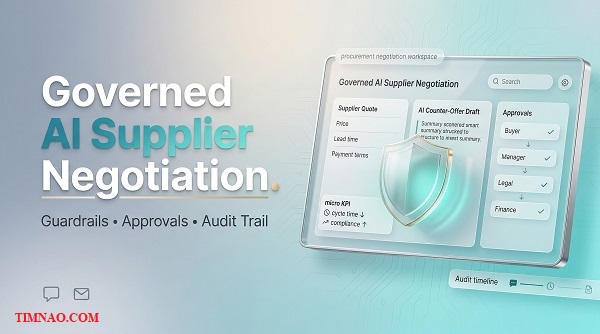
Governed AI Supplier Negotiation: A Practical, Powerful Blueprint 🚀
Governed AI supplier negotiation is quickly becoming the “safe middle path” between slow, manual procurement and risky, fully autonomous AI. It helps teams negotiate faster with suppliers—while staying inside policy through clear guardrails, multi-tier approvals, and audit-ready records. In this guide, you’ll learn how the model works, who will pay for it, and how to validate and launch it without building a massive procurement suite on day one.
Why governed AI supplier negotiation is suddenly “must-have” (not nice-to-have)
Procurement used to be judged mostly on savings. Now it’s judged on something tougher: savings plus speed plus compliance. That combination is exactly why governed negotiation is having a moment. Teams are asked to do more sourcing, more renewals, and more supplier back-and-forth—often with the same headcount—while audit expectations keep rising.
Here’s the practical reality behind the buzz: negotiation doesn’t fail because buyers don’t know what to say. Negotiation fails because the process is messy. People lose context. Approvals get stuck. Someone sends an email that technically “commits” to a term they weren’t allowed to concede. Then legal and finance step in, the thread resets, and the cycle time explodes.
A governed AI copilot becomes “must-have” when it turns negotiation from an inbox sport into a controlled workflow. Not rigid. Not slow. Just… predictable.
What changed recently (and why this matters now)
1) Procurement is becoming more scrutinized, not less.
As companies tighten budgets, leaders want traceability: Why did we agree to these payment terms? Who approved that exception? What policy justified the concession? If the answer lives in scattered emails, you don’t have a process—you have a memory problem.
2) Approval chains got longer, even in “fast” companies.
In many orgs, procurement decisions now touch more stakeholders: security, risk, finance, legal, operations. That’s not bureaucracy for fun; it’s because supplier commitments carry real downstream consequences. The problem is that approvals are often handled in the worst possible place: email threads.
3) Teams want AI help, but they fear AI mistakes.
Most procurement leaders are open to AI drafting. They’re not open to AI improvising. The category is shifting toward a simple demand: “Use AI to speed us up, but don’t let it create liability.”
4) Tail spend is still a silent killer.
The highest-value sourcing projects will always get attention. But the day-to-day grind—renewals, low-to-mid dollar quotes, vendor changes, small RFQs—eats time and creates compliance leakage. This is where governed AI makes sense first because the process is repetitive and the risk can be constrained.
Idea Snapshot (so you can quickly sanity-check the business)
- Best-fit buyers: Mid-market to enterprise procurement teams with high negotiation volume and formal approvals
- Core product: Negotiation workspace that drafts counters inside guardrails, routes approvals, and logs decisions
- Where it starts: Email-based negotiations (lowest friction)
- First use cases: Renewals, quote responses, tail-spend RFQs
- Pilot-friendly pricing: Typically positioned as a paid pilot (scoped tightly) before an annual rollout
- Time to first traction: Fast if you narrow the use case and show governance clearly
- Startup cost (lean): Can begin with prototype + concierge pilot before heavy engineering
- What makes it sticky: Policy workflows, approval logic, audit exports, and reusable playbooks
If you’re new to B2B SaaS, this is a helpful mental model: you’re not selling “AI negotiation.” You’re selling controlled speed.
The “control surface” that makes this category real
When procurement leaders say they want an AI copilot, they usually mean they want three things at once:
- Speed: fewer back-and-forth cycles, faster responses, fewer stalled threads
- Control: humans stay accountable, approvals are enforced, policies are visible
- Proof: audit-ready documentation is generated automatically, not retroactively
That’s the reason “governed” matters. It’s not a buzzword. It’s the difference between a tool procurement can use casually and a tool procurement can deploy broadly.
Now, once you understand why the category is heating up, the next question becomes obvious: who do you sell to first?
The buyers you should target first: CPOs, category managers, and “tail-spend firefighters”
A common founder mistake is pitching procurement as a single persona. It’s not. Procurement buying decisions involve multiple roles, and each role cares about different outcomes. If you try to sell everyone the same story, you’ll sound generic—and you’ll get “interesting, but not a priority.”
Instead, start with the people who feel the pain daily and can sponsor a pilot quickly.
CPOs and Heads of Procurement (the “risk + governance” buyers)
CPOs care about standardization, control, and organizational outcomes. They’re the ones who get pulled into escalations after something goes wrong.
They pay when they believe your product will:
- reduce policy leakage (exceptions that happen quietly),
- compress cycle time (speed becomes a KPI),
- and make audits less painful (proof on demand).
How to speak to them as a beginner founder:
Don’t lead with features. Lead with “here’s what we can make safer and faster in 30 days.” Offer a pilot that produces a measurable artifact: an approval log export, a cycle time report, and a clear record of policy compliance.
Category managers (the “workload + outcomes” buyers)
Category managers live in negotiation threads. They know which suppliers always push payment terms, which clauses always trigger legal, and which renewals always stall.
They pay because it improves their day-to-day reality:
- less time drafting and re-drafting,
- less time chasing approvals,
- fewer “oops” moments where something got conceded accidentally.
How to win them:
Give them a workflow that feels like an assistant, not a supervisor. Make it easy to paste a quote, see what changed, draft a counter, and trigger approvals without leaving the context.
Procurement operations / procurement excellence (the “process owners”)
These people might not negotiate every day, but they own the machinery: playbooks, approvals, tooling, reporting, compliance.
They pay because your product helps them enforce standards:
- consistent approval matrices,
- clear policy enforcement,
- dashboard-ready audit logs,
- easier training of new buyers.
How to win them:
Bring templates. Bring structure. Show how your guardrails can be configured, updated, and applied consistently. This persona loves clarity and will become an internal champion if your system reduces chaos.
“Tail-spend firefighters” (the fastest wedge to pilots)
This is less a title and more a reality: someone is constantly dealing with small-to-medium vendor requests that never stop. It’s not glamorous, but it’s urgent.
They pay because it reduces the overwhelm:
- fewer back-and-forths,
- faster approvals,
- predictable counters,
- less time wasted on repetitive negotiation patterns.
This segment is where you can often get your first pilots because:
- the volume is high,
- the process is messy,
- and the risk can be controlled with guardrails.
A quick way to pick your first niche (so you don’t boil the ocean)
If you need a beginner-friendly decision rule, use this:
Pick the niche where you have two out of three:
- High negotiation volume (many threads per month)
- Formal approvals (real bottleneck)
- Clear repeatable patterns (easy to template)
For many startups, renewals (especially SaaS/services) and tail-spend RFQs are the cleanest entry points.
Now let’s talk about what these buyers actually want to purchase—because it’s not what most founders assume.
What they actually want to buy: a negotiation workspace that makes control feel effortless
Procurement buyers don’t want another tool that forces them to “do more steps.” They want fewer steps—but with better control. This is where product design matters more than clever prompting.
If you want this to feel like something procurement teams adopt quickly, build it as a negotiation workspace with a few core screens that reduce chaos.
The “three-pane” workspace mental model (simple, effective)
A great beginner-friendly design is basically three areas:
- Supplier Offer Pane (what we received)
- quote lines, terms, attachments
- highlights of changes vs last round
- risk flags (payment terms, liability, delivery, warranty)
- Proposed Counter Pane (what we plan to send)
- AI-drafted counter-offer within guardrails
- short justification (“why this is within policy”)
- optional concession ladder suggestions
- Governance Pane (who must approve and why)
- approval ladder triggered by thresholds
- a clear diff of what changed
- one-click approve/reject + comments
- automatic audit logging
This layout makes control feel natural. The buyer doesn’t feel like they’re “submitting forms.” They feel like they’re moving a negotiation forward with guardrails quietly protecting them.
What “guardrails” should look like in real life (not theoretical)
Avoid building an over-engineered rules engine too early. In your MVP, guardrails can start as:
- Price boundaries: target price, floor price, maximum discount
- Terms boundaries: payment terms range, delivery window range, contract length max
- Clause constraints: “must include” and “never accept” clauses
- Exception triggers: anything outside the range must be approved
- Role permissions: who can propose what, who can approve what
Keep guardrails visible. Hidden rules make people nervous. Visible rules make the system feel like a partner.
Approvals should reduce friction, not add it
Approvals fail when approvers don’t understand the context. Your job is to hand them a decision in a clean package.
A strong “approval packet” includes:
- a plain-English summary of the supplier ask,
- the proposed counter,
- a highlighted diff of changes,
- and a short note: “This triggers approval because X threshold.”
That’s how you get fast approvals. Approvers don’t want to negotiate; they want to authorize safely.
Audit trails: the silent feature that closes deals
A lot of founders treat audit logs like a checkbox. Procurement doesn’t. Audit logs are the difference between “we can use this” and “we can deploy this.”
In practical terms, your audit trail should capture:
- when the supplier offer arrived (and what it contained),
- what the AI suggested,
- what the human edited,
- who approved, when, and with what comment,
- what message was sent,
- and the outcome.
Even if your first export is a simple CSV or PDF, the point is powerful: audit readiness becomes automatic.
The first “must-have” outcome your product should deliver
For early adoption, focus on one clear win:
“We respond to supplier quotes faster, with fewer policy exceptions, and approvals stop living in messy email threads.”
If you can deliver that, procurement leaders won’t care that your AI isn’t perfect. They’ll care that you made their process controllable.
At this point, you’ve got the right buyer and the right product shape. Next comes differentiation—because the world is about to flood with generic AI tools.
Your differentiation: how not to become “another AI email writer”
If your product is perceived as “AI that writes negotiation emails,” you’ll lose. Not because drafting isn’t valuable, but because drafting alone is easy to copy, easy to replace, and hard to defend.
The winning position is: governance-first negotiation execution.
Your differentiation lives in the workflow and control mechanisms, not the prose quality.
The “Trust Triangle” positioning (use this everywhere)
Procurement trust tends to come from three visible promises:
- Policy: “The system enforces our rules.”
- People: “Humans approve high-risk decisions.”
- Proof: “Everything is logged for audit.”
A generic AI email writer can’t credibly offer all three. You can.
So make your demo and messaging prove the triangle fast:
- show the guardrail rule,
- show the approval trigger,
- show the audit record.
If a buyer sees those in the first 5–7 minutes, your product stops feeling like a toy.
What NOT to claim (even if it’s tempting)
To sound human—and to sound credible—avoid the hype traps:
- Don’t lead with “autonomous negotiation.”
Start with “copilot + approvals.” Autonomy can come later, after trust. - Don’t promise “guaranteed savings.”
Procurement will challenge attribution. Focus on cycle time, compliance, and consistency first. - Don’t position against procurement suites.
You’re a layer that makes negotiation execution safer and faster, not a replacement of ERP/procurement systems on day one. - Don’t hide behind jargon like “agentic.”
Buyers don’t care about vocabulary. They care about control and accountability.
How to build “moat” in a space everyone thinks is easy
Early-stage moat here looks like a set of practical advantages that compound:
- Policy configuration that mirrors real organizations
Approval matrices, thresholds, roles—these are messy in real life. If you support the messy reality, you win trust. - Reusable playbooks that reduce onboarding time
Category guardrails and concession ladders become templates. Templates become speed. Speed becomes expansion. - Audit-ready outputs that procurement can use in reporting
Exports, logs, and dashboards become sticky because they serve internal control needs. - Integration strategy that starts lightweight and grows
Email wedge first. Then the integrations customers ask for most. This avoids roadmap chaos.
A beginner-friendly “differentiation checklist” before you build more AI
Before you spend time making the AI “smarter,” check these boxes:
- Can a buyer see the policy boundaries clearly?
- Can an approver approve in under 30 seconds with full context?
- Does every step automatically leave an audit record?
- Can the team reuse guardrails across similar negotiations?
- Is the workflow faster than email chaos, not slower?
If your answers are mostly “yes,” you’ll win pilots even with a simple model. If your answers are “not yet,” more AI won’t save you.
A practical example of a “governed” negotiation moment
Imagine a supplier pushes for net-90 payment terms and adds a liability clause the buyer shouldn’t accept.
A generic AI tool drafts a polite response. Helpful, but risky.
A governed workspace does something more valuable:
- flags the payment term as out-of-range,
- blocks acceptance of the liability clause,
- drafts a counter within policy,
- triggers legal approval automatically,
- and logs the entire decision chain.
That’s not “better writing.” That’s better procurement operations.
And once your product is framed this way, your next sections in the full article naturally follow: how to validate pilots, how to price, how to set up operations, and how to get your first customers without sounding like every other AI startup.
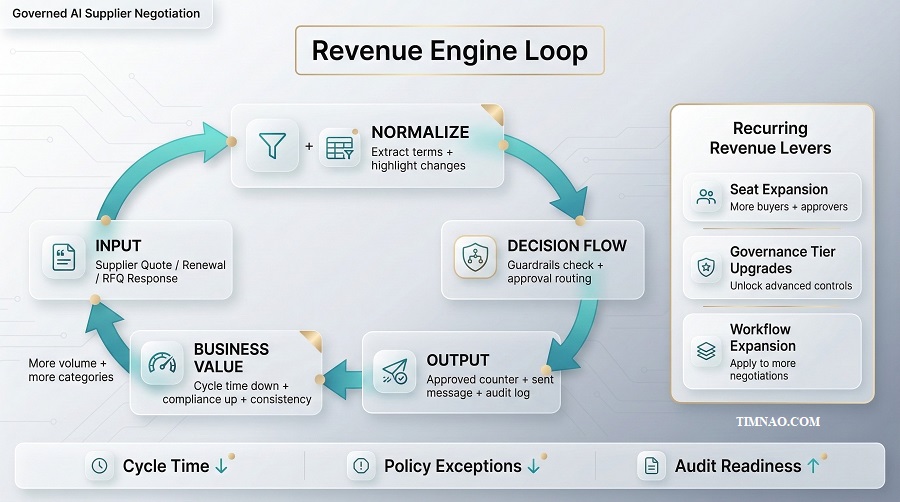
The revenue engine in one diagram: input → decision flow → output → recurring revenue
At its core, this business wins when it turns messy negotiation threads into a repeatable decision workflow. That repeatability is what makes revenue predictable.
Here’s the “diagram in words” that explains how money is made:
Supplier input (quote / renewal / RFQ response)
→ Extraction + normalization (key terms, deltas, red flags)
→ Decision flow (guardrails check + approval routing)
→ Output (approved counter + sent message + logged decision)
→ Business value (faster cycle time, fewer policy exceptions, audit-ready records)
→ Recurring revenue (seats + governance tier + expansion across categories)
If you’re building this as a beginner, keep reminding yourself: you’re not selling “AI.” You’re selling a controlled system that reduces friction while increasing accountability.
What customers are really paying for (the “value units”)
Procurement budgets are rarely approved because something is “cool.” They’re approved because a buyer can point to one of these value units:
- Cycle time saved: fewer days from quote received → approved response sent
- Approval compliance: fewer “side deals” and policy exceptions
- Consistency: playbooks actually get used (not just documented)
- Audit readiness: logs exist without someone spending Friday nights assembling evidence
Your pricing should map to these value units, not to model tokens or “AI features.”
The three recurring revenue levers you’ll rely on
- Seat expansion
Start with a small buyer group (3–10 users), then expand to more categories and stakeholders (approvers, legal, finance). - Governance tier upgrades
Basic guardrails and approvals get you in the door. Advanced policy controls, SSO, and richer audit exports justify higher tiers. - Workflow expansion
Land on email-based negotiation threads. Then expand into renewals, RFQs, supplier onboarding checkpoints, contract handoff, and integrations.
A simple rule: if your product becomes part of “how approvals happen,” churn drops naturally. That workflow becomes sticky because it’s tied to control.
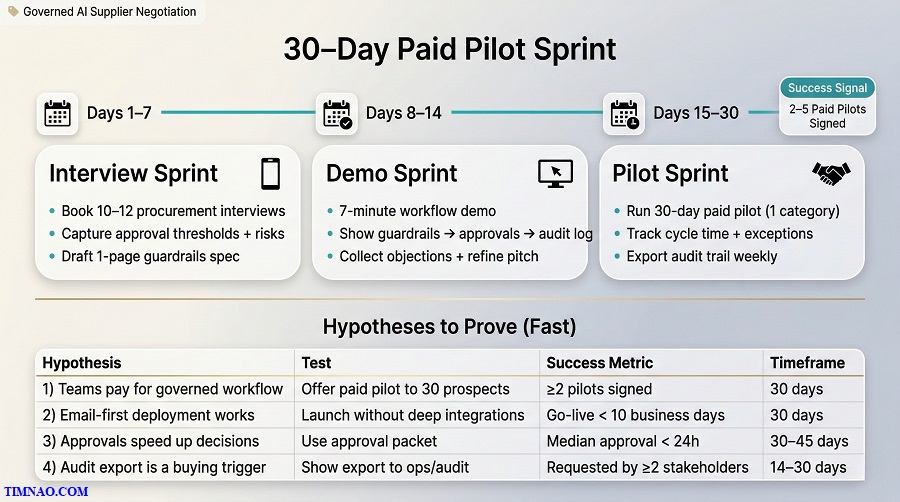
A lean validation plan to reach 10–20 paid pilots (with a 30-day clock)
If you want to validate this business quickly, you need to stop thinking like a builder and start thinking like a procurement operator. Operators care about one thing: can this fit into next week’s work without drama?
So your 30-day validation plan should answer four questions:
- Will procurement leaders pay (not just say “interesting”)?
- Can you deploy with low friction (email wedge, minimal integration)?
- Do approvals and guardrails feel like help (not overhead)?
- Can you show a credible “before vs after” story?
Your 30-day plan (simple and aggressive, but doable)
Days 1–5: Customer discovery that creates a pilot-ready spec
- Talk to 8–12 people across procurement, finance, and legal (even 15-minute calls count).
- Extract two things:
- their common negotiation scenarios (renewals, RFQs, quote responses),
- their approval triggers (discount thresholds, terms changes, clause red flags).
Deliverable by Day 5: a one-page Guardrails + Approvals Spec customized to one target segment.
Days 6–12: Demo that proves control in under 7 minutes
Your demo should show the “trust triangle” quickly:
- a visible guardrail rule,
- an approval triggered by a threshold,
- an audit log entry created automatically.
If your demo can’t show those three things, you’ll get stuck in “AI curiosity land,” not “budget land.”
Days 13–30: Paid pilots with narrow scope
Don’t pitch a big rollout. Pitch a scoped pilot:
- one category,
- one approval ladder,
- one team,
- and a fixed number of negotiation threads (ex: 30–100 threads).
The scope is what makes it safe for them—and manageable for you.
A practical hypothesis table (so you don’t fool yourself)
| Hypothesis | Test | Success metric | Timeframe |
|---|---|---|---|
| Buyers will pay for governance-first negotiation workflow | Offer a paid pilot to 30 prospects | 3–5 paid pilots agreed | 30 days |
| Email wedge is deployable without IT drama | Run pilot using email forwarding + exports | Pilot live in < 10 business days | 30 days |
| Approvals are a “speed feature” when packaged right | Measure approval turnaround with your packet | Median approval time < 24 hours | 30–45 days |
| Guardrails reduce risky exceptions | Track out-of-policy attempts vs approvals | Fewer unapproved exceptions | 30–45 days |
| Audit trail is a strong buying trigger | Ask procurement ops to review exported logs | “Audit-ready” feedback from 2+ stakeholders | 14–30 days |
Notice what’s missing: “the model is smart.” Procurement rarely buys that on its own. They buy safe execution.
The pilot offer that converts (without sounding like a generic startup)
Instead of saying “we have an AI tool,” say:
- “We help you respond faster to supplier quotes and renewals without policy leakage.”
- “We install guardrails + approvals + audit logs around negotiations that already happen in email.”
- “We’ll run a 30-day pilot in one category. You keep control. We measure cycle time and approval friction.”
Then add one sentence that reduces fear:
- “Nothing gets sent without the right approvals.”
Procurement leaders relax when they hear that.
Build the MVP on email first: the workflow you can ship in 6–10 weeks
Email is not glamorous. It’s also where most procurement negotiation still lives—especially in mid-market organizations and in the messy edges of enterprise processes.
An email-first MVP gives you three huge advantages:
- low integration friction,
- faster time-to-value,
- and real usage data you can learn from.
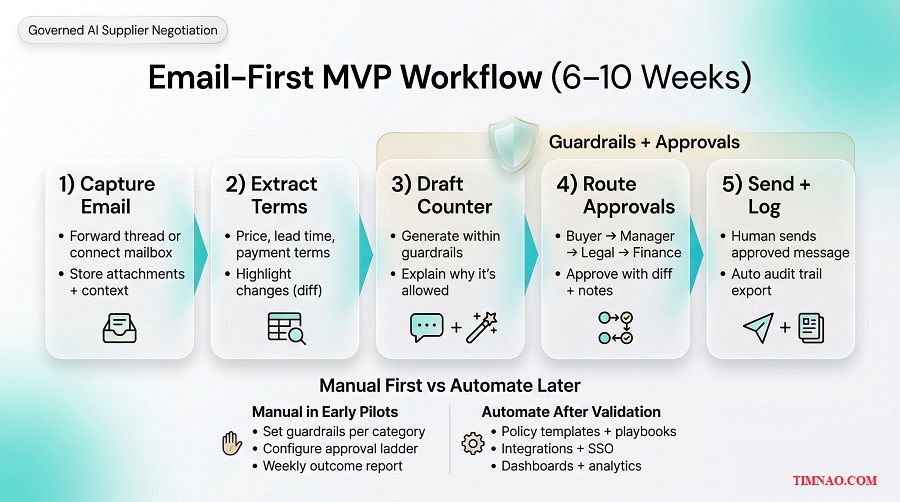
The MVP workflow (what must exist on day one)
If you ship nothing else, ship this flow end-to-end:
- Capture the supplier message
- Forward an email thread to your system, or connect via a mailbox.
- Store the conversation context and attachments.
- Extract key terms (good enough beats perfect)
- Pull out the basics: line items, pricing, lead time, payment terms, contract length, key clause signals.
- Show what you extracted so users can correct it.
- Generate a governed counter draft
- Draft a response that stays inside the guardrails.
- When it can’t comply, it should say so plainly and propose a safe alternative.
- Trigger approvals automatically
- Rule-based triggers (thresholds, term changes, red flags).
- Approvers see an “approval packet,” not a messy thread.
- Send + log
- Initially, keep sending manual: the buyer copies the approved draft into email.
- Log every decision step automatically.
This keeps the product lightweight, and it avoids the “we need IT approval to send emails from your system” delay.
What you can keep manual early (and why that’s okay)
In early pilots, being “concierge” is normal. You can manually:
- set up guardrails per category,
- configure the approval ladder,
- create clause templates,
- and send weekly reports.
You’re learning what to automate. Manual work is only a problem if it becomes permanent.
A realistic 6–10 week build plan (beginner-friendly milestones)
Weeks 1–2: Prototype + workflow skeleton
- A simple UI: inbox → extracted terms → draft counter → approval screen → audit log.
- Basic role permissions: buyer vs approver.
Weeks 3–4: Guardrails + approval triggers
- Start with threshold rules and “must/never” clause flags.
- Build an approval packet view with a clear diff.
Weeks 5–6: Audit logging + exports
- Append-only event logs (who did what, when).
- Export to CSV/PDF so procurement ops can validate quickly.
Weeks 7–10: Hardening + pilot features
- Thread handling edge cases, attachment handling, better extraction, better review UX.
- Optional: simple dashboards (cycle time, approvals pending, exceptions).
If you’re non-technical, you can still do this with a smaller scope:
- clickable prototype in Figma,
- manual extraction and drafting behind the scenes,
- approvals handled through a simple workflow tool,
- and audit logs tracked in a structured spreadsheet during the pilot.
That’s not “fake.” That’s validation.
Tools that make MVP life easier (official sites only)
- Authentication and B2B access control: WorkOS or Auth0
- Database + backend starter: Supabase
- Payments when you’re ready: Stripe
- Email infrastructure: Postmark or SendGrid
- Workflow glue for early ops: Zapier or Make
Pick a stack you can maintain. A “simple but stable” product beats a complex platform that stalls.
Pricing tiers + a simple CAC/LTV sanity check (without getting lost)
Pricing is where beginner founders accidentally trap themselves. If you price too low, you’ll be forced into heavy customization to justify renewals. If you price too high too early, you’ll trigger procurement’s slowest buying path.
The sweet spot is paid pilot pricing that feels safe, followed by an annual plan that expands naturally.
A clean pricing ladder (pilot → platform → expansion)
Tier 0: Paid pilot (30–45 days)
You’re selling scope, not perfection. A good pilot includes:
- one use case (renewals or quote responses),
- one category (or one supplier group),
- one approval ladder,
- audit export,
- and a weekly check-in.
Pilot pricing depends on deal size and complexity, but the structure matters more than the number:
- fixed monthly pilot fee,
- capped threads,
- clear deliverables.
Tier 1: Core platform (annual contract)
A simple model that procurement can understand:
- Buyer seats (the people drafting and negotiating)
- Approver seats (managers, finance, legal reviewers)
- Governance tier (policy depth + audit exports)
Tier 2: Add-ons that match enterprise budgets
- SSO + enterprise access controls
- Advanced retention / data controls
- Integrations
- Reporting dashboards
- Playbook library and clause management
The point is to land with something small, then grow into a bigger contract without changing the product story.
A beginner-friendly unit economics sanity check
You don’t need complex spreadsheets to stay grounded. You need a few numbers and a consistent method.
Start with:
- ACV (Annual Contract Value): what you charge per year
- Gross margin: revenue minus direct costs (hosting, email, model usage)
- CAC (Customer Acquisition Cost): time + tools + any paid spend to close a customer
- Payback period: how many months to earn back CAC
Here’s a simple way to estimate CAC without pretending you have perfect data:
- Track your time per closed pilot (hours).
- Assign a conservative cost per hour (even if it’s just “what you could earn elsewhere”).
- Add tool costs (CRM, email tools, demo tools).
- Divide by number of customers closed.
CAC isn’t just money. It’s your time. Early on, time is your scarcest resource.
A small example (for intuition, not promises)
Let’s say:
- you close a customer at $5,000/month on an annual deal (ACV = $60,000),
- your direct costs are low enough that gross margin stays healthy,
- you spend 40 hours to close them across outreach, demo, and onboarding.
If you can repeat that motion and expand accounts over time, the model works. If you need 200 hours of customization per customer, the model becomes consulting dressed as SaaS.
So your goal is not “charge more.” Your goal is standardize onboarding and protect your time.
Pricing mistakes to avoid (these are common)
- Pricing per negotiation thread too early
It can make customers feel like they’re being taxed for usage. Use it later as an add-on if it fits. - Undercharging to win logos
Cheap customers are often the hardest customers. They demand more and churn faster. - Letting every customer rewrite your product
Procurement is full of edge cases. If you customize everything, you’ll never scale. Build templates and configurable rules instead.
The healthy approach is: charge enough to make pilots serious, keep scope tight, and let expansion drive growth.
First traction channel: LinkedIn + targeted cold email to procurement leaders (scripts included)
If you’ve built the MVP (or even a credible prototype) and you can explain pricing without getting tangled, your next bottleneck is simple: getting real procurement people to look at it.
For this idea, your first traction channel shouldn’t be ads or “viral AI content.” Procurement buyers don’t buy that way. Early traction comes from trust + relevance + a tight pilot offer—and the fastest way to earn those is a mix of LinkedIn and cold email.
Start with a narrow “pilot promise” (so you don’t sound generic)
Before you write a single outreach message, decide what you’re actually offering. Keep it narrow and operational:
- Use case: “Quote responses” or “Renewals” or “Tail-spend RFQs”
- Scope: 1 category, 1 approval ladder, capped negotiation threads
- Outcome: faster response cycle time + fewer policy exceptions + clean audit export
If you can’t describe your pilot in one breath, prospects will assume it’s complicated—and ignore you.
Build a list that’s small but sharp (50–120 prospects)
Beginners often try to reach “everyone in procurement.” Don’t. Instead, build a list where your offer is clearly relevant.
A good list includes companies with:
- a visible procurement function (job postings, org chart hints, procurement tools mentioned),
- lots of vendor activity (multi-site operations, IT spend, supplier-heavy categories),
- and enough complexity to have approvals (finance/legal involvement).
Tools that make list-building easier (optional):
- LinkedIn for role targeting and context
- LinkedIn Sales Navigator for tighter filtering
- Apollo or ZoomInfo if you need verified emails at scale
- Hunter for lightweight email discovery
You don’t need all of these. One reliable path is enough.
Who to message first (order matters)
When you’re early, target the people most likely to say “yes” to a scoped pilot:
- Procurement Operations / Procurement Excellence (process owners love governance)
- Category Managers (they feel the daily pain)
- Head of Procurement / CPO (they sponsor budget, but often want proof first)
A practical approach: start with ops + category managers, then loop in leadership after you have pilot clarity.
Your messaging framework (so it feels human, not salesy)
Use this structure:
- Personal context: “Saw you manage X category / vendor programs.”
- Problem (specific): “Approvals and policy checks slow negotiation.”
- What you built (plain): “A governed negotiation workspace: guardrails + approvals + audit trail.”
- Low-risk ask: “Can I show a 7-minute workflow demo?”
- Pilot option: “If relevant, we can run a 30-day paid pilot in one category.”
That’s it. No hype. No “AI revolution.” Just a credible workflow offer.
LinkedIn connection message (short, clean)
Connection note (300 characters-ish):
Hi {{Name}} — I’m building a governed AI negotiation copilot for procurement (guardrails + approvals + audit trail). If you handle renewals/RFQs, I’d love to share a quick workflow demo and get your take.
LinkedIn follow-up (after they accept)
Follow-up #1:
Thanks for connecting, {{Name}}. Quick question: where do supplier negotiations slow down most for your team—drafting the counter, getting approvals, or tracking what was agreed?
If helpful, I can share a 7-minute demo showing how we keep counters within policy and route approvals automatically.
Cold email sequence (3 emails, beginner-friendly)
Email #1 (Day 1)
Subject options:
- Governed supplier negotiation for {{Company}}
- Faster approvals in supplier negotiations
- Quick question on procurement approvals
Body:
Hi {{Name}},
I’m building a governed AI negotiation workspace for procurement teams—guardrails, multi-tier approvals, and an audit trail that logs every decision automatically.
Teams use it to respond faster to quotes/renewals without “policy leakage” or approval chaos in email threads.
Open to a quick 10-minute call? I can show a short workflow demo using a sample quote.
Best,
{{Your Name}}
Email #2 (Day 4)
Subject: Re: procurement approvals + negotiation speed
Body:
Hi {{Name}},
Just following up. If you’re not the right person, who owns negotiation playbooks and approval routing for supplier terms at {{Company}}?
I’m happy to send a 1-page pilot outline (one category, one approval ladder, capped threads).
Thanks,
{{Your Name}}
Email #3 (Day 9)
Subject: Should I close the loop?
Body:
Hi {{Name}},
No worries if timing isn’t right. I’m scheduling a few 30-day pilots focused on quote responses and renewals.
If reducing approval back-and-forth is a priority this quarter, I’d love to show the workflow. If not, I’ll close the loop.
Best,
{{Your Name}}
This tone works because it’s calm. Procurement people are busy and allergic to drama.
The landing page outline that converts procurement leads
Keep the page simple and operational:
- Headline: Governed supplier negotiations—faster, safer, audit-ready
- 3 bullets: Guardrails, approvals, audit trail
- Mini workflow: Quote → Draft counter → Approve → Send → Log
- Use cases: renewals, quote responses, tail spend RFQs
- Pilot box: “30-day governed negotiation pilot (1 category, capped threads)”
- FAQ: data handling, approvals, integrations, who has final control
- CTA: Book a demo
Procurement doesn’t need long storytelling. They need clarity and safety.
Security, compliance, and legal guardrails: the questions you’ll get immediately
The moment a procurement leader likes your product, the conversation shifts from “cool” to “risk.” That’s not resistance—it’s how responsible teams operate.
Your goal isn’t to have perfect enterprise compliance on day one. Your goal is to have credible, consistent answers and a clear roadmap.
The “top questions” list (print this before every demo)
Data & privacy
- Where is our data stored?
- Is our data used to train any models?
- Who can access our negotiation threads and attachments?
- Can we delete data? What’s the retention policy?
Security controls
- Do you support SSO?
- Do you have role-based access control (RBAC)?
- Is data encrypted in transit and at rest?
- Do you log admin actions and user events?
AI safety
- How do you prevent the AI from inventing terms or making commitments?
- Can we restrict what the AI is allowed to propose?
- Can we require approvals before anything is sent?
Legal & audit
- Can we export an audit trail for internal controls?
- Can we prove who approved exceptions and why?
- Do you support version history for changes?
If you answer these cleanly, you’ll feel the buyer relax.
The minimum acceptable posture for early pilots (what to implement first)
For a beginner founder, here’s the baseline that makes pilots possible:
- “Nothing is sent without approval.”
Even if AI drafts, the human remains the sender (at least in early versions). This instantly reduces legal anxiety. - Hard guardrails + visible rules.
Avoid “soft suggestions” that buyers can accidentally ignore. If something is forbidden, block it or force an approval. - Role-based permissions.
Buyers can draft. Approvers can approve. Admins can manage policies. Keep it simple and strict. - Audit logs that are exportable.
A basic export (CSV/PDF) is often enough for a pilot. The key is that the trail is automatic. - Clear data handling statement.
Write one page that explains storage, access, retention, and model training posture.
Tools that speed up credibility (without overbuilding)
If prospects ask about security readiness, you can point to well-known compliance workflow tools (when you’re ready):
You don’t need these on day one. But it helps to know what “grown-up” looks like.
How to talk about AI safely (simple language procurement trusts)
Avoid vague statements like “the AI is accurate.” Instead say:
- “The AI is constrained by your policy guardrails.”
- “Exceptions trigger approvals automatically.”
- “We treat AI output as a recommendation, not authority.”
- “Every decision is logged and exportable.”
That’s the language that matches procurement reality.
The legal guardrail you should adopt early (even as a startup)
Put this into your product behavior and your terms:
- The platform assists negotiation; it does not have authority to bind either party.
- Customers configure approval rules; customers remain responsible for final approvals.
- The system records decision history for audit and governance.
You’re not trying to dodge responsibility—you’re aligning with how procurement accountability works.
What’s already happening in the market—and the gap you can exploit
You’re not alone in seeing this opportunity. Large platforms are clearly moving toward AI-assisted procurement, and negotiation automation is no longer theoretical.
A few signals worth paying attention to:
- SAP has brought its generative AI copilot Joule into SAP Ariba Contracts, showing that AI copilots are becoming native inside procurement stacks. (SAP Help Portal)
- Oracle has introduced an AI agent positioned to automate sourcing from creation to award for lower-dollar, high-volume negotiations while maintaining policy compliance. (Oracle Docs)
- Zip is explicitly pushing “agentic AI” across intake, approvals, risk, and sourcing—meaning governance and orchestration are becoming central themes, not side features. (Zip)
- Pactum has built autonomous negotiation agents used by large enterprises, proving that negotiation automation can work at scale in specific segments (especially long-tail negotiations). (Pactum)
So if giants are moving in, where can a startup still win?
The gap: negotiation execution governance at the messy edges
Big suites are powerful, but they often move slowly. They also tend to assume companies have clean, consistent processes. In reality, procurement work spills outside systems constantly—especially in email, renewals, and supplier exceptions.
That creates a gap you can exploit:
- A lightweight governed negotiation layer that works where negotiations already happen
- A fast pilot motion that doesn’t require months of integrations
- A focus on approvals + audit trails, not just drafting text
In other words, you can win by making the “boring” workflow smooth and safe.
Where to wedge (3 practical entry points)
1) Renewals (especially services and software)
Renewals repeat, involve sensitive terms, and trigger approvals. A governed workflow can reduce the back-and-forth dramatically.
2) Quote responses for operational categories
Packaging, facilities, logistics, maintenance—lots of quotes, lots of small negotiations, lots of inconsistency.
3) Tail-spend RFQs
This is where teams are most overwhelmed and most open to help—as long as control stays intact.
Pick one wedge. Get pilots. Then expand.
What to avoid competing on (it’s a trap)
- “Our AI writes better emails.” That becomes a commodity fast.
- “We replace your procurement suite.” That becomes a long, expensive sales cycle.
- “We negotiate autonomously.” That triggers legal and supplier adoption concerns early.
Compete on what’s hard to replicate quickly: policy configuration + approvals + auditability + workflow adoption.
How to position your product against suites (without picking a fight)
A smart line that works in conversations:
“We don’t replace your procurement system. We make negotiation execution faster and more governed, starting with email—and we integrate deeper only after value is proven.”
That positioning feels reasonable. Reasonable sells in procurement.
Scaling paths after validation: integrations, playbooks, and partner ecosystems (plus scale traps)
Scaling this business isn’t about adding random features. It’s about building repeatable adoption: faster onboarding, wider rollout inside an account, and a sales motion that doesn’t depend on you personally.
A good mental model is to scale in layers:
- Land with one use case (renewals or quote responses)
- Expand to more categories and teams (more seats + more approvers)
- Embed into the stack (integrations + governance reporting)
- Multiply distribution (partners + ecosystem)
Scaling path #1: Integrations that unlock bigger deals (without stalling you)
Integrations are powerful, but they’re also the easiest way to kill momentum. The trick is to build integrations in the order that supports adoption, not in the order prospects casually mention.
Here’s a practical integration ladder that works for beginners:
Phase A: “No-IT drama” integrations (fastest ROI)
These are the integrations that make your product feel real without requiring months of security review.
- Email and calendars: Google Workspace and Microsoft 365
- Team collaboration: Slack and Microsoft Teams
- Identity/SSO (when you start selling to bigger orgs): WorkOS
Why this matters: once approvals show up where people already work (email/Slack/Teams), adoption jumps.
Phase B: “Prove it” exports (integration-light but enterprise-friendly)
Before you build deep connectors, give teams clean outputs:
- audit log exports (CSV/PDF)
- approval matrix exports
- negotiation outcome summaries
This sounds simple, but it’s a scaling lever. Procurement ops and auditors love anything they can slot into existing reporting routines.
Phase C: Procurement suite integrations (only after you’ve earned the right)
Once you have 5–10 paying customers and you know the patterns, then start building deeper connectors to systems like:
The point is not “integrate with everything.” The point is to integrate with the one or two systems your target segment uses the most, and do it in a way that supports your wedge (negotiation execution governance).
Beginner rule: if an integration doesn’t reduce onboarding time or increase seat expansion, it’s probably a distraction.
Scaling path #2: Playbooks as a product moat (so onboarding gets easier every month)
If integrations are the “plumbing,” playbooks are the “brains.” And playbooks scale beautifully because they turn tribal knowledge into reusable assets.
Your playbook system can start simple:
- Category templates (e.g., logistics, facilities, IT services)
- Concession ladders (stepwise “what we can give up” and when)
- Clause policies (“must-have” and “never accept”)
- Approval thresholds by category and spend band
Over time, playbooks become your moat in three ways:
- Faster onboarding
Instead of weeks of configuration, you offer “80% ready” templates that teams adjust. - Consistency across buyers
Playbooks turn negotiation quality into a system behavior, not a training problem. - Expansion inside accounts
When procurement leadership sees playbooks working in one category, they can roll it out to others without reinventing rules.
A good productized offer here is a Playbook Starter Pack as part of onboarding:
- 3 category templates
- 1 approval ladder template
- 1 audit export format
- 10 “approved language blocks” for negotiation emails
It’s tangible. It also makes your pilots feel structured and safe.
Scaling path #3: Partner ecosystems that sell for you
Procurement teams trust procurement people. That’s why partnerships can be a huge accelerator—after your product is proven.
Your best partner types:
1) Procurement consultants and fractional procurement leaders
They’re already advising companies on controls, approvals, and sourcing process. Your product becomes a tool they can implement, not just recommend.
2) System integrators and ERP/procurement implementers
They’re constantly dealing with “the last mile” problems (workflow adoption, approvals, governance). Your product can fill a gap without replacing the core suite.
3) Legal ops / contract operations consultants
If your workflow touches contract handoff, this becomes a natural adjacency.
How to make partners actually care:
- create a partner-facing demo (short, operational, focused on governance)
- provide a fixed-scope implementation package
- share revenue or offer referral fees
- give them “proof artifacts” (audit export examples, approval workflow templates)
Partners won’t sell a vague platform. They will sell a repeatable package.
Scaling path #4: Expand your “surface area” carefully (without losing trust)
After you win negotiation execution, adjacent workflows start to show up naturally:
- supplier onboarding checkpoints
- risk reviews before approving exceptions
- renewal preparation (stakeholder alignment before counters go out)
- contract handoff and “what we agreed” summaries
The safest way to expand is to keep the same promise: governed decisions with approvals and logs. If a feature doesn’t reinforce that promise, it risks confusing the market.
Scale traps (the fastest ways to derail a good product)
These are the traps that quietly kill momentum—even when sales look “busy.”
Trap 1: Custom logic for every customer
Procurement is full of edge cases. If you build one-off rules each time, you become a services company.
Mitigation: templates + configurable policies + clear limits in pilots.
Trap 2: Integration-first roadmap
Founders sometimes think integrations are the product. They’re not. They’re accelerators.
Mitigation: prove value with email wedge + exports, then integrate.
Trap 3: Selling autonomy before trust
“Autonomous negotiation” sounds bold, but it triggers legal and supplier adoption fears.
Mitigation: copilot-first, approvals always, human is the sender early.
Trap 4: Competing on “better writing”
If your differentiation is “nicer emails,” you’ll be replaced fast.
Mitigation: compete on governance workflow: guardrails + approvals + audit.
Trap 5: Overpromising savings
Savings are real, but attribution is messy.
Mitigation: sell cycle time, compliance, and consistency first; let savings be upside.
Founder FAQ: the practical questions buyers (and you) will ask
This section is intentionally blunt. These are the questions that come up in real deals and pilots.
“Are we replacing our procurement suite?”
No—and you shouldn’t position it that way. Most teams already use something (or at least they think they do), even if negotiations still happen in email.
A better positioning is:
- “We sit on top of existing workflows and make negotiation execution governed and auditable.”
- “We start with email, then integrate deeper once value is proven.”
This reduces resistance and shortens time-to-pilot.
“Will suppliers hate negotiating with AI?”
If you make suppliers “talk to a bot,” some will push back. The safe starting position is buyer copilot: the buyer remains the sender, the AI accelerates drafting and decision prep.
You can also add subtle safety measures:
- keep tone human and consistent
- avoid pretending to be a person
- ensure counters stay within policy, so supplier threads don’t become chaotic
In practice, suppliers mostly care about speed and clarity. If your system improves those, they’ll adapt.
“How do you prevent hallucinations or wrong clauses?”
You don’t solve this with “a better model” alone. You solve it with product design:
- constrain drafting with templates and approved language blocks
- enforce guardrails (hard stops for forbidden terms)
- show what the AI used as context (so users can verify)
- require approvals for exceptions
- keep outbound sending controlled
Your mantra should be: AI recommends, humans authorize, the system records.
“What’s the smallest MVP that still feels valuable?”
A surprising answer: it’s not the AI. It’s the workflow.
A valuable MVP can be:
- quote/renewal ingestion
- extracted terms + “what changed” view
- counter draft inside guardrails
- approval packet + routing
- audit log export
If you do those five cleanly, teams will forgive imperfect extraction and imperfect language early on.
“Do we need deep security compliance before selling?”
For pilots, you need a credible baseline and clear posture:
- role-based access
- encryption in transit and at rest
- data retention options
- no training on customer data unless explicitly agreed
- audit logging of actions
For larger rollouts, buyers will ask for SSO and formal compliance. That’s when tools like Vanta or Drata can help you mature faster.
“How long does procurement sales take?”
It depends on scope. That’s why pilots matter.
A pilot that is:
- one category
- a small user group
- minimal integrations
can move in weeks.
A platform replacement can take months (or longer). Don’t choose the slow path by accident.
“What do we measure in a pilot to prove value?”
Keep it simple and operational. Track:
- time from supplier message → approved response
- number of approval loops per negotiation
- policy exception rate (and whether exceptions were approved)
- negotiation thread volume handled per buyer
- audit readiness (can you export a clean trail instantly?)
If you show improvement here, renewal conversations become much easier.
“What if a customer asks for a feature that derails the roadmap?”
This will happen constantly. Your job is to respond with structure, not defensiveness.
A good script:
- “That’s a real need.”
- “Is it blocking the pilot outcome (speed + governance)?”
- “If yes, we’ll scope it as a paid add-on or a limited pilot condition.”
- “If not, we’ll capture it for phase 2 after we’ve proven impact.”
This keeps you in control while respecting the buyer.
Your next 7 days: ship the guardrails spec, book 5 interviews, and earn a pilot
If you’re starting from zero, the goal of the next week is not to “build the full product.” The goal is to create enough clarity and proof that a procurement leader says: “Yes, let’s pilot this.”
Here’s the simplest path.
Day 1: Write a one-page Guardrails + Approvals Spec
Keep it to one page. No fluff. Use plain language.
Include:
- The negotiation scope
- “We’re starting with renewals” or “quote responses”
- define the category (IT services, facilities, logistics, etc.)
- Five guardrails (minimum viable governance)
Examples:
- target price range and floor
- max discount without approval
- payment terms allowed range
- “must-have” clause list
- “never accept” clause list
- Approval ladder (who approves what)
- Buyer drafts
- Manager approves beyond X threshold
- Legal approves clause changes
- Finance approves payment term changes
- Audit trail outputs
- what gets logged
- what can be exported
This spec is your sales tool. It shows you understand procurement reality.
Day 2: Turn the spec into a 5-screen demo storyboard
Even if you can’t code yet, you can storyboard the workflow:
- supplier email/quote captured
- extracted terms + risk flags
- counter draft inside guardrails
- approval packet view
- audit log view
If you can show these five screens (even mocked), you can sell a pilot.
Day 3: Create a landing page that sells “controlled speed”
Your landing page doesn’t need to be perfect. It needs to be clear.
Include:
- a simple headline (governed supplier negotiation)
- 3 bullets: guardrails, approvals, audit trail
- a pilot offer box
- one CTA: book a call
Use any lightweight website builder you like, but keep it focused and readable.
Day 4: Build a prospect list of 50 and start outreach
Don’t wait for perfection. Start learning from responses.
Outreach checklist:
- 50 prospects (mid-market + procurement roles visible)
- 20 LinkedIn connection requests
- 20 emails
- 10 follow-ups
Keep messages short and human. Aim for conversations, not “conversion rate.”
Day 5: Run 2–3 interviews (and listen for thresholds)
In interviews, don’t pitch. Ask about their process.
Good questions:
- “What triggers legal review today?”
- “Where do approvals get stuck?”
- “Which negotiation types are repetitive?”
- “What would you need logged for audit?”
- “If we piloted one category, which would you pick?”
Capture exact thresholds and exact pain points. That’s how you tailor your pilot offer.
Day 6: Offer a pilot with tight scope and clear deliverables
Your pilot offer should include:
- timeline: 30 days
- scope: 1 category, capped threads
- deliverables: approval workflow + audit export + cycle time report
- pricing: paid pilot fee (avoid “free,” it attracts low-commitment prospects)
Procurement respects scoped pilots because they reduce risk.
Day 7: Close one pilot—or learn what must change
If you don’t close a pilot in week one, that’s okay. What you want is clarity.
By day 7, you should know:
- which segment responds most
- which use case is most urgent
- which objections repeat
- and what proof you need in your demo
That knowledge is what turns week two into real momentum.
Quick takeaways to keep you grounded
- Start with governance and workflow, not “smarter AI.”
- Email wedge first; deep integrations later.
- Sell a pilot with tight scope and clear outputs.
- Track cycle time and policy exceptions—those are believable metrics.
- Build playbooks so onboarding gets easier over time.
If you execute the next seven days with focus, you’ll be in a rare position: not just “building an AI product,” but building a governed system procurement teams can actually trust—and budget for.
Disclaimer:
This article is for educational and informational purposes only. It is not legal, financial, procurement, or compliance advice. Every company’s purchasing policies, contract terms, regulatory obligations, and risk tolerance are different—so you should consult qualified legal, finance, security, and procurement professionals before making decisions or deploying any AI system in real supplier negotiations. Any examples, pricing ranges, timelines, or metrics mentioned are illustrative, not guarantees of results, and should be validated in your own context through testing and due diligence.
If this guide helped you move one step closer to launching your product, you can support my work by buying me a coffee ☕😊 It keeps the content coming—more real-world playbooks, templates, and no-fluff startup lessons.
👉 Buy me a coffee here: https://timnao.link/coffee 💛🚀
)