

Generative AI for SEO: Your Confident Beginner’s Playbook 🚀
Generative AI for SEO can help beginners work faster, spot missed opportunities, and create better pages, but only when it is used as an assistant rather than an autopilot. This guide is for bloggers, small business owners, and junior marketers who want more search traffic, better content, and a clearer workflow without falling into the trap of mass-producing weak AI pages.
The practical result you should expect is not “instant rankings.” A more realistic win is this: faster topic research, better outlines, stronger content updates, cleaner metadata, and fewer hours wasted staring at a blank page. SEO still matters because organic search remains a major traffic and conversion channel, even with AI Overviews reducing some clicks.
Why are so many beginners looking at generative AI for SEO right now?
If you are new to SEO, generative AI probably feels like the first tool that makes the field look less intimidating.
That is a big reason beginners are paying attention to it. SEO used to feel like a mix of technical jargon, endless spreadsheets, and slow feedback loops. Generative AI changes the first mile of that process. It helps you brainstorm, organize ideas, spot missing questions, and turn rough thoughts into something usable much faster.
For beginners, that matters more than hype.
Is SEO still worth learning when AI answers are changing search?
Yes, absolutely. What is changing is not the need for SEO, but the shape of the work.
People still search when they want to compare products, solve real problems, evaluate services, or make a decision with money attached to it. AI summaries may answer some simple questions faster, but they do not remove the need for strong pages that explain, persuade, and build trust.
That is why beginners are not just asking, “How do I rank?” anymore. They are asking better questions, such as:
- How do I create content that deserves to be chosen?
- How do I cover the follow-up questions a buyer will ask next?
- How do I publish faster without sounding generic?
That shift is important. SEO is moving away from “make more pages” and closer to “make better, more complete pages.”
Why does generative AI feel so useful to a beginner?
Because it solves beginner friction.
Most beginners do not fail because they are lazy. They fail because they get stuck at one of these points:
- They do not know what to write about.
- They choose a topic that is too broad.
- They are unsure whether their outline is complete.
- They write something weak, repetitive, or unclear.
- They publish too slowly to learn from the market.
Generative AI can help at every one of those points.
For example, say you run a small blog about personal finance. Instead of staring at a blank page for an hour, you can ask AI to generate:
- beginner questions about emergency funds
- common myths about personal loans
- a clean article outline
- title ideas
- meta description drafts
- missing subtopics competitors usually forget
That does not replace your judgment. It gives you a much better starting point.
What practical result are beginners really chasing?
Not “100 AI articles in one weekend.”
The real appeal is simpler than that: beginners want to get useful work done without wasting days on the wrong draft.
A realistic first win looks like this:
- one clearer outline
- one stronger article brief
- one updated page that answers more real questions
- one content refresh that feels current again
- one title and meta description that earn more clicks
That may not sound flashy, but it is exactly how good SEO compounds. Small gains in clarity, coverage, and consistency often beat a large pile of rushed content.
Why now, and not two years ago?
Because the tools are more practical now.
Today’s major AI tools are easier to use for research, planning, rewriting, file handling, and fast iteration. That makes them much more accessible to solo creators, small business owners, in-house marketers, and junior writers who do not have a full SEO team behind them.
At the same time, search behavior is becoming more conversational. People are typing longer, more specific queries. That creates a perfect entry point for beginners, because strong SEO today is less about obsessing over one stiff keyword and more about understanding what a person actually needs.
That is where generative AI becomes genuinely helpful.
What should a beginner do first instead of overthinking AI?
Start with one page that already matters.
Do not begin with a full AI content machine. Begin with one page that already has business value, such as:
- a service page
- a product category page
- a blog post that attracts qualified traffic
- a post that used to perform well but now feels outdated
Then use AI for support tasks, not final publishing.
A smart beginner workflow looks like this:
- Ask AI for the top beginner questions around the topic.
- Compare those questions with what your page already covers.
- Add missing sections, examples, or explanations.
- Generate three to five stronger title options.
- Draft a better meta description.
- Edit everything by hand before publishing.
That is where AI is most useful early on: reducing friction while improving thinking.
What changes when keyword research meets long-tail questions?
The biggest change is this: keyword research is no longer enough on its own.
It is still useful. You still need it. But if you only follow keyword tool data, you will miss a large part of what real people want to know.
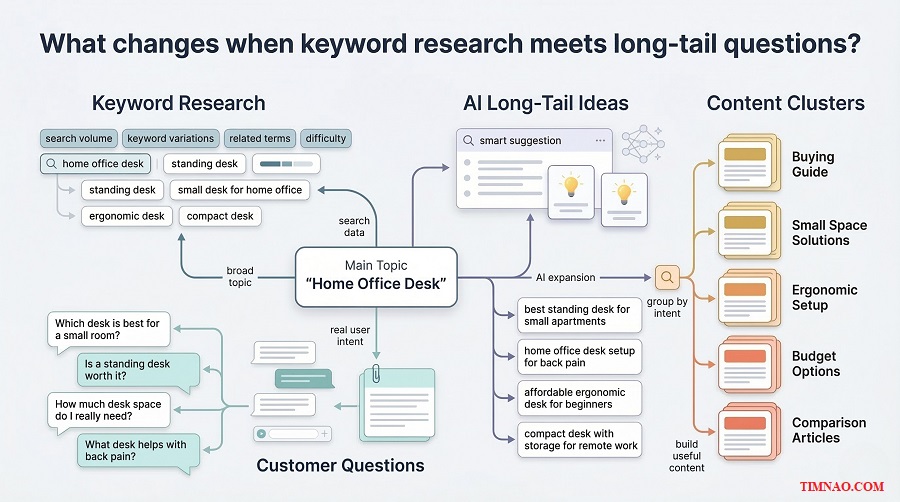
Why are keyword tools no longer the full picture?
Because search tools only show part of demand.
Traditional keyword research is great for spotting patterns, core terms, and rough search interest. But it does not capture every real question people ask, especially the weird, detailed, highly specific ones that happen later in the decision process.
That is where long-tail questions matter.
A long-tail question is simply a more specific search. Instead of “running shoes,” a person might search for:
- best running shoes for flat feet and knee pain
- trail running shoes for beginners in rainy weather
- do I need half a size up for marathon shoes
These searches are smaller individually, but they are often much closer to action. The searcher is not casually browsing. They are narrowing down a decision.
What does AI add to keyword research?
AI is good at surfacing angles and follow-up questions that keyword tools, content teams, and even subject matter experts sometimes overlook.
That makes it valuable for long-tail discovery.
A practical way to think about it is this:
- Keyword tools tell you what is already visible in demand.
- Customer research tells you what people are struggling with.
- AI helps connect the dots and expand the question set.
So instead of asking only, “What keyword should I target?” you start asking:
- What is the buyer confused about?
- What would they search after reading the main page?
- What objection is stopping them from converting?
- What question sounds too small to show up clearly in keyword tools, but still matters?
That is a much stronger content planning mindset.
How does this change the way you build content?
It pushes you away from one-keyword-one-page thinking.
Beginners often make this mistake: they find ten related keyword variations and assume they need ten separate articles. That usually creates thin content, duplicate intent, and a messy blog.
A better approach is to build around search intent.
For example, if your main topic is “home office desk,” your content plan might look like this:
- one main page targeting the broad topic
- one comparison article for standing desk vs sitting desk
- one article for small-space desk setups
- one article answering ergonomic concerns
- one section on the main page for cable management and storage questions
That is smarter than creating separate pages for tiny wording variations that all mean basically the same thing.
When should a long-tail query become its own page?
Use this simple rule: create a new page only when the searcher’s need is meaningfully different.
A separate page usually makes sense when:
- the person is in a different stage of the journey
- the question needs a different structure or example set
- the answer could stand alone as a strong resource
- the query suggests a different buying intent
A separate page usually does not make sense when:
- it is just a wording variation
- the intent is already covered well on the main page
- the answer is only one short paragraph
- the new page would feel thin, repetitive, or forced
This one decision saves beginners from a lot of bad content.
What is the easiest long-tail workflow for beginners?
Keep it simple and repeatable.
Use this five-step process:
- Pull core keyword ideas from a tool like Semrush or Ahrefs.
- Gather real customer language from comments, emails, sales calls, support chats, Reddit, or your site search.
- Ask AI to generate long-tail questions, follow-up concerns, and “people also ask” style prompts around the topic.
- Group the ideas by intent: beginner, comparison, problem-solving, and ready-to-buy.
- Decide what becomes a section, what becomes a separate article, and what gets dropped.
That last step matters. Not every idea deserves publication.
What changes for beginners in practice?
You stop chasing keywords like a collector and start building coverage like a strategist.
That means:
- fewer random articles
- better topic clusters
- stronger internal linking
- more useful pages
- a higher chance that your content answers the next question a visitor has
And that is exactly what makes a site feel more complete, more helpful, and more worth trusting.
Which tool should I start with: ChatGPT, Gemini, Claude, or Copilot?
This is the question most beginners ask too early.
They assume the secret is choosing the perfect tool. Usually, the real win comes from choosing the right first use case.
Still, tool choice matters, especially if you want a smoother workflow from day one.
Do I need one tool for everything?
No. And that mindset usually creates frustration.
Each tool has strengths. The smartest approach is to pick one as your default, then add a second tool only when you have a clear reason.
Think of it like this:
- one tool for planning and research
- one optional tool for rewriting, polishing, or workflow fit
That is enough for most beginners.
When is ChatGPT the easiest place to start?
ChatGPT is often the easiest starting point if you want help with structure, analysis, and fast iteration.
It is a strong fit for tasks like:
- content gap analysis
- outline creation
- title brainstorming
- FAQ drafting
- clustering ideas into logical groups
- turning messy notes into a usable brief
If you are a solo creator, blogger, affiliate site owner, or small business marketer, this is usually a comfortable first tool because it can handle many content planning jobs in one place.
A good beginner use case is: paste your draft outline and ask what is missing, what sounds repetitive, and what beginner questions still need answers.
When does Gemini make more sense?
Gemini is a good fit if your workflow already lives close to Google products or if you want help with broader research and idea expansion.
It can be especially useful for:
- brainstorming topic angles
- expanding content ideas
- finding related questions
- working inside a Google-centered workflow
- moving between research and drafting more fluidly
If you already use Google tools heavily, Gemini often feels natural. That matters more than people think. The “best” tool on paper is not always the best tool for your daily workflow.
For beginners, convenience is a real advantage.
When is Claude the better writing partner?
Claude is a strong choice when you care most about tone, readability, and smoother rewriting.
It is especially helpful for:
- rewriting robotic copy
- making a draft sound more natural
- simplifying dense explanations
- summarizing long notes or source material
- turning rough text into cleaner prose
That makes Claude useful when your biggest problem is not idea generation, but awkward writing.
A lot of beginners can benefit from this setup:
- use one tool to brainstorm
- use Claude to make the final draft sound more human
That is often more effective than forcing one tool to do every job.
When is Copilot the smartest choice?
Microsoft Copilot makes the most sense when your work already happens inside Microsoft 365.
If your daily workflow includes Word, Excel, PowerPoint, Outlook, and Teams, Copilot can be the most practical option because it sits closer to where the work already happens.
That matters for teams who want help with:
- turning meeting notes into outlines
- drafting content from internal documents
- organizing research in spreadsheets
- collaborating across Microsoft apps
For a solo blogger, Copilot is not always the first recommendation. For an in-house team in a Microsoft environment, it can be the easiest choice to operationalize.
So what should a total beginner actually pick?
Here is the simplest decision guide:
- Pick ChatGPT first if you want an all-around helper for SEO thinking, outlining, and content analysis.
- Pick Gemini first if you work heavily in Google’s ecosystem and want strong brainstorming support.
- Add Claude second if your drafts sound stiff and need a more natural rewrite.
- Pick Copilot first only if Microsoft 365 is already the center of your workflow.
If you are still unsure, choose one tool and stick with it for two weeks.
Use it for only three tasks:
- topic expansion
- outline building
- title and meta description drafting
That is enough to tell you whether the tool fits your brain and your workflow.
The bigger lesson is this: beginners do not need the perfect AI stack. They need a reliable way to turn ideas into better content without wasting time.
And once that part is clear, the next step is not choosing more tools. It is building a workflow that keeps quality high while making content production easier to sustain.
What should AI write first: outlines, titles, meta descriptions, or full drafts?
Once you move past topic research, this is where most beginners make their first costly mistake.
They jump straight to asking AI for a full article.
That feels efficient, but in practice, it is usually the worst place to start. A full draft can look polished before it is actually useful. It may sound complete, yet still miss the real search intent, skip key questions, flatten your voice, or introduce facts that need checking.
Why are outlines usually the smartest first step?
Because outlines improve thinking before they speed up writing.
A strong outline helps you see the shape of the article early. You can check whether the flow makes sense, whether beginner questions are being answered in the right order, and whether the piece is actually useful before you spend time polishing paragraphs.
For beginners, this is a much safer use of AI than asking for a full post on the first try.
A good AI-assisted outline can help you:
- spot missing subtopics
- structure the article around search intent
- avoid repeating the same point in different sections
- turn a vague idea into a practical content plan
A simple beginner workflow looks like this:
- Give AI your topic and target reader.
- Ask for 2 to 3 outline variations.
- Compare them.
- Merge the best parts into one final version.
- Add anything AI missed from your own experience or notes.
That last step matters. The outline should not just be “well organized.” It should reflect what your reader actually needs.
When should AI help with titles?
Earlier than most people think.
Titles are not just a finishing touch. A title can sharpen the angle of the whole article. Sometimes the fastest way to improve a weak draft is to improve the title first, because a better title forces a clearer promise.
For example, compare these two angles:
- “AI Writing for SEO”
- “What Should AI Write First for SEO? A Beginner-Friendly Workflow”
The second one immediately creates direction. It tells you who the article is for, what problem it solves, and what the reader will get.
That is why title drafting works well right after the outline stage.
Use AI to create multiple title directions, not just minor wording tweaks. Ask for:
- question-based titles
- benefit-driven titles
- titles built around beginner mistakes
- titles with a practical promise
Then choose the one that makes the article easier to write and easier to click.
Are meta descriptions worth doing with AI?
Yes, especially when you already know the page angle.
Meta descriptions are a good AI task because they are short, structured, and easy to review. You are not asking AI to build the whole argument. You are asking it to write a concise summary that gives people a reason to click.
This is useful for beginners because writing a good meta description is harder than it looks. It needs to be clear, relevant, and specific without sounding robotic.
A helpful prompt structure is:
- what the page is about
- who it is for
- what benefit the reader gets
- the search intent behind the query
Then review the output and tighten it manually.
A practical rule: if the meta description sounds like it could fit 200 other pages, it is too generic.
So when should AI write a full draft?
Only after the article direction is already under control.
That means you already have:
- a clear keyword or topic target
- a working outline
- the main reader problem defined
- your must-cover points listed
- any sensitive facts ready for checking
At that point, AI can help you build a rough first draft faster. But even then, it should not be treated as publish-ready content.
For beginners, the safest use of full-draft generation is one of these:
- turning a reviewed outline into a rough draft
- expanding bullet points into plain-English paragraphs
- rewriting your own notes into a cleaner structure
- drafting low-risk sections like intros, transitions, FAQs, and summaries
That is very different from telling AI, “Write me a complete SEO article,” and hoping for the best.
What is the best writing order for beginners?
Use this order:
- Outline
- Section prompts or bullet points
- Title options
- Meta descriptions
- Selective drafting
- Human editing
This order works because it keeps you in control of the article’s value before you start polishing wording.
If you skip straight to full drafts, you often end up editing around a bad structure. That wastes more time than starting clean.
What should you never let AI do first?
Do not let it decide the article’s purpose for you.
If AI is choosing the angle, tone, examples, structure, and final wording all at once, you are no longer guiding the piece. You are just reacting to whatever the model produced.
That is how generic content happens.
A better mindset is this: AI should help you move faster through clear decisions, not replace those decisions.
A practical starter workflow you can use today
If you are writing one blog post this week, try this:
- Ask AI for 3 outlines.
- Pick the strongest structure.
- Add real beginner questions from your audience.
- Ask for 10 title ideas based on that final outline.
- Ask for 3 meta descriptions.
- Draft only the sections where you need speed, not the entire piece.
- Rewrite the final copy in your own voice before publishing.
That approach is simple, fast, and much safer than full automation.
And once the article structure is doing its job, the next challenge is quality control, because even a clean draft can still sound flat if no real expertise is shaping it.
How do EEAT, SMEs, and brand voice keep AI content from sounding generic?
This is the part many beginners underestimate.
They think generic content happens because the prompt was weak. Sometimes that is true. But more often, generic content happens because no one added anything real after the AI output appeared.
That is where EEAT, subject matter experts, and brand voice start doing the heavy lifting.
What does EEAT actually mean in plain English?
For a beginner, the simplest version is this:
EEAT is about whether your content feels credible, informed, useful, and trustworthy.
It is not just about sounding smart. It is about showing that the content comes from someone who understands the topic, has thought about the user, and is not just rearranging words that already exist online.
That matters even more with AI-assisted writing, because AI is very good at producing content that sounds acceptable while adding very little new value.
Why does AI content often feel generic?
Usually for four reasons:
- It repeats what is already common online.
- It misses important context.
- It uses safe but bland wording.
- It has no real point of view.
That last one is the biggest problem.
A useful blog post usually has some human fingerprint in it. It may be a clearer explanation, a better example, a hard-earned opinion, a caution based on experience, or a decision framework that helps the reader act.
Without that, the article may be technically readable but forgettable.
What is the real job of the SME in an AI workflow?
The SME is not there just to “approve facts.”
The SME is there to make the content worth reading.
That can include:
- correcting factual mistakes
- spotting important omissions
- adding first-hand nuance
- removing misleading claims
- improving examples
- adjusting advice to fit real-world use
If you are writing about SEO, the SME might be the strategist who knows what breaks during implementation. If you are writing about skincare, it might be the practitioner who knows what advice sounds right but fails in real life.
For beginners, this does not always need to be a formal expert interview. Sometimes the SME is you, if you have real experience. Sometimes it is a founder, product manager, consultant, support lead, or sales rep inside the business.
The key is simple: someone with real understanding must shape the final version.
How does brand voice help more than people expect?
Brand voice is what stops your content from sounding interchangeable.
Many AI-written posts fail not because the facts are wrong, but because the tone could belong to any site in the niche. There is no texture, no rhythm, no clear identity.
A useful brand voice does not have to be dramatic. It just needs consistency.
For example, your brand might be:
- practical and calm
- direct and slightly opinionated
- friendly and beginner-focused
- data-driven but plainspoken
Once that is clear, AI becomes easier to guide.
You can give it instructions like:
- explain this like a helpful blog editor, not a textbook
- avoid hype and empty claims
- use short paragraphs
- prefer concrete examples over abstract theory
- sound confident, but not salesy
Then you still rewrite the final copy where needed.
How can a beginner make AI content sound more human?
Use this five-part editing pass after the draft is done:
- Add one real example
Replace one generic explanation with a real mini-scenario. - Cut one vague sentence in every section
If a sentence sounds polished but says nothing, delete it. - Add one opinion or judgment call
Tell the reader what is usually the smarter path and why. - Swap broad claims for practical language
“Optimize your workflow” is weak. “Start with outlines, not full drafts” is stronger. - Read it aloud once
If it sounds like a presentation script instead of a blog, soften it.
This is where human writing comes back into the piece.
What should beginners do when they do not have a strong SME?
Then work with lower-risk content first.
Good beginner options include:
- updating existing articles
- improving page structure
- rewriting weak intros
- expanding FAQ sections
- improving title tags and meta descriptions
- clarifying product or service explanations
These tasks still benefit from AI, but they carry less risk than publishing bold claims on a topic you do not fully understand.
That is a smart way to build confidence without publishing content that sounds polished but empty.
And once your content process is more grounded, AI can also help on the technical side, especially before you hand work to a developer.
What technical SEO tasks can AI help with before you call a developer?
This is where beginners often get surprised.
They assume AI only helps with writing. In reality, it can also help you prepare technical SEO work much more clearly, which saves time before a developer ever touches the site.
The key word here is prepare.
AI can support technical SEO, but it should not be trusted blindly to make production changes on a live site.
What are the safest technical SEO tasks to use AI for?
Start with tasks that require explanation, drafting, or organization.
These are usually the most beginner-friendly:
- explaining technical SEO issues in plain English
- turning audit findings into action lists
- drafting schema markup
- drafting redirect rules
- creating hreflang checklists
- generating test plans
- summarizing crawl or indexing problems
- turning messy notes into developer-ready tickets
This is valuable because technical SEO often breaks down at the communication stage. The issue exists, but nobody has translated it into a clear next action.
AI is very good at helping with that translation.
Can AI help with schema markup?
Yes, and this is one of the most practical early use cases.
If you understand the page type, AI can help draft structured data for things like articles, FAQs, products, organizations, and local business pages. That saves time, especially if you are not comfortable writing JSON-LD from scratch.
Useful tools and references here include Schema.org, Google’s Rich Results Test, and Google Search Console.
But here is the important part: drafted schema still needs review.
AI may:
- choose the wrong schema type
- include fields that do not belong
- invent values
- miss required properties
- format the code incorrectly for your implementation
So the right workflow is:
- use AI to draft
- validate with testing tools
- review before publishing
That is much safer than copying code straight onto the site.
What about redirects and migration prep?
AI can help a lot here too.
When pages move, merge, or get deleted, beginners often struggle to organize redirects properly. AI can help convert page lists into redirect logic, draft .htaccess patterns, and explain when a 301 redirect is the right move.
This is especially useful during:
- blog cleanup
- category consolidation
- URL updates
- CMS migration
- content pruning
Even if a developer still implements the redirects, you arrive with a clearer plan.
What AI should not do is become the final authority. Redirect logic still needs testing, because one wrong rule can affect many pages.
Can AI help with multilingual SEO and hreflang?
Yes, mostly by reducing confusion.
Many beginners do not need AI to write hreflang tags from scratch every day. What they need is help understanding:
- when hreflang is needed
- how language and country targeting differ
- what the page relationships should look like
- what common implementation mistakes to avoid
AI is good at turning those messy concepts into a checklist your team can follow.
If your site has multiple language versions, this is one of the best ways to use AI before bringing in a developer: ask it to explain the correct page mapping, then turn that into an implementation brief.
Can AI help with CMS and plugin-level SEO setup?
Definitely.
If you use WordPress, Rank Math, Yoast SEO, Shopify, or Magento, AI can help you troubleshoot setup problems much faster.
For example, it can help you:
- understand why title tags are not updating
- draft cleaner meta templates
- identify duplicate category pages
- create image alt text workflows
- prepare settings checklists after theme changes
- turn plugin settings into plain-English documentation
This is incredibly useful for beginners because many SEO problems are not “advanced.” They are just hidden inside confusing systems.
What about page speed and Core Web Vitals?
AI can help here, but mostly as an interpreter.
Use it to explain reports from PageSpeed Insights, summarize what is hurting performance, and separate quick fixes from developer fixes.
For example, AI can help you understand the difference between:
- render-blocking scripts
- oversized images
- layout shifts
- third-party app bloat
- slow server responses
It can also help you create a priority list so you do not send a developer a vague message like, “The site is slow.”
Instead, you can send something more useful, such as:
- compress oversized homepage images
- delay non-essential scripts
- review layout shift on mobile hero section
- reduce unused app code on product pages
That is a much better handoff.
When should you stop and call a developer?
Call a developer when the task affects live code, templates, rendering, indexing behavior, or sitewide logic.
That usually includes:
- production schema implementation
- rendering issues in JavaScript-heavy sites
- template-level canonical problems
- crawl blocking
- large redirect sets
- multilingual configuration
- performance fixes tied to code or infrastructure
AI can get you 60 to 80 percent closer to a clear brief. That alone is valuable. But the last step still needs human technical review.
And that is really the bigger pattern running through this whole article: AI is strongest when it helps you arrive prepared, not when it replaces the thinking, review, and judgment that good SEO still depends on.
Why do user experience and core web vitals matter so much?
A lot of beginners think SEO is mostly about keywords, headings, and publishing more useful content.
That is only half true.
Content helps you get into the game. User experience helps you stay there.
If a visitor lands on your page and the answer is hard to find, the layout jumps around, the page feels slow on mobile, or a pop-up blocks the content, the quality of the writing stops mattering as much. The page becomes harder to trust and harder to use.
What do Core Web Vitals actually mean in normal language?
You do not need to be technical to understand them.
Think of Core Web Vitals as three simple questions:
- Does the main part of the page load fast enough?
- Does the page react quickly when someone clicks or taps?
- Does the layout stay stable while the page loads?
That is all.
For beginners, the most useful takeaway is not the metric names. It is the experience behind them. If your page feels slow, laggy, or jumpy, that friction can hurt both user trust and SEO performance.
Why does this matter more in AI-assisted SEO?
Because AI can speed up publishing, but it cannot fix a frustrating page experience by itself.
This is where many beginners get trapped.
They improve research.
They improve outlines.
They produce cleaner drafts.
But the page still underperforms because the real problem is not just the content. It is what happens when a human being tries to use it.
For example, a page may have:
- a good title
- strong headings
- relevant information
- useful examples
But if the mobile version loads slowly, the font feels cramped, and the first screen is covered with banners, the content is fighting the interface.
That is why user experience matters so much in an AI workflow. AI can help you create better content faster, but if the page experience is poor, you are scaling content onto a weak foundation.
What does good UX look like on a beginner-friendly site?
Usually, it looks simpler than people expect.
Good UX is rarely about flashy design. It is usually about removing friction.
A beginner-friendly page often does these things well:
- tells the reader quickly what the page is about
- answers the core question early
- uses headings that make scanning easy
- keeps paragraphs short
- works well on mobile
- avoids intrusive pop-ups
- makes the next step obvious
That is one reason many plain-looking sites still perform well. They are not trying to impress first. They are trying to help first.
What are the easiest UX wins to fix first?
Start where the business value already exists.
Do not run around fixing random pages just because a tool says something is imperfect. Begin with pages that already matter:
- your top traffic pages
- pages close to leads or sales
- articles ranking on page 2 or low page 1
- old posts that still get impressions but weak clicks
Then check those pages in PageSpeed Insights and Google Search Console.
Look for obvious friction like this:
- oversized images
- slow-loading scripts
- too much space before the main answer
- messy heading structure
- distracting sidebars
- layout shifts on mobile
- weak internal linking
A lot of beginners try to solve SEO by adding more content. In many cases, improving the experience on existing pages creates faster gains.
Does page experience matter more than content quality?
No. Content quality still comes first.
A fast page with weak content is still a weak page.
But when several pages are similarly relevant, experience can become the difference between “good enough” and “better choice.” That is especially true for visitors who compare multiple results, skim quickly, and decide in seconds whether they want to stay.
So the right mindset is not:
- content or UX
It is:
- content first, then remove anything that gets in the way of it
That is a much healthier way to think about SEO.
What should a beginner actually do this week?
Use this 10-minute phone test.
Open one important page on your mobile device and ask:
- Can I understand what this page is about within 5 seconds?
- Can I reach the main answer without endless scrolling?
- Does anything shift, lag, or block me?
- Would I trust this page if I had never heard of the brand before?
If the answer feels shaky, that page needs UX attention before you worry about publishing another AI-assisted article.
What are the red flags that usually destroy AI-assisted SEO?
The biggest SEO mistakes with AI usually do not look dramatic at first.
That is what makes them dangerous.
The content gets published.
The site looks active.
The output count goes up.
Everything seems productive.
Then months later, traffic stalls, rankings weaken, the blog feels bloated, and nobody can clearly explain why.
What does bad AI-assisted content usually look like?
It often looks acceptable on a quick skim.
But once you read carefully, the problems show up fast:
- the advice is vague
- the examples are generic
- sections repeat the same idea
- the article answers the keyword, but not the real concern
- there is no real point of view
- the writing sounds smooth but forgettable
This is one of the most common beginner traps. AI makes weak content look finished.
That is why “looks polished” is not a useful quality standard anymore.
A better test is:
Did this page actually make the reader’s next step easier?
If not, the content is probably weaker than it seems.
Why is publishing too fast such a big problem?
Because speed creates false confidence.
If you used to publish one article a week and now AI lets you produce six, it feels like progress. But if quality review does not scale with production, the site starts filling with thin, repetitive pages.
That creates three problems:
- your strongest pages get buried in noise
- your overall site quality gets harder to maintain
- you train your team to reward output instead of usefulness
This is where beginners quietly move from “using AI well” to “mass-producing content because they can.”
And once that habit starts, it becomes hard to reverse.
What are the red flags worth catching early?
Here are the ones that matter most.
Is the content too generic to remember?
If the article could be published on ten competing sites without changing much, it is too generic.
That usually means it lacks:
- first-hand perspective
- real examples
- a clear judgment call
- brand voice
- anything the reader would want to quote or save
Generic content is not always wrong. It is often just too replaceable.
Does it cover the topic, but miss the real decision point?
This happens all the time.
A page may explain the basic topic correctly, but still fail because it misses the one question that actually matters to the reader.
For example:
- a tool comparison that never discusses budget
- a how-to guide that skips the setup difficulty
- a beginner article that never explains what to do first
- a service page that never addresses trust or risk
This is where AI often needs human correction. It may explain the subject, but not the hesitation behind the search.
Are there omissions, not just errors?
Beginners often look only for factual mistakes.
That is not enough.
An omission can be just as damaging as a wrong claim.
If your article forgets the one feature, warning, limit, or context that changes the reader’s decision, the page can still fail even if most of the wording is technically correct.
That is why human review matters so much. Good editors do not just catch what is wrong. They catch what is missing.
Does the tone sound like your brand?
If everything sounds neutral, padded, and interchangeable, trust gets weaker.
Strong brand voice does not mean dramatic writing. It means the article feels like it belongs to a real site with a real point of view.
A beginner-friendly brand voice usually has a few clear traits, such as:
- practical
- calm
- direct
- not overly salesy
- specific when advice matters
If AI output strips that away, your content becomes easier to forget.
Are you creating pages because readers need them, or because AI can make them?
This is the red flag that causes the most long-term damage.
If the reason for a page is “we might rank for it,” that is not always a good enough reason.
Before publishing, ask:
- Does this solve a real question?
- Is the intent different enough to deserve its own page?
- Can we make this better than what already exists?
- Does it help the reader do something next?
If the answer is weak, do not publish it yet.
What about copyright and originality concerns?
Beginners should take this seriously without becoming paranoid.
The safest approach is simple:
- do not imitate a specific writer
- do not rely on a single source
- do not assume AI output is automatically safe
- rewrite, expand, and shape the content into something clearly your own
Originality in SEO is not just about passing a plagiarism check. It is about bringing something useful, specific, and worth reading.
How do you catch problems before they spread across the site?
Run a small audit every month.
Take your last 10 AI-assisted pages and review them with these questions:
- Which pages are genuinely useful?
- Which ones feel thin or repetitive?
- Which ones sound generic?
- Which ones have clear examples and next steps?
- Which ones should be merged, updated, or removed?
This habit is not glamorous, but it protects your site from slow quality decay.
And once you understand those warning signs, the next step is building a workflow that helps you use AI without falling into them.
A 7-day sprint to build your first safe AI SEO workflow
You do not need a huge system to start using AI well.
You need one workflow you can repeat without losing quality.
This 7-day sprint is built for beginners who want a safe first process, not a complicated content machine.
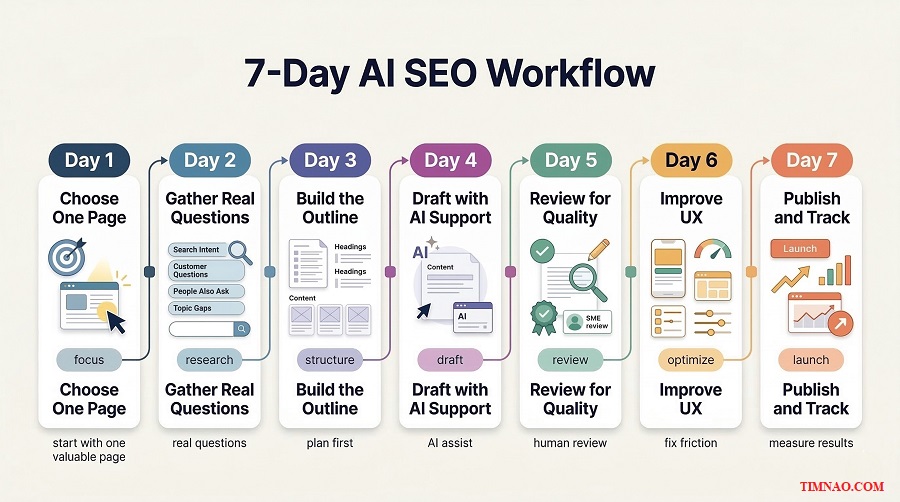
Day 1: Pick one page that already matters
Do not start with a blank-content factory mindset.
Start with one page that already has value, such as:
- a service page
- a commercial blog post
- a product category page
- an older article that still gets impressions
Write down four things:
- the main topic
- the target reader
- the intent behind the page
- the business outcome you want
That might be leads, email signups, demo requests, or clicks to a product page.
This step matters because AI performs much better when the goal is clear.
Day 2: Gather real questions, not just keywords
Today is for finding what people actually want to know.
Use any mix of these sources:
- keyword tools
- comments
- support emails
- sales calls
- site search
- competitor articles
- community discussions
Then ask AI to expand those into:
- beginner questions
- long-tail variations
- objections
- follow-up questions
- comparison angles
By the end of Day 2, you should know the real question set behind the topic, not just one target keyword.
Day 3: Build the outline before any drafting starts
This is the day that saves the rest of the week.
Ask AI for 2 or 3 outline versions. Then compare them and build one final structure.
Your job here is not to admire the outline.
Your job is to stress-test it.
Check whether it includes:
- the main problem
- the right order for a beginner
- the obvious objections
- a useful next step
- anything competitors often forget
If the outline is weak, the full article usually becomes harder to fix later.
Day 4: Use AI to draft selectively
This is where beginners usually overdo it.
Do not ask AI to take over the whole article unless the structure is already strong and the topic is low-risk.
Instead, use it selectively for things like:
- title ideas
- intro options
- FAQ prompts
- comparison bullets
- section expansion
- meta description drafts
- transition ideas between sections
Keep tighter human control over:
- recommendations
- examples
- factual claims
- judgment calls
- brand voice
This gives you speed without surrendering quality.
Day 5: Review like an editor, not a producer
Now switch roles.
You are no longer the person generating the content. You are the person protecting the site.
Read the draft and look for:
- vague filler
- missing context
- repeated ideas
- weak examples
- tone mismatch
- unsupported claims
- advice that sounds helpful but changes nothing
If possible, get one more reviewer involved. It does not need to be a large team. Even one informed reader can catch blind spots.
Day 6: Improve the page experience before publishing
Before the content goes live, improve the experience around it.
Check:
- mobile readability
- spacing
- heading clarity
- image size
- internal links
- layout stability
- pop-up behavior
- button and menu responsiveness
Use PageSpeed Insights and Google Search Console to spot obvious problems.
Also tighten the first screen of the page.
A lot of visitors decide quickly whether to stay. If the top of the page is cluttered, slow, or vague, even good content can lose momentum.
Day 7: Publish, measure, and set one review date
Now publish the page.
But do not stop at publishing. Decide what success actually means.
Track a few useful signals:
- impressions
- clicks
- click-through rate
- engagement quality
- lead actions
- whether the visitor moves to the next step
Then set one review date for 2 to 4 weeks later.
That follow-up review is important because the first workflow is never perfect. The point of the sprint is not just to publish one page. It is to learn which parts of the workflow improved quality and which parts still need human tightening.
What is the safest starter path?
Update one existing article.
This is the low-risk option because:
- the topic is already defined
- you can improve rather than invent
- quality review is easier
- SEO impact is easier to observe
A good starter update might include:
- rewriting the intro
- improving H2 and H3 structure
- adding real beginner questions
- improving title and meta description
- fixing weak transitions
- tightening the mobile reading experience
What is the higher-leverage path?
Build one small topic cluster around a page that already supports business goals.
For example:
- one main page
- three supporting long-tail articles
- one comparison article
- one refreshed FAQ section on the main page
That gives you a real content system without turning your site into an AI article warehouse.
Key takeaways that will save you months of trial and error
If you want the shortest version of the whole guide, keep these points close:
- Use AI to reduce friction, not replace judgment.
- Start with outlines, structure, and question discovery before full drafting.
- Improve existing pages before flooding the site with new ones.
- Fix user experience on important pages before publishing more content.
- Watch for omissions, generic tone, and pages created without a real user need.
- Review AI output like an editor, not like a fan of the tool.
- Build one repeatable workflow first. Scale later, only after quality is stable.
The good news is that beginners do not need a giant AI stack or a complicated SEO team to use generative AI well.
What they need is discipline.
A clean workflow.
A useful page.
A real reader problem.
And enough patience to improve quality before chasing scale.
That is what makes AI helpful instead of harmful.
Disclaimer:
This article is for educational and informational purposes only. It is intended to help beginners understand how generative AI can support SEO workflows, content planning, and website improvement. It is not legal, financial, or professional business advice. Search engine algorithms, AI tools, and SEO best practices can change over time, so readers should review current platform guidelines and test any strategy before applying it to a live website. Any use of AI-generated content should be reviewed carefully for accuracy, originality, brand fit, and user value before publishing.
If you want a slightly shorter blog-style version, use this:
Enjoyed this article and found it helpful? ☕✨
If you’d like to support my work and help me keep creating practical, beginner-friendly content like this, you can buy me a coffee here 💛