Metaverse Marketing Made Easy: A Practical Starter System 🚀
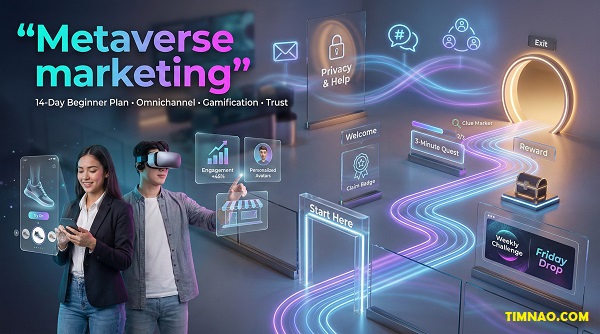
Metaverse marketing is one of the simplest ways to stand out in a crowded digital world—because you’re not “running ads,” you’re building interactive experiences people can actually step into. In this beginner-friendly guide, you’ll learn the core ideas (VR/AR, participation, trust), follow a 14-day plan to launch your first small experience, and discover realistic ways this skill can turn into career opportunities or client work—without hype.
Metaverse marketing, explained with VR/AR, AI, and blockchain (without jargon)
Metaverse marketing is basically marketing you can walk into.
Instead of showing people a banner, a video, or a product page, you’re creating an experience: a space, a moment, and a simple action people can take—often as an avatar. That “action” might be exploring a product, joining an event, completing a challenge, or grabbing a digital reward.
If that sounds big and technical, here’s the truth: you can start small. A beginner-friendly metaverse campaign can be as simple as:
- a virtual pop-up room with 3 hotspots people can click
- a mini scavenger hunt with a badge at the end
- a guided tour event where visitors ask questions in real time
To keep it clear, think of metaverse marketing as interactive brand storytelling with three ingredients:
- Immersion (it feels like a place, not a page)
- Participation (people do something, not just watch)
- Identity (people show up as “someone,” not just a viewer)
VR vs AR: which one matters for you?
You’ll hear “VR” and “AR” constantly. Here’s what they mean in plain language—and when they actually matter.
VR (Virtual Reality) is a fully digital environment. People can enter using a headset, but many “virtual world” experiences also work on desktop or mobile.
Use VR-style thinking when: you want people to feel presence—like they’re inside a showroom, event, or brand world.
AR (Augmented Reality) adds digital layers onto the real world through a phone camera (or glasses).
Use AR-style thinking when: you want a quick “wow” moment that fits everyday life—try-ons, product previews, location filters.
Beginner shortcut:
- If your audience is already comfortable with games/virtual worlds, start with VR-world experiences.
- If your audience lives on mobile and wants fast interactions, start with AR moments.
Where AI fits (and where beginners go wrong)
AI in metaverse marketing is not about “replacing creativity.” It’s about making the experience more helpful, more personal, and easier to run.
Beginner-friendly ways AI can support your campaign:
- Personalized onboarding: a short “What are you here for?” question that routes visitors to the right area.
- Smart FAQs: a simple in-world helper that answers common questions.
- Content variations: different welcome messages, signage text, or quest prompts for different visitor types.
- Basic moderation support: flagging spam or repeated bad behavior in community spaces.
Where beginners go wrong is trying to do “AI magic” before the basics work. If people are confused about where to go or what to do, personalization won’t save it.
Rule: AI is a multiplier. First make the experience clear. Then make it personal.
Mini walkthrough (3–6 lines):
- You build a virtual pop-up with 3 zones: “New here,” “See the product,” “Join the community.”
- AI shows one question: “What brings you here today?”
- If they pick “Product,” they spawn near the demo and get a 30-second guided prompt.
- If they pick “Community,” they spawn near the event board and see upcoming sessions.
What blockchain is (and when you can ignore it)
Blockchain comes up because it can support digital ownership—things like collectibles, digital goods, or proof that someone earned something.
But here’s the beginner-friendly truth:
- You do not need blockchain to run a metaverse marketing campaign.
- You only need it if your campaign involves ownership, trading, or verified rewards that live outside one platform.
A simple way to decide:
- If your reward is “a badge inside the world,” you can probably keep it platform-native.
- If your reward is “a collectible people keep across environments,” blockchain might matter.
Beginner-safe approach:
- Start with non-monetized rewards first (badges, roles, access, early previews).
- Add “ownership” later once you can clearly explain it in one sentence.
The simplest definition you can build a campaign around
If you want one clean sentence to guide your work, use this:
Metaverse marketing is designing an interactive experience that earns attention through participation.
That mindset keeps you away from the most common trap: building something that looks cool but doesn’t lead anywhere.
To avoid that trap, every experience needs:
- a clear first step (what do I do?)
- a reason to continue (why should I care?)
- a finish line (what counts as “done”?)
- a next step outside the world (follow, join, sign up, return)
A quick fit check: who should learn this (and who should skip it for now)
Metaverse marketing isn’t for everyone—at least not right now. The easiest way to waste time is to learn it for the wrong reason (like chasing hype). The best reason is practical: you want a skill that helps you build memorable campaigns, community moments, and interactive brand proof.
Good fit if you match 3+ of these
You’ll probably enjoy learning this if you:
- like campaigns that feel like events, challenges, or “drops”
- prefer building experiences over writing long ad copy
- can test small ideas without needing perfection
- enjoy community energy (chat, feedback, co-creation)
- are curious about new platforms and don’t panic when tools change
- want portfolio pieces you can show, not just describe
If that’s you, metaverse marketing is a strong “learn by shipping” skill.
Skip (for now) if these are true
You might want to hold off if you:
- need immediate sales in 7 days (metaverse is usually awareness/engagement first)
- dislike experimentation and iteration
- can’t access stable internet or a decent device (you’ll fight friction constantly)
- don’t have time to run even a small pilot test
- want a “set it and forget it” channel (this is more like events than ads)
Skipping isn’t failure. It’s strategy. You can come back when your timing is better.
Your baseline skills (the real prerequisites)
You don’t need to code. You don’t need a headset. But you do need a few basic marketing muscles:
- Goal clarity
Can you write a goal that includes an action and a number?
Example: “100 visitors enter and 30 complete the quest this week.” - Simple project planning
Can you break work into small deliverables?
Example: welcome area → main action → reward screen. - Basic measurement
Can you track counts and feedback?
Example: visitors, completions, signups, 5 short comments.
If you can do those three, you’re ready to start.
Choose your starting lane (pick ONE)
Metaverse marketing has multiple “lanes.” Beginners do better when they choose one lane and stay there for a month instead of trying everything.
Lane A: Events + community
- You host guided tours, mini workshops, Q&As, launches.
- Best for: creators, educators, community managers, brands with audiences.
Lane B: Interactive product demos
- You build a space where people explore features with prompts.
- Best for: product marketing, startups, agencies, B2B that needs explanation.
Lane C: Gamified challenges
- You design quests, badges, and weekly missions.
- Best for: youth brands, gaming-adjacent markets, loyalty programs.
Pick one lane and commit for two weeks. You’ll learn faster.
Mini fit test (2 minutes)
Answer these honestly:
- Do I enjoy building things that people do something with?
- Can I run a small test with 10–30 people?
- Am I okay learning in public (shipping imperfect v1)?
If you said “yes” to two of them, you’re good.
What “success” looks like for beginners (keep it realistic)
A beginner win is not “viral.” It’s signal:
- people finish the experience without getting lost
- you get comments like “that was fun” or “I get it now”
- you can show a simple case note: what you built, what happened, what you’d improve
That’s the kind of proof that creates opportunities later (jobs, freelance work, collaborations).
Your metaverse campaign starter kit: immersive platform design, personalization, participation
This is the part most beginners need: a simple system you can reuse again and again. Think of it like your “campaign backpack.” You don’t need fancy gear—you need the essentials.
Starter kit overview (the 3 things that make it work)
A metaverse campaign feels good when these three are in place:
- Immersive platform design (the space guides people)
- Personalization (people feel seen and involved)
- Participation (the experience has a clear action loop)
If you only do one of these, it can still be interesting—but it won’t feel complete.
1) Immersive platform design: build a “path,” not a maze
In normal marketing, you build a funnel.
In metaverse marketing, you build a path.
Your goal is not to impress people with size. Your goal is to guide them through a simple journey.
The easiest 3-zone layout (steal this)
- Zone 1: Welcome (what is this + what do I do first?)
- Zone 2: Main Action (the one thing you want them to do)
- Zone 3: Reward / Next Step (what they get + where they go next)
That’s it. Three zones. Clear movement.
Signs your space is too complicated
- visitors ask “where do I go?” more than once
- people wander for 60 seconds without interacting
- your “main action” isn’t visible within 10 seconds
Beginner rule:
- The main action should be obvious from the spawn point.
- If it isn’t, add signage, lighting cues, arrows, or a simple guide prompt.
Mini walkthrough:
- Spawn: “Welcome—Start Here”
- 10 steps ahead: a glowing object or gate labeled “Begin Quest”
- After completion: “Claim badge → Join community”
2) Personalization: tiny choices create big attachment
Personalization doesn’t mean building a complex AI system. It means giving people a small way to make it theirs.
Beginner-friendly personalization ideas:
- choose a team (A/B) and see your team color in the space
- pick a badge name (fun + shareable)
- select “what are you here for?” and get routed to the right zone
- take a “selfie spot” screenshot with a branded frame
Keep it light.
Your personalization should take 10–20 seconds, not 2 minutes.
A simple personalization checklist:
- Does it create identity? (team, role, style)
- Does it change the experience? (routing, message, reward)
- Is it easy to share? (badge, screenshot, achievement)
3) Participation: design an interaction loop people can finish
Participation is the heart of metaverse marketing. You want a loop that feels satisfying, not exhausting.
Use this loop:
Enter → Understand → Do → Get Reward → Share/Return
Beginner mistake: creating 10 interactions.
Better: create 3 interactions that feel meaningful.
The “3 interactions” formula
- Touchpoint interaction (click, talk, open, step on)
- Decision interaction (choose A/B, vote, pick a path)
- Completion interaction (claim reward, unlock door, finish badge)
That’s enough.
Mini example (quest-style):
- Click the “Welcome Terminal” to receive your mission
- Choose one of two paths (Speed vs Explore)
- Complete one task and claim a badge
Add onboarding (so beginners don’t bounce)
Most people leave not because it’s boring—but because they’re confused.
Your onboarding should answer three questions fast:
- What is this?
- What do I do first?
- How long will it take?
Use a “10-second welcome script” (text or voice):
- “Welcome! This takes 3 minutes. Start by tapping the glowing gate. Finish the task to claim your badge.”
And add a simple fallback:
- “If this is your first time, follow the arrows”
- or “Watch the 20-second walkthrough” (a short embedded clip on your site—no external links needed)
Measurement kit: track what matters (without drowning in analytics)
You don’t need advanced dashboards to learn. Track two numbers and one quality signal:
Primary metric (pick ONE)
- completions (best for quests)
- minutes spent in main zone (best for demos)
- event attendance (best for events)
Secondary metric (pick ONE)
- return visits within 7 days
- signups / community joins
- shares (screenshots posted, tagged posts)
Quality signal
- 5–10 short comments:
- “What was confusing?”
- “What was your favorite moment?”
- “Would you do this again?”
Platform sanity: choose where your audience already is
The “best platform” is usually the one your audience will actually use.
Beginner approach:
- Pick one platform for the experience.
- Use your existing channels (social/email/community) to drive attendance.
- Keep your first build small enough to finish.
If you want to explore popular virtual-world ecosystems, start here:
(You don’t have to commit to one forever. You just need one place to ship your first version.)
The “first campaign blueprint” (copy/paste template)
Use this template to plan fast:
- Campaign promise (one line):
“Step into our [experience] to [do action] and unlock [reward].” - Main action (one sentence):
Visitors will ________ (explore, vote, complete quest, test demo). - Reward (one sentence):
They get ________ (badge, role, access, early preview, downloadable bonus). - Proof (two bullets):
- Primary metric: ________
- Quality signal: ________
That’s enough to start building.
Omnichannel matters: cross-platform consistency and seamless integration
Omnichannel is the difference between:
- “We built a cool virtual experience… and nobody showed up.”
vs. - “We ran a campaign that felt connected everywhere, and people actually completed it.”
Metaverse campaigns don’t live in isolation. Your audience still discovers you through the same places they already use: social feeds, communities, email, DMs, and links shared by friends. So your job is to make the experience feel like one connected journey, not a confusing side quest.
Why omnichannel beats “build it and they will come”
In a normal funnel, traffic flows to a landing page.
In a metaverse funnel, traffic flows to a moment—but people still need:
- a clear entry link
- quick instructions
- reassurance it’s worth their time
- a next step after they leave
If any of those are missing, beginners bounce fast.
A simple mental model:
- The metaverse is the “show.”
- Your other channels are the tickets + directions + afterparty.
The 4-link chain: Discovery → Entry → Experience → Follow-up
You don’t need 12 channels. You need this chain to be unbroken.
- Discovery (where they first hear about it)
Examples: a short clip on TikTok, a post on Instagram, a community announcement in Discord. - Entry (how they join without confusion)
This is usually one link that leads to:
- “how to join” in 5 steps
- device requirements (simple)
- what to do first (one sentence)
- Experience (what they do inside)
The in-world flow should match what you promised outside. If your post says “3-minute quest,” don’t make it 12 minutes. - Follow-up (what happens after)
You need one next step:
- join a community
- sign up for updates
- claim a reward
- attend the next event
Mini walkthrough (3–6 lines):
- They see a 15-second teaser on Instagram.
- The link goes to a “Start Here” page with 5 steps.
- They enter, complete a 3-step quest, and get a badge.
- The final screen says: “Join the Discord to unlock the next drop.”
Create one “source of truth” page (your campaign hub)
Beginners get lost when you spread instructions across five posts.
Create one simple hub page on your website (or one pinned post) that contains:
- What this is (1–2 lines)
- Time required (“3 minutes” / “30 minutes event”)
- How to join (5 steps max)
- Troubleshooting (2–3 common issues)
- Next step (community join / email signup)
Rule: Your hub page should work even if someone never saw your social content.
Cross-platform consistency: make it feel like the same campaign
Consistency doesn’t mean copy-paste. It means the same promise shows up everywhere.
Use this checklist:
- Same campaign name everywhere (don’t rename it per platform)
- Same “main action” (vote / quest / demo)
- Same time expectation (“3 minutes” means 3 minutes)
- Same reward language (badge / role / access)
- Same visual cue (one key image or icon)
Quick copy formula you can reuse:
- Hook: “Step into ___ and do ___ in under ___ minutes.”
- Proof: “You’ll unlock ___ at the end.”
- Entry: “Start here: ___ (one link).”
Seamless integration ideas (pick 1–2, not all)
Beginners do better when they integrate lightly.
Integration A: Social → Hub page → Experience
- Best for: first-time campaigns, broad audience
- Keep it simple: one link, one action
Integration B: Community-first (Discord/WhatsApp) → RSVP → Event
- Best for: creators, loyal audiences, education workshops
- Tools: Discord or WhatsApp for reminders and support
Integration C: Email → Return visit loop
- Best for: brands with newsletters or existing lists
- Tool example: Mailchimp (homepage only)
- Email works great for “next drop” announcements and return visits.
Integration D: CRM-lite (even a spreadsheet) → follow-up segmentation
- Best for: B2B demos and lead capture
- Start simple: track who attended + one note (“interested in X”)
Beginner metrics that actually help you improve
Don’t drown in numbers. Track what tells you where people are getting stuck.
Pick:
- Entry metric: link clicks to the hub page
- Activation metric: % who start the in-world experience
- Completion metric: % who finish the main action
- Follow-up metric: % who take the next step (join/signup/return)
Then ask 2 feedback questions:
- “What was confusing?”
- “What was your favorite moment?”
Those two answers will improve your next version faster than fancy dashboards.
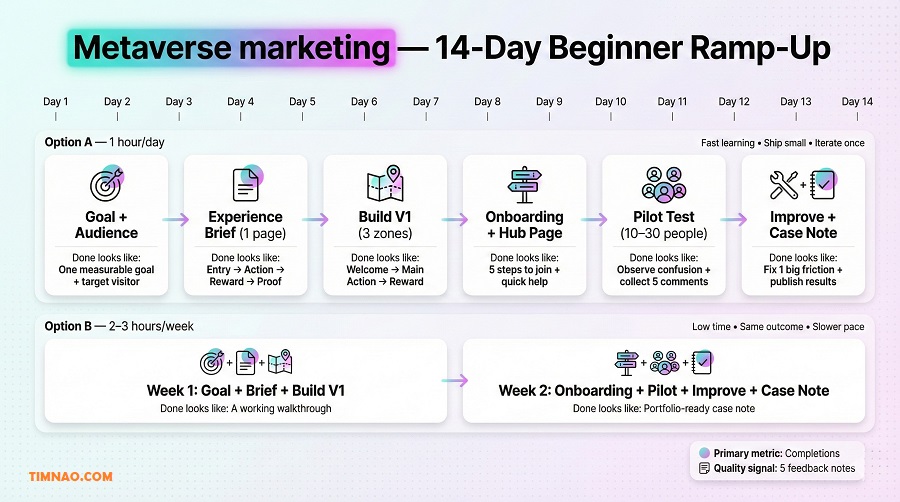
A 14-day beginner ramp-up: launch one small experience (two intensity options)
This is a beginner plan that forces the right habit: ship small, learn fast, improve once.
Before you start, lock this in:
- You are not building a “metaverse universe.”
- You are building one small experience with a clear finish line.
First, define your MVP experience (so you don’t overbuild)
Your MVP should have:
- One entry point (one link)
- One main action (quest / demo / event task)
- One reward (badge / role / access / download)
- One next step (community join / signup / return)
If your plan includes 7 features, it’s too big for 14 days.
A simple MVP example:
- “Enter the pop-up, complete 3 interactions, claim a badge, join the community.”
Option A: 1 hour/day (fast learning, best for beginners)
Days 1–2: Set the goal + pick the lane
Write a goal with a number and a timeframe:
- “100 visitors enter, 30 complete the quest in 7 days.”
Pick your lane: - event / demo / gamified challenge
Deliverable: a 6-line brief (copy this)
- Audience:
- Promise:
- Main action:
- Reward:
- Next step:
- Success metric:
Days 3–4: Design the path (3 zones)
Sketch a simple flow:
- Welcome → Main Action → Reward/Exit
Add one clarity element: - arrows, signage, or a guide prompt
Deliverable: a screenshot/mockup or simple diagram you can follow.
Days 5–7: Build the simplest version
Keep it brutally simple:
- max 3 interactions
- max 2 minutes to understand what to do
- max 5 minutes total for the experience
Deliverable: working v1 you can walk through start to finish.
Days 8–9: Build the hub page + onboarding
Create:
- “Start Here” instructions (5 steps)
- device notes (short)
- one troubleshooting tip
Deliverable: hub page + a pinned post.
Days 10–11: Pilot with 10–30 people
This is where beginners level up.
Pilot rules:
- Observe, don’t defend.
- Watch for confusion points.
- Collect 5 comments (short).
Deliverable: a list of the top 3 friction points.
Days 12–13: Improve ONE thing that moves completion
Choose the biggest friction point and fix it. Common high-impact fixes:
- clearer signage
- shorter path
- reward is shown earlier
- main action moved closer to spawn
Deliverable: v1.1 (small upgrade, not a rebuild).
Day 14: Publish your case note
Keep it clean and human. Use this template:
- What we built (2–3 lines)
- Who it was for (1 line)
- What people did (bullets)
- What happened (numbers + 2 quotes)
- What we’ll improve next time (3 bullets)
Deliverable: a portfolio-ready post (even if results are small).
Option B: 2–3 hours/week (slower schedule, same outcome)
Week 1 (2–3 hours):
- goal + brief (30 min)
- flow design (45 min)
- build v1 (60–90 min)
Week 2 (2–3 hours):
- hub page + onboarding (45 min)
- pilot (45–60 min)
- one improvement + case note (60 min)
This option is perfect if you work full-time or only have weekends.
Your pilot playbook (so it doesn’t feel awkward)
People don’t know how to “test” metaverse experiences, so you have to guide them.
Send testers a short script:
- “This takes 5 minutes.”
- “Please say out loud if you’re confused.”
- “At the end, answer these two questions: confusing moment + favorite moment.”
During the pilot, watch for:
- where people hesitate
- where they ask questions
- where they quit
Those are your improvement targets.
The most common “I’m stuck” moments (and quick fixes)
- “Nobody joined.”
Fix: shorten your entry steps, post a clearer teaser, add a time promise (“3 minutes”), and invite personally in DMs. - “People joined but didn’t finish.”
Fix: reduce interactions, make the main action visible immediately, show the reward earlier. - “People were confused.”
Fix: add one guide prompt and one sign that says “Start Here.” - “It took too long to build.”
Fix: cut features, lock MVP, and ship a smaller version. Your next iteration can be bigger.
End-of-section transition (so it reads natural): once you’ve shipped one small experience, you’ll notice something important—people return when it feels fun and social, not when it feels like homework. That’s where human-friendly gamification comes in.
Gamification that feels human: badges, story arcs, community energy
Gamification works when it adds meaning. It fails when it feels like manipulation.
The goal isn’t to trick people into staying. The goal is to give them a reason to participate that feels good:
- achievement
- belonging
- curiosity
- recognition
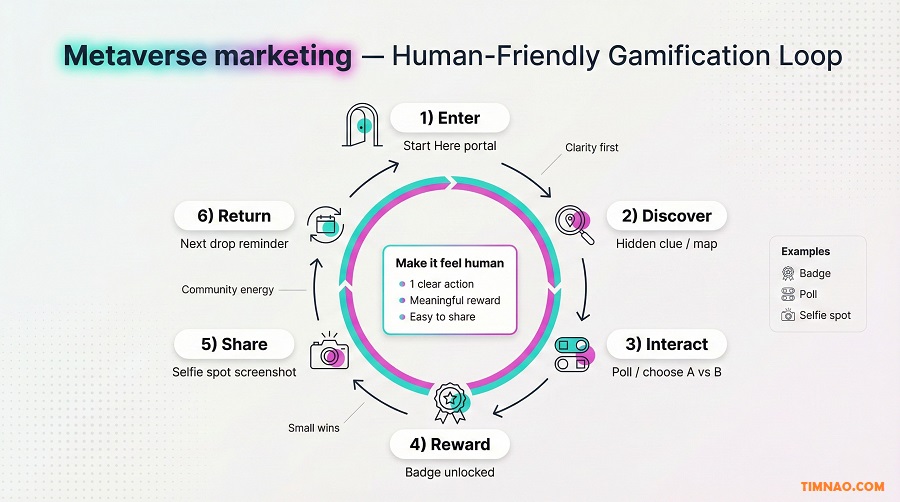
Gamification vs. “points for no reason”
Bad gamification:
- random points
- endless tasks
- leaderboards that shame beginners
Good gamification:
- clear progress
- a finish line
- rewards that match the effort
- optional competition, not forced
Beginner rule:
- If you can’t explain the game in one sentence, it’s too complex.
Choose an “emotion goal” before you choose mechanics
Pick one main feeling you want:
- Achievement: “I finished something.”
- Belonging: “I’m part of a group.”
- Discovery: “I found something cool.”
- Recognition: “They noticed me.”
Then pick one mechanic that supports it:
- Achievement → badge, completion stamp
- Belonging → team choice, group mission
- Discovery → hidden clues, unlockable rooms
- Recognition → featured screenshots, shout-outs
This prevents you from stuffing in random features.
Badges people actually want (keep it simple)
A badge is powerful because it’s proof. But only if it has meaning.
Make a badge feel worth earning by adding:
- a name that sounds like an identity (“Explorer,” “Founder,” “Early Access”)
- a short description (“Completed the 3-step quest”)
- a benefit (even tiny): role access, early preview, behind-the-scenes
Beginner-friendly badge types:
- Completion badge: finish the main action
- Attendance badge: join the live event
- Contributor badge: leave feedback or help a newcomer
Story arcs: turn your campaign into a mini narrative
You don’t need a novel. You need a micro-story that creates momentum.
Use a 3-act structure:
- Setup: what is this place? what’s the mission?
- Challenge: do the main action (quest/demo/task)
- Payoff: reward + next step (return, join, unlock)
Mini example (3–6 lines):
- Setup: “Welcome to the pop-up. Something is missing…”
- Challenge: “Find the 3 clues hidden in the space.”
- Payoff: “You restored the signal—claim your badge and unlock next week’s room.”
A story arc makes your campaign feel authored—like a human made it on purpose.
Metaverse campaigns get stronger when people feel they’re doing it with others.
Beginner ways to add community energy:
- a weekly ritual: “Friday Drop” or “Sunday Quest”
- a role: “Helper,” “Guide,” “Explorer”
- a shared moment: selfie spot, group photo, shout-out wall
If you have a community space, keep it simple:
- Discord: create one channel for “wins + screenshots”
- WhatsApp: quick reminders and support
- YouTube: upload a short walkthrough clip (optional)
The key: create a place where participation is visible.
A beginner-friendly 7-day challenge you can run next week
If you want a ready-to-use gamified campaign, copy this.
Challenge name: “3-Minute Explorer Week”
Goal: get people to return at least twice
Day-by-day:
- Day 1: enter + claim starter badge
- Day 2: find one hidden object + screenshot
- Day 3: vote on a choice (A/B) that changes the space
- Day 4: bring a friend (share invite link)
- Day 5: complete the main quest
- Day 6: leave feedback (one comment)
- Day 7: live mini-event + “Explorer of the Week” shout-outs
Rewards:
- completion badge for everyone
- recognition reward for a few (featured screenshots)
This feels human because it mixes:
- progress (badges)
- curiosity (hidden object)
- agency (vote)
- social proof (screenshots)
- recognition (shout-outs)
Common gamification mistakes (and how to avoid them)
- Too many steps.
Fix: keep the core loop under 5 minutes. - Leaderboards that discourage new people.
Fix: use “personal best” or team goals, or make leaderboards optional. - Rewards that don’t match effort.
Fix: if the quest takes 10 minutes, the reward must feel meaningful (access, recognition, useful perk). - No clear finish line.
Fix: show progress and completion clearly (“2/3 done”). - Everything feels like marketing.
Fix: add one genuinely fun moment that doesn’t “sell,” like a selfie spot or hidden surprise.
Heading into the next sections later, this is what you’ll build on: once your omnichannel flow is smooth, your 14-day ship cycle is solid, and your gamification feels human—then you’re ready to talk about trust, privacy, and turning the skill into real opportunities without hype.
Trust, privacy, and “don’t creep people out” design
Trust isn’t a legal checkbox. In immersive spaces, trust is a feeling—and it can disappear in seconds if your experience feels pushy, confusing, or overly invasive.
The good news: beginner-friendly trust design is mostly about clarity and restraint.
The “creep factor” checklist (avoid these fast)
People get uncomfortable when they feel watched, trapped, or tricked. Watch out for:
- Unexpected data requests (“Connect your wallet / log in / give email” too early)
- Over-personalized messages (“Hey Minh, we saw you looking at…”)
- Dark pattern prompts (“Limited time!” when it’s not real)
- Confusing ownership language (“Buy this” without explaining what they actually get)
- No exit (people can’t leave easily or can’t find help)
Beginner rule:
- If a visitor would feel weird explaining the experience to a friend, simplify it.
Privacy basics, explained in plain language
You don’t need a law degree to act responsibly. You need a simple structure:
- Say what you collect (and what you don’t)
- Say why (what it’s used for)
- Give control (opt-out or skip where possible)
Write it like a human:
- “We track how many people finish the quest so we can improve it.”
- “We don’t record private chats.”
- “If you don’t want to sign up, you can still complete the experience.”
Keep it short. Put it in two places:
- the hub page (“Start Here” page)
- the first in-world welcome panel (one paragraph)
The “permission ladder” (ask less, later)
One of the easiest ways to build trust is to ask for the smallest commitment first, then earn the right to ask for more.
Use this ladder:
- Step 1: Browse (no login, no email, just explore)
- Step 2: Participate (complete the action/quest)
- Step 3: Claim (optional reward claim, still low-stakes)
- Step 4: Connect (join community / email signup)
- Step 5: Purchase (only if the value is obvious)
If you jump straight to Step 5, beginners drop.
Mini example (3–6 lines):
- Visitor enters and sees “This takes 3 minutes. Start the quest.”
- They complete the quest and unlock the badge screen.
- The badge screen says: “Want next week’s room? Join the community.”
- Email/wallet is optional, not required to enjoy the experience.
Make safety visible: help, rules, and clear exits
In immersive spaces, people feel safer when they know:
- where to get help
- what behavior is expected
- how to leave
Add three simple elements:
- Help button: “Need help? Here’s how to move / interact / fix audio.”
- Community rules (short): “Be respectful. No harassment. Report issues here.”
- Exit sign: a clear portal or button that says “Exit / Back to Start.”
These tiny touches make your experience feel “real” and professionally hosted.
Design for mixed devices and mixed digital confidence
A lot of beginners underestimate friction. Not everyone has:
- a strong internet connection
- a modern phone
- a gaming background
Beginner-friendly accessibility moves:
- keep interactions simple (tap/click, not complex movement)
- keep text large and readable
- reduce heavy animations in your first version
- offer a fallback: a 20-second walkthrough video on your site (optional)
Rule:
- If your experience only works for “techy gamers,” your audience shrinks fast.
Ethical personalization: helpful, not invasive
Personalization is great when it feels like:
- “This experience understands what I want.”
It becomes creepy when it feels like: - “This experience knows too much about me.”
Beginner-safe personalization:
- let users choose their path (“I’m here to explore / learn / claim reward”)
- route them accordingly
- avoid referencing personal info they didn’t actively give you
Also: avoid “fake personalization.”
If everyone gets the same outcome, don’t pretend it’s unique.
A simple “trust audit” you can run in 15 minutes
Before launch, do this quick audit:
- Read your first screen and ask: Is the first action obvious?
- Count your asks: How many times do you ask for info before value?
- If it’s more than 1, reduce it.
- Look for pressure words: “urgent,” “last chance,” “limited time.”
- Remove unless it’s 100% true.
- Check exit: can someone leave in under 5 seconds?
- Ask a friend to try it and answer:
- “Did anything feel uncomfortable?”
- “What felt confusing?”
This is how you protect your brand—and keep people coming back.
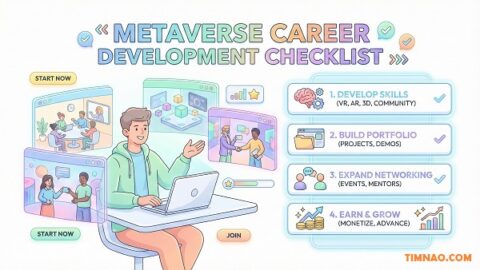
Opportunity paths: 5 realistic ways to turn this skill into work (without hype)
Metaverse marketing becomes valuable when you can do two things:
- Ship something small
- Explain what it achieved
That’s why your first goal is not “master everything.” Your first goal is to produce proof—a case note, screenshots, a walkthrough, and simple results.
Below are five realistic paths. These are not “get rich quick.” They’re “get hired / get clients / get collaborations” paths.
1) Metaverse campaign assistant (planning + coordination)
This is one of the easiest entry roles because many teams can build, but they can’t coordinate.
What you offer
- campaign brief (goal, audience, promise, metrics)
- launch checklist (hub page, onboarding, pilot plan)
- run-of-show for events and drops
Proof you need
- one case note with:
- goal + what you built
- 3 screenshots
- a simple metric (visitors/completions)
- 2 short feedback quotes
Who it helps
- small brands testing immersive campaigns
- agencies that need a reliable coordinator
- community-led projects doing events
First steps this week
- Create a 1-page “Metaverse Experience Brief” template
- Build a demo campaign using your template
- Post your case note on your blog or portfolio page
Realistic time-to-first-signal
- 2–4 weeks: one shipped demo + outreach to 20–30 leads (small brands/creators)
2) Virtual event producer (host, guide, moderate)
Virtual events are where metaverse marketing feels most “alive.” But they need someone who can run the room smoothly.
What you offer
- event plan (30–60 minutes)
- onboarding message + reminders
- live moderation + audience support
- post-event recap (highlights + metrics)
Proof you need
- a recorded walkthrough or highlight clip
- attendee feedback (even 5 short quotes)
- a simple attendance count
Who it helps
- educators and creators
- brands launching products or communities
- internal company teams running training/onboarding
First steps this week
- Host one small “guided tour + mini challenge” session for 10–15 people
- Collect 5 feedback notes and write a recap
Realistic time-to-first-signal
- 3–6 weeks: pilots build referrals quickly if you’re reliable
3) No-code immersive experience builder (simple spaces + interactions)
You don’t need to code to build useful experiences. Many clients want “simple and done,” not “complex and perfect.”
What you offer
- a small branded space (3 zones)
- 1–3 interactive elements
- onboarding + hub page copy
- a basic measurement plan
Proof you need
- before/after screenshots
- a 60-second walkthrough video (hosted on your site or YouTube)
- a “what we learned” section
Who it helps
- local businesses experimenting with digital presence
- startups needing interactive demos
- agencies that want fast prototypes
First steps this week
- Build a tiny sample experience around a fake brand (or your own personal brand)
- Package it as a “Starter Pop-up” offer:
- deliverable list
- timeline
- what success looks like
Realistic time-to-first-signal
- 4–8 weeks: clients often need time to approve budgets, but prototypes help
4) Gamification + community engagement designer
Some brands already have attention—but they struggle to turn it into participation. That’s where gamification design can be a real service.
What you offer
- a 7-day or 14-day challenge plan
- badge/reward structure
- weekly ritual design (“Friday Drop”)
- community content prompts (daily tasks)
Proof you need
- one completed challenge calendar
- results from your own test (participation count)
- screenshots of community engagement
Who it helps
- loyalty programs
- gaming-adjacent brands
- online communities that need energy and retention
First steps this week
- Design a 7-day challenge with one mechanic (badge OR quest)
- Run it with a small group (even 10 people)
- Publish results + what you’d improve
Realistic time-to-first-signal
- 2–5 weeks: if you have any audience/community, you can test quickly
5) UX + trust tester for immersive experiences (clarity + safety audits)
This is an underrated path—and it’s perfect for beginners who are strong at communication.
Many metaverse experiences fail because users are confused or uncomfortable. A “trust and clarity audit” is a real service.
What you offer
- onboarding rewrite (hub page + welcome screen)
- friction audit (where people get stuck)
- trust audit (permission ladder, privacy clarity)
- accessibility suggestions (mixed devices)
Proof you need
- a sample audit PDF or blog post:
- top 10 issues you found
- “before/after” copy examples
- quick wins vs longer fixes
Who it helps
- startups launching immersive demos
- agencies delivering client experiences
- communities that need better onboarding
First steps this week
- Offer 3 free audits to build samples
- Run 5 quick user tests per audit
- Publish one anonymized case note (remove sensitive details)
Realistic time-to-first-signal
- 3–6 weeks: this converts well because it’s low-risk for clients
Three mini scenarios: from beginner to first credible win
These are realistic, beginner-level stories. Notice how none of them require “huge budgets” or “massive tech.” They require shipping something clear and learning from it.
Starting point
- The brand has an Instagram audience, but engagement is flat.
- They want something interactive that feels modern without building a whole virtual world.
What they practiced
- simple campaign promise
- clear onboarding
- social-to-experience integration
What they shipped
- A quick AR try-on prompt (style filter or overlay concept)
- A “selfie spot” moment inside the experience
- A reward: “Style Explorer” badge + early preview access via email signup
First credible win
- People start sharing screenshots because it’s fun and identity-based
- The brand collects:
- 30 shares
- 12 email signups
- 8 comments about which style they liked
Why it matters:
- They now have proof that interactive moments beat static posts for attention.
Scenario 2: An educator hosts a virtual workshop that feels like an experience
Starting point
- A creator runs Zoom classes but wants something more memorable.
- They don’t want complicated tech—they want participation.
What they practiced
- event flow + moderation
- participation loop
- trust design (clear rules, clear help)
What they shipped
- A 30-minute guided tour session:
- welcome + how to move
- a 3-question interactive quiz
- a badge at the end for completion
- A follow-up: “Join the community for next week’s session”
First credible win
- 15 attendees show up
- 5 testimonials come in (“I actually remembered the lesson”)
- 2 people ask for a repeat session
Why it matters:
- The creator can now pitch “interactive workshops” instead of just “classes.”
Scenario 3: A startup turns a confusing product into a simple quest demo
Starting point
- The product is hard to explain in a normal ad.
- The startup’s landing page converts poorly because people don’t “get it.”
What they practiced
- immersive path design
- clarity-first onboarding
- simple measurement
What they shipped
- A 3-zone demo:
- Zone 1: “What problem do you have?” (choose A/B)
- Zone 2: “Try the feature” (interactive prompt)
- Zone 3: “See the outcome” (before/after result)
- A reward: early-access waitlist signup
First credible win
- Users spend longer with the product message than on the landing page
- The team collects:
- completion rate
- 10 feedback comments about what finally made sense
- a small bump in waitlist signups
Why it matters:
- They now have a repeatable “interactive demo” format for future launches.
Mistakes that waste weeks (and what to do instead)
These are the mistakes that quietly drain your momentum. I’m going to keep them practical, with fixes you can apply immediately.
Mistake 1: Overbuilding your first experience
This is the #1 time-waster. You add:
- too many rooms
- too many interactions
- too many “cool ideas”
…and suddenly you’re in week 3 with nothing shippable.
What to do instead
Use the MVP rule:
- 3 zones (Welcome → Main Action → Reward/Exit)
- 3 interactions max
- 5 minutes max to finish
If you want more features, make them “Version 2.”
Quick test:
- If you can’t explain the experience in one sentence, it’s too big.
Mistake 2: Picking a platform before you pick a goal
Some people choose a platform because it’s popular, then try to force a campaign into it. That’s like buying a billboard and then deciding what to say.
What to do instead
Pick your goal first, then choose the simplest platform that can deliver it.
Examples:
- Goal: “Teach a concept” → guided event + quiz
- Goal: “Show product value” → interactive demo path
- Goal: “Boost retention” → 7-day challenge
Then pick a platform where your audience will actually show up.
Mistake 3: Treating the metaverse like a separate planet
You build something inside a virtual world, but you forget:
- discovery
- instructions
- follow-up
So even if people join, they don’t return.
What to do instead
Use the 4-link chain:
- Discovery (social/community)
- Entry (hub page + steps)
- Experience (clear action)
- Follow-up (join/signup/return)
One broken link breaks the whole campaign.
Mistake 4: Confusing “looks cool” with “works”
A beautiful space with unclear purpose is still a confusing space.
Symptoms:
- people wander
- they don’t interact
- they don’t finish
- they leave without taking the next step
What to do instead
Design for “first 10 seconds.”
From the spawn point, a visitor should instantly see:
- where to start
- what to do
- how long it takes
If not, add:
- one big “Start Here” sign
- arrows or lighting cues
- a guide prompt (“Tap the glowing gate”)
Mistake 5: Asking for too much too soon (email, wallet, permissions)
If the first thing you ask is “Connect / sign up / pay,” you’ll feel conversion pain.
What to do instead
Use the permission ladder:
- browse → participate → claim → connect → purchase
Earn trust with value first. Then ask.
Mistake 6: Trying to use AI to fix a broken experience
AI doesn’t fix confusion. It just personalizes confusion.
What to do instead
Make the experience clear first:
- reduce steps
- simplify language
- shorten the path
Then use AI for: - routing (“What are you here for?”)
- FAQs
- content variations
Think: clarity first, then personalization.
Mistake 7: No pilot test (launching cold to the public)
A pilot feels like extra work, but it saves weeks.
Without a pilot:
- you won’t know where people get stuck
- you’ll “fix” the wrong things
- you’ll lose confidence
What to do instead
Pilot with 10–30 people:
- watch them join
- collect 5 comments
- fix one high-impact friction point
Pilot rule:
- don’t rebuild everything—upgrade one thing.
Mistake 8: Measuring everything (and learning nothing)
Beginners sometimes track 20 metrics and still don’t know what went wrong.
What to do instead
Track:
- one primary metric (completion / attendance / demo interaction)
- one follow-up metric (signup / join / return)
- one quality signal (5 comments)
That’s enough to improve your next version.
Mistake 9: Making gamification feel like chores
A 14-step quest is not engagement. It’s homework.
What to do instead
Make it human:
- one simple loop
- one meaningful reward
- one social moment (selfie spot / shout-out wall)
Gamification should feel like:
- “I want to do this.”
Not: - “I’m being pushed.”
Mistake 10: Writing like a robot (inside the experience and outside)
Even great designs fail if the copy feels cold or confusing.
What to do instead
Use short, friendly microcopy:
- “This takes 3 minutes.”
- “Start here.”
- “You’re 1 step away from the badge.”
- “Want next week’s room? Join us here.”
If you can, read your onboarding out loud. If it sounds awkward, rewrite.
Start today: 3 actions for the next 24 hours
Here are three actions that get you moving without overthinking. If you do only these, you’ll already be ahead of most beginners.
Action 1: Write your one-sentence campaign promise
Use this template:
- “Step into [experience] to [do action] and unlock [reward] in [time].”
Examples:
- “Step into our mini showroom to explore 3 features and unlock an early-access badge in 5 minutes.”
- “Step into our quiz tour to learn one skill and unlock the ‘Explorer’ badge in 3 minutes.”
Your promise becomes your headline, your teaser, and your first screen copy.
Action 2: Draft a 6-line experience brief (don’t skip this)
Copy and fill:
- Audience:
- Goal (number + timeframe):
- Main action:
- Reward:
- Next step:
- Success metric:
This prevents platform-hopping and feature creep.
Action 3: Build a “Start Here” hub page (even if your experience isn’t ready)
Your hub page can be simple. It should include:
- What this is (2 lines)
- How long it takes
- How to join (5 steps)
- What to do first (1 sentence)
- Next step (join/signup/return)
This is how you make omnichannel work.
Optional tool links (official homepages only):
- Community: Discord
- Email: Mailchimp
- Virtual worlds to explore: Roblox, Decentraland, The Sandbox, Horizon Worlds
FAQs: Beginner Questions About Metaverse marketing Answered
Do I need a VR headset to do metaverse marketing?
No. Many experiences can be accessed via desktop or mobile. Headsets can increase immersion, but they’re not required to start. Your first goal is to ship a small experience people can actually enter easily.
Do I need to know how to code?
Not to begin. You can learn the skill through:
- campaign planning
- experience design
- onboarding and community flow
- simple builds using tools or templates
If you later choose to code, it can expand your options—but it’s not the entry ticket.
Is metaverse marketing only for big brands with big budgets?
No. Small brands and creators can run effective metaverse campaigns because the strongest driver is not budget—it’s participation. A clear 3-minute quest with a meaningful reward can beat an expensive space nobody finishes.
What’s a realistic first project for a beginner?
Pick one:
- a 3-zone pop-up with 3 interactions
- a 30-minute guided event with a quiz
- a 7-day mini challenge with one badge
Your first project should be small enough to ship in 14 days.
How do I know if my experience is “good”?
Use three beginner signals:
- people understand what to do within 10 seconds
- they finish the main action without asking for help
- you get at least 5 feedback comments you can use to improve
If those are true, it’s good enough to publish and iterate.
What should I measure in my first campaign?
Keep it simple:
- Primary metric: completion rate (or attendance for events)
- Follow-up metric: join/signup/return
- Quality signal: 5–10 short comments
If you can’t measure it, you can’t improve it.
How long does it take to see results?
For beginners, the first “results” are usually learning and proof, not revenue:
- Week 1–2: you ship a demo experience
- Week 2–4: you refine it and publish a case note
- Week 3–8: you start getting opportunity signals (collabs, small clients, interviews)
If you show consistent proof, opportunities stack.
Should I use blockchain or NFTs in my first campaign?
Only if you can clearly explain the value in one sentence and your audience actually wants it. Beginners usually do better starting with simple rewards:
- badges
- access
- community roles
- early previews
You can add “ownership” later.
What if my audience isn’t “into the metaverse”?
Then your job is to lower friction and start with a familiar format:
- an AR moment (fast, mobile)
- a guided event (feels like a workshop)
- a simple interactive demo (feels like a product tour)
Don’t sell “the metaverse.” Sell the benefit:
- “Try it quickly.”
- “Learn this fast.”
- “Unlock something fun.”
How do I avoid making it feel creepy?
Three rules:
- Ask for less, later (permission ladder)
- Explain data use in plain language
- Don’t over-personalize based on invisible tracking
If you’re unsure, run the “trust audit” with one friend before launch.
What’s the fastest way to build a portfolio in metaverse marketing?
Ship one small experience, then publish a case note with:
- screenshots
- a walkthrough
- simple metrics
- what you’d improve
Two case notes are often enough to start outreach for entry-level opportunities.
Disclaimer
This article is for general educational and informational purposes only. It does not provide legal, financial, tax, investment, or professional advice, and it should not be treated as a substitute for advice from qualified professionals.
Metaverse platforms, features, pricing, and policies can change quickly. Always verify the latest terms, privacy policies, age requirements, and technical specs on the official websites of any platforms or tools you use before launching a campaign.
Examples, timelines, metrics, and “opportunity paths” in this article are illustrative and may not reflect typical results. Your outcomes will vary based on your audience, market, execution quality, budget, and platform fit.
If you collect any user data (including analytics, email addresses, voice/text chat logs, device identifiers, or location signals), you are responsible for complying with all applicable privacy and advertising laws and regulations in your jurisdiction (and your users’ jurisdictions). Use clear consent, minimize data collection, and prioritize user safety—especially if minors may access your experience.
All trademarks, brand names, and platform names mentioned are the property of their respective owners and are used for identification purposes only.
If this guide helped you take your first steps in metaverse marketing, you can support my work by buying me a coffee ☕️✨ It keeps the tutorials coming, helps me create better templates, and lets me share more real-world experiments (no hype, just what works).
👉 Buy me a coffee here: https://timnao.link/coffee 🙌💛