Use AI at Work Confidently: A Practical, No-Hype Playbook 🚀
If you want to use AI at work but you’re tired of hype, confusing jargon, and “it’ll replace everyone” headlines, this guide is for you. It’s written for busy beginners who want real results: less busywork, cleaner drafts, faster research, and fewer “how did I waste an hour on this?” moments.
This article is based on practical mental models about AI as a work tool—especially the ideas that AI is an assistant (not a replacement), that you must verify outputs, and that good results depend heavily on context and the surrounding software (“scaffolding”).
A quick reality check: what AI can (and can’t) do for your job
Before you try to squeeze big productivity gains out of AI, it helps to set expectations the way a calm, experienced coworker would: AI is useful, sometimes surprisingly so — but it’s not a “truth machine,” and it’s not a complete employee. Think of it like a fast drafting assistant that can help you move quicker through language-heavy work.
“Is AI going to replace me if I don’t use it?”
In most everyday jobs, the more realistic story isn’t “AI replaces everyone.” It’s: people who learn a few practical AI habits can deliver faster and cleaner work, which can change who gets picked for projects, promotions, and clients.
You don’t need to become a technical expert to benefit. You need a small set of reliable moves you can repeat on real tasks.
Try this today:
- Write down 5 tasks you repeat every week.
- Circle the one that feels most annoying or time-consuming.
- Use AI on that one task only for the first draft.
This is how you build skill without risking your reputation.
“What’s AI actually good at for beginners?”
AI is strongest when it’s working with your material, not inventing reality. The best beginner wins usually come from tasks like:
- turning bullet points into a clear email or memo
- summarizing meeting notes into action items
- rewriting text to be shorter, clearer, or friendlier
- organizing messy information into categories or steps
- brainstorming options (then you choose)
A simple rule that keeps beginners safe: use AI to shape and polish what you already know, not to generate facts you haven’t checked.
If you want a starter prompt that behaves like a helpful assistant (not a creative storyteller), use this:
Turn my notes into a clean draft.

Rules:
- Don’t add new facts.
- If something is missing, write [NEED INFO].
- Use short paragraphs and bullets where helpful.

Notes:
[PASTE YOUR NOTES]
“What can’t AI do reliably (even if it sounds confident)?”
AI can sound smooth and certain even when it’s wrong. That’s why the most important beginner skill isn’t “prompting.” It’s knowing which tasks are safe and which tasks are risky.
Usually safe (with a human review):
- rewriting, formatting, summarizing
- brainstorming and outlining
- converting one format into another (notes → email, transcript → bullets)
Usually risky (needs careful checking):
- numbers, dates, names, quotes
- policy, compliance, legal or medical wording
- anything that could be used as an official record
A practical way to protect yourself: make two lists in your notes app.
- “AI can help me draft: ____”
- “AI cannot finalize without checking: ____”
Fill those blanks with your actual work. It will save you from the classic beginner mistake: letting a confident draft slip into a high-stakes situation.
“Do I need to understand prompts, models, or coding?”
No. Most people only need three “human” skills they already have:
- Briefing — telling the assistant what you’re trying to do
- Editing — shaping a draft into something that sounds like you
- Checking — verifying anything that could cause damage if wrong
If you can write an email, you can use AI. The trick is being clear about the goal.
A quick briefing template you can reuse:
- Who is this for?
- What do I want them to do/decide?
- What tone should it have? (3 words)
- What must be included? (3 bullets)
- What must be avoided? (2 bullets)
That’s enough to get useful output without turning your prompt into a novel.
“What’s a realistic expectation for results?”
A lot of people try AI once, get a mediocre draft, and quit. That’s like using a new keyboard for 10 minutes and deciding you’ll never type fast.
Realistic wins typically look like:
- saving 10–25 minutes on a weekly task after you repeat the workflow a few times
- producing cleaner first drafts with less staring at a blank page
- reducing back-and-forth because your message is clearer
The big payoff comes when you stop experimenting randomly and start using AI in one repeatable place in your work.
How to use AI at work without breaking trust or quality
If AI is going to become a “normal” part of your workflow, you need something better than clever prompts. You need a safe routine that protects privacy, protects accuracy, and still saves time.
“What’s the safest way to start today (without embarrassing myself)?”
Start with a task where:
- you already know what “good” looks like
- the stakes are low
- you can review quickly
Good starters:
- rewrite a tricky email so it sounds clear and calm
- turn notes into a structured update
- summarize a meeting into action items with owners
A simple beginner workflow (you can do this in 30–45 minutes the first time):
- Paste your raw notes (even ugly bullets are fine).
- Ask for a structured draft (summary + key points + next steps).
- Edit the draft like you would edit a coworker’s message.
- Send it after a final quick pass.
The first time might feel slower. That’s fine. The second and third time is where it starts paying you back.
“How do I give enough context without oversharing?”
Most beginners either share too little (generic output) or share too much (privacy risk + confusing output). Aim for the minimum effective context:
- audience (who’s reading)
- goal (what you want them to do/decide)
- key facts you already trust
- constraints (length, tone, structure)
- “don’t do” rules (don’t add facts, don’t mention internal details, etc.)
If you’re working with sensitive information, anonymize. Replace names and identifiers with placeholders like:
- [Client], [Manager], [Project], [Deadline]
This keeps your workflow safe while still giving the AI enough to draft something useful.
“How do I stop the output from sounding generic?”
Generic output is usually a “briefing” problem, not a model problem. AI writes average when your instructions are vague (“make it better”).
You get much better results when you give it either:
- a clear target voice (“direct but friendly, no hype, short sentences”), or
- a short example of your writing
Here’s an easy approach that feels natural:
- Paste a short sample you wrote (100–150 words).
- Paste your draft.
- Ask it to rewrite in that style and keep facts unchanged.
Here’s a short sample of how I write:
[SAMPLE]

Rewrite the draft below to match my style.
Keep facts unchanged. Remove fluff. Use short paragraphs and bullets where helpful.

Draft:
[DRAFT]
Then you still add one personal sentence only you would write. That tiny “human touch” often removes the AI vibe immediately.
“How do I use AI for emails without sounding like a robot?”
Email is where AI can quietly save a lot of time — if you keep control.
A simple, reliable routine:
- Ask for 2–3 versions: short, standard, firm
- Pick one and tweak the first and last lines (that’s where tone lives)
- Add one specific detail you verified (a date, a decision, a next step)
Example prompt:
Draft an email based on my bullets.
Give me 3 versions: short (5 lines), standard, and firm-but-polite.
Keep it human and direct. No buzzwords.
Bullets:
[PASTE]
This produces usable drafts without sounding like a marketing brochure.
“How do I use AI in docs and meetings without lowering quality?”
In documents, AI is great for:
- reorganizing sections into a clean outline
- turning long paragraphs into bullets
- generating a checklist from your existing process
- spotting missing pieces (“What’s unclear or missing?”)
For meetings, AI works best after the meeting:
- summarize notes into decisions + action items
- draft the follow-up message
- turn discussion into a simple plan
If you already use tools like Google Docs, Notion, or Microsoft Word, AI is often more useful when it’s applied right inside those workflows (drafting, outlining, cleaning up) rather than trying to run your entire job in a chat window.
“How do I make results consistent instead of random?”
Consistency isn’t magic. It comes from repeatable inputs.
Build a tiny “prompt pack” you reuse:
- Brief: audience + goal + tone + constraints
- Structure: the exact format you want (headings, bullets, steps)
- Example: one good output that represents “done”
Here’s a structure template that works for many workplace outputs:
- Summary (2–3 bullets)
- Details (bullets grouped by topic)
- Next steps (numbered)
- Open questions (optional)
When you reuse the same structure, the output feels more like a reliable tool and less like a random generator.
“How do I keep trust with my manager or clients?”
People don’t lose trust because you used AI. They lose trust because the output is sloppy, wrong, or sounds fake.
The easiest trust-preserving habits:
- verify any numbers, names, dates, and claims
- keep tone simple and direct
- make sure next steps are clear
- don’t let AI “promise” anything on your behalf
If you treat AI like a drafting assistant you supervise, you’ll usually come across as more organized, not less authentic.
Hallucinations and verification: how to trust AI without wasting hours
This is the part that makes beginners nervous — and it should. AI can confidently produce details that aren’t true. But you don’t need to become paranoid. You just need a lightweight verification habit.
“What are hallucinations in plain English?”
A hallucination is when AI invents something: a statistic, a feature, a policy detail, a quote, a person’s name, a “source,” or a timeline — and presents it like it’s real.
It’s not necessarily “lying” the way a human lies. It’s generating text that sounds plausible.
Once you understand that, the workflow changes. You stop asking AI to be your authority and start using it as your assistant.
“How do I verify without turning it into a research project?”
You don’t verify everything. You verify the risky parts.
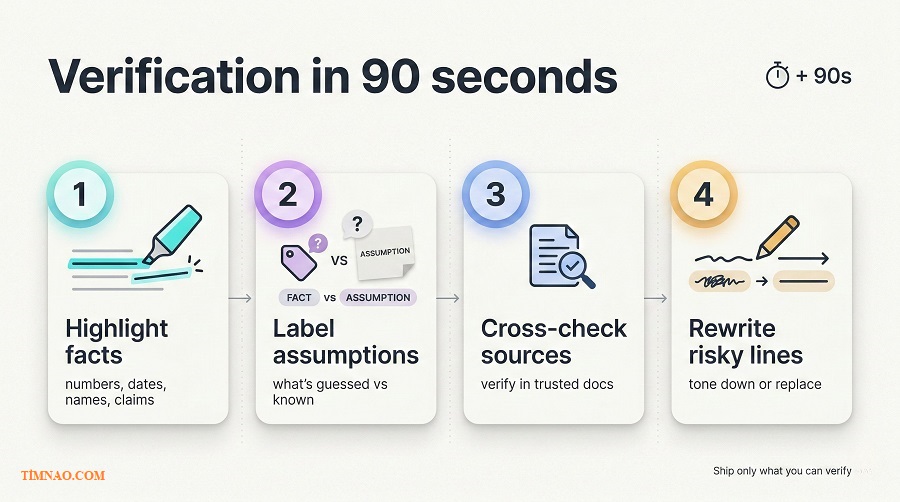
Here’s a fast habit that works in real life:
- Scan the draft and highlight “high-risk tokens”:
- numbers, dates, names
- “according to…” claims
- anything that could embarrass you if wrong
- Check only those items against a trusted source (your original notes, your company docs, the email thread, the real database).
- If you can’t verify something quickly, rewrite it so it’s safer.
Instead of:
- “This is the best approach and it will increase results by 30%.”
Write:
- “This is one approach worth testing. If it performs well in our context, we can expand it.”
This keeps your credibility intact.
“Can I make AI admit uncertainty instead of guessing?”
Yes — and it’s a smart move.
Ask it to label what it knows versus what it’s assuming:
Answer the question, then add:
- Assumptions you made
- What you’re unsure about
- What I should verify before using this
Keep it concise.
Question:
[YOUR QUESTION]
Even if it’s not perfect, it forces the model to slow down and surface weak spots.
“What do I do when the AI is confidently wrong?”
Don’t argue in circles. Reset the task.
A simple recovery routine:
- Tell it what’s wrong in one sentence.
- Provide the correct rule or a short excerpt of the real source (2–5 lines is enough).
- Ask it to rewrite using only the provided facts.
Example:
- “You said X is allowed. Our policy says Y. Rewrite the message to follow Y. Don’t add anything else.”
This usually works better than “Are you sure?” because you’re giving it a clear boundary.
“When should I stop using AI for that task?”
If every output requires heavy fact-checking, AI might be costing you time instead of saving it.
Tasks where AI is often not worth it:
- legal/compliance wording
- anything requiring precise quotes
- high-stakes, high-accuracy deliverables where verification is slow
In those cases, AI can still help with low-risk support:
- structuring the doc
- cleaning language
- making a checklist from already-approved content
That way you still get value, without risking your reputation.
“What’s the simplest rule I can actually follow?”
Here’s the rule many experienced users quietly follow:
- AI is great for words.
- You are responsible for truth.
If you adopt that mindset, AI becomes a useful tool instead of a risky gamble.
Memory, context windows, and consistency: why the bot “forgets” mid-task
If AI has ever “forgotten” a key detail you just gave it, you’re not crazy. You ran into a very normal limitation: most AI tools can only hold a limited amount of text in focus at once.
“Why does the bot forget what I said earlier?”
As a conversation grows, earlier instructions can fade into the background. This gets worse when:
- the thread is long
- you paste large blocks of text
- you change goals mid-way
- you ask for many different outputs in one go
A surprisingly effective fix: when the task matters, start a fresh chat and paste only what’s essential.
A clean starter packet:
- the brief (audience, goal, tone, rules)
- the input (notes/draft/source material)
- the output format you want
You’ll often get better results in a fresh chat than in a 60-message thread.
“What’s the difference between memory and context?”
A helpful way to think about it:
- Context is what the AI can “see” right now in the current conversation.
- Memory (if your tool supports it) is what gets saved for future use.
Even with memory features, don’t rely on “it should remember.” For important work, repeat your key rules in the brief. It’s faster than cleaning up a wrong draft.
“How do I stop it from changing direction halfway through?”
AI tends to drift when priorities aren’t clear. You can prevent that by “locking” the rules at the top.
Use a compact rules block like this:
Rules to follow:
1) Don’t add new facts.
2) If info is missing, write [NEED INFO].
3) Keep paragraphs short.
4) Use bullets for clarity.

Output format:
- Summary
- Key points
- Next steps
Then when you add new information, say what changed:
- “Update: replace the previous deadline with Friday.”
- “Update: this is now for a client, not internal.”
That one sentence prevents a lot of confusion.
“Why do I get inconsistent results from the same prompt?”
Because outputs naturally vary, and small differences in your input matter more than you think:
- one day your notes are detailed, another day they’re vague
- sometimes you include tone guidance, sometimes you don’t
- sometimes you paste examples, sometimes you don’t
If you want consistency, keep your inputs consistent:
- same brief template
- same structure template
- one example of a “good result”
This is exactly how you turn AI from a toy into a tool.
“What should I do when it starts going off-topic?”
Instead of correcting individual sentences, steer the task back to center:
- “Pause. Restate the goal in one sentence.”
- “List the rules you’re following.”
- “Continue, but only use the info I provided.”
This works because it forces the model to re-load the mission before it generates more text.
“How do I handle long projects without losing important details?”
For long projects, chat history is a weak foundation. A better approach is a single source-of-truth doc.
Create one short document called:
Project Brief (Always Current)
Keep it short and practical:
- goal
- audience
- key facts
- what not to do
- tone and structure
- definition of “done”
Then paste that brief at the top of each new session. You’ll spend less time re-explaining and more time getting usable drafts.
“How do I keep my voice consistent?”
Describing your voice in adjectives is okay, but examples work better.
A simple routine:
- paste two short samples you wrote (100–200 words each)
- ask AI to extract a style checklist
- rewrite your draft using that checklist
After that, you do the final pass — not because AI is bad, but because your voice includes judgment: what you emphasize, what you cut, what you soften, what you make direct.
Scaffolding: why AI works better inside real tools than in a blank chat
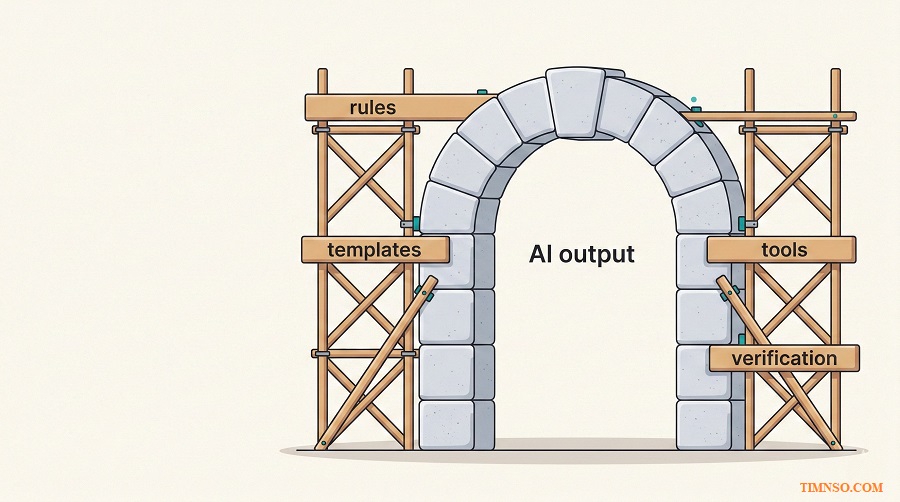
If AI sometimes feels brilliant and sometimes feels messy, you’re noticing something important: a blank chat has too much freedom. What makes AI truly useful day-to-day is scaffolding — structure around the tool.
“What does scaffolding mean in real life?”
Scaffolding is the set of supports that makes AI reliable:
- templates
- checklists
- saved snippets
- standardized formats
- workflows inside tools you already use
A blank chat is like asking someone to “build a house” with no blueprint. Scaffolding is the blueprint.
Once you add a consistent structure, AI becomes less chaotic:
- fewer random tangents
- fewer inconsistent formats
- fewer “I guess you meant…” moments
“Should I use AI inside tools or use a chatbot?”
For beginners, AI inside tools is often easier because:
- your work already lives there
- the output fits the tool (doc, email, meeting notes)
- the workflow is clearer
Chatbots like ChatGPT, Claude, and Gemini can be great when you need:
- brainstorming
- outlining
- rewriting
- restructuring messy notes into clear writing
A simple rule:
- use in-tool AI for routine work inside that tool
- use chatbots for thinking, drafting, and restructuring — then paste the result back
“How do I build scaffolding without becoming a ‘prompt nerd’?”
You only need three reusable assets:
- Brief template (audience, goal, tone, rules)
- Structure template (the exact format you want)
- Quality checklist (what “done” looks like)
Here’s a simple set you can copy into a note and reuse:
Brief
- Audience:
- Goal:
- Tone (3 words):
- Must include:
- Must avoid:
- Length/format:
Structure
- Summary (2–3 bullets)
- Details (grouped bullets)
- Next steps (numbered)
- Open questions (optional)
Quality check
- clear next step
- no fluff
- numbers/dates verified
- tone matches audience
- readable in 30 seconds
That’s scaffolding. It’s not complicated — it’s just consistent.
“What’s the fastest way to make outputs ‘ship-ready’?”
Make the format predictable and boring (in a good way).
When you want a deliverable you can send, give tighter boundaries:
- “Use bullets only.”
- “Keep each section under 6 lines.”
- “No buzzwords.”
- “If unsure, ask a question instead of guessing.”
You’re basically trading a little freedom for a lot more reliability.
“How do I avoid tool overload?”
New AI tools demo well, but real life is messy. You don’t win by collecting tools — you win by saving time on tasks you repeat.
Use a quick test on one real task:
- How long to paste context?
- How long to get a usable draft?
- How long to edit it into “sendable”?
- Did it save time, or add steps?
If it doesn’t help after a couple tries, move on. The best tool is the one you actually reuse.
“Can scaffolding help teams, not just individuals?”
Yes. Teams often get bigger gains because shared scaffolding reduces chaos:
- everyone uses the same weekly update format
- meeting notes follow a consistent structure
- client follow-ups don’t vary wildly by person
A simple team starter:
- define one standard template for one recurring output (weekly update, project brief, client email)
- keep it short
- include one example of a “good one”
People adopt templates when they make life easier, not when they feel like bureaucracy.
Use AI as a research assistant (without letting it rewrite reality)
AI can help you “research,” but the safest use isn’t “tell me the truth.” The safest use is: “help me organize what I have, surface questions, and turn information into a usable brief.”
“What’s the safest beginner way to use AI for research?”
Use AI on material you already trust:
- your notes
- internal docs you’re allowed to use
- text you pasted from a reliable source
Ask it to:
- summarize
- extract key claims
- identify missing info
- turn content into a plan or checklist
A safe research prompt:
I’ll paste source material below.

Task:
1) Summarize it in 8–10 bullets.
2) Extract key claims (only from the text).
3) List open questions / missing info I should confirm.

Rules:
- Don’t add facts not found in the source.
- If something is unclear, write [UNCLEAR].
Source:
[PASTE]
This keeps AI in “organizer mode,” which is where it shines.
“How do I learn faster from a doc I’m reading?”
One of the best uses of AI is turning reading into action. After you paste your notes or an excerpt, ask for:
- the 5 main ideas in plain English
- what a beginner would misunderstand
- what to do first, second, third
- what questions you should ask your team or manager
Then convert it into a checklist you can actually follow this week.
“How do I prevent AI from turning research into confident nonsense?”
Force the output into an evidence-friendly shape.
Ask for:
- what the text explicitly states
- what is implied
- what is missing
- what needs confirmation
A simple “evidence table” request:
- Claim
- Evidence in the text (paraphrase)
- Confidence (high/medium/low)
- What to verify
This doesn’t magically make it perfect, but it makes weak points obvious.
“Can AI help me search smarter without doing the searching?”
Yes. AI is good at turning a vague goal into better queries and clearer criteria.
Give it:
- your goal
- what you already know
- what you’re deciding
- what constraints you have (time, budget, skill)
Ask it for:
- 5 search queries
- keywords to include/exclude
- what signs indicate a trustworthy answer
Then you do the searching and decide what sources you trust.
“How do I use AI to compare options without bias?”
AI can “pick a favorite” if you let it. The fix is to compare using criteria you define.
Ask it to compare A vs B using:
- cost
- time to implement
- risk
- learning curve
- best use-case
- what could go wrong
Then ask for a recommendation only after the comparison, with trade-offs spelled out. This keeps the decision grounded.
“How do I turn research into something useful at work?”
Most people don’t want a “research essay.” They want clarity.
Useful work outputs:
- a 1-page brief
- a recommendation memo
- a meeting agenda
- a stakeholder update email
- a plan with next steps and owners
A clean decision brief format:
- Situation (2–3 lines)
- Options (bullets)
- Recommendation (1–2 lines)
- Risks/unknowns (bullets)
- Next step (one clear action)
This is where AI becomes practical: it helps you package information into a decision-ready shape.
“What if I’m researching internal docs and tribal knowledge?”
This is one of the highest-value uses — as long as inputs are controlled.
A safe internal workflow:
- gather trusted docs into a “source pack” folder
- create a short index doc (what each file is for)
- ask questions using only that pack
- confirm anything important in the original document
The key is discipline: AI helps you navigate complexity, but your organization still needs a real source of truth.
Turning AI wins into real outcomes: time saved, better work, more money
“How do I know AI is actually saving me time (not just feeling productive)?”
The easiest trap is “AI theater”: you spend 25 minutes prompting, tweaking, and polishing… to save 10 minutes of writing. The fix is boring, but it works: measure one workflow for one week.
Do this next (simple tracking):
- Pick one repeat task (weekly update, meeting recap, proposal draft, support reply).
- For 5 runs, write down:
- start time
- finish time
- how many revision rounds you did
- Compare week-to-week.
Keep the measurement lightweight. You’re not doing science. You’re checking whether the workflow pays rent.
“What’s a realistic ‘time saved’ target for beginners?”
A realistic first goal is 10–20 minutes saved on one repeat task, once you’ve run the workflow a few times.
The real compounding happens when:
- you reuse the same prompt pack
- your input gets cleaner (better notes, clearer bullets)
- you stop asking AI to “figure out everything” and start feeding it structured material
If you want a simple benchmark:
- Week 1: you might break even
- Week 2–3: you start saving time
- Month 2: you save time consistently (because the workflow becomes muscle memory)
“How do I turn ‘time saved’ into better work, not just more tasks?”
Time saved can disappear instantly if you fill it with more busywork. The better play is to “reinvest” part of the time into quality upgrades that actually matter.
High-leverage quality upgrades AI can help with:
- clearer structure (so people understand you faster)
- cleaner summaries (so decisions move faster)
- better stakeholder communication (less back-and-forth)
- faster iteration on drafts (you ship sooner)
A practical habit: every time AI saves you time, use 3–5 minutes of it to improve one thing that increases trust:
- add clearer next steps
- add one verified detail
- remove fluff and ambiguity
- add a simple decision point (“Choose A if…, choose B if…”)
“How do I use AI to become more valuable at work (not replaceable)?”
People become replaceable when their work looks like generic output and their decisions are invisible. You become more valuable when you:
- make good judgment visible
- communicate clearly
- reduce chaos for others
- ship reliably
AI can help you do that if you use it to amplify your strengths:
- turn rough thinking into clean writing
- turn scattered info into a clear plan
- turn meetings into action items with owners
- turn “I think…” into a structured recommendation
A simple way to show value without making it weird:
- you deliver a clear output quickly
- you’re confident about what’s true
- you highlight what’s missing and what needs a decision
“Where does the ‘more money’ part become real (without hype)?”
“More money” usually comes from one of these paths:
- Career path: better performance reviews, stronger project ownership, leadership visibility
- Freelance path: faster turnaround, better proposals, more consistent client communication
- Business path: clearer marketing messages, faster content production, smoother ops docs
AI doesn’t magically create money. It helps you create capacity and quality:
- capacity = you can take on one more project or ship faster
- quality = your work is easier to understand and trust
If you’re freelancing or building a side income, a very practical use is accelerating the “boring but paid” work:
- proposals
- onboarding docs
- client updates
- revisions and rewrites
- summaries and deliverables
(And yes, you still personalize. AI helps you get to a solid draft faster, not spam people faster.)
Your 7-day AI-at-work sprint (low-risk starter path + higher-leverage path)
“What’s the goal of this sprint, really?”
The goal is not “learn AI.” The goal is: build one repeatable workflow you can run in 15 minutes or less that improves output quality or saves time.
Pick one track:
Low-risk starter path (recommended if you’re new):
- AI helps you rewrite, summarize, structure, and format
- You stay grounded in your own notes and drafts
Higher-leverage path (when you’re ready):
- you build templates + prompt packs
- you standardize outputs (for yourself or your team)
- you create a mini “scaffolding system” you reuse
“Day 1: What should I choose as my first workflow?”
Pick a task that is:
- repeatable (at least weekly)
- language-heavy (writing, summarizing, organizing)
- easy to verify
- low drama if imperfect
Examples:
- weekly status update
- meeting recap → action items
- internal email updates
- a project plan outline
Do this next (10 minutes):
- Name the workflow: “Meeting recap → action items”
- Define “done” in one sentence: “A 10-bullet recap with owners + deadlines.”
- Create a folder or note where you’ll store your prompt pack.
“Day 2: How do I create a prompt pack I’ll actually reuse?”
Your prompt pack should be short enough to paste without sighing.
Make these 3 blocks:
- Brief: audience, goal, tone
- Rules: don’t add facts, mark missing info
- Format: exactly how the output should look
Here’s a clean example you can adapt:
Audience: [who will read this]
Goal: [what they should know/do]
Tone: clear, calm, direct

Rules:
- Don’t add new facts.
- If something is missing, write [NEED INFO].

Format:
1) Summary (3 bullets)
2) Decisions (bullets)
3) Action items (owner + due date)
4) Risks / open questions (bullets)
Save it. Reuse it. That’s how the sprint becomes real.
“Day 3: How do I stop spending time cleaning messy inputs?”
Messy input creates messy output. The fastest upgrade is a 2-minute “note cleanup” before you prompt.
Do this next (2 minutes before using AI):
- write 5–10 bullets
- each bullet is one idea
- include any dates/numbers you trust
- add placeholders for unknowns (“Owner: ?”)
Then prompt AI using that as the only source.
“Day 4: How do I make the output sound like me?”
Don’t chase “voice” too early. First chase clarity. But once the workflow works, add a lightweight voice layer.
Do this next:
- add one line to your prompt: “Keep it human. Short sentences. No buzzwords.”
- after AI drafts, rewrite:
- the first sentence
- the last sentence
Those two edits alone remove a lot of “AI flavor.”
If you want to go one step further, paste a short writing sample once and reuse the same “style checklist” for future drafts.
“Day 5: How do I build the higher-leverage version of the workflow?”
If you’re on the higher-leverage path, Day 5 is when you turn your workflow into scaffolding.
Do this next:
- Create a template in your main tool:
- in Google Docs or Notion
- Bake in the headings:
- Summary
- Decisions
- Action items
- Open questions
- Keep it as the default page you duplicate every time.
Now AI isn’t replacing your process — it’s powering a process that already has rails.
“Day 6: How do I make it faster than 15 minutes?”
Speed comes from reducing choices:
- fewer prompt edits
- consistent input structure
- predictable output format
- fewer revision rounds
Do this next (15-minute target):
- 3 minutes: bullets
- 5 minutes: AI draft
- 5 minutes: human edit + verify key details
- 2 minutes: final polish
If it takes longer, don’t panic. Identify the bottleneck:
- did your notes lack key details?
- did you ask for too much in one draft?
- did you skip structure and get a wall of text?
Adjust one thing and try again.
“Day 7: How do I lock in the win so I don’t forget next week?”
If you don’t “package” the workflow, it disappears.
Do this next (10 minutes):
- Create a single note titled: “My AI Workflow: ____”
- Include:
- when you use it
- what you paste (inputs)
- what prompt pack you use
- what you verify
- what ‘done’ looks like
- Add one sentence: “Next week, I will run this on ____.”
That’s it. You’ve built a real habit, not a one-time experiment.
Optional quick answers that beginners usually need
“Which AI tool should I start with?”
Start with the tool you’ll actually open and reuse. For general drafting and rewriting, beginners often do well with:
If your workplace is Microsoft-heavy, Microsoft Copilot may fit more naturally into your existing workflow.
The key is not picking the “best” tool. The key is picking one tool and building one workflow you repeat.
“Should I pay for a subscription?”
Pay only after you’ve proven a repeatable weekly win.
A simple rule:
- If it saves you 30–60 minutes a week, a paid plan can make sense.
- If you’re still experimenting and not reusing anything, wait.
Subscriptions don’t create productivity. Workflows do.
“Can I use AI at work if I have privacy concerns?”
Yes — by staying disciplined:
- avoid pasting sensitive information into tools you don’t control
- anonymize names and details
- use AI for rewriting and formatting based on your own notes
- keep “source of truth” facts in approved internal systems
If your company has approved tools, use those. If you’re not sure, assume public chatbots are not the place for confidential details.
“Why does AI sometimes ‘refuse’ or give overly safe answers?”
Sometimes it’s because your prompt is vague. Sometimes it’s a safety feature. Either way, you can usually get what you need by narrowing the task:
- ask for structure, not final claims
- ask for questions to clarify missing info
- ask for a draft based only on your provided notes
If the AI won’t give a direct answer, ask it to help you frame the decision:
- options
- pros/cons
- risks
- what to verify
“How do I avoid sounding like everyone else using AI?”
Three practical moves:
- Use your own real examples and context.
- Rewrite the first and last lines yourself.
- Add one specific detail that proves you were there (a decision, a deadline, a nuance).
Generic writing isn’t an AI problem. It’s an input problem.
“What’s the one mistake beginners make that wastes the most time?”
Trying to get a perfect output in one shot.
A faster approach:
- first prompt: structure + draft
- second prompt: tighten + remove fluff
- final pass: you edit for truth and tone
Two quick rounds beats one endless round.
What to remember when you open AI tomorrow morning
“What’s my simplest ‘do this every time’ checklist?”
Use this as your mental checklist before you hit enter:
- Start with a real task, not a random experiment.
- Paste your raw material (bullets, notes, draft).
- Tell it what not to do (don’t add facts, mark missing info).
- Lock the format (bullets, steps, short paragraphs).
- Do a human pass (especially for names, numbers, dates, promises).
If you do only those five things, your results will feel less chaotic immediately.
“What should I do when I’m stuck and don’t know what to ask?”
When you’re stuck, don’t ask AI for a full solution. Ask for a next step you can verify.
Try one of these:
- “Ask me 5 questions to clarify what you need.”
- “Give me a simple outline I can fill in.”
- “Turn my messy notes into a checklist.”
- “Rewrite this to be shorter and clearer.”
Momentum beats perfection.
“How do I keep it human and not ‘AI-flavored’?”
A quick finishing routine:
- read it out loud once
- cut any sentence that feels inflated
- replace one generic phrase with your natural wording
- add one line that shows judgment (“Given our timeline, I recommend…”)
You’ll be surprised how quickly the “AI tone” disappears when you do small, intentional edits.
“What’s the bottom line mindset?”
Keep this mindset and you’ll stay both productive and safe:
- AI helps you draft and organize.
- You decide what’s true, what matters, and what gets sent.
- One repeatable workflow beats twenty clever prompts.
4 action takeaways to keep on your desk:
- Pick one weekly task and build an AI workflow around it.
- Reuse the same brief + structure + rules each time.
- Verify the parts that can hurt you (names, numbers, dates, claims).
- Make your final message sound like you by editing the first and last lines.
Disclaimer
This article is for general educational and informational purposes only. It’s not legal, financial, medical, or professional advice, and it shouldn’t be relied on as a substitute for guidance from qualified professionals or your employer’s policies.
AI tools can produce inaccurate, incomplete, or misleading information. You are responsible for verifying facts, numbers, names, dates, and any high-stakes claims before using or sharing AI-generated content. Always use trusted sources and follow your organization’s confidentiality, data-handling, and compliance rules. Do not paste sensitive, personal, confidential, or proprietary information into AI tools unless you have explicit permission and the tool is approved for that use.
Any examples, prompts, workflows, and tool mentions in this article are provided as practical illustrations only. Results will vary depending on your role, industry, data access, and how you apply the methods. Use your judgment, and when in doubt, take a cautious approach and seek appropriate review.
If this guide helped you use AI at work with more confidence, you can support the blog by buying me a coffee ☕✨ It keeps these no-hype, beginner-friendly tutorials coming — and it genuinely means a lot. 💛
👉 Buy me a coffee here: https://timnao.link/coffee