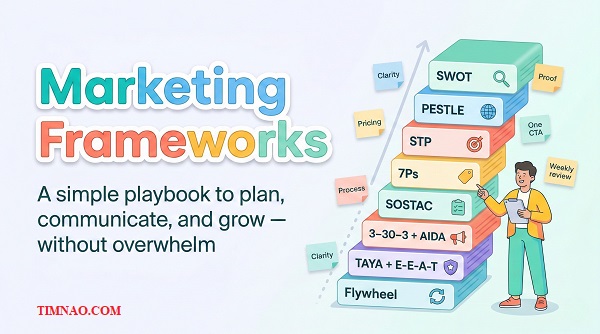
Marketing Frameworks Made Simple: A Confident, Powerful Playbook ✅
Marketing frameworks turn messy “random marketing” into a clear plan you can actually follow—so you stop wasting time, attract better-fit leads, and make smarter decisions with your budget. In this guide, you’ll learn a simple stack of beginner-friendly models you can apply this week to sharpen your offer, clarify your message, and build momentum without burning out.
The week Alex “did marketing” and still lost money
Alex runs a small service business. He’s good at the work. Customers who buy usually love the results. But his calendar has weird gaps—busy for two weeks, then quiet for one.
So he decides: “This week, I’m finally going to do marketing.”
Monday: he boosts a post.
Tuesday: he runs a discount.
Wednesday: he posts three reels because someone said “consistency is everything.”
Thursday: he tweaks his website headline (again).
Friday: he sends an email to an old list with “BIG NEWS!” and prays.
By the end of the week, he’s tired and down a few hundred dollars… and he can’t explain what happened.
Not because marketing is “a scam.”
Because he did random actions without a decision system.
Here’s what the week really looked like:
- He paid for attention (boosted post) before he had a clear offer.
- He created urgency (discount) before he built trust.
- He posted content without knowing who it was for.
- He changed messaging without measuring the impact.
- He emailed without a single strong “next step.”
What hurt most wasn’t the money. It was the feeling of:
“I did all the things… why doesn’t it work?”
The turning point: structure beats random tactics
A friend asked Alex one question that changed everything:
“What are you trying to fix—awareness, trust, conversion, or retention?”
Alex couldn’t answer.
That’s the moment he realized he needed marketing frameworks—not more ideas.
Frameworks aren’t fancy theory. They’re practical checklists that help you:
- choose the right move for your situation,
- stop doing “busy marketing,”
- and make results more predictable.
And here’s the best part for beginners:
You don’t need 20 frameworks. You need a few that work together in the right order.
Before we touch anything like ads or content calendars, we’ll first build Alex (and you) a simple way to choose frameworks without drowning in them.
How to choose marketing frameworks without drowning in models
If you’ve ever searched “marketing strategy frameworks,” you’ve seen the problem: there are too many models, and they all look important.
Beginners usually do one of two things:
- They ignore frameworks and run on vibes (“post more, discount more”).
- They collect frameworks like Pokémon and still don’t know what to do next.
Here’s the rule that keeps frameworks useful:
A framework is only valuable if it helps you make a decision today.
The 3 questions a framework must answer
When you’re choosing what to use, ask these three questions. If a framework can’t help you answer at least one clearly, skip it (for now).
1) Who are we trying to attract?
If this is fuzzy, your message becomes generic—and generic marketing is expensive.
2) Why should they choose us (instead of doing nothing or choosing someone else)?
If this is fuzzy, you end up competing on price or “personality.”
3) What do we do next—this week—to move a real metric?
If this is fuzzy, you get activity without progress.
A simple “Framework Stack” for beginners (so you don’t overthink)
Think of frameworks like a short stack, not a buffet:
- Diagnose (What’s actually happening?)
- Focus (Who are we for and what’s our angle?)
- Plan (What actions happen weekly?)
- Communicate (How do we say it clearly?)
- Improve (What do we measure and tweak?)
For the sections you asked for in this part, we’re only doing step 1: Diagnose.
That’s where SWOT and PESTLE shine.
One decision per framework (the anti-overwhelm rule)
This is where beginners get stuck: they try to “finish” the framework perfectly.
Instead, use this rule:
- Every time you use a framework, you must end with one decision and one next action.
Examples:
- After SWOT, your decision might be: “We will stop targeting low-budget buyers.”
- After PESTLE, your decision might be: “We will add ‘payment options’ to our pricing page because buyers are more price-sensitive this year.”
Frameworks are not homework. They’re steering wheels.
Next, let’s run a quick SWOT so you stop guessing what’s wrong.
Start with a quick SWOT so you stop guessing
SWOT is simple on purpose. It’s a snapshot of your situation in four boxes:
- Strengths: what you do well (and customers value)
- Weaknesses: what causes friction or lost deals
- Opportunities: what’s changing in your favor
- Threats: what could reduce demand or increase competition
Most beginners fill SWOT like a school worksheet. Don’t do that.
Use SWOT for one thing: find your biggest bottleneck and your best leverage point.
The 15-minute SWOT prompts (beginner-friendly)
Open a page in Notion or a doc in Google Docs. Make four headings: Strengths, Weaknesses, Opportunities, Threats.
Then answer these prompts fast—no overthinking.
Strengths (what helps you win deals)
- What do customers compliment most?
- What do you deliver faster, simpler, or safer than others?
- What do repeat customers come back for?
- What part of your work feels “easy” because you’ve done it so many times?
Weaknesses (what loses deals or wastes time)
- What question do you dread on sales calls?
- Where do projects go off-track?
- What causes refunds, complaints, or long delays?
- What do you keep apologizing for?
Opportunities (what the market is asking for)
- What are people asking more often this month than last month?
- What niche or problem do competitors ignore?
- What channel is clearly sending buyers (not just views)?
- What partnership could bring warm leads?
Threats (what could hurt margins or demand)
- Who is undercutting on price (and why)?
- Are customers delaying purchases?
- Are platform changes affecting reach?
- Are costs rising (tools, labor, shipping, rent)?
Now comes the part that makes SWOT useful.
Turn SWOT into one clear decision (the “So what?” step)
Pick one bottleneck and **one leverage point.
Use this simple filter:
- Biggest bottleneck = the thing that causes the most lost revenue or wasted time.
- Best leverage point = the strength you can amplify quickly and prove with examples.
Here’s Alex’s real SWOT (simplified):
Strengths
- Fast response time
- Clear communication
- High-quality work with photos to prove it
Weaknesses
- Pricing is unclear, so he gets endless “how much?” messages
- Website doesn’t explain process, so leads feel uncertain
Opportunities
- Local search is growing for his service
- People are researching longer before contacting providers
Threats
- Low-cost competitors with vague promises
- Customers are more price-sensitive than last year
Alex’s decision from SWOT:
“I will build a simple ‘Pricing + Process’ page this month so I stop wasting time on bad-fit leads.”
Alex’s next action:
“Draft the top 10 questions I answer on calls and turn them into website sections.”
That’s it. One decision, one action.
Why SWOT impacts money (in plain language)
SWOT helps you avoid three expensive mistakes:
- Buying traffic before fixing conversion
If your offer is unclear, ads just pay to send people into confusion. - Marketing to everyone
Generic messaging attracts low-intent people. You’ll get inquiries, but not sales. - Competing on price by accident
If you don’t clearly position your value, you’ll drift into discounts.
If you’re a beginner, SWOT is the fastest way to stop guessing and start choosing.
Now let’s add PESTLE to catch outside forces that can break a strategy—even if your SWOT looks good.
Use PESTLE to avoid building a strategy that the world breaks
SWOT is mostly about you and your competitive position.
PESTLE is about the world around you—the stuff you don’t control that still affects buying behavior.
PESTLE stands for:
- Political
- Economic
- Social
- Technological
- Legal
- Environmental
Beginners often skip this because it feels “corporate.” But you don’t need a boardroom presentation.
You need one thing:
What’s changing around my customer that affects how they decide and spend?
The “2–3 factor” PESTLE scan (don’t do all six unless you must)
For most small businesses and creators, doing all six is overkill.
Pick the 2–3 factors most likely to affect demand or conversion in the next 90 days.
Here are beginner-friendly prompts you can use:
Economic (money mood)
- Are customers delaying purchases or comparing more?
- Are they asking for cheaper options or payment plans?
- Are you seeing more “just checking price” inquiries?
Technological (how people discover and decide)
- Did a platform change reduce your reach?
- Is AI changing how customers search, compare, or get answers?
- Are competitors using tools that speed up quoting, booking, or delivery?
Social (values + trends)
- Are customers valuing speed, trust, sustainability, or personalization more?
- Are people more skeptical of marketing claims?
- Are reviews and “proof” more important than before?
Legal (rules and compliance)
- Any claim you can’t legally make anymore?
- Any new requirements for contracts, privacy, or disclaimers?
Environmental (context + constraints)
- Seasonality, weather, supply chain delays?
- Any “busy season” shifts?
How PESTLE turns into practical marketing moves
PESTLE matters because it tells you what to emphasize and what to adjust before you waste time.
Let’s translate common PESTLE findings into actions a beginner can do this week.
If Economic pressure is rising (more price sensitivity)
Do this:
- Add a “What affects cost?” section to your pricing page.
- Offer clear tiers (good / better / best) instead of discounts.
- Add “budget-fit” language: “If your budget is under X, here are better options.”
Why it works:
- You filter bad-fit leads earlier.
- You reduce “sticker shock.”
- You stop losing buyers who assume you’re too expensive.
If Technological shifts are changing discovery (platform reach drops)
Do this:
- Move at least one core asset to your website (pricing/process/FAQ page).
- Build a simple email capture (“Get the checklist”) so you’re not platform-dependent.
- Make your headlines match what people search (“cost,” “timeline,” “best option”).
Why it works:
- You’re building something you own.
- You don’t reset to zero every algorithm update.
If Social trust is lower (more skepticism, more comparison)
Do this:
- Add proof: reviews, photos, case snapshots, “what we learned.”
- Publish one “trade-offs” page: “When this is NOT worth it.”
- Use clearer language, fewer buzzwords.
Why it works:
- Trust becomes a conversion lever when attention is cheap but belief is expensive.
Alex’s PESTLE (quick version) and the decision it triggered
Alex picked 3 factors:
- Economic: customers were more budget-conscious
- Technological: people researched longer online before calling
- Social: trust mattered more; buyers wanted proof and clarity
Decision from PESTLE:
“I will stop leading with discounts and instead lead with clarity: pricing ranges, process steps, and proof.”
Next action:
“Update my website homepage to answer: who it’s for, what it costs (range), and what happens next.”
The beginner mistake: treating PESTLE like a report instead of a filter
PESTLE isn’t something you “complete.” It’s something you use to avoid bad decisions.
If you only remember one line, remember this:
- SWOT tells you what to fix inside your business.
- PESTLE tells you what to adapt because the world changed.
And once you’ve diagnosed the situation with SWOT + PESTLE, you’re finally ready for the fun part: picking a target, sharpening your message, and stopping the “marketing to everyone” trap.
That’s where STEP/STP comes next.
STP/STEP: the fastest way to stop sounding like everyone else
After Alex finished his SWOT and PESTLE, he had a clearer picture of why marketing felt random.
But he still had a bigger issue: his message sounded like every competitor’s message.
You know the kind:
- “High quality service”
- “Affordable prices”
- “We care about customers”
- “Trusted, reliable, professional”
None of that is wrong. It’s just invisible.
This is where STP/STEP saves beginners the most time.
- Segmentation: split the market into meaningful groups
- Targeting: choose which group you’ll focus on
- Positioning: decide how you’ll be the obvious choice for that group
If you do this well, your content gets easier, your ads get cheaper, and your sales calls become calmer because you’re no longer trying to convince everyone.
Segmentation ideas beginners can actually use
Segmentation sounds fancy, but it’s just “group people by the reason they buy.”
Beginners often segment by age or gender because it’s easy to imagine. Most of the time, that’s not the useful segmentation.
Use segmentation that changes the decision.
Here are simple segmentation angles that work in real life:
1) Budget level
- “Looking for the cheapest option”
- “Wants a fair price with predictable results”
- “Willing to pay for premium + no headaches”
2) Urgency
- “Need it this week”
- “Planning for next month”
- “Just researching”
3) Risk tolerance
- “Wants the safest option”
- “Open to experimentation”
- “Has been burned before and needs reassurance”
4) Knowledge level
- “Beginner (needs education)”
- “Intermediate (wants comparisons)”
- “Advanced (wants specifics, proof, process)”
5) Use case
- “Personal/home”
- “Business”
- “Resale/investment”
A good segmentation question is:
“What kind of buyer conversation changes depending on who they are?”
If your answers change a lot, that’s a useful segment.
Targeting without losing customers
Here’s the fear: “If I pick one target, I’ll lose everyone else.”
In practice, targeting usually does the opposite. It makes you more memorable and easier to trust.
A beginner-friendly targeting rule is this:
Pick one primary target for the next 30 days.
That doesn’t mean you reject everyone else. It means your marketing speaks clearly to one group so it finally cuts through noise.
Alex’s business had three common segments:
- Budget hunters (“just tell me the cheapest price”)
- Mid-range planners (“I want a fair quote and clear timeline”)
- Premium buyers (“I’ll pay more if it’s handled smoothly”)
Before STP, he tried to appeal to all three, which made his message bland.
After STP, he chose one primary target:
- Mid-range planners who valued clarity and predictability.
Why? Because:
- They were profitable.
- They weren’t as price-obsessed.
- They responded well to clear processes and good communication (his strength).
Positioning sentence you can paste everywhere
Positioning isn’t a slogan. It’s a decision.
Use this simple formula:
For [target], I help you [result] by [unique approach], so you get [benefit].
Examples (adapt to your situation):
- “For busy homeowners planning a project in the next 90 days, we deliver predictable timelines by using weekly check-ins and clear scope stages, so you’re never left guessing.”
- “For small businesses that need steady leads, I build simple marketing systems using buyer-focused pages and weekly review loops, so you stop wasting time on random tactics.”
Now turn it into website-ready language:
1) One-line headline (clear, not clever)
- “Predictable renovations for homeowners who want clarity and calm.”
2) One-line proof or mechanism
- “Weekly updates, clear scopes, and transparent pricing ranges.”
3) One-line next step
- “See pricing → book a call if it fits your budget.”
That’s how you stop sounding like everyone else—because you stop trying to be for everyone.
And once you know who you’re for, the next question becomes painfully practical:
“Is my offer actually set up to convert that person?”
That’s where the 7Ps come in.
The 7Ps: fix your offer before you try to “promote” harder
Most beginner marketing fails because the offer is fuzzy.
People don’t say “no” because they hate you. They say “no” because they don’t understand:
- what they’re buying,
- what happens next,
- what it costs,
- and whether it’s safe.
The 7Ps framework helps you fix that before you spend more effort on promotion:
- Product: what you sell (and what’s included)
- Price: how you charge (and how you justify it)
- Place: where/how it’s delivered
- Promotion: how people discover it
- People: who delivers it (and how you show credibility)
- Process: how it works step-by-step
- Physical Evidence: proof that reduces anxiety (reviews, case studies, guarantees, policies)
Beginners try to “Promote” their way out of a weak offer.
7Ps flips that: tighten the offer first, then promotion becomes easier.
The 3 Ps that most directly affect conversion
If you’re overwhelmed, start with the three that usually move the needle fastest:
1) Price (remove the guessing game)
You don’t have to publish exact prices if your work is custom.
But you do need clarity. Choose one:
- A starting price (“Projects start at…”)
- A range (“Most projects fall between X and Y”)
- tiers (“Basic / Standard / Premium”)
- A minimum (“We’re not a fit under X”)
Alex avoided pricing because he feared scaring people off.
But the people he “kept” were the ones wasting his time.
When he added a range and minimum, two things happened:
- fewer inquiries overall,
- but the inquiries were far more serious.
That’s a trade most businesses should happily take.
2) Process (show what happens after “yes”)
Process is the most underrated conversion tool.
A buyer’s brain is quietly asking:
“What happens after I pay? Will this be chaotic?”
A simple process section can look like:
- Quick call (fit + budget check)
- On-site or detailed intake
- Quote + scope confirmation
- Work begins (weekly updates)
- Final walkthrough + follow-up
This doesn’t need to be long. It needs to be specific enough that someone can picture it.
3) Physical Evidence (proof that reduces risk)
When trust is low, proof becomes your shortcut.
Beginner-friendly proof options:
- 3–5 testimonials (even short ones)
- before/after photos
- screenshots of results (if digital work)
- a short “case snapshot” (problem → approach → outcome)
- clear policies (refund, timeline expectations, what’s included)
Alex added one simple proof block:
- “Recent projects” + photos + two short quotes.
That alone improved conversion because it made the offer feel real.
Quick 7Ps tune-up checklist (one page, one sitting)
Use this checklist once, then revisit monthly.
Product
- What exactly is included?
- What is not included?
Price
- Is there a range, tier, or minimum?
- Do you explain what changes cost?
Place
- How is it delivered (online, on-site, hybrid)?
- Is the delivery experience clear?
Promotion
- Which channel brings your best buyers today?
- What’s the one channel you’ll focus on for 30 days?
People
- Why should they trust you?
- Do you show your face, your work, or your credentials?
Process
- Can a buyer understand the steps after paying?
- Do you set expectations around timeline and communication?
Physical Evidence
- Do you show proof near the call-to-action?
- Do you reduce anxiety with policies and examples?
The beginner move that prevents wasted ad spend
Before Alex spent another dollar on promotion, he made one decision:
“I will not run ads until my pricing and process are clear enough that a stranger can understand them in 30 seconds.”
That one decision saved him from paying for traffic that would have bounced.
Now that the offer is clearer, we need a simple plan that turns “good intentions” into weekly actions.
That’s where SOSTAC helps you stop improvising.
SOSTAC: the easiest way to turn ideas into a real marketing plan
Most beginners don’t need a “strategy deck.”
They need a plan they can actually follow on a Tuesday afternoon.
That’s what SOSTAC is for:
- Situation: where you are now
- Objectives: what you want
- Strategy: your approach
- Tactics: what you’ll do
- Action: who does what and when
- Control: how you measure and improve
The power of SOSTAC is that it forces you to connect actions to outcomes.
No more “we should post more.” More of what? For who? For which goal?
A one-page SOSTAC you can fill in 10 minutes
Open a doc and fill this in like a human, not a robot.
Situation (today)
- Best lead source right now:
- Biggest bottleneck (from SWOT):
- What people ask before buying:
- What’s unclear on the website/offer:
Objectives (next 30 days)
Pick numbers you can realistically hit.
- Qualified inquiries:
- Calls booked:
- Sales closed:
- Revenue target (optional):
Strategy (your approach)
- Primary target segment (from STP):
- Positioning sentence:
- Primary channel for 30 days:
- What you’ll lead with (pricing/process/proof):
Tactics (what you’ll do weekly)
Keep it small.
- Publish: 1 helpful page/post per week
- Improve: 1 conversion element per week (pricing/process/proof)
- Follow-up: 1 system (email template, DM script, quote process)
Action (who does what, when)
- Owner:
- Support (if any):
- Weekly time block:
- Tools you’ll use (keep it minimal):
If you need a tool for basic organization, something like Trello is enough.
Control (one metric + review habit)
- One metric tracked weekly:
- Where you track it:
- What “good” looks like:
- What you’ll change if it’s not good:
One metric to track weekly (Control)
Beginners break their brains trying to measure everything.
Pick one primary metric based on your current bottleneck:
- If you need more leads: qualified inquiries
- If you get inquiries but poor quality: budget-qualified calls booked
- If calls happen but sales don’t: close rate
- If people buy but don’t repeat: repeat purchase / referrals
Alex chose:
- Budget-qualified calls booked
Because that matched his real problem: too many time-wasters.
How SOSTAC stopped Alex from “doing everything”
Alex’s old marketing week looked like this:
- post, discount, tweak, email, panic
His SOSTAC-based week looked like this:
- publish one “pricing clarity” page
- update process steps on homepage
- follow-up using a simple script linking to the page
- track calls booked
Same time. More progress. Less chaos.
Now you’ve got a plan—but there’s one last problem that can still ruin results:
even a good plan fails if your message doesn’t land fast.
That’s where 3–30–3 and AIDA help you write like you respect attention.
3–30–3 + AIDA: make your message land in the real attention economy
Your buyer is not sitting down with tea and reading every word.
They’re skimming between meetings, scrolling in a line, or half-paying attention while they compare options.
Two simple frameworks help you write and present your message in a way that fits real life:
- 3–30–3: structure for attention and skimming
- AIDA: structure for persuasion and action
Use them together and you’ll notice two things:
- people understand faster
- people take the next step more often
Rewrite the first 30 seconds (headline + bullets)
Here’s the practical rule:
If someone gives you 30 seconds, what do they need to know to stay?
Most beginner pages waste that window with fluff like:
- “Welcome to our website”
- “We’ve been serving the community”
- “We’re passionate about excellence”
Instead, your first 30 seconds should include:
- A clear headline
- Say what you do, for who, and the main outcome.
- A “who it’s for” line
- This filters and attracts at the same time.
- 3–5 bullets that answer buyer anxiety
- price range or minimum
- timeline expectation
- process steps (short)
- proof (one line)
- next step
Here’s a simple example Alex used:
Headline: Predictable renovation timelines for homeowners who want clarity
For who: Best for projects planned in the next 30–90 days
Bullets:
- Transparent pricing ranges (so you know if it fits)
- Clear step-by-step process (so it doesn’t feel chaotic)
- Weekly updates (so you’re never guessing)
- Photos and real project examples
- Book a call if your budget starts at X
That’s not “creative.” It’s effective.
AIDA: the flow that makes your page feel natural
AIDA gives your message a human rhythm:
- Attention: grab the right person’s focus
- Interest: show relevance and clarity
- Desire: build belief with proof and benefits
- Action: make the next step obvious
Here’s how to apply AIDA to a homepage or service page:
Attention
- Headline that matches what they want, not what you want to say.
Interest
- Short paragraph + bullets that clarify: what it is, who it’s for, how it works.
Desire
- Proof and specifics:
- mini case snapshot
- testimonials
- before/after
- what happens next
Action
- One primary CTA:
- “Check pricing”
- “Book a call”
- “Get a quote”
- “Download the checklist”
One CTA rule to reduce decision fatigue
Beginners love adding options:
- “Call us!”
- “Email us!”
- “DM us!”
- “Book a consultation!”
- “Get a quote!”
- “Join our newsletter!”
That’s not helpful. It’s overwhelming.
Use this rule:
One page = one primary action.
Secondary actions can exist, but they should be visually smaller.
Alex changed his page from five buttons to one:
- “See pricing and process”
Then, on that pricing page:
- “Book a call if it fits”
Conversion improved because the decision got easier.
A quick “3–30–3 + AIDA” edit you can do today (30 minutes)
Pick one page (homepage or your main service page) and do this:
- Rewrite the headline to include:
- what you do
- who it’s for
- the outcome
- Add 4 bullets that answer:
- cost fit
- timeline
- process
- proof
- Add one proof block near the CTA:
- a testimonial
- a case snapshot
- a photo grid
- Make one CTA obvious
- one button
- one next step
This is the kind of boring clarity work that creates real results—because it respects how people actually read and decide.
And once your message lands quickly, your marketing stops feeling like you’re pushing. It starts feeling like you’re guiding the right people toward a clear choice—which is exactly where we want to go next.
TAYA + E-E-A-T: turn buyer questions into pages that pre-sell for you
By now, Alex had a clearer target (STP), a cleaner offer (7Ps), and a simple weekly plan (SOSTAC). But his days still felt noisy because every call started the same way:
“How much is it?”
“How long does it take?”
“What can go wrong?”
“Why are you more expensive than the other guy?”
So he stopped chasing “content ideas” and started building buyer-question pages—answers he could send before a call, after a call, and (eventually) rank for in search.
That’s the idea behind TAYA (They Ask, You Answer): publish the real questions buyers ask—especially the uncomfortable ones—so your site does the explaining before you ever talk.
The five question types that decide the sale
If you’re a beginner, you don’t need 50 topics. Start with these five buckets and make them specific to your business:
- Price & cost (ranges, minimums, what changes price)
- Problems & trade-offs (downsides, risks, “not a fit if…”)
- Comparisons (option A vs B, DIY vs hiring)
- Reviews & results (examples, realistic outcomes, case snapshots)
- Best choice by situation (“best for small budgets,” “best for beginners,” etc.)
These pages help you earn in a very unsexy way: fewer time-wasters, faster decisions, better-fit leads.
A page format that keeps you from writing fluff
Here’s the beginner trap: you write “helpful” content that never answers the question.
Use this structure instead:
1) Lead with the answer
- Price question? Give a range or starting point.
- Timeline question? Give a typical window.
- “Is it worth it?” question? Give your honest verdict and when it changes.
2) List 3–7 decision drivers (bullets)
- what increases cost
- what delays timelines
- what makes this higher risk
- what changes the outcome most
3) Add one real scenario
Keep it short:
- “If your budget is around X, here’s what’s realistic…”
- “If you need it fast, the trade-off is…”
4) End with one next step
One page, one primary action:
- “See pricing & process”
- “Book a call if your budget starts at X”
- “Request a quote”
E-E-A-T: make strangers trust your answers
TAYA is “what to publish.” E-E-A-T is “why anyone should believe you.”
For beginners, treat E-E-A-T like a safety checklist: does this page feel real, competent, and low-risk?
Experience
- 2–3 real photos (even phone photos)
- a “what we learned” note from a past job
Expertise
- a short bio (who you are + what you do)
- simple explanations of jargon
Authority
- legit certifications/partners (only if real)
- a short “As seen in…” line (only if true)
Trust
- clear contact info and service area
- what’s included / not included
- a few genuine reviews
If you’re publishing on WordPress, adding an author box and a simple “Work Examples” block takes minutes and upgrades trust a lot. (WordPress)
Your first three buyer-question pages (copy these prompts)
If you only publish three pages this month, make them these:
- Pricing clarity page
- “Most projects fall between X and Y.”
- “Here are 5 things that change the price.”
- “We’re not a fit if your budget is under X.”
- Process + timeline page
- “Here’s what happens after you say yes (5 steps).”
- “Typical timelines and what causes delays.”
- “How we communicate (updates, check-ins, approvals).”
- Trade-offs / comparison page
- “DIY vs hiring: when each makes sense.” or “Option A vs B.”
- “What you gain and what you give up.”
- “My honest recommendation for different situations.”
You don’t need perfect writing. You need pages you can reuse in sales starting this week.
The fastest way to see results (even before SEO kicks in)
Don’t wait for traffic. Use your pages immediately:
- Send the pricing page after every inquiry.
- Link the comparison page in your proposal.
- Pin the “not a fit if…” page in DMs.
Once Alex did that, the pages started paying him back the same week—because he reused them in sales.
Next comes the mindset shift that makes this sustainable: build a flywheel, not a monthly reset.
Flywheel thinking: build momentum instead of restarting every month
Most beginners run marketing in bursts:
- post a lot → burn out → stop → panic → restart
A flywheel is a loop where each effort makes the next effort easier, because you’re building reusable assets and proof.
A beginner flywheel you can run without a team
Use this simple loop:
- Publish one buyer-question page (TAYA)
- Route it into sales (follow-ups, proposals, quick replies)
- Improve one small conversion point (headline, CTA, pricing clarity)
- Collect one proof item (review, photo, tiny case snapshot)
- Add that proof back into your key pages (E-E-A-T)
Repeat weekly.
The “one-one-one” rule (so you don’t burn out)
Flywheels die when you try to do everything at once. Keep it tiny:
- 1 asset per week (one page)
- 1 improvement per week (one clarity fix)
- 1 proof item per week (one review/photo)
That’s enough to create momentum.
Two common flywheel breaks (and quick fixes)
Break #1: You publish, then forget the page exists
Fix: add the link to your proposal template and save it as a DM quick reply.
Break #2: You wait for “more traffic” before you collect proof
Fix: start with 3 reviews, put them on your top pages, and keep collecting.
Now let’s make this even easier: when you’re busy, the Framework Stack tells you what to do next—without guessing.
The action system: the “Framework Stack” decision rules (use this every time)
When you’re tired or busy, you don’t need motivation. You need decision rules.
The Framework Stack is an order of operations that stops you from doing the wrong work first.
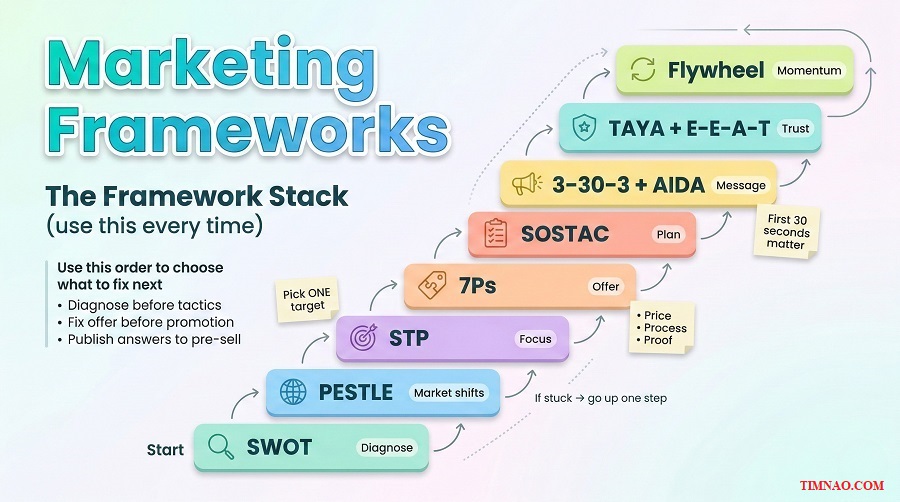
The Framework Stack (simple order)
- Diagnose: SWOT + PESTLE
- Focus: STP/STEP
- Fix: 7Ps (price, process, proof first)
- Plan: SOSTAC (weekly rhythm + one metric)
- Communicate: 3–30–3 + AIDA (clear first 30 seconds, one CTA)
- Compound: TAYA + E-E-A-T + Flywheel (one reusable asset per week)
If-then rules you can use in real life
- If leads are low quality, then tighten STP and add a “not a fit if…” section.
- If you get inquiries but not sales, then fix price/process/proof before doing more promotion.
- If you don’t know what to publish, then write the question you answered 3 times this week (TAYA).
- If people bounce fast, then rewrite the first 30 seconds (headline + bullets) and keep one CTA.
The 30-minute weekly reset
Alex’s weekly reset looked like this:
- Check one metric (5 min)
Calls booked, qualified inquiries, or close rate. - Name the bottleneck (10 min)
What confused people? Where did they drop off? What question kept repeating? - Pick one framework (10 min)
Use the if-then rules. - Ship one deliverable (5 min)
One page, one headline rewrite, one proof item—just one.
A simple Notion checklist works great for this routine. (Notion)
Now, the last piece: how to apply this when your situation is different—no audience, limited time, or too many tire-kickers.
Practical paths: how different beginners can use this (and get a first win)
Pick the path that matches your current reality. Your goal is one measurable win—proof the system works.
Path 1: Beginner with no audience (starting from zero)
Goal: get one qualified inquiry without paying for ads.
Do this
- Choose one target segment (STP).
- Publish one buyer-question page (TAYA): pricing or process is best.
- Add three trust signals (E-E-A-T): photo, short bio, one example.
Share it simply
- Post once on LinkedIn summarizing the answer.
- Message 10 warm contacts: “If you know someone planning X, this guide might help.”
First measurable win
- A message that includes timeline + budget range.
Path 2: Freelancer/creator selling a service
Goal: fewer DMs, faster decisions.
Do this
- Create a “Working together” page (process in 5 steps + proof).
- Create one comparison page: “DIY vs hiring help” (TAYA).
- Make your CTA singular: “Book a call” or “Request a quote.”
First measurable win
- Prospects arrive with better questions (not basic ones), and calls get shorter.
Path 3: Local service owner (leads exist, quality is the problem)
Goal: filter tire-kickers and raise deal quality.
Do this
- Publish a pricing clarity page (range + cost drivers + minimum).
- Publish a trade-offs page (“what can go wrong and how we prevent it”).
- Send those links after every inquiry.
First measurable win
- Fewer “just curious” calls, more budget-qualified calls.
Path 4: Limited time (1–2 hours/week)
Goal: build momentum without burnout.
Weekly rhythm
- Week A: publish one buyer-question page
- Week B: improve one conversion point (headline, CTA, pricing clarity)
- Week C: collect + add one proof item
Then repeat.
First measurable win
- One week where you saved time on calls because you sent a page instead of re-explaining.
If you can get one win, you’ll naturally want the next step: turning this into a short sprint so you can build a full set of core pages quickly.
The beginner mistakes that make frameworks feel “useless”
Frameworks don’t fail because they’re “too theoretical.” They fail because beginners use them in ways that create more thinking and less doing. If you want frameworks to feel practical, you need a few guardrails that keep you moving—even on busy weeks.
Mistake 1: Treating frameworks like homework instead of a steering wheel
A framework isn’t something you “complete.” It’s something you use to make one decision, then you drive.
What it looks like:
- You spend an hour filling boxes and feel productive… but nothing changes.
- You keep revising the same doc instead of shipping a page or improving a step.
Fix (the 1-decision rule):
- Every framework session ends with:
- One decision (what we will do / stop doing)
- One deliverable (a page, a headline rewrite, a proof block, a script)
Example: “We’ll stop targeting bargain shoppers” + “Add a minimum budget line on the pricing page.”
Mistake 2: Collecting marketing models instead of stacking them
A single framework rarely solves everything. The magic is the order.
What it looks like:
- You jump to AIDA and rewrite copy… but your target is still “everyone.”
- You run ads… but price and process are unclear.
- You build content… but it doesn’t connect to sales.
Fix (use the Framework Stack):
- Diagnose (SWOT/PESTLE) → Focus (STP) → Fix (7Ps) → Plan (SOSTAC) → Communicate (3–30–3 + AIDA) → Compound (TAYA + E-E-A-T + flywheel)
If you skip earlier steps, later steps feel “useless” because they’re trying to solve the wrong problem.
Mistake 3: Using frameworks to “find the perfect strategy”
Beginners often think there’s one correct plan. There isn’t. There’s only a plan you can run consistently and improve.
What it looks like:
- You delay publishing until you’re 100% sure.
- You keep changing direction before anything has time to work.
Fix (run one 30-day bet):
- Pick one target segment, one channel, one primary metric.
- Commit for 30 days.
- Improve weekly, not daily.
That’s how you get signal instead of noise.
Mistake 4: Targeting “everyone” and hoping your copy saves you
No amount of clever copy can overcome a fuzzy target. If your page tries to speak to everyone, it ends up sounding like a brochure.
What it looks like:
- Your headline is vague (“High quality service you can trust”).
- You get inquiries, but they’re random and low intent.
Fix (make your targeting visible):
Add one line near the top of your main page:
- “Best for: ____”
- “Not a fit if: ____”
- “Minimum budget / starting point: ____”
This instantly filters and improves lead quality.
Mistake 5: Skipping offer clarity and blaming promotion
Promotion amplifies what already exists. If your offer is unclear, promotion amplifies confusion.
What it looks like:
- You boost posts and get clicks, but no calls.
- People ask the same basic questions before they’ll book.
Fix (7Ps triage):
Before you promote, fix:
- Price clarity (range, minimum, tiers)
- Process clarity (steps + timeline expectations)
- Proof (reviews, examples, photos, policies)
Then promote.
Mistake 6: Measuring everything and learning nothing
Beginners either measure nothing (“I’ll just feel it out”) or measure too much (10 dashboards, zero decisions).
What it looks like:
- You track likes, views, followers… but can’t connect it to sales.
- You change tactics based on a bad day, not a trend.
Fix (one metric + one check-in):
- Choose one primary metric:
- Qualified inquiries
- Calls booked
- Close rate
- Repeat/referrals
- Review it once a week.
- Make one change based on that review.
If you want simple tracking, Google Analytics and Google Search Console are enough for most beginners.
Mistake 7: Trying to run the whole playbook at once (burnout)
Frameworks are supposed to reduce overwhelm. If they’re making you feel behind, you’re doing too much.
What it looks like:
- You plan to publish 10 pages in a week, then publish none.
- You keep “restarting” because you can’t maintain the pace.
Fix (the one-one-one rhythm):
Each week, ship:
- 1 asset (one buyer-question page)
- 1 improvement (headline, CTA, pricing clarity)
- 1 proof item (review, photo, mini case snapshot)
Track it in a simple board like Trello or a checklist in Notion.
Mistake 8: Forgetting to route your work into sales
This is the most common reason “content doesn’t work.” You publish something helpful… and then never use it.
What it looks like:
- Your blog exists, but your sales process doesn’t reference it.
- You keep answering the same questions manually.
Fix (the routing habit):
For every page you publish, decide where it will live in your workflow:
- As a link in your proposal template
- As a quick reply in DMs
- As a follow-up email after calls
If it doesn’t get routed, it doesn’t compound.
The goal is simple: frameworks should make your marketing feel calmer and more predictable—not heavier. Next, let’s turn all of this into a sprint you can finish in a single week.
A 7-day sprint to build your first real strategy (without overwhelm)
This sprint is designed for beginners who want a usable strategy fast. Each day has one deliverable. If you only have 45–60 minutes, you can still complete it—because the work is focused.
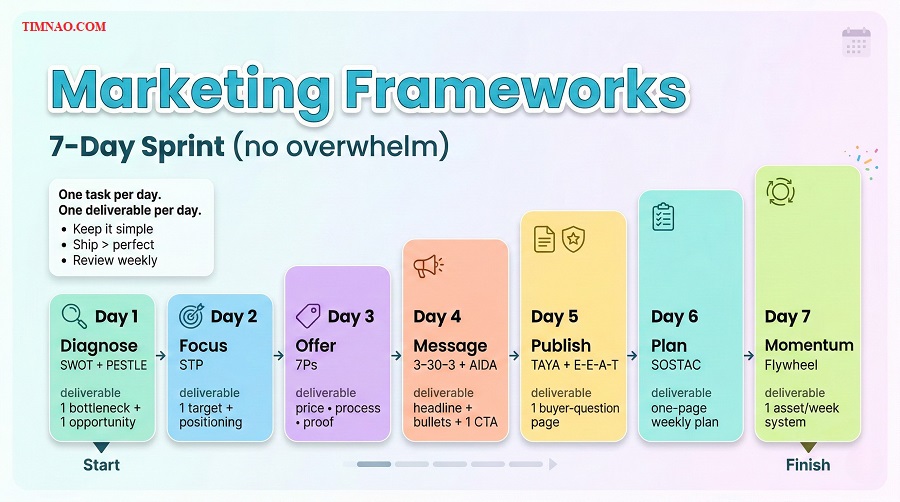
What you need before Day 1 (10 minutes)
- One doc (or workspace) to keep everything together
- Your website (or a simple page builder) so you can publish
- A place to capture questions from customers
If you’re on WordPress, keep it simple and publish the first pages as posts or basic pages. (WordPress)
Day 1: Diagnose in one hour (SWOT + quick PESTLE)
Deliverable: one bottleneck + one opportunity + one market shift to respect
- Do a quick SWOT:
- Strength: what customers praise
- Weakness: what loses deals or wastes time
- Opportunity: what’s rising in demand
- Threat: what’s squeezing margins or attention
- Do a “2–3 factor” PESTLE scan:
- Economic (budget sensitivity)
- Technological (discovery changes)
- Social (trust changes)
Make one decision:
- “This week, we focus on fixing ____ because it blocks sales.”
Day 2: Focus your message (STP in 45 minutes)
Deliverable: one target segment + one positioning sentence
- Segment quickly using one axis:
- Budget level OR urgency OR knowledge level
- Choose one primary target for 30 days.
- Write your positioning sentence:
- “For [target], I help you [result] by [approach], so you get [benefit].”
Paste it in three places:
- Your homepage draft
- Your bio/about section
- Your proposal template
Day 3: Fix the offer (7Ps triage—no fluff)
Deliverable: clearer price + process + proof blocks
Do these in order:
- Price clarity
Choose one:
- starting price, range, tiers, or minimum
- Process clarity
Write 5 steps: - Intake
- Scope/plan
- Quote + approval
- Delivery + updates
- Wrap-up + follow-up
- Proof
Add one proof block:
- 3 testimonials OR
- a mini case snapshot (problem → approach → result) OR
- a photo grid of recent work
You’re not aiming for perfection. You’re aiming for “a stranger understands and feels safe.”
Day 4: Make your main page skimmable (3–30–3 + AIDA)
Deliverable: a homepage/service page that works in the first 30 seconds
Rewrite the top of your main page:
3 seconds
- Clear headline: what you do + who it’s for + outcome
30 seconds
- 4 bullets answering:
- price fit
- timeline expectation
- process clarity
- proof
3 minutes
- A short section that builds desire:
- a case snapshot
- an FAQ block
- a “not a fit if…” line
One CTA
Pick one primary action:
- “See pricing”
- “Book a call”
- “Request a quote”
Remove extra buttons that compete with your main CTA.
Day 5: Publish your first buyer-question page (TAYA + E-E-A-T)
Deliverable: one page that pre-sells for you
Pick the question you answered most this week. If you’re unsure, start with pricing.
Use this format:
- Answer first (range/minimum/tier)
- 3–7 drivers (bullets)
- One real scenario
- One next step
Then add E-E-A-T signals:
- author bio line
- one photo or screenshot
- one review or proof line
- clear contact info
Share the page today:
- Send it to every new inquiry
- Post a short summary once on LinkedIn (with the link)
Day 6: Turn it into a weekly plan (SOSTAC in one page)
Deliverable: a plan you can repeat next week
Fill a one-page SOSTAC:
- Situation: best lead source + biggest bottleneck
- Objectives: one 30-day goal (qualified inquiries or calls booked)
- Strategy: target segment + channel + what you lead with
- Tactics: 1 publish + 1 improve + 1 proof each week
- Action: who does what + when
- Control: one metric + weekly review time
Keep this visible. Print it or pin it.
Day 7: Lock in the flywheel (so you don’t restart next month)
Deliverable: your momentum system
Set up three tiny systems:
- Question capture
- A single list titled “Buyer Questions”
- Add questions daily for one week
- Routing
- Add your Day 4 and Day 5 links into:
- proposal template
- DM quick replies
- follow-up email template
- Weekly reset
Book a recurring 30-minute session each week to:
- check your one metric
- pick next week’s buyer-question page
- add one proof item
If you want visuals for posts without overthinking, Canva is plenty.
At the end of Day 7, you won’t have a “perfect strategy.” You’ll have something better: a strategy you can run, measure, and improve without burning out.
Where to start: actions you can take today
- Use frameworks to make one decision, then ship one deliverable—a page, a headline rewrite, a proof block, or a follow-up script.
- Stop targeting everyone. Add “Best for” and “Not a fit if” lines to your main page to filter leads and save time.
- Fix price, process, and proof before promotion. Clear offers convert better than louder marketing.
- Publish buyer-question pages and route them into sales. If you’re not sending your pages to prospects, they won’t compound.
- Run the one-one-one rhythm weekly: 1 asset, 1 improvement, 1 proof item—then review one metric and adjust.
Disclaimer:
This article is for educational purposes only and reflects general marketing concepts and personal opinions. It does not guarantee results, and your outcomes will depend on your industry, offer, skills, market conditions, and how consistently you implement the ideas. Nothing here should be taken as legal, financial, or professional advice—always do your own research and, when needed, consult qualified professionals before making business decisions or spending money on marketing.
If this guide helped you simplify your marketing and take action, consider buying me a coffee ☕️💛 Your support helps me keep creating practical, beginner-friendly resources (and a lot more frameworks made simple!).
👉 Buy me a coffee here: https://timnao.link/coffee