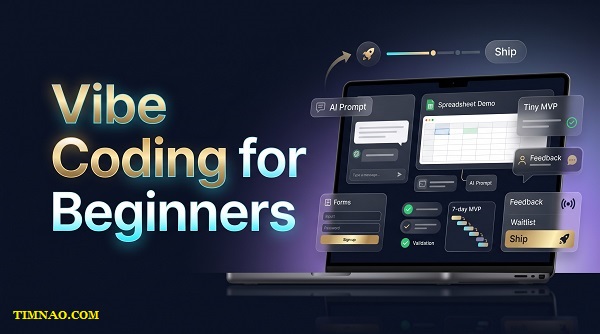
Vibe Coding for Beginners: A Confident 7-Day AI MVP Playbook 🚀
Vibe coding for beginners is one of the fastest ways to turn an idea into something real—without waiting until you feel like a “real developer.” Instead of spending months learning every technical detail first, you learn by building small, useful AI-powered workflows that solve real problems.
In this guide, you’ll learn how to find a painful task, cut your idea down to a tiny MVP, test it with real people, and turn early feedback into practical opportunities. The goal is not to chase hype or build a perfect app on day one. The goal is to ship something useful, learn quickly, and create proof you can build on.
Why Vibe Coding for Beginners Is Really a Shipping Skill
Vibe coding for beginners is not about “letting AI do everything.” It is about learning how to move from idea to usable result faster, with less fear and less overthinking.
In the past, beginners often thought they had to learn a full programming language, master databases, understand hosting, design a polished interface, and then maybe build something people could try. That path still has value, but it is no longer the only starting point.
With tools like ChatGPT and Claude, a beginner can now describe what they want, ask for structure, generate rough code, create prompts, build workflows, test examples, and improve the result step by step. The skill is not just “coding.” The real skill is shipping.
Shipping means putting a simple version of an idea in front of a real person so you can learn from reality.
That is what separates vibe coding from random AI tinkering.
A random AI tinkerer says, “Look what I made.”
A beginner builder says, “Here is a small thing that solves a specific problem. Can you try it?”
That difference matters because AI makes it easy to create demos. But demos are not always useful products. A demo can look impressive for 30 seconds and still fail to help anyone finish a real task.
The beginner-friendly goal is not to build a perfect app. The goal is to create a small useful outcome.
For example:
- A freelancer pastes messy client notes and gets a clean proposal outline.
- A coach uploads call notes and gets a follow-up summary.
- A store owner pastes product details and gets a clearer product description.
- A student pastes lecture notes and gets a study checklist.
- A small agency pastes a client brief and gets campaign angles to review.
None of these needs to start as a full software platform. They can begin as a form, a spreadsheet, a prompt, and a manual review step.
That may sound too simple, but simple is exactly what beginners need.
The beginner mistake: trying to build the final version first
Many new builders make the same mistake. They imagine the finished product too early.
They start thinking about login pages, dashboards, pricing tables, team accounts, user profiles, automation, branding, analytics, and fancy design. Before they have helped one person, they are already building like they have 10,000 users.
That feels productive, but it is often avoidance in disguise.
The uncomfortable question is:
“Does anyone actually need this result?”
You do not answer that question by polishing the interface. You answer it by shipping a small version and watching what people do.
Do they use it?
Do they ask for it again?
Do they send feedback?
Do they share a better use case?
Do they offer to pay?
Do they say, “Can you make this work with my files?”
These signals are more useful than your private opinion.
Vibe coding works best when you think in loops
A beginner does not need a giant roadmap at the start. You need a loop you can repeat.
A practical vibe coding loop looks like this:
- Notice a repeated problem.
- Describe the desired result clearly.
- Use AI to create a rough solution.
- Test it with real input.
- Fix what breaks.
- Show it to someone.
- Use their feedback to improve the next version.
This loop is small, but it builds real skill.
You learn how to explain ideas clearly. You learn how to test outputs. You learn what AI does well and where it needs human review. You learn which problems are worth solving and which ones only sound exciting in your head.
That is why vibe coding is really a shipping skill.
The person who improves fastest is not the person with the longest prompt library. It is the person who ships small things, collects feedback, and keeps improving.
What “done” means in the first version
For a beginner, “done” should not mean perfect.
A first version is done when a target user can experience the main value.
If your idea is an AI tool for turning meeting notes into action items, “done” might mean:
- The user gives you messy notes.
- Your workflow produces a clean action list.
- You review the output for quality.
- The user receives something they can actually use.
That is enough for a first test.
You do not need automated billing, a beautiful dashboard, or advanced settings yet. Those may come later, but they should not delay your first learning cycle.
A good beginner rule is:
If the user cannot feel the value today, you are probably building too much around the value instead of delivering the value.
The Starting Point: Are You Solving Pain or Chasing a Cool Demo?
Before you build anything, you need to ask a very honest question:
“Is this solving a painful problem, or am I just excited by the demo?”
This is where many AI projects go wrong.
AI makes it easy to create something that looks magical. You can generate text, images, code, summaries, plans, scripts, and analysis in seconds. But just because something is impressive does not mean someone needs it.
A cool demo gets attention.
A painful problem creates action.
That action may be a reply, a meeting, a trial, a payment, a referral, or a request for a better version. In business terms, this is the difference between a “vitamin” and a “painkiller.”
A vitamin is nice to have. People agree it sounds useful, but they can live without it.
A painkiller solves something urgent, annoying, expensive, risky, or repetitive. People want relief because the problem already costs them time, money, energy, or opportunities.
How to recognize real pain
Real pain usually has at least one of these signs:
- The task happens often.
- The task is boring or frustrating.
- The task takes too much time.
- Mistakes create real consequences.
- The person already uses a messy workaround.
- The person has paid for a tool, assistant, template, or service before.
- The person complains about the problem without being prompted.
For example, “I want better productivity” is broad and weak.
But “I spend every Friday turning client notes into follow-up emails, and I hate it” is specific and useful.
That second sentence tells you who has the problem, when it happens, what the task is, and why it matters.
That is where a beginner should start.
Use the “current workaround” test
One of the simplest ways to test pain is to ask:
“How are you handling this right now?”
This question is powerful because it moves the conversation away from imagination and into behavior.
If someone says, “I do not really handle it,” the pain may not be strong.
If they say, “I copy everything into a spreadsheet, clean it manually, then rewrite it again for the client,” you have something to study.
Current workarounds are clues. They show that the person already cares enough to solve the problem badly.
That is good news.
A messy workaround means there may be room for a better workflow.
For example:
- A coach uses Google Docs, voice notes, and copy-paste to create session summaries.
- A recruiter rewrites job descriptions from scratch every time.
- A real estate assistant manually extracts details from property forms.
- A YouTuber turns video transcripts into newsletters by hand.
- A consultant keeps rebuilding the same client report in slides.
These are not abstract ideas. They are repeated workflows.
And repeated workflows are excellent places to look for beginner AI MVPs.
Be careful with polite feedback
Beginners often get trapped by polite feedback.
Someone says:
“That sounds cool.”
“I would probably use that.”
“Interesting idea.”
“Let me know when it launches.”
These comments feel encouraging, but they are weak signals.
They do not mean the person has a painful problem. They may simply be trying to be supportive.
Stronger signals sound different:
- “Can I send you a file to test?”
- “How much would this cost?”
- “Could this work for my team?”
- “I need this for next week.”
- “I currently pay someone to do this.”
- “If it saves me two hours, I would use it.”
The more specific the reaction, the more useful it is.
Your job is not to collect compliments. Your job is to find evidence.
A simple beginner pain check
Before choosing your idea, answer these questions:
- Who exactly has this problem?
- How often does it happen?
- What do they do now?
- What is annoying, slow, risky, or expensive about the current method?
- What would a useful first result look like?
- Would they care if the first version looked simple but worked?
If you cannot answer these questions, do not build yet. Talk to more people, observe workflows, read community complaints, or study your own workday.
Good AI product ideas often hide inside boring tasks.
That is actually an advantage for beginners. You do not need to invent a futuristic concept. You can start by improving one annoying process that already exists.
Mini walkthrough: from cool demo to useful problem
A cool demo idea:
“An AI assistant that helps small businesses.”
This sounds nice, but it is too broad. A beginner would not know what to build first.
A more useful problem:
“Local service businesses often receive messy customer inquiry emails. They need a faster way to turn those emails into clear quote request summaries.”
Now you have a direction.
The user is clearer: local service businesses.
The input is clearer: messy inquiry emails.
The output is clearer: quote request summaries.
The benefit is clearer: faster response and less manual sorting.
That is much easier to test.
You could ask five business owners, “When customers email you for quotes, what information is usually missing or messy?” Their answers would help you shape the first version before you waste time building the wrong thing.
Use the One-Sentence Spec Before You Build Anything
The One-Sentence Spec is one of the most useful habits a beginner can build.
It forces you to explain your idea in plain English before you turn it into prompts, code, forms, or automations.
If you cannot explain the product simply, the product is probably not clear enough yet.
Here is the basic format:
“When [specific user] has [specific input or problem], they get [specific output], so they can [clear benefit].”
This sentence becomes your filter.
It tells you what to build.
It tells you what not to build.
It keeps your first version small enough to finish.
Good One-Sentence Spec examples
Here are a few beginner-friendly examples:
“When a freelance designer pastes messy discovery call notes, they get a clean project brief, so they can send a proposal faster.”
“When a fitness coach uploads weekly client check-in notes, they get a simple progress summary, so they can respond with better coaching feedback.”
“When an Etsy seller pastes rough product details, they get a polished product description, so they can publish listings faster.”
“When a podcast creator uploads a transcript, they get newsletter draft sections, so they can repurpose the episode without starting from a blank page.”
Notice how each sentence is narrow.
There is no “all-in-one platform.” There is no “AI-powered productivity ecosystem.” There is no vague promise to “save time for everyone.”
Each sentence has a user, input, output, and benefit.
That is what makes it buildable.
Weak specs create messy products
A weak spec sounds like this:
“I want to build an AI tool that helps creators make better content.”
This is too vague.
Which creators?
What type of content?
What input do they provide?
What output do they receive?
What does “better” mean?
What would they use first?
Without answers, you will start adding random features.
Maybe it needs a caption generator. Maybe a content calendar. Maybe a scriptwriter. Maybe thumbnail ideas. Maybe analytics. Maybe brand voice training.
Now the project becomes too big, and the beginner gets stuck.
A stronger version would be:
“When a YouTube creator pastes a video transcript, they get five short-form clip ideas with hooks, so they can plan repurposed content faster.”
That is specific enough to test.
You can create sample outputs today. You can show it to creators. You can ask if the ideas are useful. You can improve the prompt. You can decide later whether it deserves automation.
Use the spec to cut features
Once you write your One-Sentence Spec, use it as a decision tool.
Ask:
“Does this feature help deliver the promised output?”
If yes, keep it.
If no, remove it from the first version.
For example, imagine your spec is:
“When a consultant pastes meeting notes, they get a client-ready follow-up email, so they can respond faster after calls.”
For the first version, you probably need:
- A place to paste meeting notes
- A prompt that creates the email
- A review step
- A way to deliver the final email draft
You probably do not need:
- A client dashboard
- Team roles
- A calendar integration
- A mobile app
- A template marketplace
- A full CRM
- Advanced analytics
Those features may be useful later. But right now, they distract from the first promise.
Beginners need this discipline because AI tools make expansion tempting. You can always think of more things to add. The real skill is choosing what to ignore.
Turn the spec into your first test
After writing your One-Sentence Spec, do not hide it in a notebook. Use it.
Send it to a few people who match the target user.
You can write:
“I’m testing a small workflow for [specific user]. The idea is: when you provide [input], you get [output], so you can [benefit]. Is this a real problem for you, or not really?”
This message is simple, but it opens the right conversation.
You are not pretending the product is finished. You are checking whether the promise matters.
If people are confused, your spec needs work.
If people understand it but do not care, the problem may be weak.
If people start explaining their current workflow, you are learning.
If someone says, “Can I try it?” you have a useful signal.
The One-Sentence Spec checklist
Before moving forward, check your sentence against this list:
- Is the user specific?
- Is the input clear?
- Is the output clear?
- Is the benefit practical?
- Could a beginner build a rough version in a few days?
- Could you test it manually before automating it?
- Would the user understand the value without a long explanation?
If the answer is yes, you have a workable starting point.
If not, narrow it.
Narrowing is not a downgrade. It is how you make the idea real.
Once your sentence is clear, the next step becomes much easier: you can cut the scope, choose the simplest tools, and build only the tiny version that proves whether the promise is worth continuing.
Cut Scope With the 80/4 Rule
The fastest way to ruin a beginner AI MVP is to make it too big.
Not because big ideas are bad. Big ideas are fine. The problem is that beginners often try to build the final version before they have proved the first useful result.
That is where the 80/4 Rule helps.
The idea is simple: a very small part of your planned product can often deliver most of the first user value. Not 20 percent. Even smaller. Sometimes 4 percent of the original idea is enough to help someone, start a conversation, or earn your first pilot customer.
This is especially true with AI products because the useful part is often not the full app. It is the output.
A user does not care whether you have a dashboard if the result is weak. They care whether your tool helps them finish the task faster, make a better decision, avoid a mistake, or produce something they can use.
So before you build more, ask:
“What is the smallest version that lets the user feel the main benefit?”
Your first version should feel almost too small
A beginner-friendly AI MVP may look embarrassingly simple.
It might be:
- A form where the user submits information
- A spreadsheet where you organize inputs and outputs
- A prompt that creates the result
- A manual review step
- A simple delivery email
- A short demo video
- A payment link for a small pilot
That is enough if it proves the core value.
For example, imagine your idea is an AI tool that helps consultants create client follow-up emails after meetings.
The big version might include:
- Calendar integration
- Call recording
- Transcript storage
- Client profiles
- Email templates
- Team collaboration
- Analytics
- Auto-send features
That sounds impressive, but it is too much for the first test.
The 80/4 version is much smaller:
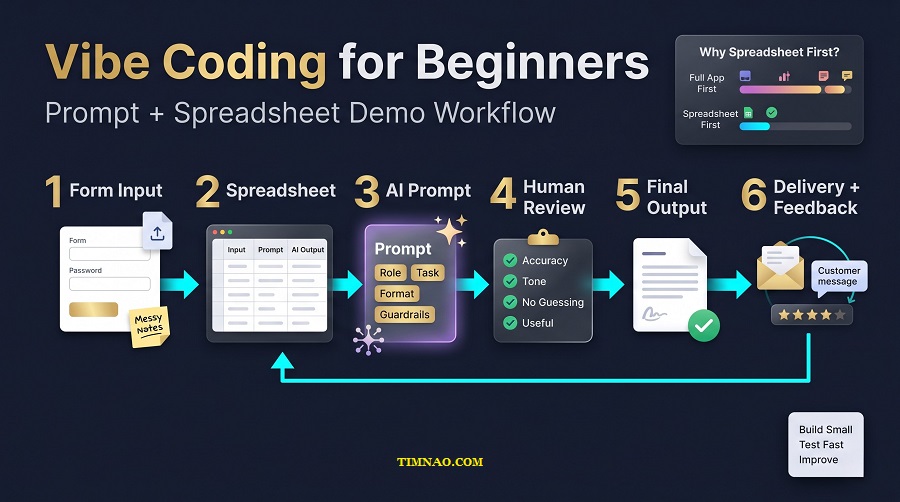
- The consultant pastes messy meeting notes into a form.
- Your prompt turns the notes into a clean follow-up email.
- You review the output.
- The consultant receives the draft.
That is the product at the beginning.
Not the platform. Not the full system. Just the useful transformation.
Messy notes go in. A client-ready follow-up email comes out.
If users love that result, you can build more later. If they do not care, you saved yourself weeks or months.
Use “delete until useful,” not “delete until broken”
Scope cutting does not mean removing so much that the product becomes useless.
It means removing everything that does not support the first promise.
Use this quick exercise:
- Write your One-Sentence Spec at the top of a page.
- List every feature you want to build.
- Put a star next to the features required to deliver the promised output.
- Move every unstarred feature into a “later” list.
- Build only the starred items.
For a beginner, this exercise is powerful because it separates real value from emotional comfort.
Many features feel necessary because they make the product look more professional. But “professional-looking” is not the same as useful.
Your first version does not need to answer every possible edge case. It needs to show whether the main result matters.
What to keep in your first version
Keep anything that helps the user experience the core result.
That usually includes:
- A clear input method
- A reliable prompt
- A simple output format
- A basic review process
- A way to collect feedback
- A way to ask for payment or commitment
For example, if your MVP turns podcast transcripts into newsletter drafts, the must-have pieces are simple:
- The transcript input
- The prompt that creates the draft
- A readable newsletter format
- A quality check before delivery
- A way for the creator to say what worked or failed
That is enough to learn.
What to remove from your first version
Remove anything that mainly serves your ego, fear, or imaginary future scale.
You probably do not need:
- A full brand identity
- Advanced user settings
- A complex homepage
- A custom dashboard
- Password reset flows
- Team permissions
- Multi-language support
- A template marketplace
- A mobile app
- Deep analytics
These things may matter later. But early on, they often hide the real question:
“Does this result solve a painful enough problem?”
The 80/4 Rule keeps you honest. It forces you to build the smallest useful proof instead of decorating an unproven idea.
Build a Prompt + Spreadsheet Demo First
For beginners, the easiest AI MVP is often not an app.
It is a prompt and a spreadsheet.
That may sound too basic, but it is one of the most practical ways to learn vibe coding because it keeps the workflow visible. You can see the user input, the prompt, the AI output, the review notes, and the final result in one place.
A spreadsheet also prevents you from hiding behind technical complexity. Instead of spending days setting up a backend, you can test the actual product logic today.
Use Google Sheets or Airtable as your first working surface. Use ChatGPT or Claude to generate and refine outputs. If you need automation later, connect the pieces with Zapier or Make.
But do not automate too early.
At the beginning, manual is fine. Manual teaches you where the value is.
The simple sheet layout
Create a spreadsheet with these columns:
| Column | What it does |
|---|---|
| user_name | Who submitted the request |
| user_type | Their role or niche |
| raw_input | The messy information they provide |
| goal | What they want the output to do |
| prompt_version | Which prompt you used |
| ai_output | The first AI-generated result |
| human_review | Your edits or quality notes |
| final_output | The version you send back |
| feedback | What the user says after receiving it |
| signal | Weak, medium, or strong interest |
This layout gives you a simple learning system.
You are not just producing outputs. You are collecting evidence.
Over time, you will notice patterns:
- Which inputs create the best outputs
- Which users understand the value fastest
- Which prompts fail repeatedly
- Which use cases create stronger interest
- Which results people would pay for
That information is more valuable than a fancy interface.
Build the prompt like a product
Your prompt is not just a sentence. In a Tiny MVP, the prompt is often the heart of the product.
A beginner prompt should include six parts:
- Role — Tell the AI what perspective to use.
- Context — Explain who the user is and what they need.
- Task — Give a specific job to complete.
- Input — Paste the user’s raw material.
- Output format — Define the structure you want.
- Rules — Tell the AI what to avoid.
Here is a simple structure:
“You are a [role]. Help a [specific user] turn the following [input] into [output]. Keep the result [tone/style]. Use this format: [format]. Avoid [mistakes]. Here is the input: [raw input].”
For example:
“You are a client communication assistant. Help a freelance consultant turn messy meeting notes into a clear follow-up email. Keep the tone professional, warm, and concise. Use this format: greeting, short recap, action items, next step, sign-off. Avoid making promises that are not in the notes. Here is the input: [raw notes].”
This is much better than asking, “Write a follow-up email.”
The clearer the prompt, the easier it is to test and improve.
Test with real messy inputs
Do not test your prompt only with perfect examples.
Perfect examples make everything look better than it really is.
Use messy inputs like:
- Incomplete notes
- Long rambling text
- Repeated points
- Missing details
- Contradictory information
- Informal language
- Industry-specific terms
Your goal is not 100 percent perfection. Your goal is to see whether the output is useful enough to review, edit, and deliver.
A good beginner standard is:
“Can this produce a helpful first draft 80 percent of the time?”
If yes, you can test it with people.
If no, improve the prompt or narrow the input.
Keep a prompt change log
Every time you change the prompt, record what changed and why.
Use a simple format:
- Prompt v1: Too generic, output sounded vague.
- Prompt v2: Added output format, improved readability.
- Prompt v3: Added “do not invent missing details,” reduced hallucination.
- Prompt v4: Added example input/output, improved consistency.
This habit makes you a better AI builder quickly.
Without a change log, you will forget what worked. With a change log, you start building reusable knowledge.
Add a human review step
Beginners sometimes assume the AI output should go straight to the user. That is risky.
A human review step protects quality.
Check for:
- Wrong assumptions
- Made-up details
- Confusing wording
- Missing context
- Tone mismatch
- Overpromising
- Repetitive phrasing
- Formatting problems
For client-facing content, this step is not optional. Your first users are trusting you with their workflow. Treat the output like a draft that needs editorial judgment.
This is also where your “vibe” matters. Many people can use the same AI tools. Your taste, judgment, clarity, and understanding of the user make the result better.
Record a short demo
Once your prompt and sheet produce a useful result, record a simple two-minute demo with Loom.
Keep it practical:
- Show the messy starting input.
- Show the spreadsheet workflow.
- Show the AI-generated output.
- Show your reviewed final version.
- Explain who it helps and what problem it solves.
Do not over-explain the technology.
The viewer should understand the before-and-after transformation quickly.
A good demo does not say, “Look at my AI tool.”
It says, “Here is a painful task, and here is a faster way to get it done.”
Run a 5-Call Validation Sprint Before You Polish
After you have a small demo, your next move is not polishing.
Your next move is conversation.
A beginner AI MVP gets better when it touches real workflows. You need to hear how people describe the problem, what they already tried, where the cost shows up, and what would make the solution worth using.
That is why a 5-call validation sprint is so useful.
Five calls are enough to reveal whether your idea has a real pulse. Not perfect proof, but enough signal to decide whether to continue, narrow, or change direction.
Who to contact
Do not ask random friends unless they match the target user.
Choose people who actually experience the workflow.
For example:
- If your tool helps coaches summarize client notes, talk to coaches.
- If your tool helps recruiters rewrite job descriptions, talk to recruiters.
- If your tool helps agencies create client reports, talk to agency operators.
- If your tool helps ecommerce sellers clean product descriptions, talk to store owners.
Make a list of 20–30 possible contacts. You can find them from your network, LinkedIn, niche communities, past clients, newsletters, or small business groups.
You only need five calls, but you may need to ask more than five people to get them.
Use a simple outreach message
Keep the message short and human.
Try this:
“Hi [Name], I’m testing a small AI workflow for [specific role] who deal with [specific task]. I’m not selling anything on this call. I’m trying to understand how this workflow works in real life. Would you be open to a 15-minute chat this week?”
This works because it is clear and low pressure.
If you already have a demo, do not lead with it too soon. First, understand their workflow. Then show the demo if it fits.
The 3-layer call structure
Each call should have three layers.
First, ask for the workflow story.
“Walk me through the last time you had to do this task.”
This helps you understand the real process, not the ideal process. Listen for steps, tools, delays, handoffs, and frustrations.
Second, ask about cost.
“How long does this usually take?”
“What happens if it is done late?”
“What happens if there is a mistake?”
“Do you already pay for tools or help with this?”
Cost does not always mean money. It can be time, stress, lost sales, missed deadlines, or lower quality.
Third, test the offer gently.
“If I could help you get [specific output] from [specific input] in [timeframe], would that be useful enough to try?”
For stronger validation, ask:
“What would make this worth paying for?”
This question may feel uncomfortable, but it saves you from building around fake interest.
What to listen for
Do not only listen to whether they “like” the idea.
Listen for evidence.
Strong signs include:
- They describe the problem in detail.
- They already have a workaround.
- They complain without you pushing.
- They mention time or money lost.
- They ask if your demo can handle their case.
- They offer to send real examples.
- They ask about price, setup, or timeline.
Weak signs include:
- “Cool idea.”
- “Maybe useful.”
- “I can see people using this.”
- “Keep me posted.”
- “Interesting, but not for me right now.”
Weak signals are not useless, but they should not drive your build plan.
Score each call immediately
Right after every call, score it while the conversation is fresh.
Use this simple 1–5 score:
- No real pain
- Mild annoyance
- Clear problem, but low urgency
- Strong repeated pain
- Urgent pain with willingness to try or pay
Also write down exact phrases the person used.
For example:
- “I lose half a day every Friday doing this.”
- “We tried hiring a VA, but the quality was inconsistent.”
- “If this worked, I’d use it every week.”
- “The hard part is not writing; it’s turning messy notes into something client-ready.”
These phrases are gold. They can improve your product, your landing page, your demo, and your outreach.
Decide before you polish
After five calls, make a simple decision.
Continue if:
- At least three people have the problem.
- At least two people want to see or test the demo.
- One person shows strong interest in a paid or serious pilot.
- The workflow is repeated often enough to matter.
Narrow if:
- People like the idea, but only one subgroup cares strongly.
- The output is useful, but the user type is too broad.
- The pain is real, but the offer needs to be more specific.
Pause or pivot if:
- People are polite but not engaged.
- Nobody has a current workaround.
- The task is too rare.
- The result is not valuable enough.
- You cannot explain the benefit simply.
This is not failure. This is how you avoid wasting time.
A validation sprint gives you something beginners badly need: direction.
Instead of polishing based on guesses, you improve based on real conversations. Now you have a tighter problem, a clearer user, and better language for the next version.
From here, the work becomes much more concrete: turn the strongest signal into a small 7-day plan, deliver the result for a few real users, and let their feedback shape what you build next.
Your 7-Day AI MVP Plan
A 7-day AI MVP plan is not about building a perfect product in one week. It is about creating enough proof to answer one simple question:
“Is this idea worth another week?”
That is a much healthier goal for beginners.
If you try to build the full version in seven days, you will likely feel overwhelmed. But if you use the week to test one painful workflow, create one useful output, and get feedback from real people, the process becomes manageable.
Think of this as a learning sprint. By the end of the week, you should have one of three things:
- A small idea with real user interest
- A clearer version of the problem
- A useful reason to stop or pivot before wasting more time
All three outcomes are valuable.
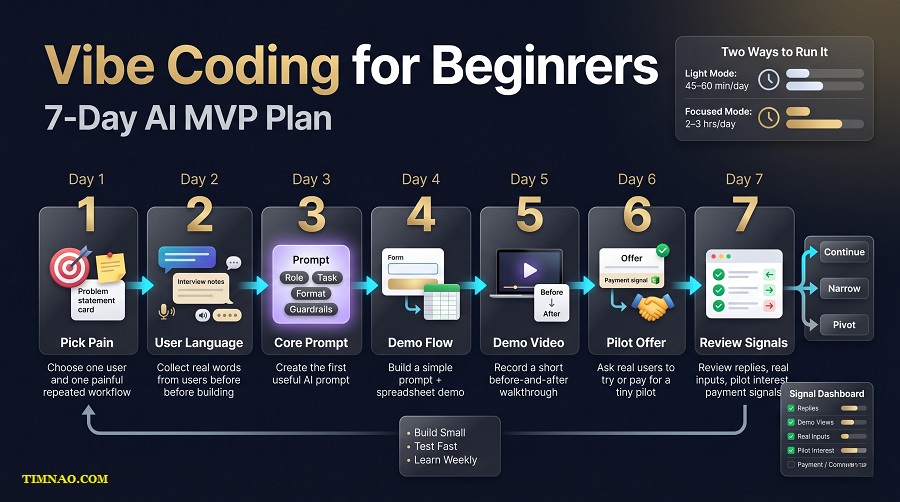
Choose your intensity before you start
Before day one, decide how much time you can honestly give this project.
Do not create a plan based on your fantasy schedule. Create one based on your real life.
Light mode: 45–60 minutes per day
Best if you have a job, school, family responsibilities, or limited energy.
Focused mode: 2–3 hours per day
Best if you want faster feedback and can handle more outreach, testing, and editing.
The work is the same in both modes. The difference is depth.
In light mode, you may talk to fewer people and build a rougher demo. In focused mode, you may create more sample outputs, test more inputs, and ask more users for feedback.
Both are fine. Consistency matters more than intensity.
Day 1: Pick one painful workflow
Start with the problem, not the tool.
Choose one user and one repeated task.
A weak idea sounds like:
“AI for small business owners.”
A stronger idea sounds like:
“An AI workflow that turns messy customer inquiry emails into clean quote request summaries for local service businesses.”
That is much easier to test because the user, input, and output are clear.
On day one, write:
- Who has the problem?
- What messy input do they start with?
- What useful output do they want?
- What happens if the task is slow, unclear, or done badly?
- How do they handle it right now?
Your “done” point for day one is simple: one clear One-Sentence Spec and a list of 10–20 people who might experience that problem.
Do not build yet. Clarity comes first.
Day 2: Collect real language from users
Your goal on day two is to collect the words real people use to describe the problem.
Send short messages to potential users. Ask about the workflow, not your product.
For example:
“Hi [Name], I’m learning how [specific role] handles [specific task]. I’m not selling anything. Could I ask you 2–3 quick questions about how you do this now?”
Ask questions like:
- “How often do you do this task?”
- “What part takes the longest?”
- “What do you usually copy, rewrite, clean, or check manually?”
- “What would a useful output look like?”
If someone answers with detail, save their exact phrasing. Their words will help you write better prompts, better landing page copy, and better outreach later.
Your “done” point for day two is three useful conversations, comments, or written replies.
Day 3: Build the first prompt
Now create the core prompt.
Use ChatGPT or Claude to help, but do not let the AI make the product vague. Your prompt should serve the workflow you chose, not expand it into ten different ideas.
A practical prompt structure looks like this:
- Role: what the AI should act as
- User: who the output is for
- Input: what raw material it receives
- Task: what the AI must produce
- Format: how the answer should be structured
- Guardrails: what it should avoid
For example:
“You are a client communication assistant. Turn the following messy meeting notes into a clear follow-up email for a freelance consultant. Keep the tone warm, professional, and concise. Use this format: short greeting, meeting recap, action items, open questions, next step. Do not invent details that are not in the notes.”
Test your prompt with at least three messy examples.
Your “done” point for day three is not a perfect prompt. It is a prompt that produces a useful first draft most of the time.
Day 4: Put the workflow into a simple demo
Day four is where the MVP starts to feel real.
Use a simple tool stack:
- Google Forms or Tally for input
- Google Sheets or Airtable for tracking
- ChatGPT or Claude for generation
- Manual review before delivery
Your first demo can be manual. That is not a weakness. Manual steps help you understand quality before you automate.
Create a small test flow:
- User submits raw input.
- Input appears in your spreadsheet.
- You run the prompt.
- You review and edit the output.
- You send the final result back.
Your “done” point for day four is one complete test from input to final output.
Day 5: Record a short before-and-after demo
A demo makes the value easier to understand.
Use Loom or any simple screen recorder. Keep it under two minutes.
Show:
- The messy starting point
- The simple submission process
- The AI-assisted output
- The reviewed final result
- Who this is for
Do not spend five minutes explaining your future roadmap. People need to understand the transformation quickly.
A strong demo sounds like:
“Here is the messy input most coaches start with after a client call. Here is the cleaned summary this workflow produces. The goal is to help coaches respond faster without rewriting everything from scratch.”
Your “done” point for day five is a shareable demo link.
Day 6: Offer a tiny pilot
Now ask for a small commitment.
This does not need to be a full subscription. A tiny pilot is enough.
Examples:
- “I’ll turn 5 meeting notes into follow-up emails for $49.”
- “I’ll clean 20 product descriptions for $99.”
- “I’ll create 3 newsletter drafts from podcast transcripts for $75.”
- “I’ll process your next 10 customer inquiries into quote summaries for $149.”
If charging feels too early, ask for a serious non-money commitment:
- A real file
- A scheduled feedback call
- A referral to one teammate
- Permission to use anonymized results as a case study
Money is the strongest signal, but it is not the only signal.
Your “done” point for day six is five direct pilot offers sent to relevant people.
Day 7: Review the evidence
Do not judge the week based on feelings. Look at signals.
Create a simple review:
| Signal | What happened? |
|---|---|
| People contacted | How many did you ask? |
| Replies | How many responded? |
| Demo views | How many watched? |
| Real inputs received | Did anyone send examples? |
| Pilot interest | Did anyone ask about trying it? |
| Payment or commitment | Did anyone commit? |
| Quality issues | What broke or felt weak? |
Then choose your next move.
Continue if people understand the offer and want to try it.
Narrow if people like the idea but only one specific user type seems excited.
Pivot if people are polite but nobody has real urgency.
The goal is not to protect the original idea. The goal is to find the version that real users care about.
The 48-Hour Commitment Loop for Consistency
After the 7-day sprint, the biggest danger is losing rhythm.
Beginners often start with excitement, ship one rough version, then disappear for three weeks trying to make it “better.” By the time they come back, the feedback is cold and the momentum is gone.
The 48-Hour Commitment Loop solves this.
It gives you a simple weekend rhythm: commit, build, show, learn.
You do not need to do this forever, but using it for four weekends can dramatically improve your shipping habit.
Friday: Make one public or private commitment
On Friday, choose one thing you will ship by Sunday.
Keep it small.
Good commitments:
- “I will improve the output format for the proposal generator.”
- “I will test the workflow with three new users.”
- “I will create a landing page for the pilot offer.”
- “I will add a feedback form after each delivered output.”
- “I will record a cleaner demo for coaches.”
Bad commitments:
- “I will build the whole app.”
- “I will finish the platform.”
- “I will make everything scalable.”
- “I will redesign the brand.”
The commitment should fit inside 48 hours.
You can post it on LinkedIn, X, a small founder group, your newsletter, or even send it to one accountability friend. Public is useful, but private accountability is still better than silent planning.
Saturday: Build only what supports the promise
Saturday is for focused execution.
Do not open ten new tabs. Do not compare every tool. Do not rebuild the idea from scratch.
Work only on the promise you made.
If the commitment is to improve the output format, improve the output format.
If the commitment is to test with three users, spend your energy on outreach and delivery.
If the commitment is to record a demo, script it, record it, and share it.
This is where beginners must be strict. New ideas will appear while you build. Write them in a “later” list, but do not chase them.
The loop works because it protects your attention.
Sunday: Show the result and ask one useful question
On Sunday, share what changed.
It does not have to be dramatic. You can show a screenshot, a short video, a before-and-after example, or a short written update.
Then ask one useful question.
For example:
- “Is this output format easier to use?”
- “What would make this worth trying?”
- “Which version feels more useful: A or B?”
- “What is missing before this could save you time?”
- “Would you rather receive this as a Google Doc or email?”
Do not ask five questions at once. One good question gets better answers than a survey nobody wants to finish.
Track your weekly learning loop
A shipping loop is only useful if you track what it teaches you.
Use a simple weekly log:
- What did I commit to?
- What did I ship?
- Who saw it?
- What feedback did I get?
- What signal was strongest?
- What should I change next week?
This takes 10 minutes, but it prevents random building.
After four weeks, you will see patterns. You will know which users respond, which outputs matter, which claims are confusing, and which parts of the workflow need more care.
That is how consistency becomes product intelligence.
Turn the Waitlist Flywheel Into Feedback, Not Vanity
A waitlist can be useful, but only if it creates learning.
A waitlist is not a trophy. It is not proof that your product will work. It is simply a group of people who were curious enough to raise their hand.
That curiosity can disappear quickly if you do nothing with it.
The beginner mistake is treating the waitlist like a popularity counter:
“We got 300 signups!”
That sounds exciting, but it does not answer the real questions:
Who signed up?
What problem do they have?
How urgent is it?
What do they want first?
Would they try a manual pilot?
Would they pay?
Why did some people ignore the offer?
A good waitlist helps you learn these answers.
Keep the waitlist page simple
Your waitlist page should not feel like a full website.
For an early MVP, keep it focused:
- One headline
- One short explanation
- One example outcome
- One email field
- One question after signup
For example:
“Turn messy coaching notes into client-ready follow-up summaries.”
Short explanation:
“Join the early list for a simple AI-assisted workflow that helps coaches send better follow-ups after client calls.”
Signup question:
“What do you currently do with your client notes after a session?”
That question is important. It turns the waitlist from a list of emails into a research tool.
Segment people by problem, not just signup date
Not all signups are equal.
Someone who says, “I’m curious about AI” is different from someone who says, “I spend two hours every Friday rewriting client notes.”
Create simple labels in your spreadsheet:
- Curious
- Has problem
- Strong pain
- Sent real input
- Wants pilot
- Paid or committed
This helps you avoid treating everyone the same.
When you have a new demo, send it first to people with strong pain. When you need general feedback, send it to curious people. When you want a paid pilot, ask the people who already sent real input or described urgent pain.
Good segmentation makes your outreach feel more relevant and less spammy.
Send progress emails with tiny asks
A waitlist becomes a flywheel when every update creates more learning.
Send one short update per week.
Keep it simple:
“Here is what we tested this week.”
“Here is one before-and-after example.”
“Here is what we are improving next.”
“Can you answer one quick question?”
Examples of tiny asks:
- “Which output would help more: summary or email draft?”
- “What format would you prefer: Google Doc, email, or spreadsheet?”
- “Would you use this weekly or only occasionally?”
- “What would make this feel safe enough to use with client work?”
- “Want to test the manual version with one real example?”
These small questions help you shape the product without overwhelming people.
Watch behavior more than compliments
People may say nice things and still never use the product.
Pay attention to behavior.
Stronger waitlist signals include:
- They reply with a detailed workflow.
- They forward the update to a teammate.
- They send a real file or example.
- They ask when they can try it.
- They choose a price or pilot option.
- They open multiple updates and keep responding.
- They ask if the workflow can handle their specific case.
Weak signals include:
- They join and never respond.
- They say “sounds cool” but avoid testing.
- They vote in a poll but will not send input.
- They ask for many features before using the basic version.
This does not mean you should ignore quiet subscribers. It means you should not build your roadmap around silent approval.
Use the waitlist to decide the next build
Before adding a feature, send a quick test to the waitlist.
For example:
“We are deciding what to improve next. Which would help you more?”
- Cleaner final email format
- Better handling of messy notes
- Faster turnaround
- Export to Google Docs
Then compare votes with actual behavior.
If people vote for Google Docs export but nobody has used the basic output yet, the export may not be urgent.
If several users complain that messy notes create weak results, improving input quality may matter more.
The waitlist should help you prioritize the next smallest useful improvement.
When you combine a 7-day MVP plan, a 48-hour shipping loop, and a feedback-driven waitlist, you stop guessing in isolation. The next stage is turning those signals into realistic opportunity paths without forcing hype or pretending every small workflow needs to become a giant startup.
Realistic Opportunity Paths From a Tiny MVP
A tiny MVP does not have to become a software company immediately.
That is one of the most important things beginners should understand. When you build a small AI workflow, the first goal is not to “scale.” The first goal is to discover where the value is.
Sometimes the value becomes a SaaS product later. Sometimes it becomes a service. Sometimes it becomes a better freelance offer. Sometimes it becomes a career advantage inside your current job.
All of those are valid.
The mistake is thinking there is only one successful outcome: launch an app, get users, raise money, and grow fast. That path exists, but it is not the only practical path for beginners.
A tiny MVP gives you proof. Once you have proof, you can choose the opportunity path that fits your skills, time, audience, and risk level.
Path 1: Turn the MVP into a paid pilot service
The simplest path is a paid pilot.
This means you do not sell a full product yet. You sell a small, limited version of the result.
For example:
- “I will turn 5 client call transcripts into follow-up summaries.”
- “I will clean 30 product descriptions for your store.”
- “I will convert 3 podcast transcripts into newsletter drafts.”
- “I will turn 10 messy customer emails into quote request summaries.”
This works well because the buyer does not need to understand your backend, prompt system, or automation. They only need to understand the result.
What you offer is simple: “Give me the messy input, and I will return the useful output.”
The proof you need is also simple:
- One before-and-after example
- A clear delivery timeline
- A sample output
- A basic explanation of who it helps
- A small price that feels easy to test
A paid pilot is especially useful for freelancers, consultants, virtual assistants, content creators, marketers, coaches, and small service providers.
Your first step this week: create one sample result and send it to five people who match the target user.
A realistic time-to-first-signal is 3–14 days if you already have access to the right people. If you are starting with no network, expect a few weeks of outreach before you get strong replies.
Path 2: Package it as a productized AI workflow
A productized workflow is more structured than a one-off pilot.
Instead of saying, “I can help with AI,” you sell a fixed deliverable.
For example:
- “Weekly client summary pack for coaches”
- “Podcast-to-newsletter repurposing pack”
- “SEO product description cleanup for Shopify sellers”
- “Proposal draft package for freelance consultants”
- “Customer inquiry sorting for local service businesses”
The advantage is clarity. People know what they get, how long it takes, and what it costs.
This path is beginner-friendly because you can still deliver manually behind the scenes. Your customer does not need to know every tool you use. They only care that the result is useful and reliable.
You might use ChatGPT, Claude, Google Sheets, Airtable, Zapier, or Make to support delivery. But your offer should not sound like a tool stack. It should sound like a solved problem.
A weak offer says:
“I use AI to help with content.”
A stronger offer says:
“I turn your weekly podcast episode into a newsletter draft, 5 social post ideas, and 3 short-form video hooks within 48 hours.”
That is easier to buy.
Your first step this week: turn your MVP into one fixed package with a price, a clear input requirement, and a delivery promise.
A realistic time-to-first-signal is 1–4 weeks, depending on how clearly you can reach the target buyer.
Path 3: Use it for freelance or agency leverage
You do not always need to sell the MVP directly. You can use it to improve a service you already offer.
This is a practical path if you are a writer, designer, marketer, developer, editor, coach, consultant, virtual assistant, or agency owner.
For example:
- A copywriter uses an AI intake workflow to turn client notes into sharper first drafts.
- A social media manager uses a transcript-to-post system to produce ideas faster.
- A web designer uses an AI brief generator before starting client projects.
- A consultant uses a meeting-summary workflow to improve client communication.
- A virtual assistant uses a spreadsheet-based AI system to organize messy inbox requests.
In this case, the MVP becomes part of your delivery system. You may not sell it as software. You use it to become faster, clearer, and more reliable.
This can create income indirectly.
You might:
- Deliver faster without lowering quality
- Offer a clearer package
- Serve more clients with the same hours
- Improve client communication
- Add a premium workflow to your existing service
The proof you need is not a public app. The proof is better work.
Track before-and-after results:
- Time saved per project
- Fewer revision rounds
- Faster client response time
- More consistent output quality
- Better onboarding experience
Your first step this week: choose one repeated task in your current work and build a simple AI-assisted workflow around it.
A realistic time-to-first-signal is 1–2 weeks because you can test it inside work you are already doing.
Path 4: Build a lightweight SaaS only after repeat demand
A tiny MVP can become a SaaS, but it should earn that right.
Do not jump into building a self-serve product just because one person liked the demo. SaaS adds complexity: onboarding, accounts, payments, support, bugs, user confusion, data handling, and ongoing maintenance.
Before turning your workflow into software, look for repeat demand.
Good signs include:
- Multiple people have the same input problem.
- Users ask to run the workflow again.
- The output format becomes predictable.
- You can explain the value in one sentence.
- People are willing to pay for the result.
- Manual delivery is becoming repetitive enough to automate.
That last point matters.
Automation is most useful after you understand the manual process. If you automate too early, you may automate the wrong thing.
A good SaaS starting point might be:
- A single upload page
- One core workflow
- One output format
- Simple payment through Stripe
- Basic onboarding
- A feedback button
- Manual support in the background
You do not need every feature. You need the smallest self-serve version of a workflow people already want.
Your first step this week: list the steps you repeat manually for users. Then identify one step that is painful enough to automate.
A realistic time-to-first-signal is 4–12 weeks after you already have manual proof. Without manual proof, it may take much longer because you are guessing.
Mistakes That Make Beginner AI MVPs Stall
Beginner AI MVPs usually do not stall because the builder is lazy. They stall because the project becomes unclear, too big, too hidden, or disconnected from real users.
The good news is that most of these mistakes are fixable.
Mistake 1: Building for “everyone”
“Everyone” is not a useful target user.
If your product is for everyone, your message becomes vague. Your demo becomes generic. Your prompt tries to handle too many cases. Your outreach becomes weak because nobody feels like the offer was made for them.
Start narrower.
Instead of “AI tool for creators,” choose “AI workflow for podcast creators who want newsletter drafts from transcripts.”
Instead of “AI assistant for business owners,” choose “AI workflow for local service businesses that receive messy quote request emails.”
Narrow does not mean small forever. It means clear enough to test now.
Mistake 2: Polishing before proving
Design polish feels safe. It gives you something visible to improve. But it can also become a hiding place.
If nobody has used the workflow yet, do not spend days perfecting colors, logos, landing page animations, or dashboard layouts.
First, prove the result.
Can you take a real input and produce an output someone values?
If yes, polish later.
If no, polish will not save the idea.
A useful rule:
Do not improve the appearance before you improve the evidence.
Mistake 3: Automating too early
Automation is attractive because it feels like progress.
But in an early MVP, manual work is often a gift. Manual delivery shows you what users actually submit, where the prompt breaks, what needs review, and which outputs create the strongest reaction.
If you automate before learning those details, you may create a faster version of a weak process.
Start manual. Watch carefully. Then automate the repeated parts.
For example, do not build a full upload-to-output system before you know whether users prefer a summary, email draft, checklist, report, or table.
Let real usage guide the automation.
Mistake 4: Trusting the AI output too much
AI can produce confident mistakes.
It may invent missing details, misunderstand context, use the wrong tone, or produce an output that looks polished but is not accurate.
That is why a human review step matters, especially in client-facing, legal, financial, medical, technical, or business-critical contexts.
For beginner MVPs, use a simple quality checklist:
- Did the AI invent anything?
- Is the output based on the input?
- Is the tone right for the user?
- Is the format easy to use?
- Are action items clear?
- Are uncertain details marked instead of guessed?
- Would I feel comfortable sending this to a real person?
Your judgment is part of the product.
Mistake 5: Measuring attention instead of commitment
Likes, views, and comments can be encouraging, but they are not the same as demand.
A post can perform well because people enjoy the idea, not because they need the product.
Look for commitment signals:
- Someone sends real input.
- Someone books a call.
- Someone asks for pricing.
- Someone requests a pilot.
- Someone uses the output again.
- Someone refers another person.
- Someone pays, even a small amount.
Attention is useful at the top of the funnel. Commitment is what tells you whether the idea has business potential.
Mistake 6: Adding features instead of fixing the core output
When a user is not excited, beginners often add more features.
But the problem may be the core output.
Before adding new features, ask:
- Is the result specific enough?
- Is it better than the user’s current workaround?
- Does it save real time?
- Does it reduce effort?
- Does it make the user feel more confident?
- Is the output easy to apply immediately?
If the core output is weak, more features will only create more complexity.
Improve the transformation first.
Mistake 7: Ignoring privacy and trust
Even a tiny MVP should respect user data.
If people send you notes, transcripts, emails, documents, or business information, be clear about how you handle it.
You do not need a complex legal page on day one, but you should be honest.
Tell users:
- What they should not send
- How you will use their input
- Whether examples may be anonymized
- Whether outputs are reviewed manually
- How they can request deletion
Trust is not something to add later. It is part of the product experience from the beginning.
What to Do in the Next 24 Hours
You do not need another week of research before starting.
You need a small, clean action plan.
The next 24 hours should help you move from “interesting idea” to “testable workflow.”
Action 1: Choose one user and one painful task
Write down three possible users.
For each one, list one repeated task they probably dislike.
Example:
- Coaches — writing client follow-up summaries
- Podcast creators — repurposing transcripts
- Shopify sellers — cleaning supplier product descriptions
Now choose the one you can reach fastest.
Access matters. A good idea is harder to test if you cannot talk to the people who need it.
Your goal is not to choose forever. Your goal is to choose something testable today.
Action 2: Write your One-Sentence Spec
Use this format:
“When [specific user] has [specific input/problem], they get [specific output], so they can [clear benefit].”
Example:
“When a coach pastes messy session notes, they get a client-ready follow-up summary, so they can respond faster and stay organized.”
Check that your sentence has four parts:
- Specific user
- Clear input
- Clear output
- Practical benefit
If any part is vague, narrow it.
Action 3: Create one sample before-and-after
Do not build the system yet. Create one sample transformation.
Take a realistic messy input and use ChatGPT or Claude to generate the output.
Then edit it manually.
Your sample should show:
- The messy starting point
- The improved output
- Why the output is useful
- Who it helps
This before-and-after example becomes your first proof asset.
Action 4: Send five simple validation messages
Reach out to five people who match the target user.
Use a simple message:
“Hi [Name], I’m testing a small workflow for [specific user] who deal with [specific task]. The idea is to turn [messy input] into [useful output]. Is this a real problem in your workflow, or not really?”
This question is direct and respectful.
You are not forcing a sale. You are checking whether the pain exists.
If someone replies with detail, ask a follow-up:
“How do you handle it right now?”
That answer will teach you what to build next.
Action 5: Decide what signal you need before continuing
Before you get emotionally attached, define your signal.
For the next 24–72 hours, a good signal might be:
- Three people reply with specific pain.
- Two people send real examples.
- One person asks to try the workflow.
- One person asks about price.
- One person agrees to a pilot.
Without a signal, do not panic. Improve your user, problem, or message.
With a signal, do not overbuild. Deliver the result manually, learn from it, and improve the next version.
Key takeaways
- A tiny MVP can become a service, productized workflow, career advantage, or SaaS later.
- The best first opportunity is usually the one closest to a painful repeated task.
- Paid pilots are often easier and smarter than building a full app too early.
- Manual delivery helps you learn what should be automated later.
- Strong signals come from commitment, not compliments.
- In the next 24 hours, choose one user, write one clear spec, create one before-and-after sample, and ask five people if the problem is real.
The best beginner move is not to build louder. It is to build closer to the pain, smaller than your ego wants, and fast enough that real feedback can shape the next step.
Disclaimer: This article is for educational and informational purposes only. It is not business, legal, financial, or technical advice. The examples, tools, workflows, and opportunity ideas shared here are meant to help beginners understand how to test small AI MVPs in a practical way.
AI tools can produce inaccurate, incomplete, or misleading outputs, so always review and verify important results before using them with clients, customers, or sensitive business information. If your workflow involves private data, legal documents, financial details, health information, or confidential client materials, use extra caution and follow the relevant privacy, security, and compliance requirements.
Any income or opportunity examples mentioned are illustrative, not guarantees. Your results will depend on your skills, niche, offer, execution, market demand, and consistency.
If this guide helped you feel more confident about building your first AI MVP, you can support the blog with a small coffee ☕✨
Your support helps me keep creating beginner-friendly, practical guides on AI tools, online business, and smarter ways to build useful digital skills.
👉 Buy me a coffee 🚀