
Claude Code Skills vs. Hooks: Which One Should You Use?
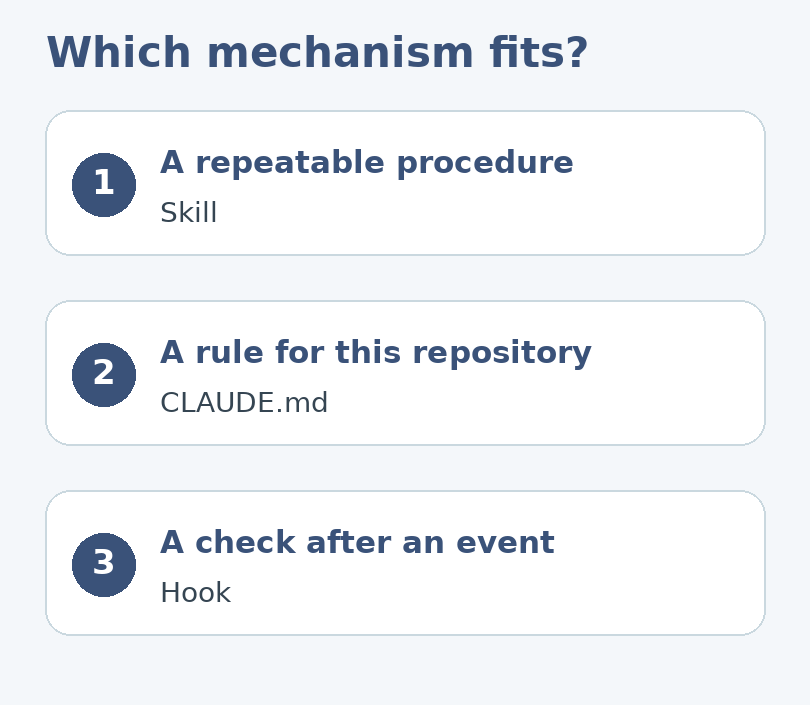
Imagine that every Friday you ask Claude Code to review a pull request. You want the same four checks each time: unclear changes, missing tests, risky side effects, and anything the reviewer should verify by hand. Then someone suggests automating it with a hook. Before adding one, ask: do you need Claude to follow a procedure, or do you need something to run after a specific event?
That distinction is the quickest way to choose between Claude Code skills and hooks. A skill helps you reuse instructions. A hook runs an action at a defined point in a session. A project’s CLAUDE.md is a separate place for standing guidance. Each can help, but putting everything in all three makes the workflow harder to change and debug.
Choose by what should happen next
Claude Code skills are defined with a SKILL.md file. Use a skill when you want a named procedure, such as a release-note review or a recurring check of proposed changes. The procedure can explain what to inspect, when to ask a question, and how to report findings. Start by invoking it deliberately while you refine the instructions.
Hooks are tied to lifecycle events such as before or after tool use. The event defines when the hook is considered, and its configuration determines what runs. A hook is a better fit for a bounded check that has a clear input and result. It is a poor first choice for a process that still needs you to define what a good result looks like.
CLAUDE.md is for guidance the project repeatedly needs, such as where test files live or which existing command is standard. Instructions in that file are not a security boundary. Use actual permissions and human review for actions that must not happen without approval.
Run the Friday review by hand first
Choose one small change in a disposable branch. Ask for a review that does not edit or deploy anything. Compare its report with your own review. If it flags a missing test, ask which behavior is untested. If it says a change is risky, ask for the file and the possible user-visible result. Replace vague instructions with a decision the reviewer can verify.
For a second run, use a change that deliberately lacks a test, then another where the test is already present. Good instructions distinguish those cases. If the skill reports a missing test in both, more automation will repeat the mistake faster; it will not resolve it.
Once the manual procedure works, give it a short skill name, a description of the work it covers, and a small output contract. For example: “Return the concern, the evidence, and a suggested human check. If you find no issue in a category, say what you inspected.” Keep repository-specific commands in project guidance when that is where the team maintains them.
Add a hook only for a predictable check
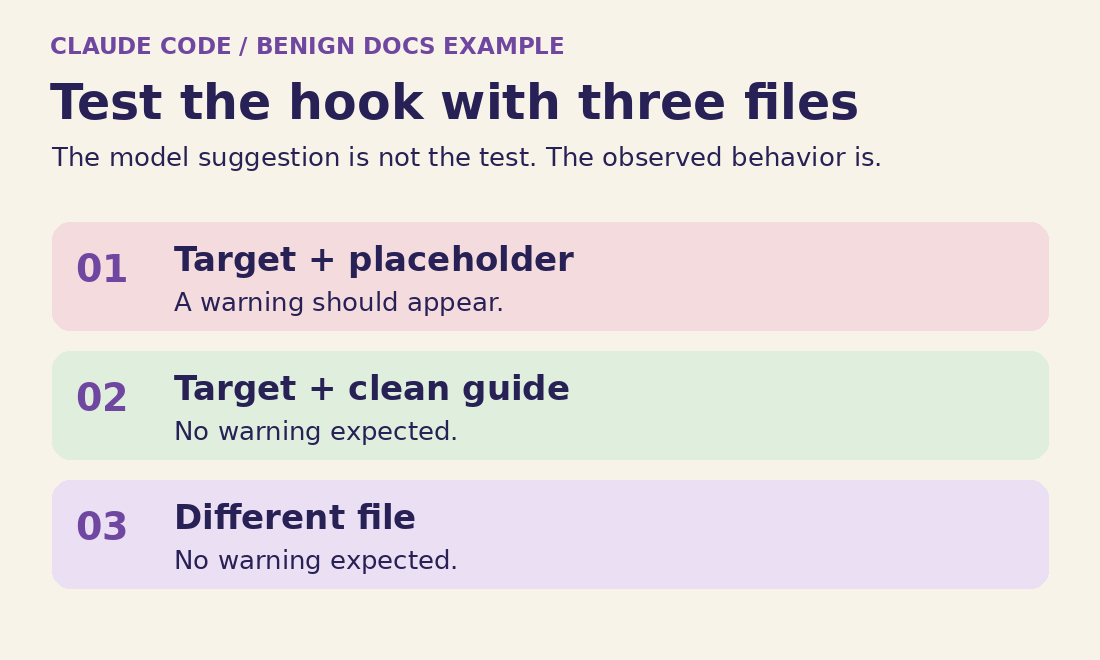
Suppose the team already has a lint command that reports formatting violations without changing files. Use that as a candidate for an event-triggered check in a sandbox. Run it manually on a clean file and a deliberately failing file. Before adding a trigger, decide whether the result should block work or simply be reported. Start with the least disruptive behavior that gives useful feedback.
Verify that the hook runs on the intended event, not on unrelated activity. Confirm that the command uses a trusted path, that an error is visible, and that the team knows how to disable the hook. Don’t pass untrusted text into a shell command or allow an unknown script from a repository to run merely because it is present. Keep automatic deployment, deletion and external notifications out of this first test.
Decide what should stay in each layer
Imagine a small studio that produces client handoff guides. Three separate requests come up in the same meeting: use descriptive link text, review a guide for a beginner, and notice when an edited Markdown document still says “TODO.” They all involve documentation, but they ask for three different kinds of behavior. Putting them all in an automatic hook would make the editorial review run at awkward times. Putting them all in a skill would leave the recurring project convention invisible whenever nobody requests the review.
- Standing context → CLAUDE.md
- “Examples in docs use fictional data.” Useful even when nobody invokes a workflow.
- Judgment on request → skill
- “Review whether this draft lets a beginner finish the handoff.” Needs interpretation and an explanation.
- Observable event → hook
- “After a supported edit, look for an unfinished placeholder.” Same input contract and repeatable check.
Start by asking what happens if the behavior never runs. If the answer is “the team would miss a preference sometimes,” standing context is an economical choice. If the answer is “there would be no review until somebody requests one,” that may be exactly the right behavior. If the answer is “we would miss a predictable defect right after editing,” an event-driven diagnostic may be worthwhile. If the answer is “something could be published without approval,” none of these mechanisms is a substitute for the permissions on the actual publishing system.
Next, ask how to know the procedure succeeded. “The introduction seems helpful” needs an argument tied to the intended reader. “The heading is missing” can be detected with a narrowly defined rule. The hook can report the missing heading; the skill can explain why that makes the next step confusing. A human can decide whether the exception is intentional. Keeping those roles distinct prevents a string match from turning into a blanket editorial verdict.
Build a documentation skill you can actually test
Use a scratch project, not the working copy of a customer deliverable. Create a short fictional guide, a second guide with an obvious gap, and a third guide with an intentional exception. For instance, the first explains how to export a preview; the second leaves out where the preview appears; the third includes a placeholder in a fenced example that teaches readers how to recognize placeholders. The third fixture matters because an assistant that treats every match as a defect will produce noisy reviews.
For a project-local skill, use .claude/skills/doc-check/SKILL.md. The directory supplies the normal invocation name. Keep this first version local to the exercise; there is no reason to make every repository inherit a procedure you are still evaluating. A small definition might look like this:
---
name: doc-check
description: Review one Markdown guide for a beginner's ability to finish a task.
disable-model-invocation: true
---
Review the file supplied with /doc-check.
Do not edit files or run commands.
Identify the intended reader and what they should be able to finish.
Flag missing prerequisites, ambiguous steps, and undefined success signals.
For each finding give a location, why it matters, and a proposed fix.
Distinguish a teaching example from unfinished publication copy.
If the file or the intended audience is unclear, ask before judging it.
With this setup, invoke the workflow deliberately, for example with /doc-check docs/preview-guide.md. The manual-only setting is useful here because the experiment is about reproducibility, not about how often the assistant can discover a matching procedure. The instruction not to edit describes the workflow, not a hard permission guarantee. Use a read-only environment or appropriate tool permissions when an edit would be consequential.
Try reading the report as the author who has never seen the instructions. “Improve clarity” fails because the author cannot locate a change. “Under Export, name the destination folder so the reader knows where to look” is testable. If the review says the example is unfinished copy, check whether you gave the file and correctly represented the reader’s task. Only then change the skill. Do not weaken the rule just to make one test pass; refine the condition that distinguishes the two cases.
Keep the first release short. Move bulky reference material into separate files only when the skill has a real recurring reason to consult it, and identify when to open each reference. Avoid packing the whole project handbook into one procedure. A review skill should not need pricing policy, support routing, or deployment notes unless those are genuinely part of the review. Smaller instructions make it easier for a maintainer to see which sentence caused a recurring problem.
When you compare runs, keep the same file, stated audience, invocation, and test conditions. Model output is not a byte-for-byte expected snapshot. Instead, record whether it found the intended omission, whether it invented a requirement, and whether it cited the right location. Order and wording may vary; material behavior should be stable enough to help the next editor.
Capstone: report an unfinished Markdown line after an edit
This is a deliberately small hook exercise. The hook does not publish, send a message outside the session, install anything, or modify the document. It reads an intended fixture in a scratch repository and reports a specific marker. It is a contrast with the skill: instead of evaluating whether the document teaches well, the hook checks a file for one mechanical condition and gives the assistant information it can use.
Use this only when the project and interpreter are trusted. The following example is for a POSIX shell and an already available Python 3; use Linux, macOS, or a suitable WSL environment. Do not assume that the shell, executable name, current directory, or interpreter path matches a native Windows installation. The event runs after a successful matching tool call. It is not a watcher for edits made by an external editor, a different tool, or Git.
- Tool reports success. Only a matching
WriteorEditis considered. - Script validates the target. It skips anything except the named fixture.
- Script reads the fixture. A matching line produces an advisory for review.
- Reviewer decides. No automatic rewrite, commit, or external notice follows.
Use a fresh project where .claude/settings.json has no existing settings. If you later transfer the experiment into another project, merge the new entry rather than replacing its settings file. The filter checks tool names; the script is responsible for checking the actual file. Do not make that separation implicit.
{
  "hooks": {
    "PostToolUse": [
      {
        "matcher": "Write|Edit",
        "hooks": [
          {
            "type": "command",
            "command": "python3 \"$CLAUDE_PROJECT_DIR/.claude/check-doc.py\""
          }
        ]
      }
    ]
  }
}
Put an ordinary test file at docs/preview-guide.md and save the following example as .claude/check-doc.py. The path is compared after resolution, so the hook does not treat every path mentioned in the event as permission to read it. It accepts the documented JSON data on standard input, rather than interpolating that data into shell syntax. Keep the fixture itself under your control.
import json, os, sys
from pathlib import Path

def main():
    event = json.load(sys.stdin)
    root = Path(os.environ["CLAUDE_PROJECT_DIR"]).resolve()
    allowed = root / "docs" / "preview-guide.md"
    name = event.get("tool_input", {}).get("file_path")
    if not isinstance(name, str):
        return
    candidate = (root / name).resolve()
    if candidate != allowed or not candidate.is_file():
        return
    lines = candidate.read_text(encoding="utf-8").splitlines()
    hits = [str(i) for i, line in enumerate(lines, 1)
            if line.strip().startswith("TODO:")]
    if hits:
        print(json.dumps({
            "hookSpecificOutput": {
                "hookEventName": "PostToolUse",
                "additionalContext": "Preview guide has TODO markers on lines "
                                     + ", ".join(hits) + ". Review before publishing."
            }
        }))

if __name__ == "__main__":
    main()
The value here is that the hook reports evidence: it names marker locations, not a general assessment. The script does not parse fenced Markdown examples. If a team has code samples that contain literal marker lines, that limitation can be acceptable for this named fixture but not for a repository-wide policy. Either keep the scope narrow or implement and test an explicit exception before broadening it. An apparently simple check gets harder once the text being checked has syntax of its own.
Since this is an advisory, a silent clean case is fine in normal use. It is not fine as your only test. First make a known matching case that emits an advisory, then change just one variable and confirm the message disappears for the right reason. If no message ever appears, you have no evidence that the matcher, the interpreter, or the hook registration is working. A known positive case prevents that false confidence.
Test the pieces separately before trusting the combination
Start outside the assistant with the intended fixture and a sample event. From the scratch project root in a compatible shell, the following local test supplies the input the script expects. First place TODO: name the output folder on its own line in the fixture. You should see JSON containing the line number. Remove that marker and repeat; the command should complete without an advisory. A parse or interpreter error means the check itself did not complete.
export CLAUDE_PROJECT_DIR="$PWD"
printf '%s\n' '{"tool_input":{"file_path":"docs/preview-guide.md"}}' \
  | python3 .claude/check-doc.py
Next test the actual trigger in a fresh Claude Code session started from the project. Ask for a harmless edit to the named guide and confirm that the observed tool was Write or Edit. Try a similarly named file outside the fixture, and confirm it produces no advisory. Then edit the fixture manually in your usual editor: the example hook should not be expected to run. This negative test checks an assumption about the event, not just about the script.
- Positive control
- Named guide plus a known marker: one advisory with the right line.
- Clean control
- Named guide without a marker: no advisory.
- Scope control
- Another file with a marker: no advisory.
- Event control
- Manual editor write: no Claude tool event expected.
If the skill does not appear, verify the directory, the spelling of SKILL.md, and the frontmatter delimiters. Confirm which project the session opened and which account or environment owns the files. A project skill in a local clone does not magically appear in a cloud clone with a different checkout. Restarting a session can help distinguish a stale session from a wrong path, but it will not copy missing files into the workspace. Avoid editing several versions of the skill at once when looking for the culprit.
If the hook script works manually but not in the session, use the supported /hooks view to inspect the effective configuration and event before changing the script. Confirm that the tool name in the session actually matches the filter, that the session can start the interpreter, and that the project directory belongs to the environment where the hook runs. Linux and Windows builds may be using different executable search paths. Never assume a script failure is a reason to relax permissions or bypass a warning.
When a hook produces repeat notices, ask whether it is firing more than once per real editing action or whether the assistant is making several real edits. Check which events occurred before deciding. A warning on each of ten small edits may be technically correct and still be a bad user experience. Keep the diagnostic narrow, move the check to an explicit review step, or remove it if manual invocation gives the same value with less interruption.
Write down the removal path while the setup is fresh. In the scratch project this is the one hook entry and its tiny script; preserve unrelated settings. After removal, repeat the known positive edit and confirm the advisory is gone. Keep the skill if it still helps review a guide on request. You are not committing to both mechanisms simply because you tried them together.
Hand over the setup without asking teammates to guess
For the first real trial, leave the default owner an ordinary note explaining the purpose of each file. Someone editing a guide should know which check runs, what its advice looks like, and how to report a false positive. Someone maintaining the skill should know the intended reader and the minimum evidence that makes a finding useful. These are different audiences even if one person holds both roles today.
Consider the difference between an unfinished step and a legitimately optional one. If a guide says readers can skip the export, the skill should ask which task they are trying to finish rather than automatically declaring that the step is missing. The placeholder hook cannot make that distinction and should not try. A maintainer can test the difference with two short sample guides that use the same wording but serve different readers.
Finally, agree on when to retire the check. If your publishing system now rejects placeholders itself, the manual check or the hook may be redundant. Remove the weaker duplicate and keep a sample proving that the remaining check catches the original problem. This is more informative than maintaining tools simply because they were once useful.
Extend the check only when its new scope is clear
Suppose the studio now asks for the same warning on every client handoff guide. The original checker deliberately names one file. A careful extension starts with a written scope: for example, only regular Markdown files in a dedicated handoff directory, excluding templates and archived versions. Before changing the implementation, make a short list of files that should and should not qualify. Include one file with a similar name in a neighboring directory. The new test should catch that distinction before the broader rule runs against real work.
A second change might be to report an open placeholder only when it appears outside a fenced example. Here the first check would produce a known false positive. Define the behavior in terms of what an author can see: a literal sample marker inside a code block should remain untouched; a marker in the instructions above the block should still be reported. Match those two cases with otherwise identical test files. If authors use several kinds of fences or include nested examples, use the project’s existing Markdown parser where available instead of quietly expanding a line-based check into an unreliable parser.
Change one dimension at a time. First widen the group of eligible documents and keep the old marker rule. Then update how the marker is interpreted. If both changes ship together, a missed advisory could come from file selection or from text interpretation, and the person investigating must reconstruct two decisions instead of one.
If the next request is a subjective design check, such as whether an illustration explains a step at a glance, route it back to the skill. Give the reviewer the caption, expected audience, and intended takeaway; keep the final judgment with the author.
Judge the result as a workflow, not a feature demo
A good documentation setup leaves a small, legible trail. The project instructions tell a new teammate where conventions are kept. The skill answers a question a person intentionally asked. The hook names an observable condition without hiding an action. If somebody opens the repository a month later, they should be able to explain why each entry exists and how to test or remove it.
Compare one manual review with one assisted review on similar fixtures. Count false positives you had to dismiss and real omissions you confirmed. Include the time spent interpreting hook output. These are observations for your own test, not promises about productivity. A skill that finds one repeated blind spot may earn its place. A hook that fires every time but rarely changes a decision may not.
For a real publication workflow, keep final authority in the publishing account and preserve a human preview. A review can flag that an illustration lacks alt text or that a heading is misleading, but it should not prove those findings by changing the live page. Separate the editable draft from the published result, and confirm the final rendering in the environment where readers will see it. A local test cannot tell you whether the CMS preserves a disclosure, an image crop, or the navigable order of headings.
Once that test succeeds, decide what to keep based on the work your team actually does. Use a skill when the outcome depends on interpretation, a hook when a real event should trigger a trusted bounded check, and project guidance for concise standing rules. The examples are designed for an isolated local project. Check the current Anthropic documentation when adapting the syntax or behavior to your installation.