
Explainable AI for Small Teams: Test the Reason, Not Just the Result
A customer writes, “I already paid; where is my package?” The support tool sends the message to Billing. Underneath, it supplies an explanation: “This message is about a payment issue.” Both the route and the note look tidy on a dashboard. Neither helps when the person opening the ticket needs to find the parcel.
For small teams, explainable AI starts with separating three questions. Did the recommendation fit the facts? Does the explanation point to evidence a reviewer can check? Does it accurately describe what produced the recommendation, or is it a supporting note written after the fact? You can get different answers to all three. This guide uses a fictional support inbox to show how to test them separately, decide when to keep a person in the loop, and back out of an automation without abandoning the inbox.
A right answer can still have a wrong explanation
Imagine the tool sends “I was charged twice” to Billing because it matches a rule named Duplicate Charge. If your system records the matched rule and the phrase it saw, you have something inspectable. You can still disagree with the rule or ask what happened before the match, but at least the record points to a specified event in the workflow.
Now imagine an AI assistant picks Billing and writes, “The order was refunded twice.” The right department receives the work, but the reason invents a refund. Neither the customer text nor the route makes that statement true. The reviewer should keep the useful routing result, discard the note, and record those outcomes separately. If one accuracy column covers both, a successful route hides the fabrication.
There is another trap: a bad decision can have a faithful explanation. A rule that sends every message containing “paid” to Billing might reliably explain its own results. The rule is still a poor match for a delivery question that mentions prior payment. This is one practical implication of the distinction the National Institute of Standards and Technology makes between an explanation, an explanation people can understand, whether it represents the process correctly, and whether the system knows its limits. You do not need a larger dashboard to start separating those questions.
| Route | Evidence checks out | Evidence fails |
|---|---|---|
| Right | Accept the route. Keep the note as supporting information. | Keep the route, discard the note, investigate the explanation step. |
| Wrong | Correct the route. Check how the system interprets genuine evidence. | Correct the route and remove the note. Check both workflow steps. |
Evidence that checks out is not the same as proof that the model used it.
What an inspectable record looks like in a real product
The public Amazon Connect Contact Lens Categories reference documents data for category rules matched in an analyzed segment, including category details about a match and when it occurred in the transcript. This is an example of a narrow technical record: a reviewer can look for a named match and a location instead of taking a free-form explanation on faith.
There are two important limits. First, a category match does not prove the ultimate route, assignment, or business outcome. A later rule, a manual move, or an unavailable queue could change where work lands. Second, this is documented product behavior, not a claim that an Amazon workflow was configured or measured for this article. The takeaway is to ask vendors and internal builders whether you can inspect the particular event you need. A category match, final queue assignment, and reviewer override are three different events.
A crisp request to a vendor might be: “For a single ticket, can we see the proposed queue, the matched rule or supporting excerpt, and the final assignment as separate fields? Which of those fields are generated after the decision? Can support staff correct the result without permission to edit the routing rules?” An honest “we only record the recommendation” is useful information. It tells you to describe the tool as a suggestion engine and to build human review around what is actually available.
Build one test case that belongs to your inbox
Consider a fictional shop, Cedar Parcel. It has two specialist queues, Shipping and Billing, plus Manual Review. The test policy routes delivery status and damaged packages to Shipping and duplicate charges or failed payments to Billing. Refund status is also Billing, but the tool may not interpret a question about returns as an approved refund. If a message contains two substantive requests or not enough detail, it goes to Manual Review. This is a local example, not a model for every shop: yours might prefer to split a mixed ticket rather than hold it.
Start with a real job the shop already knows how to do by hand. The workflow is allowed to propose a label, not send a reply, open a payment action, change a delivery address, or update an order. A person can accept, change, or hold the suggestion. Set these permissions before the trial rather than relying on a sentence in the prompt. A classifier that cannot send messages cannot accidentally promise to refund a charge while you are testing its labels.
Write down the policy on one page. Define what counts as a complaint rather than a passing mention. “I submitted the payment yesterday” is context; “I see two charges” is a billing issue. Record what would make a ticket ambiguous. For example, a parcel marked delivered might be missing, delayed, or at a neighboring address; for this policy, all versions of that delivery issue still belong to Shipping. “I need help with my order” does not identify a specific issue and goes to Manual Review. Without those distinctions, reviewers disagree about how to score a model that may simply be following an unwritten rule.
Specify the output before inviting the tool to explain
- Proposed queue: Shipping, Billing or Manual Review, with no invented categories.
- Supporting excerpt: a short exact phrase from the approved test text, or none if the text is insufficient.
- Reviewer note: one sentence explaining why the excerpt maps to the written policy, with a second issue called out when relevant.
- Decision record: a matched rule identifier or logged event, only if the system actually provides one. Leave it blank rather than asking the model to invent it.
- Limit: what is missing or needs human judgment; do not infer order status, refund eligibility, or account facts from a support note.
A usable example is “Shipping; ‘where is my package?’; customer is asking for delivery status; no account or tracking status checked.” That last phrase keep the staff member from mistaking a correct classification for a logistics lookup. Where supported, verify exact excerpts against the submitted text before displaying them. The fact that the excerpt exists does not prove it is interpreted correctly, so the reviewer still checks the sentence around it.
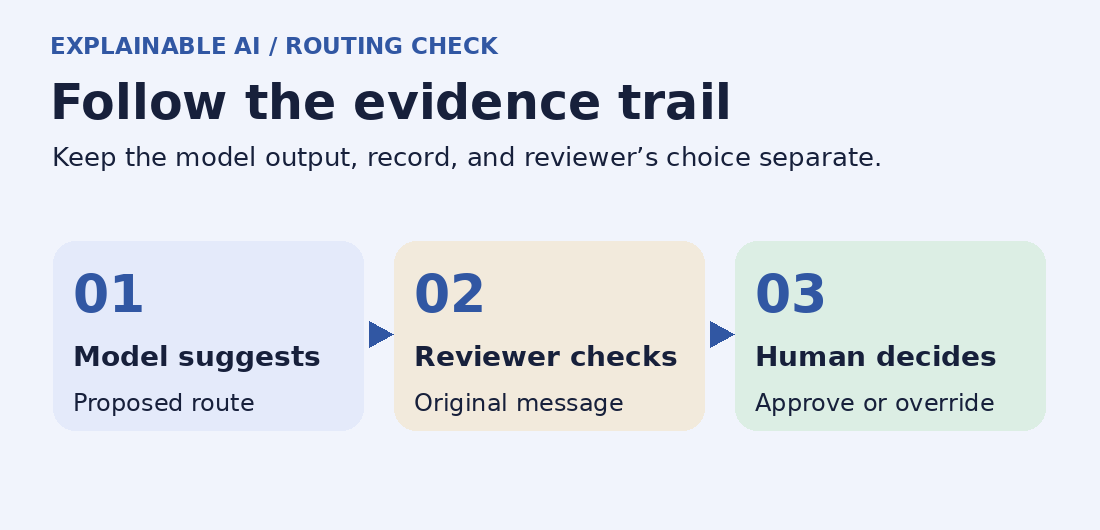
- 1. Capture. Use only the text needed for the test; record a case ID.
- 2. Suggest. Store the queue and the supporting note in separate fields.
- 3. Review. Compare the suggestion with the text and the written policy.
- 4. Decide. Accept, correct or hold; record why and keep the ordinary queue working.
Run a small evaluation set that can actually fail
Build the set before tuning the workflow. A colleague should label each case in a clean copy before seeing the model output. If two people disagree, first resolve whether the policy is unclear or both queues would work. Do not retroactively change an expected label just to make a result look good. If the intended policy changes, version it and rerun the affected cases.
The table below is a ready-to-typeset synthetic starter set. These are invented messages, not customer data. The expected outcomes are based only on Cedar Parcel’s written policy. The first three cases are a contrast group: one changes the words without changing the request, one changes the substance, and one removes the evidence needed to make a useful choice.
| Case | Synthetic ticket | Expected queue and evidence |
|---|---|---|
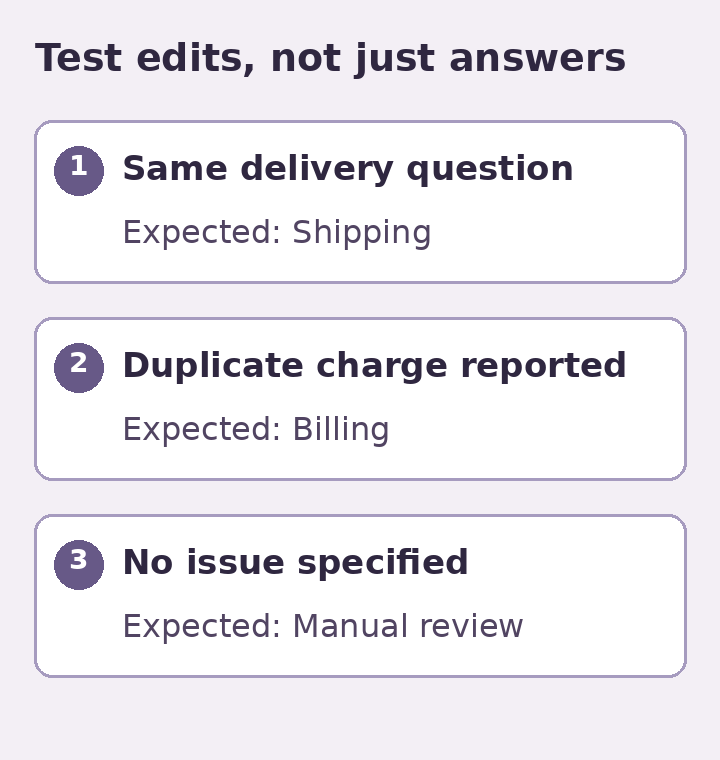
| 01 Original | I already paid; where is my package? | Shipping. The question is about the package. |
| 02 Paraphrase | I paid already. Has my parcel reached the depot? | Shipping. Payment is context; the request is about progress. |
| 03 Relevant edit | I already paid, but I was charged twice. | Billing. The duplicate charge changes the job. |
| 04 Missing detail | There’s an issue with my order. | Manual Review. No usable delivery or payment detail. |
| 05 Two issues | The parcel still hasn’t arrived and I see two charges. | Manual Review. Both issues are substantive. |
| 06 Negative wording | My card wasn’t charged twice. I’m asking when the package will arrive. | Shipping. The duplicate-charge phrase is negated. |
| 07 Quoted history | Old reply: “Payment failed.” Update: The card payment cleared, but my box arrived crushed. | Shipping. Use the update, not the quoted history. |
| 08 No false promise | Did the refund ever go through? | Billing. No evidence that a refund was approved or processed. |
| 09 Missing attachment | The screenshot explains it. Can you fix it? | Manual Review when the attachment is inaccessible or outside scope. |
| 10 Out of scope | Please change the email on my account. | Manual Review. An account change is outside this tool’s allowed actions. |
| 11 Typo | Chagred twce for my order. Can you check? | Billing if a reviewer can confidently identify “charged twice.” The note may preserve the original spelling. |
| 12 Unsupported input | Voice message only, with no transcript available to the tool. | Manual Review. The workflow cannot inspect content it has not received. |
Use the same model, settings, workflow and available inputs across the baseline comparisons. Where timing or prior conversation matters, hold those fixed too. Suppose two text edits differ in both the sentence and the channel that supplied it. A changed result might come from a channel-specific rule rather than the words. Change only the factor you intend to probe; otherwise record it as a combined test, not a controlled comparison.
Once you have inspected the starter set, write new examples that the workflow did not see during tuning. Include only languages and channels your team expects to support. Keep original and edited variations in the same group rather than putting one half of a near-duplicate into tuning and the other into evaluation. Near duplicates can make a new test look more independent than it really is. If a model output varies from one run to the next, repeat a few boundary cases under matching settings and record the variation rather than saving only the most persuasive response.
Read the scorecard, not just the accuracy number
Evaluate three outcomes that can improve or worsen independently. Route agreement is the number of correct queues divided by the total number of test tickets. Evidence support is the number of non-empty notes with all material details grounded in the provided ticket divided by the number of non-empty notes you checked. Correct handling of uncertainty is the number of review-required cases held correctly divided by the number of such cases. Track evidence coverage too: a model that omits nearly every note may look precise in the few notes it emits, but it is not supplying an explanation most of the time.
Imagine that Cedar Parcel gets 10 correct routes out of 12, eight supported notes out of nine notes emitted, and four correctly held cases out of five that required review. These values are imaginary: 10 divided by 12 gives 83.3%; eight divided by nine gives 88.9%; four divided by five gives 80%. The denominator of five is especially small. Here the missed hold might matter more than either headline percentage. If the held case concerned an inaccessible attachment and the note nevertheless described its contents, treat that as a failure before you discuss whether 83.3% is good enough.
Add a line for reviewer effort: how long it takes someone to check the suggestion compared with labeling a similar ticket unaided, and which decisions were reversed. Use representative reviewers, include slow and ambiguous cases, and compare time on the same task. If the explanation is longer than the ticket and makes people check more fields than before, the feature can be a poor choice even when the labels look strong. The experiment described by Buçinca and colleagues offers a useful design idea: try having people form an independent judgment before revealing the AI suggestion. That is a testable procedure, not a promise that it will outperform another design in your inbox.
Prefer raw counts and concrete examples to claiming statistical precision from a dozen synthetic messages. Log false positive and false negative examples for each queue. “The tool mistakes quoted history for the current question” is actionable; “the model has 83% accuracy” does not tell the person responsible for the inbox what to fix.
Known answers. No customer action.
Compare silently. The team routes tickets as usual.
Offer suggestions only where a reviewer can correct them.
If a stop condition trips, return to manual routing and keep incoming work visible.
Set your rollout gates before the first live suggestion
Gate 1: Offline practice
Run the synthetic set and a separate holdout. Do not advance if the tool invents facts, sends a decision outside its authority, or turns a missing-input test into a specific claim. An example starter threshold for Cedar Parcel is all review-required cases held, no invented material details, and acceptable routing on the clear examples. Set “acceptable” in advance: a local team might add clear holdout cases and require nine of ten correct before shadowing, then replace that initial hurdle with a larger evaluation before production. These are proposed operational gates, not universal standards or evidence that any vendor met them.
Gate 2: Shadow comparison
Where authorized to process actual ticket data, compare suggestions against the queue people chose without surfacing the suggestions operationally. Normal assignments and notifications stay untouched. Pick a fixed sample and period before starting. For a small inbox, a team could agree to sample the first 30 eligible messages over a week and report the denominator actually reached. If only eight eligible messages arrive, the trial is incomplete. Track sample composition and avoid declaring a pass on short or atypical coverage.
A person should review disagreements and decide whether an apparent error was a bad label, a revised rule, or a bad expectation. Do not let a synthetic success erase a live failure. If a newly discovered pattern matters, create an invented counterpart for future regression tests so you can test again without repeatedly copying a real customer conversation.
Gate 3: Narrow, reversible assistance
Show suggestions for one queue or one type of message where reviewers have time to inspect them. Give them a visible correction action and a route to a named owner. Keep ordinary manual routing available. For Cedar Parcel, the owner stops the pilot if a restricted label bypasses review, invented details reach staff as facts, or the team cannot restore normal routing with a short documented procedure. Agree beforehand who pauses the workflow, where unprocessed work goes, and who checks that no message was lost or handled twice.
Audit the cases the aggregate score hides
Suppose Shipping accounts for most incoming mail and the pilot agrees with staff on nearly all delivery-status questions. On the same week, it misroutes the only two messages about damaged parcels. The overall rate may still look good. For a small team, those two messages deserve their own line in the scorecard: damaged parcels, two seen, two missed. Keep the existing manual handling for that subgroup, investigate the text and policy behind the errors, and add new invented examples before you widen the pilot. Do not say that a two-case sample estimates future performance; it tells you where the evidence is too thin to advance.
Choose groups by operational consequences before the pilot, such as mixed requests, missing attachments, refund disputes, or unsupported languages. For each group, decide whether the tool should route, merely suggest, or always hold. Report how many examples were observed as well as how many were handled correctly. A group with zero observed examples has no result. A dedicated holdout may be useful if the live sample rarely includes the cases the team least wants to get wrong.
When two reviewers disagree, do not break the tie using an AI confidence label. A confidence value is a property of the tool’s output; a case adjudication is a judgment about the evidence and the written policy. Have the reviewers identify the exact clause and the relevant sentence independently, then ask the workflow owner to settle any disagreement that persists. If the policy does not cover the case, record that as a policy gap, not as a model error or a correct answer. Decide how the case should be handled next time, version the policy, and rerun both the new case and previously passing examples that could now change. Keep the prior result so a policy change does not masquerade as a software improvement.
Give people correction access without creating another data store
Separate the correction interface from the tool’s configuration. A reviewer should be able to replace a queue label, mark a note inaccurate, hold an unclear message and ask someone to change the policy. That does not require unrestricted access to historical tickets or permission to edit the model. A lead can review patterns and approve a rules change; an administrator can manage provider credentials, access and retention. For a team of two, one person may perform more than one role, but the permissions should still be explicit.
Decide what a customer can correct as well. For a shipping issue, someone may reply with a missing order reference through the ordinary support channel. The reviewer can then reconsider the ticket rather than silently telling the model to guess. Do not write public notes implying access to hidden account data. Do not let a chat explanation expose someone else’s details or internal rules they do not need to see. Where the system is used for consequential decisions about people, a support-triage example is not adequate policy or review. Use qualified oversight and the requirements that actually apply to that use case.
For a minimal internal log, try a case ID, workflow version, expected and proposed queues, pass or fail on note support, final queue, correction reason, and timestamp. Keep raw messages in the authorized source system. Do not store full card details, access tokens or other information that is unnecessary for the routing decision. Decide how long the evaluation log is useful, who can access it, and how to remove data in accordance with your obligations and agreements. A URL that opens a ticket should not go into a shared spreadsheet accessible to people who cannot otherwise view it.
Before sending real tickets to a third-party tool, check whether your agreement permits that processing, what the provider retains, where data can be handled, and whether messages may be used for activities beyond delivering your service. Apply the same caution to attachments, contractor access, screenshots, and model-generated copies of logs. Use synthetic examples in a public guide or vendor demo unless you have the rights and approvals needed for the exact material. Removing a name is not always enough to make a message safe to share: dates, internal IDs, unusual purchases and quoted history can still identify a person. The AI Risk Management Framework measurement guidance from NIST offers further prompts on oversight, tracked escalation, and controlled access. It is guidance, not a certification of your process.
When to keep a simple rule or a manual queue
Explainability does not require a second AI model. If a rule reliably catches a clean structured label, such as a support form with an explicit “Delivery question” selection, the plain rule may be cheaper to maintain and easier to inspect. Test its failure cases too: customers can select the wrong option, type two issues into one ticket, or omit the detail someone needs. A manual fallback can catch what the rule cannot. A generator might be most useful only when people write unstructured messages in several ways and your team can support the review burden.
Conversely, if the team has no time to verify reasons, cannot correct assignments, or cannot separate the supporting note from an outgoing response, keep the workflow manual for now. Fixing the intake form or labeling queues more clearly may remove the need for a complex tool. Use one measurable decision to make the comparison: can reviewers find the right queue and notice unsupported details more easily than they could with the current process, without losing tickets or exposing extra data?
If you are still deciding what to automate, see this beginner guide to AI workflows with human review. For your next test, choose one existing queue and run a clear case, a corrected case and an ambiguous case against the written policy. The first question to ask an explanation is not whether it sounds smart. It is whether it helps someone catch and correct a credible mistake.