
Claude Code First Repository Workflow: From One Ticket to a Tested Diff
A new repository is a bad place to start with “make this better.” You might get a patch that looks polished, touches six files you have never seen and leaves you unable to tell whether the original problem is fixed. A better first session produces something less impressive and more useful: one observable behavior change, a test that checks that behavior, and a diff you can explain without asking the model what it meant.
This is a Claude Code workflow for someone who can run an existing project but is still learning to read code. The example is fictional: an invoice list shows a blank panel when the request succeeds and returns no invoices. We will keep the loading and error behavior intact and add an empty-state message. Nothing involves real invoice data, deployments, payments or a production service.
A tested diff is not a guarantee of correctness. It means the changes are visible, the commands and results are accounted for, and the remaining uncertainty is named. That is a useful stopping point even if someone else will merge the work.
Write a ticket you can test
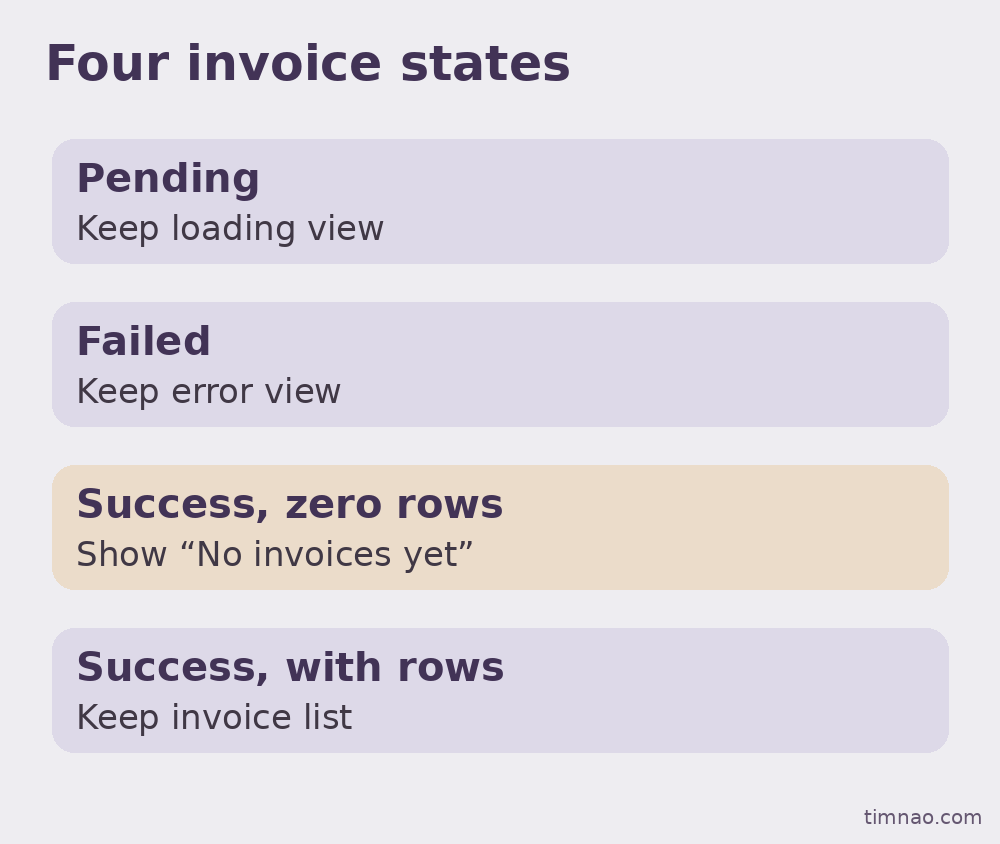
Before opening a coding session, give the ticket a trigger, a result and a boundary. A good trigger is a situation you can reproduce with a fixture or local input. A good result describes what changes for the person using the app. A good boundary names a nearby behavior that should not change. In our example, an empty successful response should show a message; a failed response should still show the existing error; a loading request must not briefly show the new message. These are three states, not three unrelated feature requests.
Choose a first ticket whose failure is cheap to observe. A UI label, a familiar local calculation or a narrowly scoped formatting rule is easier to review than a change spanning authentication, billing and deployment. Don't choose a ticket merely because its requested patch sounds short. “Let our app accept another login provider” looks small in a sentence and big as soon as you ask which accounts it can link and what happens to existing users.
Use this template to turn a general request into a first task:
If you cannot yet describe the trigger, the first task is diagnosis, not implementation. Ask the assistant to find how to reproduce the issue, then stop before changing anything. That can be a successful session. A wrong fix is not an efficient way to discover what the ticket meant.
Record the baseline before asking for edits
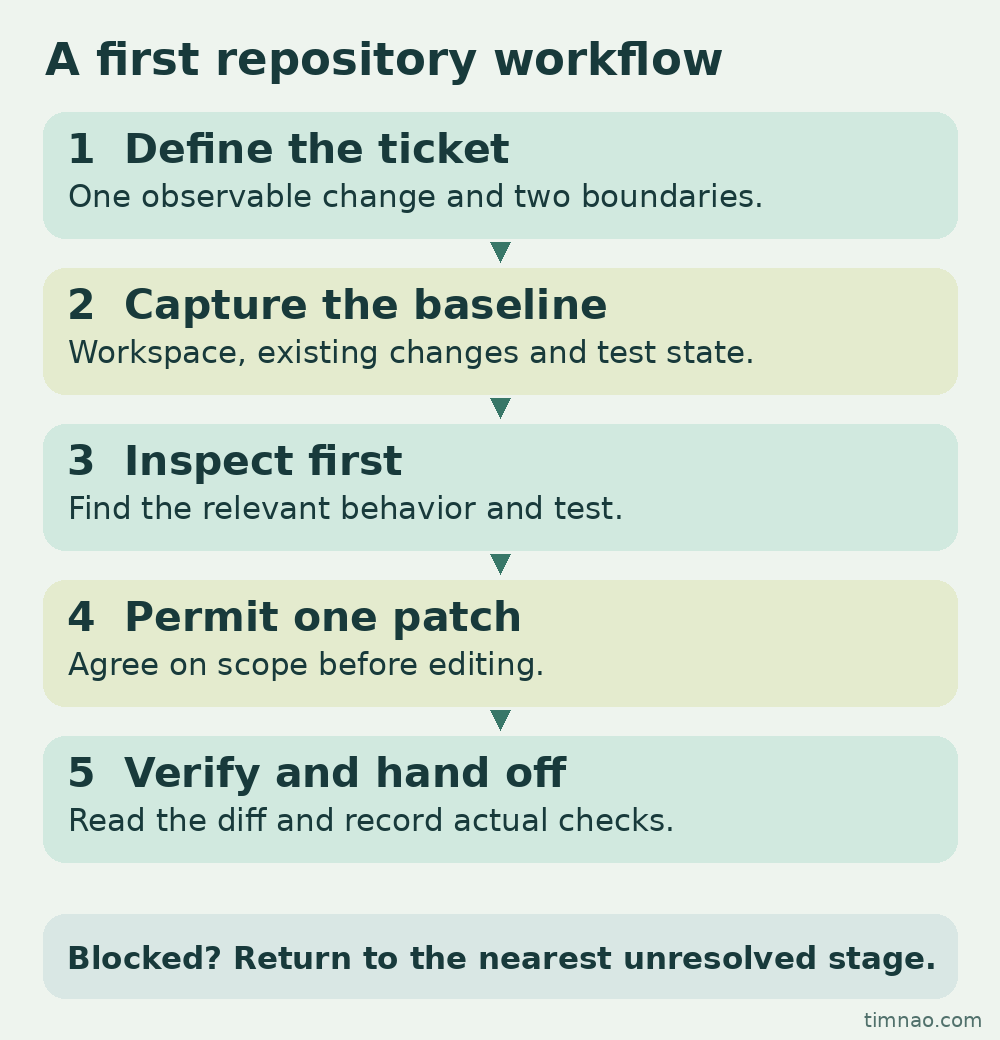
The point of a baseline is to remember what was true before work began. If you open a repository and a test fails, capture the command, the error and the conditions under which it failed. You do not need to repair it just to make the log look good. You do need to know whether a failure after the patch was already there.
Work in a project you own or are authorized to edit. For a beginner exercise, use an isolated copy or an appropriately created branch from an agreed clean starting point. A branch by itself does not make uncommitted work invisible or protect every folder on your computer. If you see edits you do not recognize, do not discard or move them for convenience. Find out whose work they are, or use a separate clean workspace. Keep secrets and live customer records out of the exercise.
Here are three ways to capture the starting state in a Git repository:
git status --short
git diff
git diff --staged
The first command is a concise inventory. The second shows unstaged changes to tracked files. The third shows the changes already staged for a potential commit. New untracked files can appear in status without appearing in either diff; open or inspect them separately. A blank diff does not prove a clean starting point if you never check status or the staged view. Git’s own documentation distinguishes these views. The habit we want is simple: name what you checked, not just “clean.”
Record which relevant tests were attempted and whether the project could actually run in your environment. A missing runtime is different from a failing assertion. A test that cannot connect to the intended local service is different from a bug observed in an app that launched correctly. Write “blocked by setup” if that's the state. Do not let the assistant rewrite the application merely to get around an environment that wasn't configured for the project.
Ask Claude Code to inspect first
Let the assistant learn the project before it proposes a line change. In Claude Code, an appropriate permission mode can help separate the exploration phase from ordinary editing. Consult the available modes in your specific client and configuration. A prompt saying “read only” describes what you want; it is not a substitute for the tool's permissions, sandbox or your review of a command. If the environment presents a request that you did not expect, evaluate that particular action rather than loosening protections so the session can move on.
Ask for evidence that tells you where to look next. “Find the relevant file” is a start. “Identify which component decides whether to show loading, an error, rows or an empty message; give file paths and describe how it distinguishes those states” is more useful. You can read one function and two tests more easily than you can verify the assistant's summary of a whole repository.
The exploration output should separate what the assistant observed from what it inferred. A real file path and the branch of a conditional are observations. “This probably also affects the export page” is a hypothesis until the code or a reproduction supports it. A beginner can ask for that distinction explicitly without knowing the syntax of the project’s language.
A useful plan need not list exact line numbers ahead of time. It must identify the place the behavior lives, the reason the proposed change belongs there and a check that can distinguish before from after. Suppose the assistant finds that an existing component already receives the success state and an invoice array. It can probably change display behavior at that point. If the component only receives a generic signal that conflates error with empty, the work is not as localized as it first sounded. The right answer then is not to fake a small patch. It is to explain the dependency and revise the ticket or defer it.
Permit one small patch
After reading the plan, authorize the proposed work only if the files and behavior make sense. In the example, the expected changes are a display component and its existing test file. That does not mean exactly two files is a universal rule. It means anything outside the agreed set should cause a conversation before it happens. If the project stores strings in a message catalog, changing that catalog may be the correct third file. The assistant needs to explain it before silently editing it.
Protect the parts you intend to leave alone. Say whether you expect package versions, generated files, environment settings, formatting and public interfaces to remain unchanged. It is common for a broad formatter or test preparation step to touch many files even when the business logic is one line. If that happens, review the intent behind the extra changes. An accidental sweep of unrelated formatting should not be accepted as the price of one label.
Before running any suggested command, ask what it changes and what it depends on. Normal local checks are useful. Installing an unexpected package, writing access credentials, or turning on a broad permission mode is outside the exercise. A blocked command is information: perhaps the person needs a maintainer to show how tests are meant to run. It is not permission to look for a bypass.
Apply the approved empty-state patch and add the focused regression
test in the existing test file. Preserve loading, error, and nonempty
behavior exactly. Use the existing message and rendering conventions.

Do not change dependencies, config, unrelated formatting, or live data.
If another file is necessary, stop and explain why before editing it.
Run the documented focused test only if the local setup is suitable.
Do not commit, push, or deploy.

Return changed paths, the test command with its actual result, and
any behavior you did not verify.
A small patch is not necessarily fewer typed characters. Sometimes the right small change adds a clear, readable condition and a test rather than cramming new behavior into an expression that nobody understands. Scope is about how many concepts and interfaces move, not how few characters you can fit into a pull request.
Work through the empty-invoice example
Everything in this example is fictional: repo name, file names, data, test outputs and results. Assume a small invoice dashboard called Paperdesk. The existing component is InvoicesPanel; a successful response contains an array of invoice summaries. The relevant test file already covers loading, an API error and a nonempty response. No live account or real invoice is necessary.
During inspection, the assistant observes that loading and error views return before the list rendering branch. That observation is the reason the minimum patch is plausible. It proposes an empty message immediately before the normal rows are rendered, after the existing loading and error paths. It also proposes a focused test that uses a fake successful response containing an empty array and searches for the expected user-visible message.
To see why order matters, consider an initial props value that initializes the rows to an empty array while the request is still pending. Putting the empty check at the top of the component would satisfy a simplistic test that only checks empty success. It would also show “No invoices yet” during loading. A strong review checks not just whether a condition exists, but which conditions it takes precedence over.
| Local scenario | Expected behavior after patch | What counts as evidence |
|---|---|---|
| Request pending, rows not yet loaded | Existing loading view, no empty message | Loading test or controlled manual run |
| Request fails, rows are absent | Existing error view, no empty message | Error test with synthetic failure |
| Request succeeds with zero rows | “No invoices yet” | New regression test using an empty fixture |
| Request succeeds with one fake invoice | Existing list display, no empty message | Existing nonempty test or local fixture |
Imagine the bug test fails first because the message is absent; the component is then changed and the same test passes. These are illustrative outcomes, not commands run against a real repo. A reviewer still needs to check that the test originally failed for the right reason. A missing fixture or broken import can produce a red test that tells you nothing at all about the bug. If the failure is unrelated, fix the setup of the test, not the product code, and capture the appropriate before result if you can do so without losing work.
A convincing fictional handoff looks like this: the display component gained one branch; the test file gained a case for empty success; the test suite for this component passed after the change; other program areas were not tested. Notice what the handoff does not say: “All issues are resolved,” “CI passes,” or “Safe to deploy.” Those would require checks beyond the example.
The example also gives you a way to practice reading code in a new environment. Explain to yourself why the text cannot appear when the request is pending. Then explain what fixture would show the opposite. If you can do that and point at where the order is enforced, the patch is becoming legible. If you cannot, ask the assistant to explain the condition without editing it again.
Read the diff and verify the test
Then trace the requested behavior through the patch. In the invoice example, locate the success-with-zero-rows case and check what happens immediately before and after it. Ask why error and loading are still handled independently. Read the new test with the same care as the product code. Does the test create a successful empty response? Does it check something the user sees, or merely that an internal object exists? A test that checks the wrong thing can pass even when the visible bug remains.
There is no reason to take “tests passed” as an unexplained verdict. Ask for the exact command, the scope selected by that command, and the actual output or failure summary. If an example uses a name like tests/InvoicesPanel, do not copy it into a different repo expecting it to work. Use the documented command. If local checks were skipped, say why. If a wider suite is expensive, note which checks were intentionally deferred to the maintainer or CI. Do not imply those checks ran simply because there is a future plan to run them.
A sensible manual check can complement the automated test. On a local instance, use fake data for each relevant condition and observe the panel. Compare it at a normal window width and a narrow one if the display is likely to wrap. Check that the empty message doesn't look like an error alert. Do not infer that the accessibility of the whole page is verified because the text is visible, and don't test against a real invoice service just to see something appear.
When results conflict, stop and name the discrepancy. Suppose the component test passes but the local app still shows the blank state. You might be running a stale build, using a different route, or testing a component that isn't rendered there. Those are hypotheses. Pick one observation that separates them, rather than starting another edit. Ask which route resolves to which file or which fixture is actually used. This keeps the review from becoming a second session of unrelated improvements.
Hand off what you know and stop
A review note should be short enough that a maintainer can read it before the diff. List what changed, why it belongs to this ticket, and how to verify it. Separate evidence from intention. “Only two files changed” is verifiable in Git. “No other behavior changed” is usually stronger than the evidence supports. Say instead which adjacent cases you checked. That wording makes the note more useful, not less confident.
Ticket:
Accepted behavior:
Workspace and baseline:
Paths changed and why:
Focused test command and observed result:
Manual checks and observations:
Not tested / known pre-existing failures:
Decision: ready for review / needs revision / blocked.
Next owner and one next action:
For the fictional invoice case, the next owner might be the maintainer reviewing the diff. The decision might be “ready for review, not deployed.” If this is your own learning repository, the next action might simply be explaining the four states in your own words before deciding whether to keep the changes. Either is a complete first practice run.
A first Claude Code repository workflow is successful when the approved change is small enough to understand, the test says what you think it says, and the reviewer can reproduce the important parts. Start with one ticket you can explain to another person in sixty seconds. The next practice session can be larger only if you can still do that.
Once the same check has proved useful on several small tasks, compare Claude Code Skills and hooks before turning it into a reusable automation.