

13-Week Cash Flow Forecast: Plan Around Late Payments
The invoice is for $8,000. The work is finished, the customer has approved the job, and the money appears in next week’s forecast. Then the customer reschedules the payment. Your expected cash at the end of the quarter doesn’t change. But on the Tuesday payroll is due, you’re $2,000 short.
A 13-week cash flow forecast helps you see that difference while there’s still time to act. It starts with cash the business can use, places incoming and outgoing payments in the weeks they’re expected to clear, and carries the balance forward. When a week looks tight, you can switch to a daily view and check which payment lands first.
The fictional example below follows a print studio through one delayed invoice, one proposal that isn’t enough, and one combination that clears both checks. You’ll also get a spreadsheet layout and a weekly review routine. You don’t need AI to do the math. It can help prepare questions once the forecast is reconciled, if your information policy permits that use.
Start with the cash you can actually use
Start with a dated cash position, not the revenue you booked last month, the amount customers owe you, or the total shown on a processor dashboard. A customer can owe you money on Monday that you can’t spend on Tuesday. A card processor can show a successful sale before the payout reaches your bank. Both things matter, but they belong in different places in the model.
Set a cutoff first. For example: “Opening balance as of Monday at 8:00 a.m., USD, operating accounts only.” Compare the balances with your transaction records. Decide which funds you can use for the payments you’re modeling. Treat restricted money or funds with a specific obligation separately, and check the terms rather than assuming the dashboard balance is available to spend. If a transfer between two included accounts clears within the same scope, it doesn’t create new cash for the business. If it’s still in transit, track when the destination can use it, especially if that account funds payroll.
A short-term forecast answers a different question from a cash flow statement: it estimates what might happen next rather than reporting what already occurred. It also complements, rather than replaces, a budget. A budget might tell you how much the business expects to spend on materials this quarter. The forecast asks which dates the material bills will clear and whether cash is available then. BDC includes a rolling weekly forecast among its tools for managing near-term cash.
Use 13 weekly columns with explicit start and end dates. Keep the convention consistent so a Monday receipt doesn’t fall into different weeks depending on who opens the file. For a business with irregular trading hours, multiple currencies, or different bank holidays, note the account, currency, and applicable settlement calendar before treating balances as interchangeable. This example uses one currency and one combined pool of usable operating cash. If your own business can’t move money between accounts in time to cover a payment, you need an account-level check in addition to the combined view.
Build the forecast from payment dates
Keep confirmed receivables, documented but uncertain milestones, and unsigned sales opportunities distinct. A milestone that depends on customer acceptance has at least two timing assumptions: when acceptance is expected and how long payment takes after it. If the date isn’t known, mark the missing dependency instead of filling in a convenient Friday. For a storefront or marketplace, model available settlement proceeds rather than placing gross sales and net payouts in the same receipt rows. Record refunds, deductions, and settlement fees in a way that doesn’t count the same amount twice.
| Cash item | Date to verify | Common mistake |
|---|---|---|
| Customer invoice | Expected usable bank credit | Using the issue date or treating a promise as a cleared receipt |
| Processor payout | Expected settlement and release date | Adding gross sales on top of the net payout |
| Payroll | Funding or debit date | Using the employee pay date when funding leaves earlier |
| Supplier payment | Agreed payment and debit dates | Moving an overdue bill without agreement |
| Loan or owner funding | Conditions and expected availability | Adding undrawn or uncommitted funds to cash on hand |
For payments, copy actual obligations before estimating variable spend. Depending on your business, that might include payroll funding, rent, payroll or tax remittances, scheduled loan principal and interest, critical suppliers, insurance renewals, and owner withdrawals. Identify obligations you can’t casually reschedule, commitments you could discuss with the counterparty, and purchases you haven’t yet committed to. Those are different categories, not a ranking the spreadsheet can decide for you. If an installment moves with permission, change its forecast date while preserving the original due date and evidence of the agreement.
Distinguish “none” from “unknown.” A zero can mean you’ve verified there’s no payment that week. An unknown means someone still has to check. For example, if a payroll provider’s debit amount hasn’t arrived, use the best supported estimate, label it, and assign a review deadline. For a transaction that isn’t sufficiently supported to include in base receipts, flag it as unmodeled or show it separately in a named scenario. Don’t let a visually tidy summary hide large unresolved items.
Work the late-invoice scenario
Consider a fictional print studio with $18,000 of usable operating cash. It starts with an internal target of at least $8,000 at each weekly close. It also monitors a separate $4,000 daily reserve during the critical payroll week. Those thresholds are made up for the example, not recommendations or lender requirements. The owner chose them for two different conversations: whether there’s enough cash to head into the following week and whether a tight day deserves immediate attention.
The base forecast includes an $8,000 invoice, labeled C-08, in Week 2. The remaining Week 2 receipts are $4,000. In the downside scenario, C-08 moves to Week 5, so Week 2 receipts fall to $4,000 and Week 5 receipts rise from $8,000 to $16,000. No other entry changes. In the response scenario, the client’s accounts-payable team instead confirms two $4,000 installments, one in Week 2 and one in Week 5. The studio also obtains written approval to move one $4,000 supplier payment from Week 3 to Week 6. That changes the operating timeline, not the total owed.
| Week | Base opening | Base cash in | Base cash out | Base closing | Delay closing | Response closing |
|---|---|---|---|---|---|---|
| 1 | 18 | 9 | 10 | 17 | 17 | 17 |
| 2 | 17 | 12 | 9 | 20 | 12 | 16 |
| 3 | 20 | 7 | 14 | 13 | 5 | 13 |
| 4 | 13 | 6 | 8 | 11 | 3 | 11 |
| 5 | 11 | 8 | 7 | 12 | 12 | 16 |
| 6 | 12 | 12 | 10 | 14 | 14 | 14 |
| 7 | 14 | 7 | 8 | 13 | 13 | 13 |
| 8 | 13 | 8 | 9 | 12 | 12 | 12 |
| 9 | 12 | 9 | 7 | 14 | 14 | 14 |
| 10 | 14 | 7 | 10 | 11 | 11 | 11 |
| 11 | 11 | 10 | 8 | 13 | 13 | 13 |
| 12 | 13 | 8 | 9 | 12 | 12 | 12 |
| 13 | 12 | 11 | 10 | 13 | 13 | 13 |
Fictional figures in USD thousands. Forecast closings are projections, not realized results. Only the base case’s opening, receipts, and payments are shown.
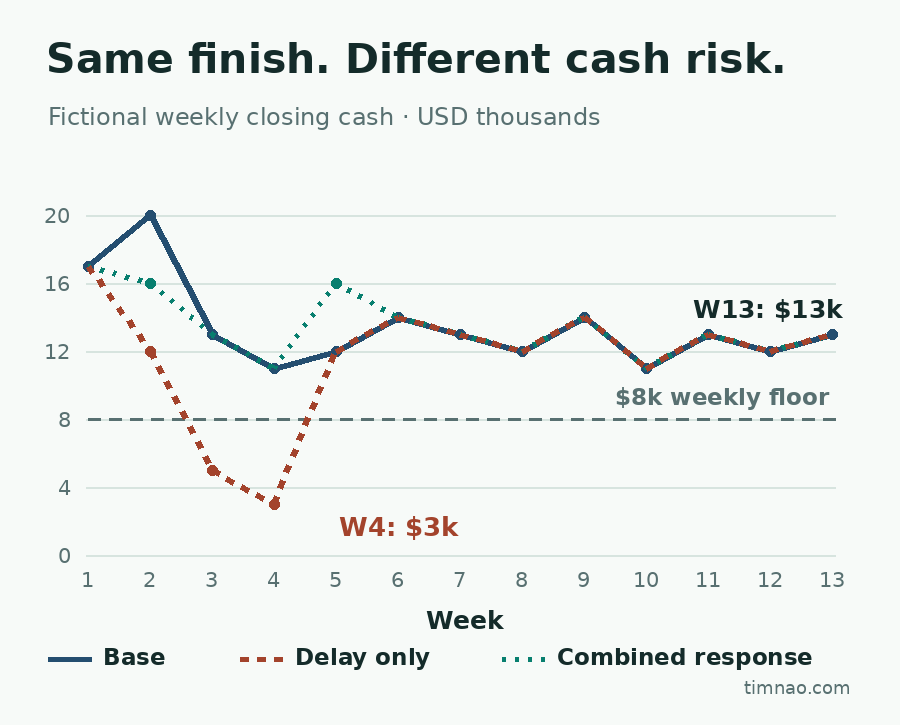
Follow the money through Weeks 3 and 4. Week 3 starts with $20,000 in the base case and only $12,000 in the delay case. It still receives $7,000 and pays $14,000 across the full week. That makes the delay-case Week 3 closing $5,000: positive, but $3,000 below the weekly target. Week 4 begins with that $5,000, then brings in $6,000 and pays $8,000. It ends at $3,000, the lowest weekly close, and $5,000 under the target. That second shortfall follows from the lower opening balance; it doesn’t require a second customer to pay late.
Try the supplier change in isolation. Moving $4,000 from Week 3 to Week 6 raises Week 3’s closing from $5,000 to $9,000, which clears the weekly target there. Week 4 rises from $3,000 to $7,000 and still misses it. An intervention can fix the first red cell while leaving the decision problem unresolved. Check all subsequent weeks affected by the change, including the week when a deferred bill comes due. In the combined response, Week 5 closes with $16,000 and Week 6 pays $14,000 instead of $10,000; the balance returns to $14,000.
Check the day payroll actually leaves
There’s a second problem the weekly table conceals. In Week 3, the supplier’s $4,000 debit is on Monday, payroll funding of $10,000 leaves Tuesday, and $7,000 in other receipts is expected Friday. The delay case opens at $12,000. Subtract Monday’s payment and Tuesday’s funding requirement and the arithmetic gives minus $2,000. This is a projected funding gap, not a prediction that the bank will authorize an overdraft or that payroll will settle.
| Week 3 checkpoint | Base | Delay only | Supplier move only | Combined response |
|---|---|---|---|---|
| Monday opening | 20 | 12 | 12 | 16 |
| After scheduled Monday supplier debit | 16 | 8 | 12 | 16 |
| After Tuesday payroll funding | 6 | −2 | 2 | 6 |
| After Friday receipt | 13 | 5 | 9 | 13 |
USD thousands. Monday’s supplier debit is zero in the last two cases because the move was approved in those modeled options; Friday’s $7,000 receipt is unchanged. No other movements are modeled for this week.
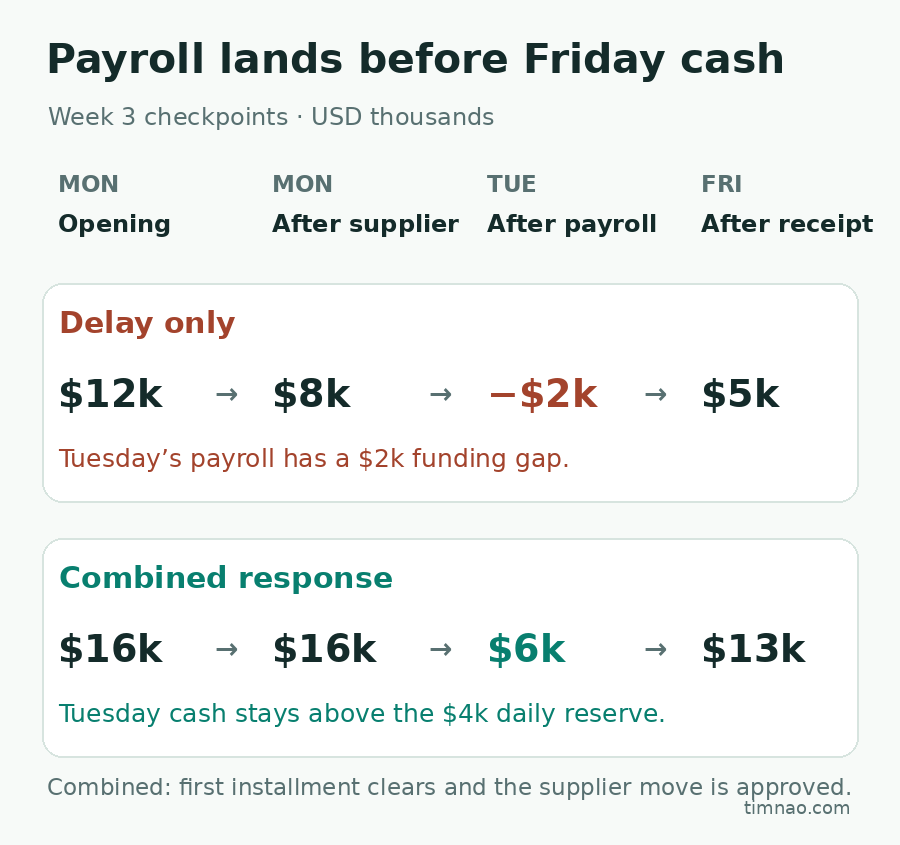
The supplier-only option appears to solve Week 3 in the weekly table, but leaves only $2,000 after payroll funding, below the studio’s $4,000 daily reserve. The combined response starts at $16,000 because $4,000 from C-08 actually arrives in Week 2. With the supplier move approved, Tuesday’s balance is $6,000, leaving $2,000 of daily headroom. This explains why the person running the forecast can’t mark the response “ready” if either agreement is missing. In real operations, confirming a payment arrangement and seeing the money settle are also separate steps.
A tight week merits another check if a debit and a receipt share a date. “Both occur Tuesday” doesn’t tell you which one funds the other. Record expected bank availability and payment cutoffs. If the order isn’t confirmed, test the conservative order first, with the debit leaving before the receipt becomes usable. Some schedules have a weekend or bank holiday between initiation and settlement. A daily line for only the most exposed dates can be more useful than spreading uncertain precision over every day in the quarter.
Choose a decision date, not just a shortage date. In this fictional case the owner checks with the client and supplier before Week 2 closes, verifies the bank receipt, then checks payroll’s funding cutoff before Monday ends. If either condition fails, the owner stops taking on new optional commitments and immediately works through authorized options with the relevant people. If a material obligation may be missed, bring the dated cash schedule and supporting records to qualified local help promptly. A planning sheet isn’t permission to postpone taxes, payroll, debt, or contractual payments, and it doesn’t determine who should be paid first.
Copy the worksheet and test it
A workable first file has three parts: a transaction ledger, a 13-week summary, and an action log. One person can manage all three; separate them so a forecast change doesn’t erase the reasoning. The ledger is where you type or import assumptions. The summary is where formulas roll those values forward. The action log is where you write down decisions about confirmation, authority, and follow-up.
| Sheet | Copyable fields |
|---|---|
| Cash items | Item ID · direction · category · positive amount · original due date · forecast bank date · confidence/status · evidence reference · owner · last checked |
| Weekly forecast | Week start · week end · opening · receipts · payments · change · closing · chosen weekly floor · headroom · exception |
| Actions | Trigger · action or question · owner · deadline · status · approval/evidence · forecast version · next review |
Use positive values in both cash-in and cash-out columns. That convention makes the formula unambiguous: subtract payments exactly once. If your source exports negative debits, convert or map the sign before summing, and keep the original export available for reconciliation. Use a unique item ID. For a split invoice, assign installment IDs such as C-08-A and C-08-B and reconcile them to a common parent. Don’t leave the full invoice in the totals as well as its installments.
| Weekly summary row | First forecast column (B) | Next forecast column (C) |
|---|---|---|
| 2 · Week start | Enter the start date | =B2+7 |
| 3 · Ending date, inclusive | =B2+6 | =C2+6 |
| 4 · Opening cash | Enter reconciled usable cash | =B8 |
| 5 · Total receipts | Sum eligible in-scope receipts for B2:B3 dates | Same rule for C2:C3 dates |
| 6 · Total payments | Sum eligible in-scope payments for B2:B3 dates | Same rule for C2:C3 dates |
| 7 · Net movement | =B5-B6 | =C5-C6 |
| 8 · Closing cash | =B4+B7 | =C4+C7 |
| 9 · Weekly floor | Enter chosen floor | =B9 if the same floor applies |
| 10 · Headroom | =B8-B9 | =C8-C9 |
If the ledger tab is called CashItems and uses column B for direction (In or Out), D for positive amount, and F for forecast bank date, a base-case receipts formula in B5 can be:
=SUMIFS(CashItems!$D$2:$D$500,CashItems!$B$2:$B$500,"In",CashItems!$F$2:$F$500,">="&B2,CashItems!$F$2:$F$500,"<"&(B3+1))Use “Out” in B6. This version assumes all records on that tab are already approved for the base case and all dates are valid spreadsheet dates. It handles transactions with time values on the final date because the upper bound is exclusive at the start of the following day. Expand the ranges or use a spreadsheet table if you need more than 499 items. Some locales use semicolons between arguments.
Keep an unresolved list outside the summed inputs. If you prefer one ledger for multiple scenarios, add a scenario tag and an explicit inclusion flag, then add those criteria to both SUMIFS formulas. Avoid a mixture of copies and tags that silently includes two versions of the same receipt. For a first model, separate scenario ledger copies with one shared layout are easier to inspect, provided the base is frozen and you log the changed item IDs. Use either approach, not both at once, and retain a named control case unaffected by your test changes.
Missing dates are worth a control of their own. Put an exception counter next to the summary for included items with blank or nondate forecast fields, and review that list before you rely on the results. Keep actual results out of forecast totals unless you have a deliberate transition rule for the current week, such as available cash at an intraday cutoff plus remaining expected movements after that cutoff. Otherwise a receipt already included in the opening position can accidentally be added again. Don’t use an error-suppressing formula to turn a broken reference into a zero without showing an error.
Roll it forward and review the exceptions
Pick a recurring review time at which you can reliably see settled transactions and get confirmation from someone who understands the receivables. Save the prior forecast before changing anything. Then reconcile the closed week: compare its projected opening and closing with actual usable cash, verify the material receipts and payments, and note why the largest differences occurred. Start the new Week 1 from the reconciled new opening, carry uncollected items forward only if still outstanding, and add one new week at the far end. Keep the review tied to the same cash scope as last week unless you explicitly document the change.
| When you see this | Record this | First action |
|---|---|---|
| Important receipt moved | Old date, new date, amount, evidence | Confirm bank availability and rerun downstream balances |
| Weekly close below policy floor | First breach, deepest breach, decision date | Recheck drivers and dated alternatives |
| Daily forecast below zero | Earliest affected debit and funding amount | Verify cutoff, escalate promptly, and preserve the original schedule |
| Conditional response | Written terms, missing approvals, owner | Keep separate until conditions are met |
A simple reporting approach is to show the lowest weekly closing, its week, and the nearest critical daily low, rather than starting the review with the closing number in Week 13. Follow each figure with a dependency you can verify. If the lowest balance depends on three receipts touching the same customer or platform, test a single event that delays all affected receipts together. Testing them separately can hide a concentration risk. On the other hand, don’t make a scenario more pessimistic for dramatic effect by moving unrelated receipts with no explanation. The point is to make the next action clearer.
The weekly cash review and a month-end variance analysis serve different jobs. The cash review asks “Can we fund the next payment on time?” The month-end analysis can help explain why recognized revenue or cost differed from budget. Keep both questions, and don’t edit the earlier forecast to make last week’s error harder to see. A forecast that always looks right after edits can’t teach you which assumptions to improve.
Use AI to prepare questions, not change the forecast
Start with a synthetic version of your data. If you later use real information, check company policy, customer commitments, approved tools, and access and retention controls first. Share only the minimum authorized fields for the specific task; changing a client’s name alone may not conceal its identity if the amount, date, and transaction details reveal it. Don’t paste bank statements, account numbers, individual payroll data, or customer communications into an unapproved tool. A risk profile from NIST documents that generative systems can return convincing but false information; verify their wording even when you have supplied the inputs.
A useful answer might ask: “C-08: Is the Week 2 installment reflected in available bank funds before Week 3 payroll funding?” That’s a question an owner can resolve. An unhelpful answer would say, “C-08 is secured, so payments should continue as normal.” There’s no such conclusion in the inputs. Compare every amount and date with the worksheet before using an AI-generated review note. If the tool repeatedly turns tentative scenarios into facts, cut it from that step rather than asking colleagues to spot the same category of mistake each week.
Make the first forecast useful this week
Start with one representative operating cash scope, a reliable opening position, and the receipts and obligations that matter most to your next two weeks. Extend to 13 weeks with the best supported estimates you have; don’t delay the first check because the far end is uncertain. Put one realistic late-payment assumption beside the base case. If the results change a decision, write down what you need to verify, who can verify it, and when waiting stops being safe.
The print studio’s quarter-end number never told the owner what to do on Tuesday. The forecast became useful when it exposed who needed to confirm the installment, when payroll money had to be available, and whether an approved change merely moved the problem. Use that as your test: if the file makes one near-term decision clearer without pretending uncertain money is in the bank, it’s worth keeping current.